AI Agents for Business Operations: Practical Workflows, Controls, and Use Cases
AI agents for business operations help teams coordinate work across intake, routing, exception handling, reporting, approvals, and follow-up. They are most useful when the business process is clear enough to support automation but still requires context, judgment, and controlled handoffs.
Operations executives, COOs, CTOs, process owners, and transformation leaders can use this guide to evaluate operational AI agents without ranking tools or unsupported productivity claims. It explains practical use cases, data and integration requirements, governance controls, implementation steps, and metrics.
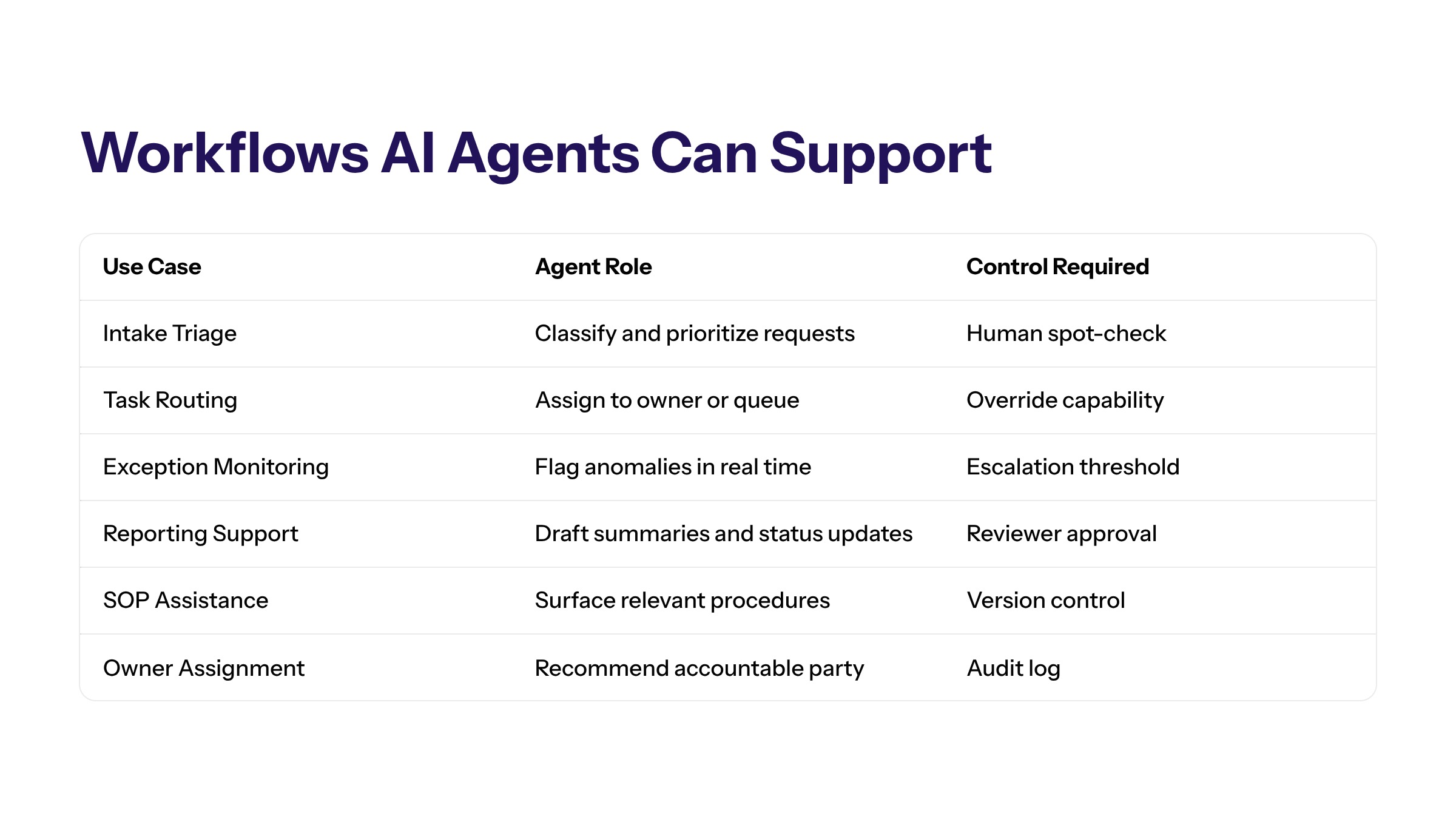
In production, operational AI agents can support workflows by interpreting context, recommending next steps, routing tasks, summarizing records, or triggering approved actions. They should operate inside defined boundaries, with human review, audit evidence, and clear ownership.
The useful question is not which tool sounds fastest, but which agent design fits the operating workflow, integrates with the right systems, respects security requirements, and gives teams a clear way to measure improvement.
What Operational AI Agents Mean
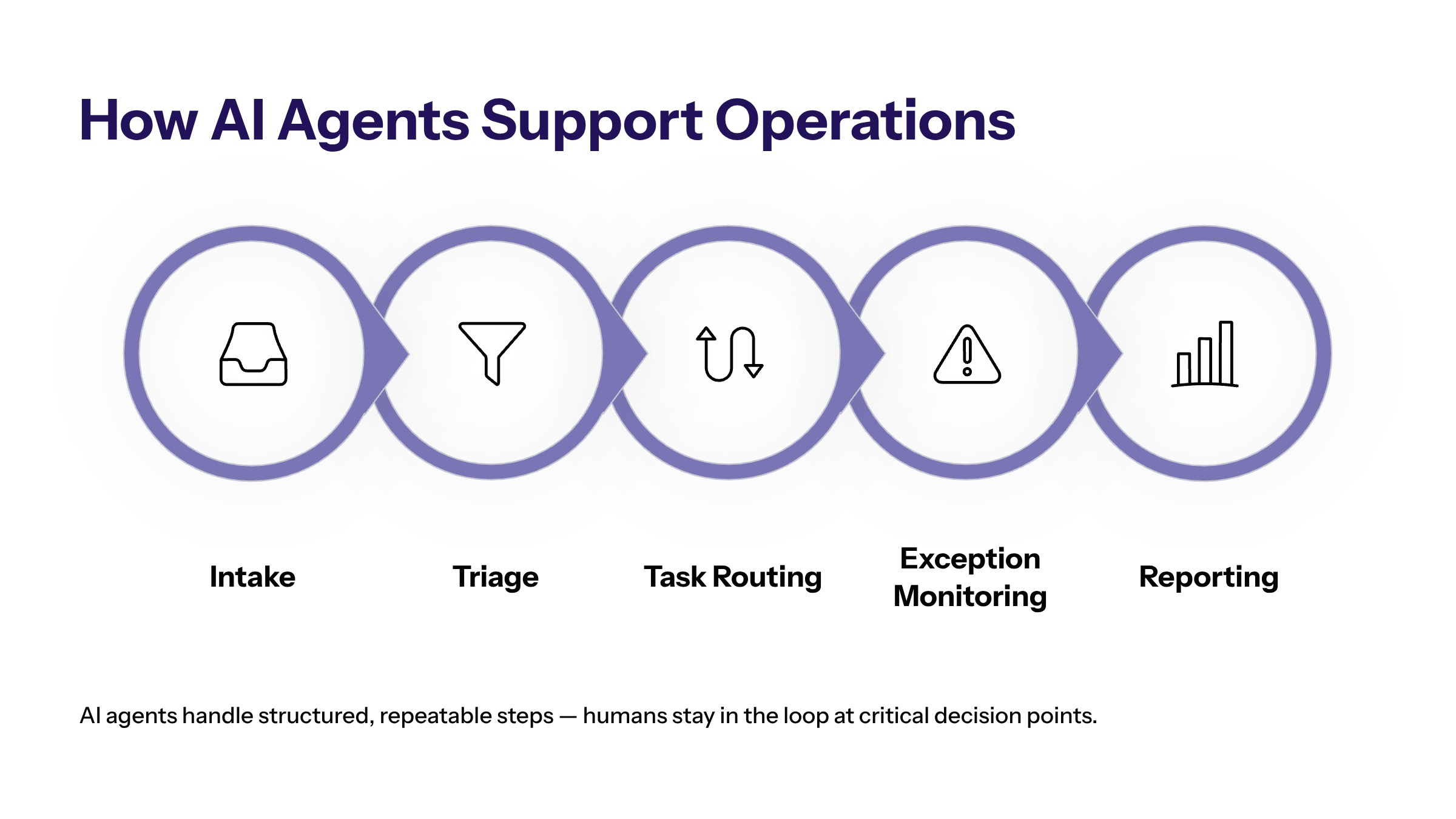
Operational AI agents are bounded systems that help move work through a process. They may read approved context, classify requests, recommend owners, prepare summaries, draft updates, or monitor exceptions. The point is not to create uncontrolled digital workers. The point is to reduce coordination drag in workflows that already have business rules.
Operations teams often manage work that crosses systems and departments. A customer issue may touch support, finance, fulfillment, and account management. A procurement exception may require documents, approval thresholds, vendor records, and policy checks. AI agents can help organize those steps when data and ownership are clear.
The agent should have a defined role. It may support intake, triage, routing, monitoring, or reporting, but it should not own the business decision by default. A useful agent makes work easier to see and act on. It does not remove accountability from the operation.
This boundary is important because operations teams already carry process risk. If an agent misroutes a case, misses an exception, or updates a record without review, the downstream team may lose time fixing the work. The agent should therefore be treated as part of the operating model, with a role, owner, review path, and performance expectation.
A good definition also prevents scope creep. An operations agent for intake should not quietly become a finance decision agent. A reporting agent should not gain write access to operational systems unless the business has approved that move. Each expansion should be reviewed as a workflow change, not as a casual feature toggle.
Business Operations Workflows AI Agents Can Support
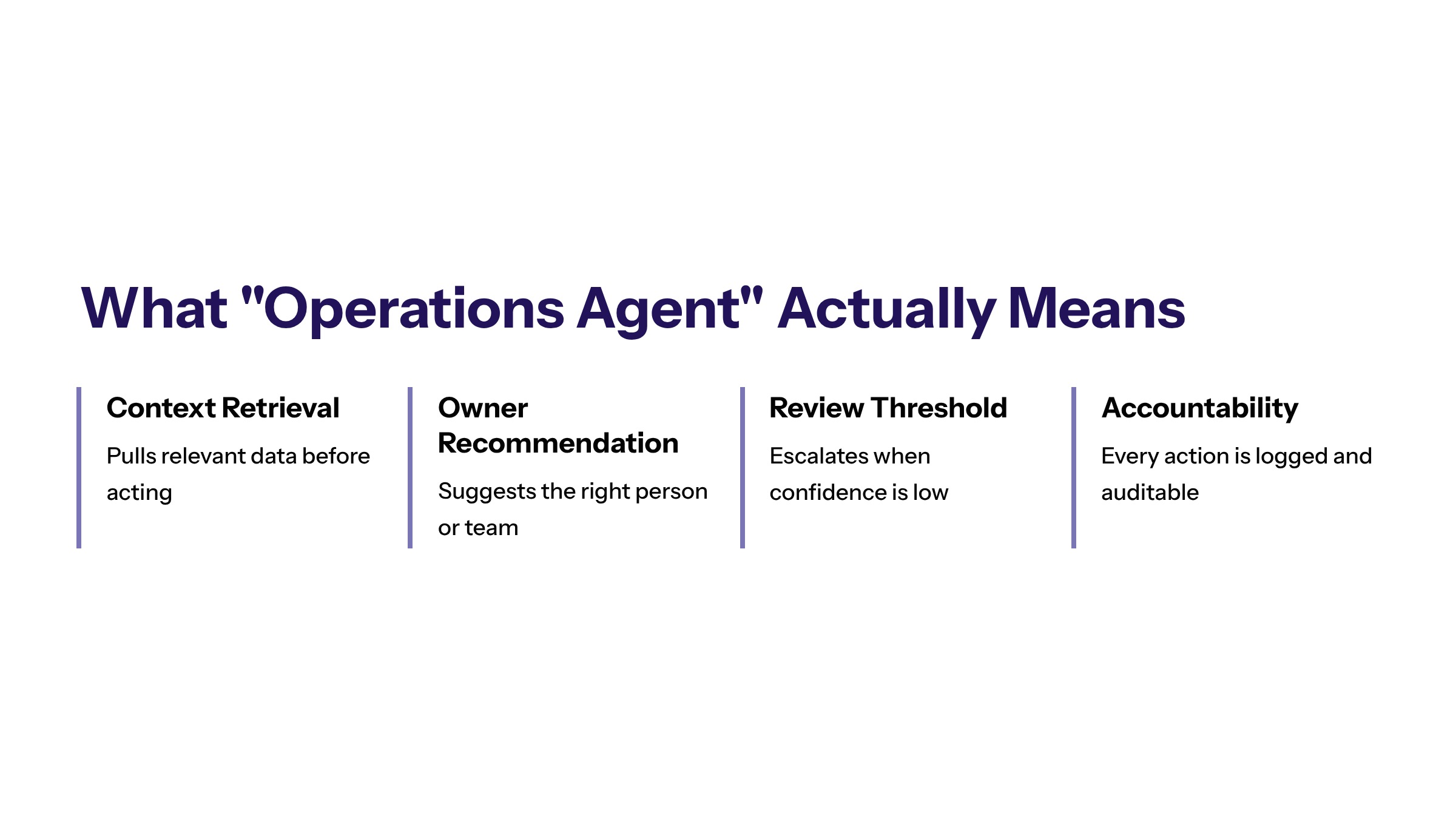
Operational AI agents are strongest when the workflow is repeated, measurable, and bounded. They are weaker when the work is undefined, politically sensitive, dependent on poor data, or too risky for automated action.
|
Operations Workflow |
Agent Role |
Control Requirement |
Useful Metric |
|---|---|---|---|
|
Intake triage |
Classify requests and identify missing information. |
Human review for ambiguous or high-impact cases. |
Classification quality and queue age. |
|
Task routing |
Recommend owner, priority, and next step. |
Override path and owner accountability. |
Routing accuracy and time to assignment. |
|
Exception monitoring |
Detect blockers, summarize context, and escalate. |
Escalation thresholds and incident review. |
Exception age and resolution time. |
|
Reporting support |
Summarize operational records and prepare notes. |
Reviewer confirms figures and context. |
Review time and correction rate. |
The same pattern can apply across customer operations, internal service desks, field operations, finance operations, sales operations, and administrative workflows. The agent should support the work step where context gathering or routing creates friction.
Use-case selection should start with a friction map. Identify where work waits, where people copy information between systems, where requests arrive incomplete, where owners are unclear, and where managers cannot see status. Those areas often create better agent opportunities than broad productivity goals.
The best early workflows usually have limited decision complexity and clear review. For example, an agent can summarize an exception queue, draft owner assignments, or prepare a status update for review. Those tasks create value without requiring the organization to grant broad autonomy before trust has been earned.
Operations Agents vs Automation Tools and Copilots
Automation tools usually follow predefined rules. Copilots assist individual users with drafting, summarizing, or analysis. Operations agents sit between those models when they coordinate multi-step work across context, tools, and workflow state.
A business operations agent may interpret a request, retrieve relevant records, prepare a summary, recommend an owner, and update a queue after approval. That is different from a chatbot answering a question or an automation script moving data from one field to another.
This distinction matters because governance requirements change as the system gains workflow responsibility. If the agent only drafts notes, review may be enough. If it updates systems, routes cases, or triggers follow-up, the organization needs stronger access controls, logs, and escalation paths.
Many teams should use all three patterns. Rules-based automation can handle predictable handoffs. Copilots can help individuals analyze or draft. Operations agents can coordinate bounded workflow steps where context changes from case to case. The implementation question is not which category is fashionable, but which pattern fits the job.
Misclassification creates waste. If a simple rule can solve the problem, an agent may be unnecessary overhead. If the workflow requires judgment, context, and exception handling, a basic automation rule may be too brittle. If the need is personal productivity, a copilot may be enough. The workflow should decide the technology shape.
Data, Integration, and Permission Requirements
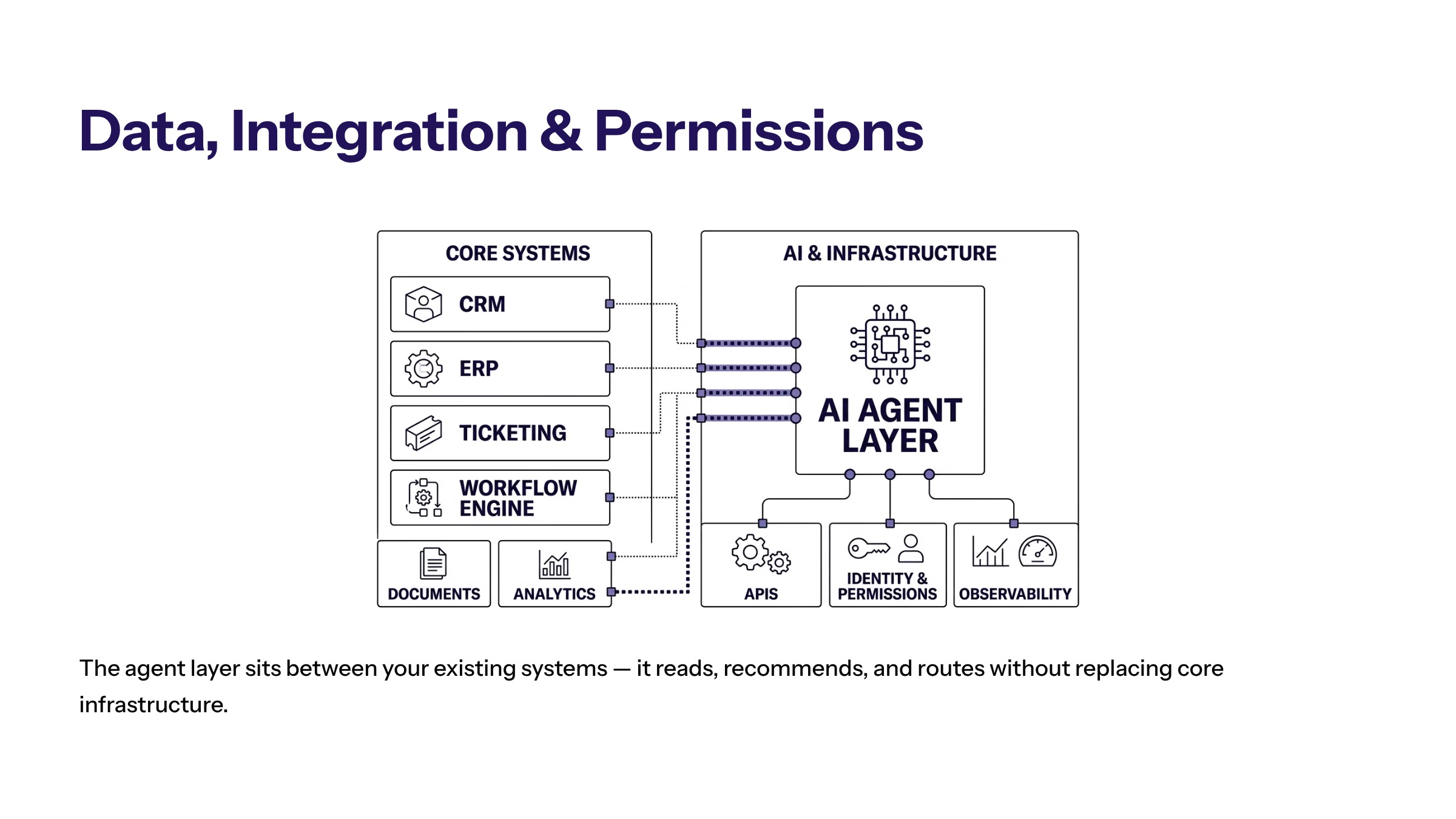
Operations-focused agents depend on operational context. They may need access to CRM records, ERP data, ticketing systems, documents, policies, calendars, inventories, analytics, or workflow tools. Each source should be approved and permissioned.
Integration matters because agents create value by reducing handoff friction. If the agent cannot read the right records, write to the right queue, or pass work to the right owner, it may become another interface instead of an operational improvement.
Permission design should separate read access from write access. An agent may be allowed to retrieve context and draft a recommendation before it is allowed to update a system. Higher-impact actions should require human approval, clear logs, and rollback options.
Custom enterprise software planning can help when off-the-shelf tools do not match the workflow. Operations often need integrations, permissions, and reporting that reflect how the business actually works.
Data readiness should be checked before the pilot. If fields are inconsistent, ownership is unclear, or records are incomplete, the agent may amplify operational disorder. Teams should clean the minimum data needed for the chosen workflow rather than waiting for a perfect enterprise data program.
Integration readiness should be equally practical. The first pilot may not need every system connection. It may need one reliable source, one queue, one review interface, and one logging pattern. A narrow but observable workflow gives the team better evidence than a large agent concept that touches many systems poorly.
Human Review and Escalation in Operations Workflows
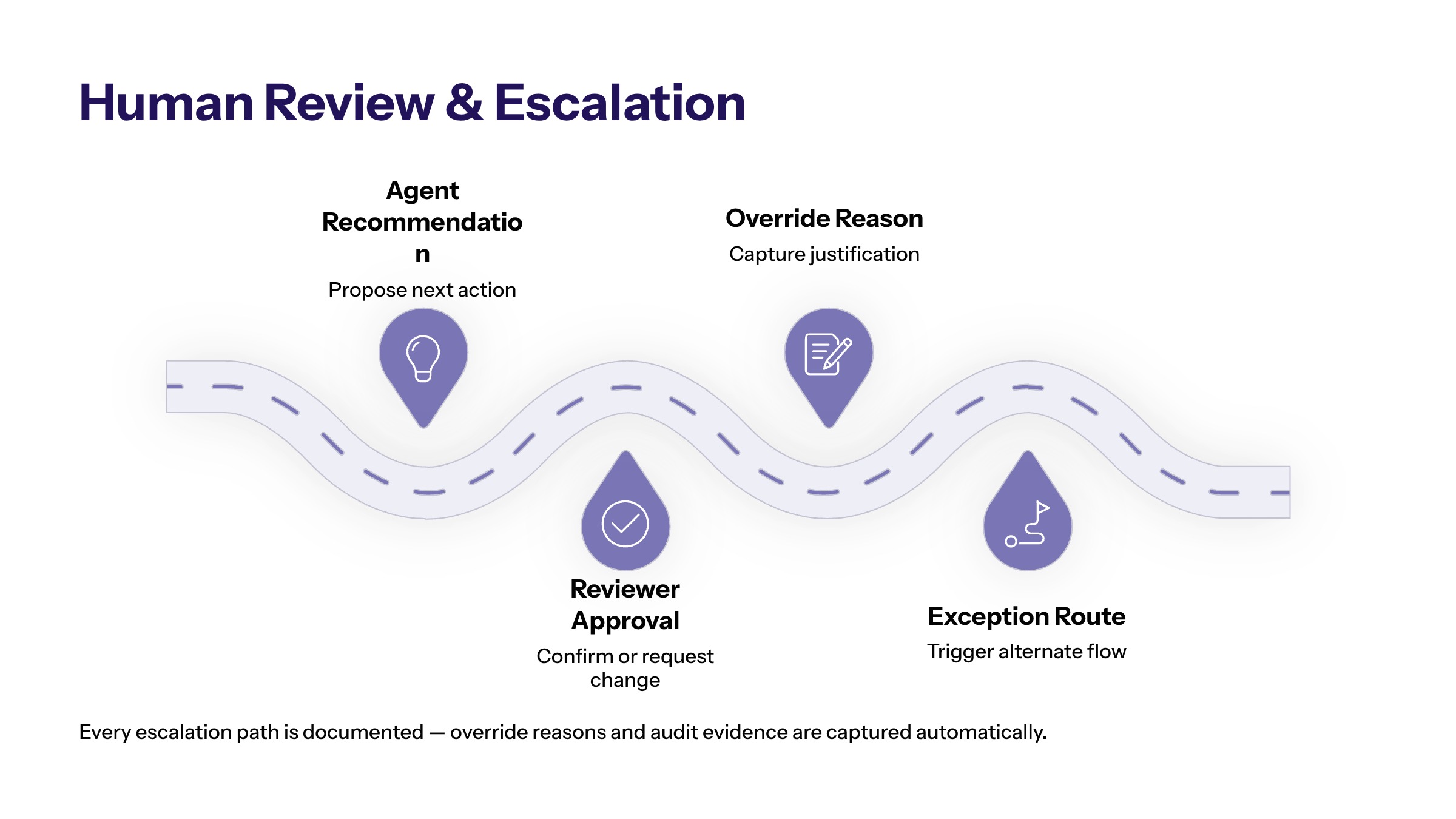
Human review is not a weakness in operational AI. It is how teams keep accountability visible. Review thresholds should be based on risk, customer impact, financial impact, data sensitivity, and reversibility.
Escalation rules should identify the owner for uncertain, high-risk, or blocked cases. If the agent cannot determine the right next step, it should not improvise silently. It should escalate with context, evidence, and a clear reason.
Operations leaders should also track override patterns. If people repeatedly correct the same agent recommendation, the workflow may need better data, rules, interface design, or training. Overrides are not just errors. They are signals about where the operating model needs adjustment.
Escalation should be designed for speed and clarity. A good escalation record explains what happened, what the agent saw, why the case exceeded the boundary, who owns the next step, and whether the workflow should be changed. This prevents escalations from becoming vague complaints about AI quality.
Review should also protect users from automation pressure. Employees should be able to reject an agent recommendation when the context is wrong. The system should capture the reason without punishing the reviewer for using judgment. That feedback is essential for improving the agent safely.
How to Evaluate Operational AI Agent Opportunities
Not every workflow is ready for an AI agent. A useful evaluation starts with the business problem. What work is slow, repetitive, error-prone, or hard to monitor? What decisions are delayed because information is scattered? What handoffs create friction?
A strong candidate has a clear trigger, known owner, accessible data, repeatable path, measurable outcome, and manageable risk. A weak candidate has unclear ownership, inconsistent records, no baseline metric, or high-impact decisions without review.
Business strategy should guide prioritization. The agent should solve a real operational constraint, not exist because a tool is available. A smaller workflow with clear value is usually better than a broad agent concept that no team can own.
A useful evaluation workshop can score each candidate workflow on volume, repeatability, data availability, risk, owner clarity, integration complexity, and measurable value. The best first workflow is not always the highest-volume workflow. It is the workflow where the team can safely prove value and learn how agent operations should work.
Teams should also decide what success means before implementation. If the goal is faster routing, measure assignment time and queue age. If the goal is better reporting, measure review time and correction rate. If the goal is fewer missed follow-ups, measure task completion and escalation quality.
Implementation Roadmap for Business Operations Agents
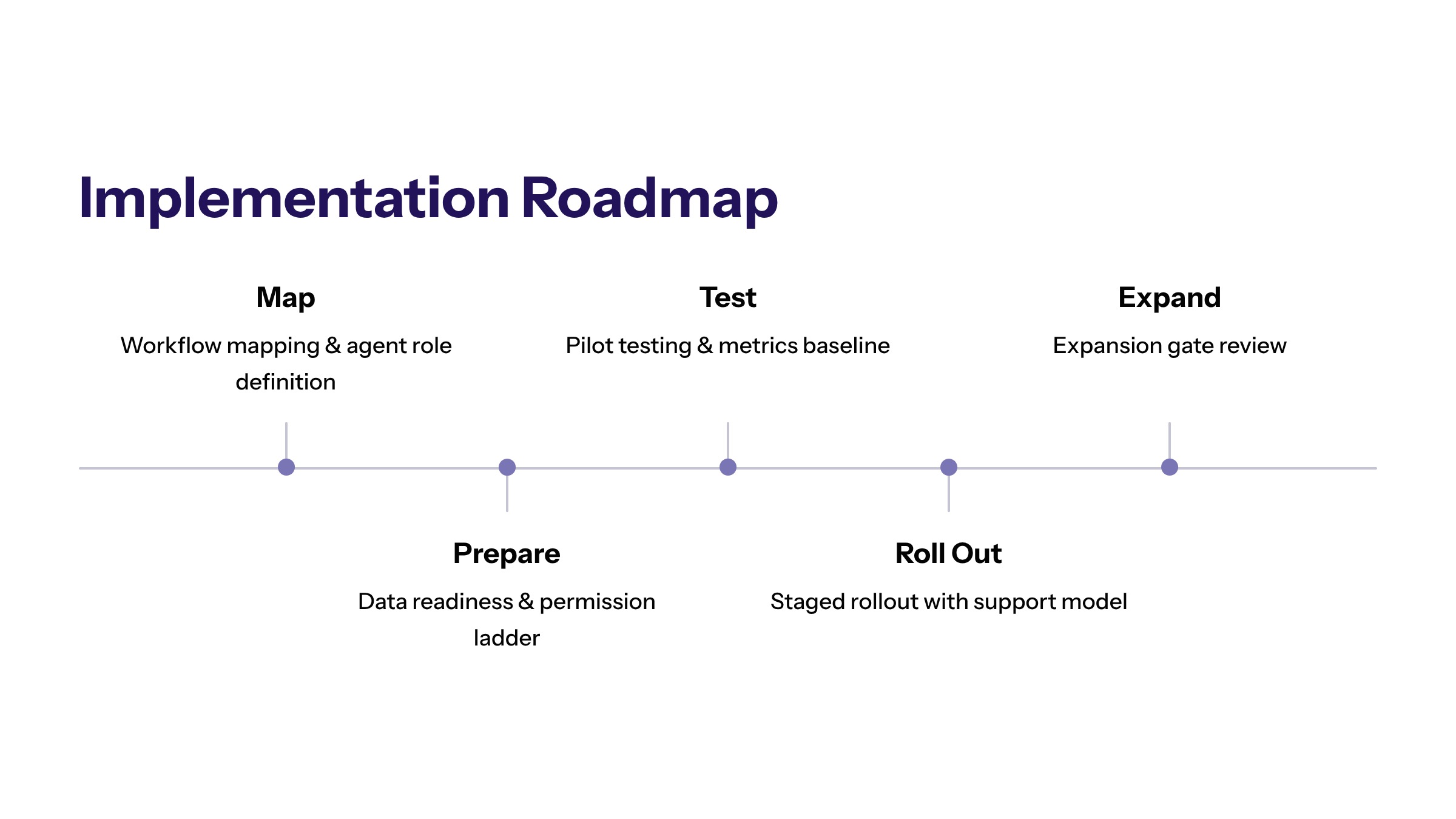
A practical roadmap starts with workflow mapping. Document the trigger, inputs, systems, roles, decisions, exceptions, and success metric. Then define the agent role: classify, retrieve, summarize, route, recommend, draft, monitor, or update after approval.
The pilot should be narrow enough to test safely. For example, start with ticket classification, exception summaries, or operations reporting notes. Avoid giving the agent broad write access before the workflow has proven reliable.
After the pilot, review evidence. Did the agent reduce queue age, manual touches, rework, or coordination delays? Did it create new exceptions? Did users trust the output? Did logs provide enough evidence for review? Those answers should decide the next stage.
The roadmap should include a permission ladder. Stage one may be read-only context retrieval and draft recommendations. Stage two may allow queue updates after review. Stage three may allow low-risk actions under defined thresholds. Each step should require evidence from the previous step, not optimism about the next one.
Metrics for AI Agents in Business Productivity
AI agents for business productivity should be measured by workflow outcomes, not general excitement. Useful metrics include cycle time, queue age, manual touches, routing accuracy, exception rate, review time, override frequency, and adoption.
Business productivity also includes visibility. If the agent helps leaders see where work is stuck, which exceptions recur, or which teams need support, it can improve operations even before full automation expands.
Metrics should be paired with control signals. A workflow that gets faster but produces weak evidence may not be ready to scale. A workflow that reduces manual work but increases escalation confusion needs redesign.
Productivity metrics should also distinguish saved work from shifted work. If the agent saves the operations team time but creates review burden for managers, the benefit may be overstated. If it reduces manual copying but increases correction work, the workflow needs tuning before expansion.
A balanced scorecard includes outcome, adoption, quality, and control. Outcome shows business value. Adoption shows whether teams actually use the agent. Quality shows whether outputs hold up under review. Control shows whether the workflow remains accountable.
Common Mistakes With Business Operations Agents
The biggest operations mistake is starting with a broad agent instead of a bounded workflow. "Improve operations" is not a use case. "Route incomplete onboarding requests to the right owner with a summary and missing-field checklist" is closer to a useful pilot.
The second mistake is underestimating data quality. Operations agents depend on current, structured, and permissioned context. If records are stale or inconsistent, the agent may produce confident but weak recommendations.
The third mistake is hiding ownership. Someone should own the workflow, data, technical setup, escalation path, and measurement. Without ownership, an agent can become another operational dependency with no accountable team.
A fourth mistake is expanding before the first workflow is stable. Teams may see early promise and immediately add more systems, actions, and user groups. That can make the agent harder to govern before the organization understands the baseline pattern. Controlled expansion is usually faster in the long run because it avoids remediation work.
How to Start With AI Agents for Operations
AI agents for operations should begin with process clarity. Choose one workflow, define the agent role, map the data, set approval thresholds, and measure the outcome before expanding.
The strongest operational agent programs make work easier to coordinate without removing human accountability. They use AI to improve visibility, consistency, and handoffs while keeping control in the business.
Frequently Asked Questions About AI Agents for Business Operations: Practical Workflows, Controls, and Use Cases
No. Workflow automation can route predefined steps. AI agents may interpret context, retrieve information, prepare recommendations, or support multi-step work inside a governed workflow. For related reading, see custom enterprise software.
Only when the action is low-risk, approved, logged, and reversible. Many teams start with recommendation-only or draft-only workflows before allowing system updates. For related reading, see custom software development.
Start with a repeated workflow that has a clear owner, measurable friction, accessible data, and manageable risk. Intake triage, exception summaries, and task routing are common starting points. For related reading, see AI agent frameworks.
Operational agents need approved data from the workflow they support, such as tickets, exceptions, status records, policies, and system activity. The data should be current, reliable, and limited to the task. For related reading, see AI agent orchestration.
Operations teams should define exception triggers before launch and route uncertain, sensitive, or failed cases to a named owner. Exceptions should become feedback for improving the workflow. For related reading, see AI agent platforms.
Useful metrics include queue age, cycle time, manual touches, exception rate, rework, owner response time, and audit completeness. These measures show whether the agent improves operations without weakening control. For related reading, see AI agent tools.