AI Agents vs Chatbots for Business: Differences, Use Cases, and Decision Criteria
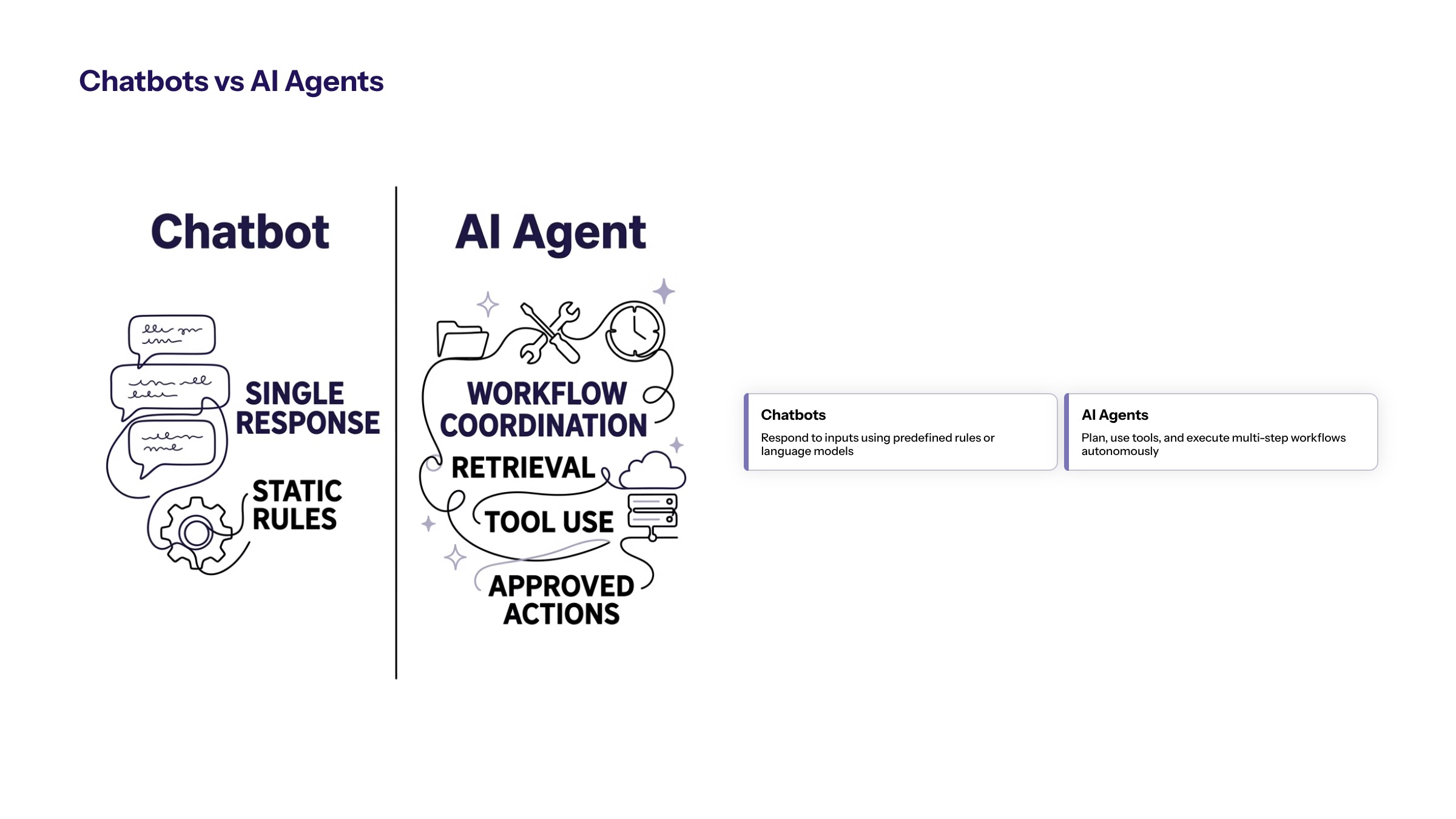
AI agents vs chatbots for business is a practical decision, not a terminology debate. Chatbots are usually designed around conversation. AI agents are designed around bounded tasks that may include context retrieval, tool use, recommendations, routing, and approved actions.
CTOs, operations leaders, customer experience leaders, product owners, and enterprise teams can use this comparison to decide whether they need chatbots, AI agents, or a hybrid workflow. It explains the difference, what each does well, how business processes affect the choice, and what governance is required before deployment.
Chatbots are useful for structured conversations, intake, FAQs, guided support, and simple routing. AI agents are useful when the workflow requires multiple steps, access to systems, contextual reasoning, task coordination, and controlled actions. Many businesses eventually need both, but they should not confuse the two.
The stronger comparison is functional: whether the business needs a conversational interface, a workflow assistant, or an agent that can coordinate controlled actions across systems.
AI Agents vs Chatbots: The Core Difference
The core difference is workflow responsibility. A chatbot responds inside a conversation. It may answer questions, collect information, guide users, or route a request. An AI agent can work toward a defined task goal by using context, tools, steps, and decision rules.
A chatbot might ask a customer for order information and provide a status answer. An agent might retrieve the order, summarize the issue, check policy, recommend a next step, draft an internal note, and route the case to the correct queue. The second workflow has more operational responsibility and needs more control.
The difference is not that agents are always better. A chatbot can be the right choice when the business needs a controlled interface for simple interactions. An agent is the better fit when the business needs process support beyond conversation.
A practical way to separate them is to ask what the system must remember and do after the message. If the answer is mostly "respond with approved information," the chatbot pattern may be enough. If the answer is "carry work across tools, records, owners, and review steps," the business is moving into agent territory.
This distinction also affects cost, risk, and ownership. A chatbot may need content governance and escalation. An agent may need integration ownership, access reviews, workflow testing, logs, rollback, and operational metrics. The label matters less than the responsibilities the system receives.
What Chatbots Do Well in Business
Chatbots work well when the interaction is conversational, bounded, and repeatable. They can answer common questions, collect intake details, guide users through forms, provide status updates, or route requests to human teams.
Customer service teams often use chatbots to reduce repetitive intake and improve availability. Internal teams may use chatbots to answer policy questions or help employees find information. In both cases, the chatbot should rely on approved content and escalation rules.
Chatbots are weaker when the workflow requires multi-system coordination, complex decisions, or actions that affect records. They may still be part of the experience, but a chatbot interface alone does not create reliable business process automation.
Chatbots are also useful when consistency matters. A business can use approved answers, controlled flows, and escalation rules to reduce variation in common interactions. This can help customer-facing teams avoid repeated manual intake while still keeping the experience bounded.
The limitation is that conversation can create the appearance of resolution even when the process behind it is unchanged. If the chatbot collects information but the user still waits for someone to re-enter details, check systems, and route the case manually, the business has improved the interface but not the workflow.
What AI Agents Do Differently
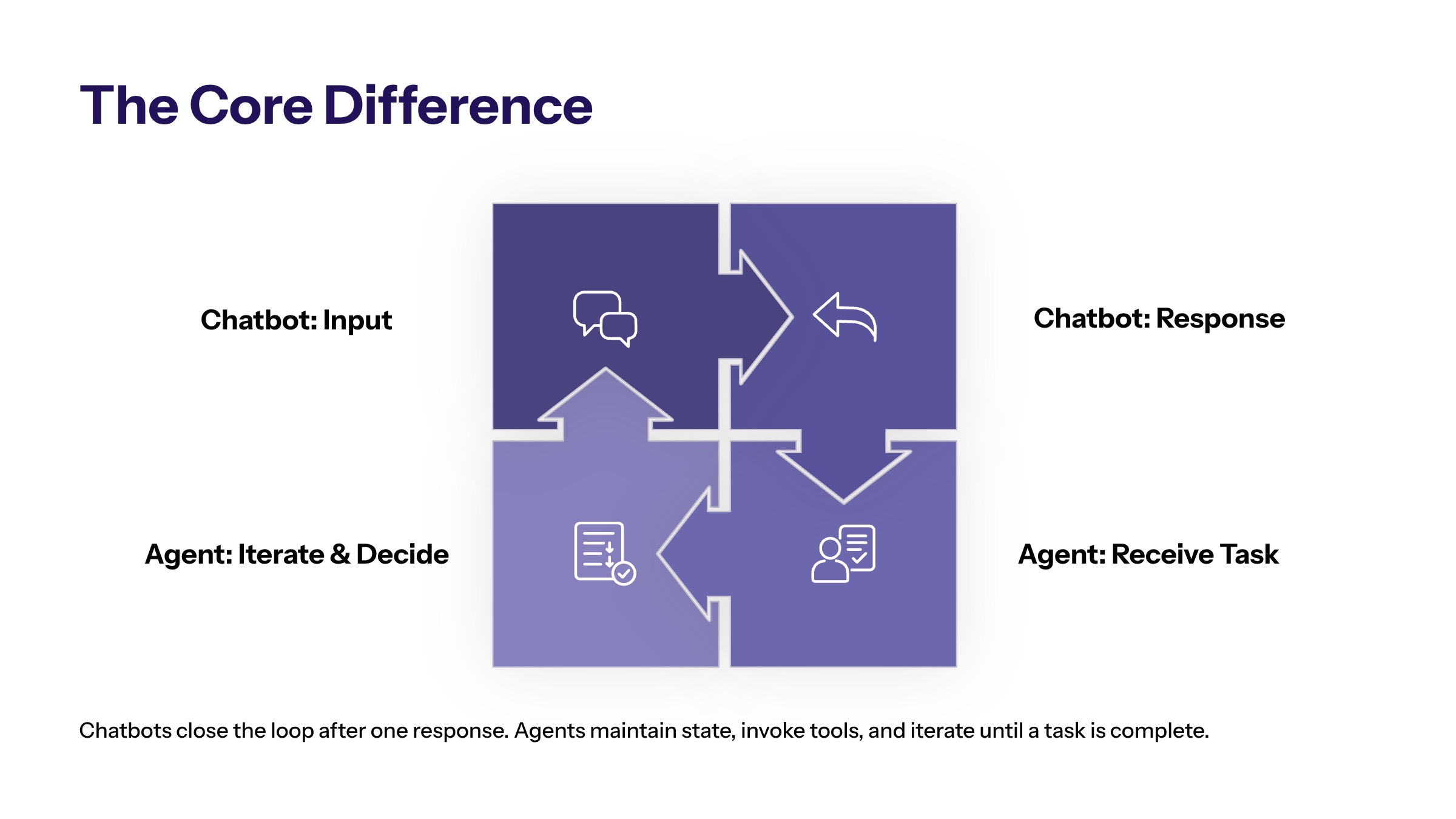
AI agents can support tasks that require context and steps. They may retrieve information, compare records, summarize documents, classify exceptions, recommend actions, route work, or trigger approved updates. That makes them useful for business processes that extend beyond conversation.
AI agents for business processes should be bounded. The business defines what the agent can access, what it can recommend, what it can change, and when human review is required. Without those boundaries, an agent can create operational risk.
AI software development often becomes important when agents need integration with CRM, ERP, ticketing, document repositories, analytics, workflow systems, or identity controls. The agent needs architecture, not just a prompt.
Agents also differ because they may hold workflow state. They can help track whether a case is new, waiting for review, routed, escalated, approved, or complete. That state turns the AI system from a response layer into part of the operating workflow.
That added capability should be earned gradually. A useful first agent may only prepare a recommendation for review. Later, if evidence supports it, the business may allow the agent to draft a task, update a status, or route a case under defined thresholds. The permission ladder should be intentional.
When Businesses Need Chatbots, Agents, or Both
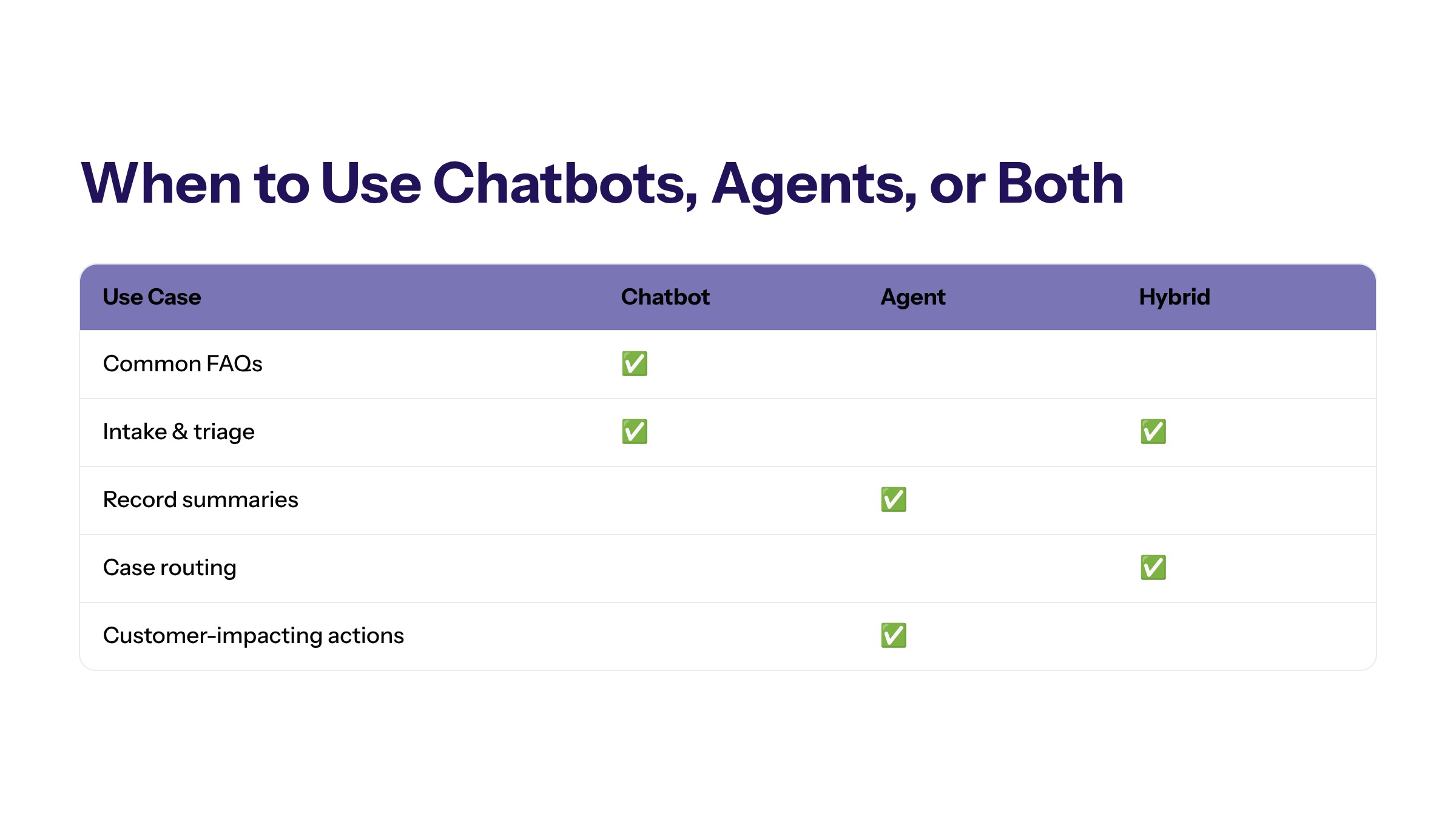
Businesses need chatbots when the primary need is interaction. They need agents when the primary need is workflow coordination. They may need both when a user-facing conversation triggers a backend process.
Need | Best Fit | Why | Control Required |
|---|---|---|---|
Answer common questions | Chatbot | The task is conversational and source-based. | Approved knowledge base and escalation. |
Collect intake details | Chatbot or hybrid | The interface can gather structured information. | Validation and routing rules. |
Summarize records and recommend next steps | AI agent | The task needs context across systems. | Source traceability and review. |
Route an operational case | AI agent or hybrid | The workflow needs owner, priority, and queue logic. | Override path and audit log. |
Take customer-impacting action | Hybrid with review | The interaction and process both matter. | Human approval and rollback path. |
This decision matrix helps teams avoid forcing every use case into one technology model. The workflow should determine the architecture.
A hybrid model is common when the business needs a user-facing conversation and a backend process. The chatbot gathers information and manages the user experience. The agent prepares the operational next step. Human review approves high-impact decisions. This split keeps the interface simple while preserving workflow control.
Teams should also consider whether the user needs visibility into the workflow. A customer may only need confirmation that a request was received. An employee may need to see the agent's source context and reasoning before approving the next step. The right model depends on both the front-end interaction and the back-end process.
AI Agents for Business Processes
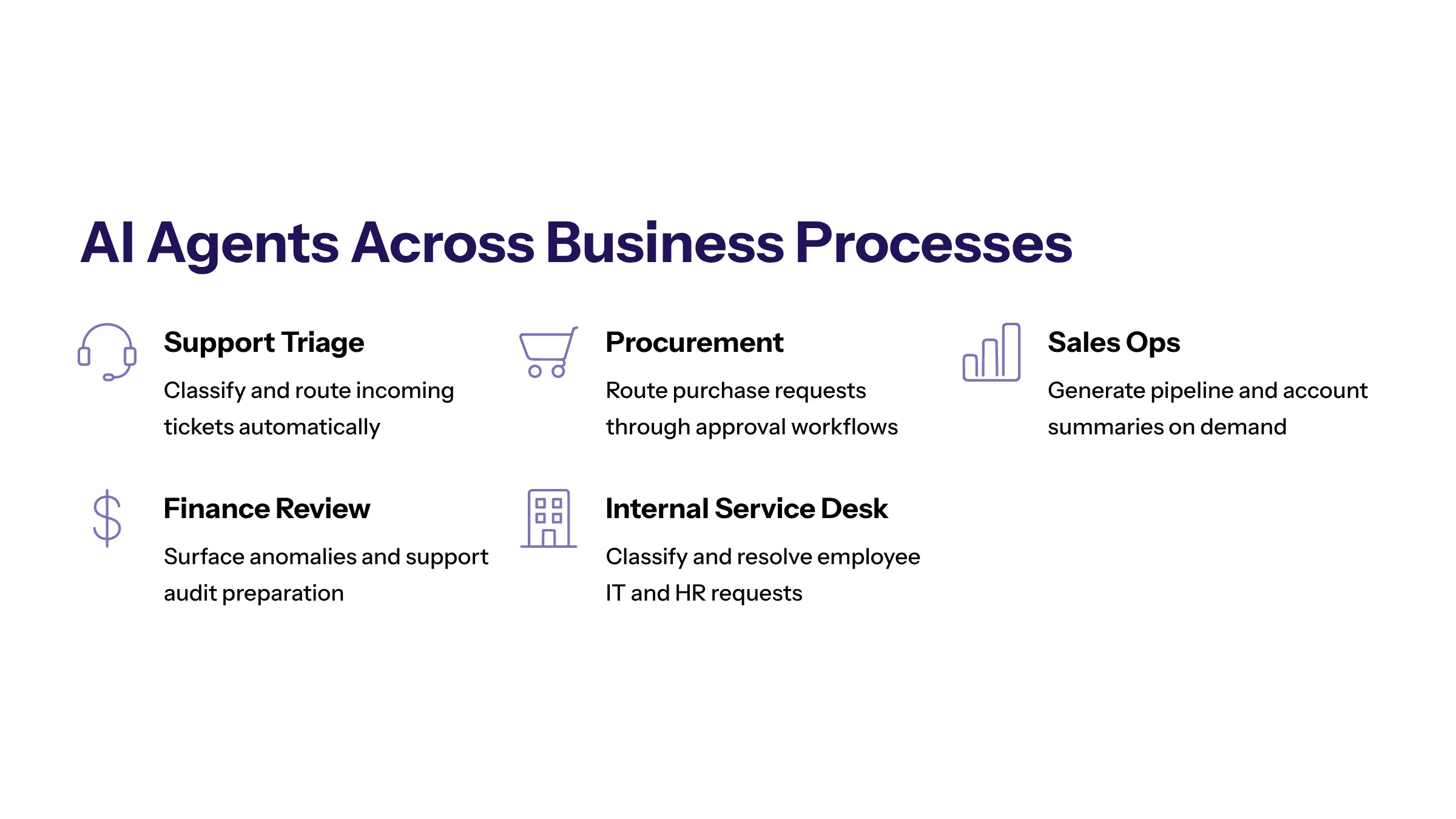
AI agents for business processes are strongest when the work has a defined goal, repeated pattern, accessible data, and measurable result. Examples include support triage, finance document review support, sales operations summaries, procurement routing, internal service desk classification, and compliance evidence preparation.
In these workflows, the agent does not simply chat. It helps move work forward. It may collect context, prepare a recommendation, route a task, or flag an exception. The business still owns the decision and the process.
Agents should be introduced gradually. A recommendation-only agent is easier to test than one that updates records. A draft-only agent is safer than one that sends customer-facing responses. Capabilities should expand only after evidence supports scale.
Business-process agents should be measured against process outcomes. Did routing improve? Did queue age fall? Did employees spend less time gathering context? Did escalation become clearer? Did the workflow produce better evidence? If the answer is unclear, the agent may be interesting but not operationally valuable yet.
These agents also need exception design. A process will always include incomplete records, conflicting sources, unusual customer requests, and policy-sensitive cases. The agent should know when to stop, ask for review, or escalate instead of forcing every case through the happy path.
AI Support Agents and Voice Agents
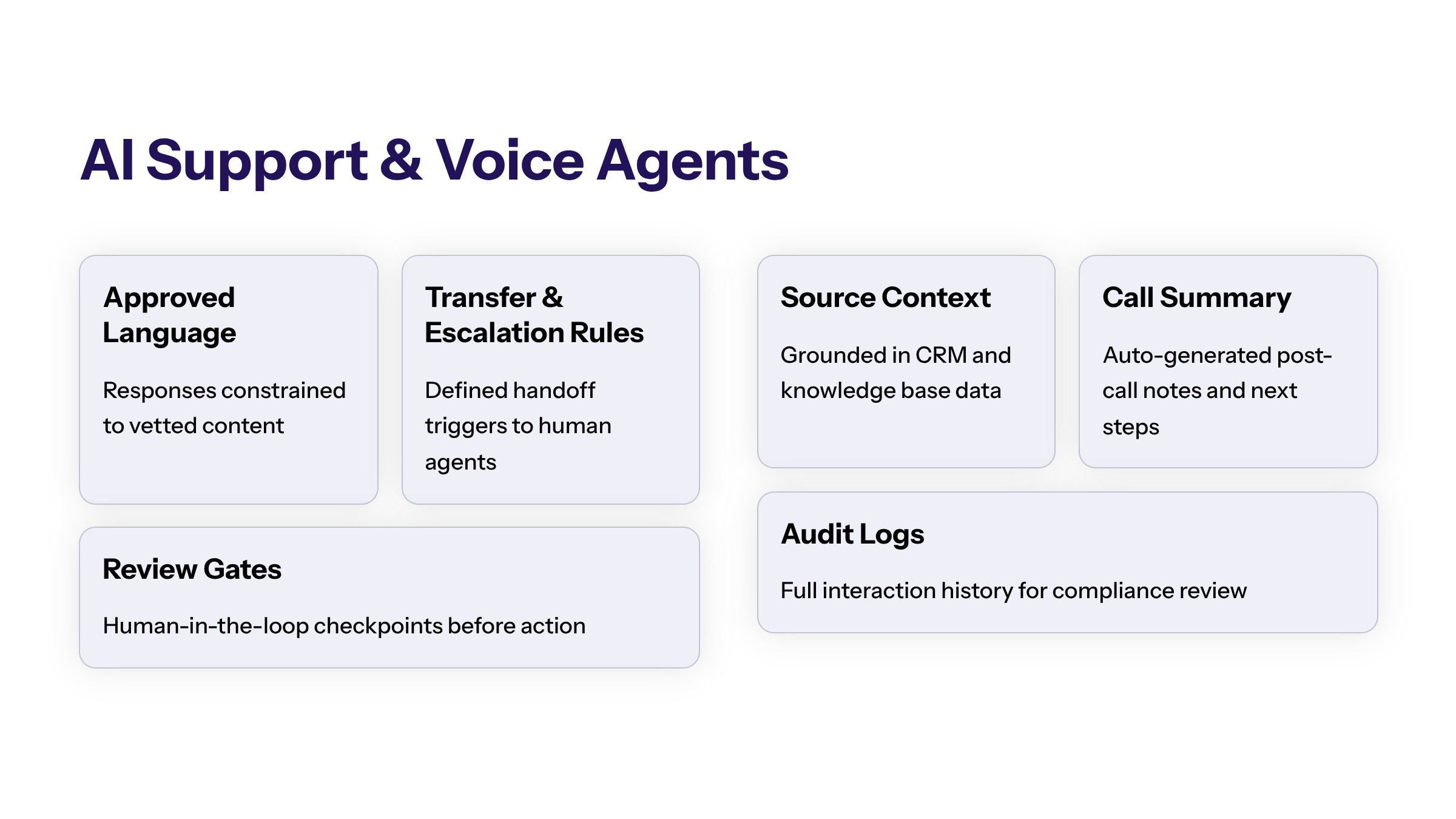
AI support agents often combine chatbot and agent patterns. They may interact with a customer or employee, retrieve account context, summarize the issue, recommend a response, and route the case. That hybrid model needs clear boundaries.
AI voice agents for business introduce additional customer-impact risk because voice interactions happen in real time. The workflow should define what the voice agent can say, when it must transfer, how consent and recording rules are handled, and what evidence is retained. Legal, consent, and compliance-sensitive workflows should be reviewed by the appropriate business owners before deployment.
The safest starting point is often internal support or low-risk intake. Teams can then expand toward customer-facing workflows when knowledge sources, escalation, and monitoring are ready.
Support and voice workflows should be designed around customer impact. A customer may treat a spoken or written AI answer as a commitment from the business. That means the workflow needs approved language, transfer rules, logging, and a clear boundary between information gathering and decision-making.
For internal support, the risk profile may be lower but still real. An internal agent that misroutes access requests or summarizes policy incorrectly can create delays or control issues. Internal does not mean uncontrolled; it only changes the review model.
Architecture, Data, and Integration Differences
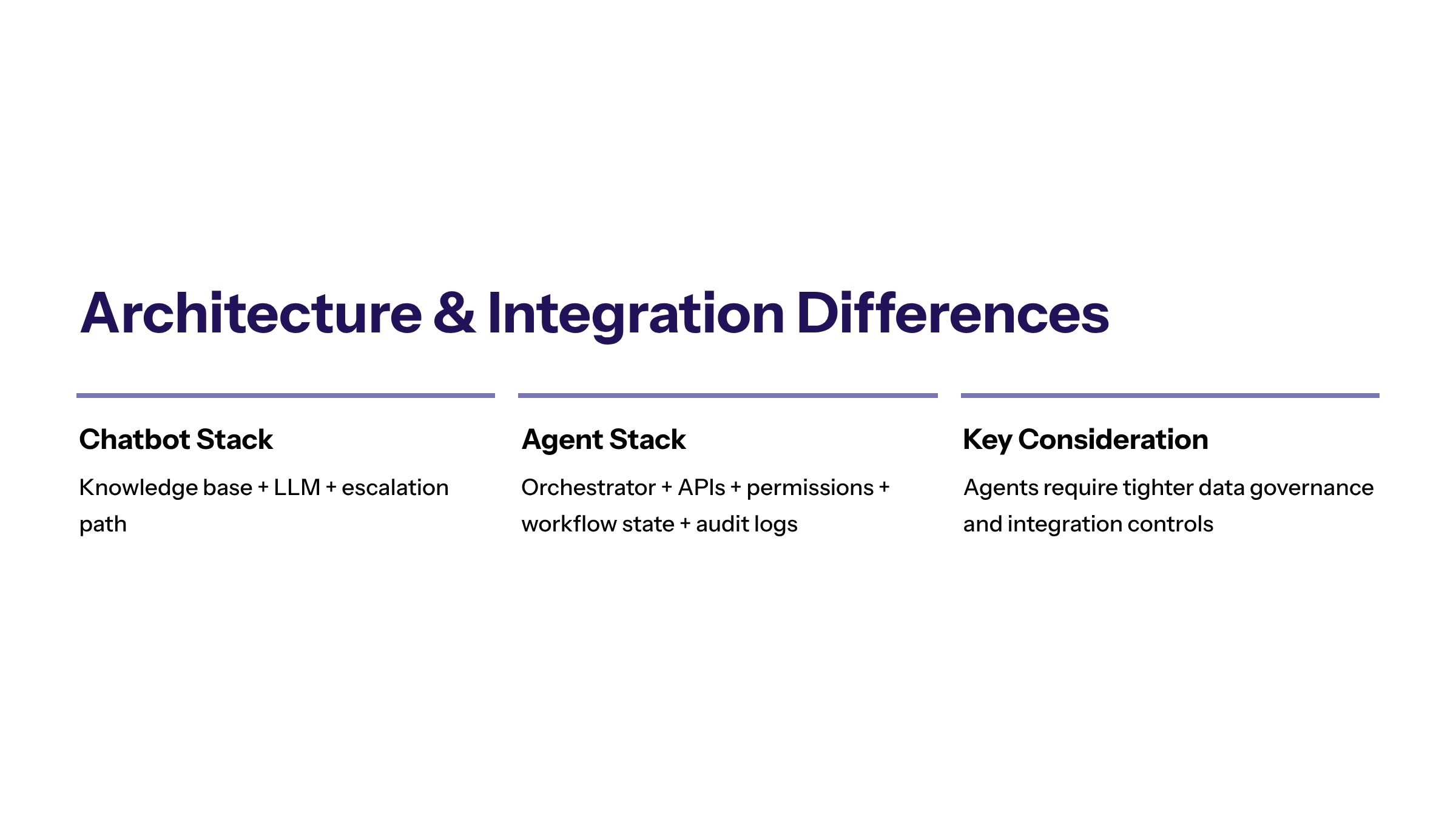
Chatbot architecture may focus on conversation interface, knowledge retrieval, response rules, and escalation. AI agent architecture usually needs more: orchestration, tool access, system permissions, workflow state, audit logs, and action controls.
Data access also differs. A chatbot may answer from an approved knowledge base. An agent may need CRM records, ticket history, documents, inventory, finance records, or workflow status. That access should be limited and logged.
AI-first architecture helps teams design these layers before production. It clarifies how the interface, agent logic, data sources, integrations, permissions, monitoring, and human review connect.
Integration differences also affect maintenance. A chatbot knowledge base may need content updates. An agent connected to systems may need API monitoring, permission reviews, schema-change handling, and release coordination. The operating model should account for that support burden before launch.
Data architecture should follow least privilege. The chatbot or agent should only access the sources required for the approved workflow. A broad data connection may make demos easier, but it increases exposure and makes it harder to explain why the system produced a specific output.
Governance and Human Review Requirements
Governance requirements increase when AI affects business operations. A chatbot that answers approved FAQs needs content governance and escalation. An agent that routes work or prepares actions needs workflow governance, access control, logs, and owner accountability.
Human review should match risk. A low-risk internal summary may only need periodic review. A customer-facing response, financial workflow, legal-sensitive document, or system update may require approval before action.
Teams should also monitor user overrides. If employees frequently reject agent recommendations, the workflow may need better source data, clearer rules, or narrower scope. Governance should use that feedback to improve the system.
The governance model should also define who can change prompts, sources, tool permissions, and escalation thresholds. Small changes can alter behavior in meaningful ways. If those changes are not documented, the business may lose the ability to explain why a chatbot or agent behaved differently over time.
For customer-facing use cases, governance should include content review and brand consistency. For operational agents, it should include evidence, action boundaries, and role ownership. A hybrid workflow may need both.
Decision Criteria for Choosing Chatbots or Agents
Start with the business process. If the need is mostly question-and-answer, a chatbot may be enough. If the need is to coordinate work across systems and steps, an AI agent may be required. If users need a conversation that starts a workflow, a hybrid model may be best.
Decision criteria should include workflow complexity, data sensitivity, integration needs, action risk, escalation requirements, measurement, and ownership. Tool features should come after process fit.
A useful question is: what must happen after the AI responds? If the answer is "nothing, the user just needed information," a chatbot may be sufficient. If the answer is "a case must be routed, reviewed, updated, and measured," the business likely needs an agent workflow.
Another useful question is: what would failure look like? A chatbot failure may be a wrong answer, frustrating loop, or missed escalation. An agent failure may be a wrong record update, misrouted case, unauthorized action, or poor evidence. The higher-impact failure mode should drive the control model.
Common Mistakes in AI Agents vs Chatbots Decisions
One comparison mistake is assuming agents replace chatbots. In many businesses, chatbots remain useful as controlled interfaces while agents support backend process work.
The second mistake is using a chatbot for a workflow that really needs system integration. If the user must repeat information to a human because the chatbot cannot create structured context, the process may not improve.
The third mistake is giving agents too much autonomy too early. Agents should earn expanded permissions through pilot evidence, user feedback, control quality, and business outcomes.
A fourth mistake is treating vendor terminology as architecture. One platform may call a workflow an agent, while another calls a similar capability an automation or assistant. The business should document the actual role, data access, action rights, review path, and evidence instead of relying on product labels.
How to Choose the Right Model
Choosing between AI agents and chatbots should begin with workflow fit. Define the user need, the process behind it, the systems involved, the risk level, and the evidence required to prove value.
The right model may be a chatbot, an agent, or a hybrid. The key is to design around the business process instead of adopting a label before the work is understood.
Frequently Asked Questions About AI Agents vs Chatbots for Business: Differences, Use Cases, and Decision Criteria
No. Some agents include conversational interfaces, but agents are defined by their ability to work through bounded tasks with context, tools, and workflow steps. For related reading, see building AI agents.
Not automatically. If the chatbot solves the interaction need, keep it. Add agent capabilities when the business needs workflow coordination, system context, or controlled actions. For related reading, see AI agent architecture.
Safety depends on scope. A chatbot with approved responses can be safe for simple intake. An agent can support more complex workflows, but it needs stronger review, logging, and escalation controls. For related reading, see AI agent use cases.
A chatbot is enough when the main job is answering questions, collecting simple information, or guiding users through known paths. It is usually not enough when the workflow requires tool use or multi-step coordination. For related reading, see AI agent workflows.
A business needs an AI agent when the work requires interpreting context, retrieving data, coordinating steps, or recommending actions inside a workflow. The agent still needs boundaries and review points. For related reading, see generative AI implementation.
Yes. A chatbot can be the user interface while an AI agent handles controlled workflow steps behind it. The design should make responsibilities, permissions, and escalation paths clear. For related reading, see AI-first architecture.