Agentic AI Workflow Automation for Enterprise Teams
Agentic AI workflow automation uses AI agents to pursue workflow goals across multiple steps, tools, and systems within defined boundaries. It is different from simple automation because the agent can interpret context, choose a next step, use a tool, and continue a process until it reaches a defined outcome or escalation point.
For enterprise teams, the key phrase is "within defined boundaries." Agentic AI becomes useful when autonomy is constrained by business rules, permissions, approval paths, audit logs, and human review. Without those controls, agentic automation can create operational risk faster than it creates value.
This guide explains what agentic AI workflow automation means, how it differs from rule-based automation, where it can help, and how to implement it with governance from the start.
Enterprise teams may also describe this pattern as agentic AI for workflow automation or an agentic AI automation workflow. In either case, the priority is the same: autonomy should follow workflow design, not replace it.
What Agentic AI Workflow Automation Means
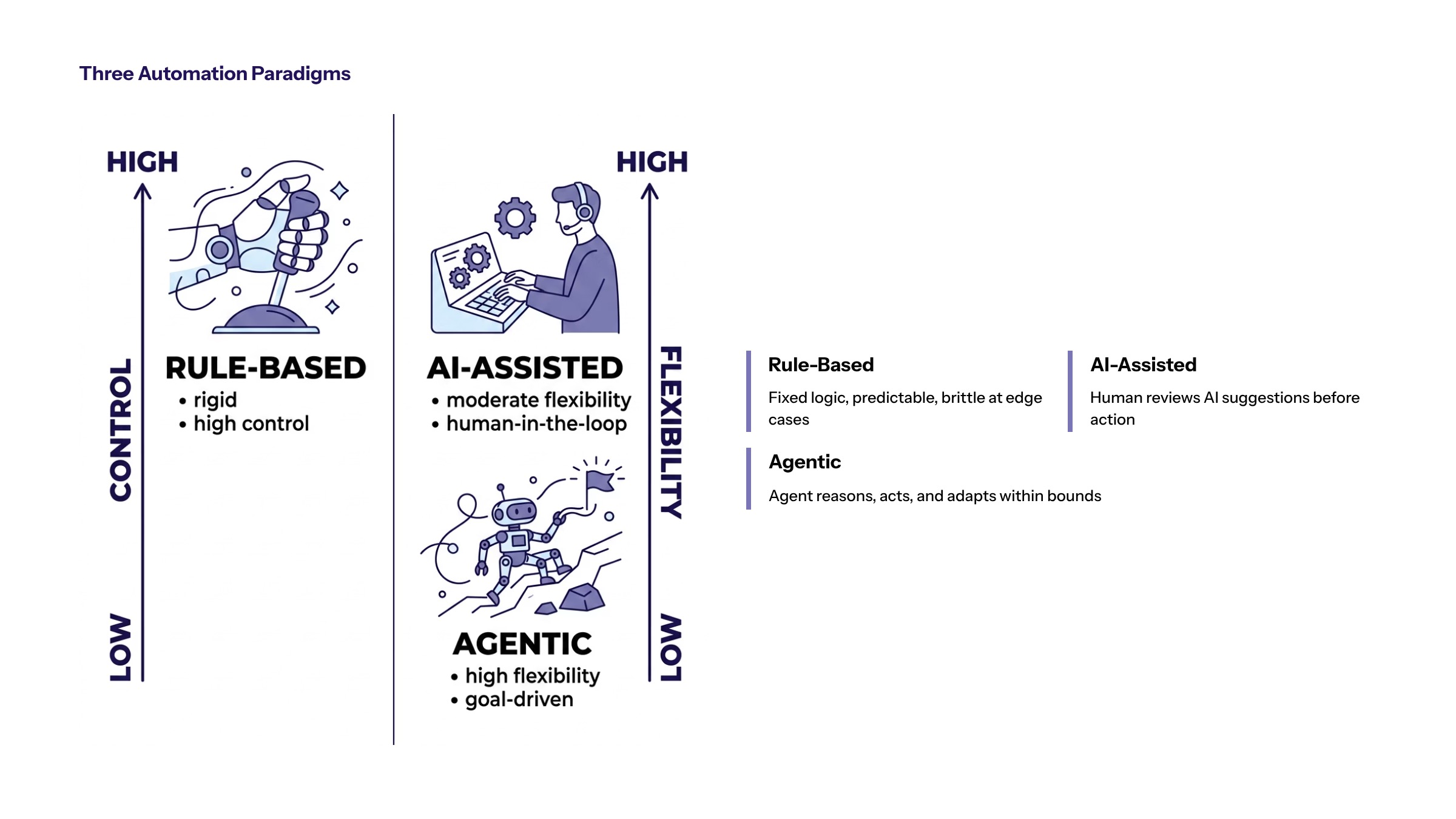
An agentic workflow gives an AI system a goal and a set of available actions. Instead of only responding to one prompt, the system can reason through steps, retrieve information, call tools, and decide whether to continue, stop, or escalate.
In a business workflow, that might mean reviewing a request, checking customer data, identifying the next process step, drafting a response, routing the case, and logging the decision. The agent is not just generating content. It is participating in process execution.
This is why agentic automation should be designed through AI-first architecture. The workflow needs technical structure and operational control before agents are trusted with business actions.
How Agentic Workflows Differ From Rule-Based Automation
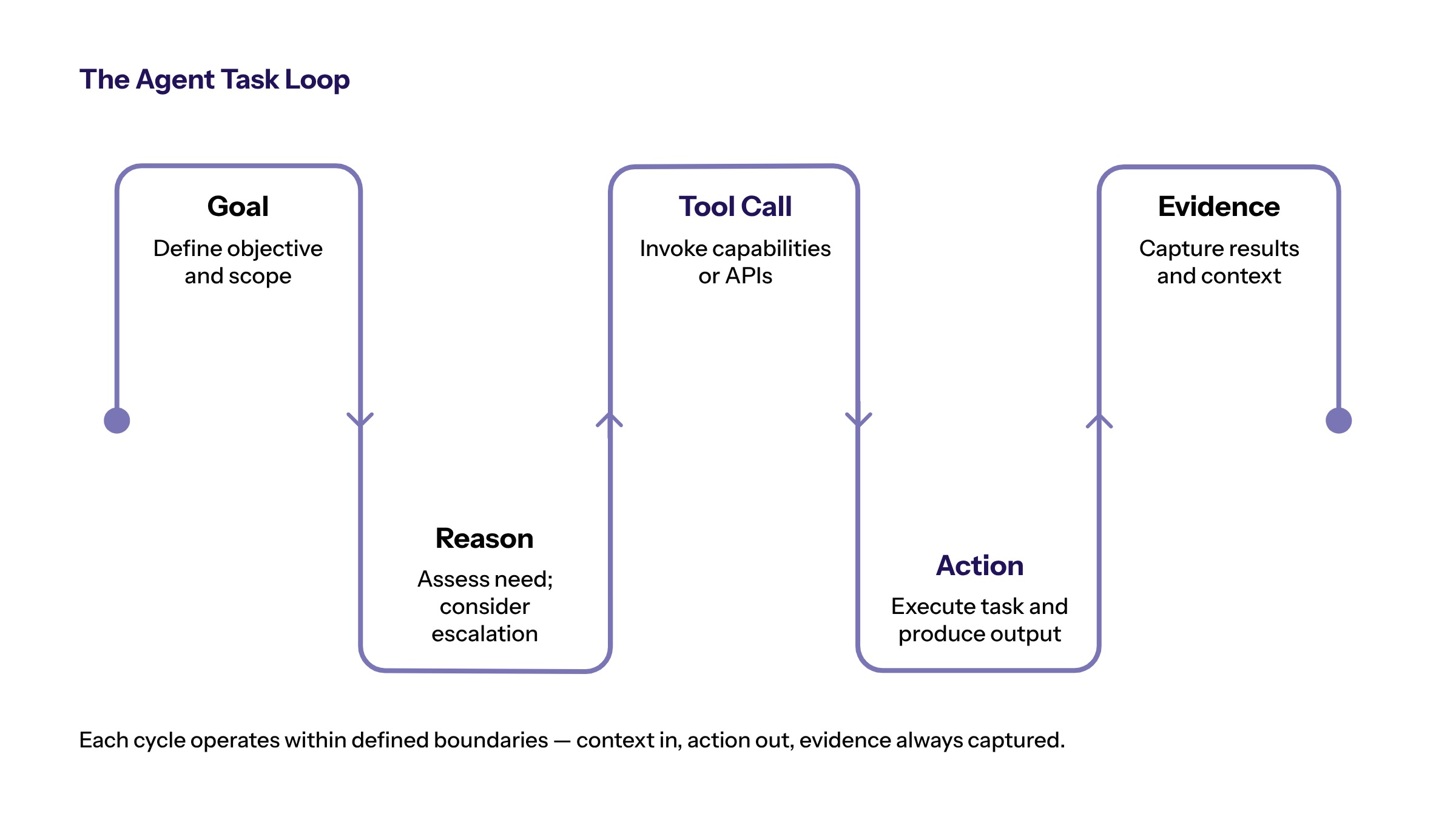
Rule-based automation is best when the path is predictable. Agentic AI is useful when the workflow includes ambiguity, unstructured data, changing context, or multiple possible next steps. The difference is not a replacement pattern. It is a fit-for-purpose decision.
Automation Type | How It Works | Best Use |
|---|---|---|
Rule-based automation | Follows predefined if/then rules. | Stable, predictable workflows. |
AI-assisted workflow | Uses AI to summarize, classify, or recommend. | Human-led decisions with AI support. |
Agentic automation | Uses AI agents to work through steps toward a goal. | Multi-step workflows with context and exceptions. |
The strongest enterprise systems often combine all three. Rules handle deterministic steps. AI assists with interpretation. Agents coordinate work where flexibility is needed.
Where Agentic AI Can Support Enterprise Workflows
Agentic AI can support workflows where a task requires multiple decisions or systems. Examples include support triage, document intake, onboarding, contract review, compliance queues, sales operations, finance exceptions, and internal service requests.
In each case, the agent should have a narrow job. A support workflow agent might classify cases, retrieve account context, suggest a response, and escalate high-risk issues. A finance workflow agent might identify missing information, prepare a summary, and route the item for approval.
Useful agentic AI workflow automation examples usually show the same pattern: the agent handles repeated context gathering and controlled next steps while humans retain authority over sensitive decisions. That makes agentic AI workflow automation tools only one part of the solution; workflow ownership and auditability still matter.
Agentic automation is not appropriate for every process. If the workflow is highly regulated, irreversible, or dependent on incomplete data, human control should remain stronger and agent actions should be limited.
Architecture Components for Agentic Automation
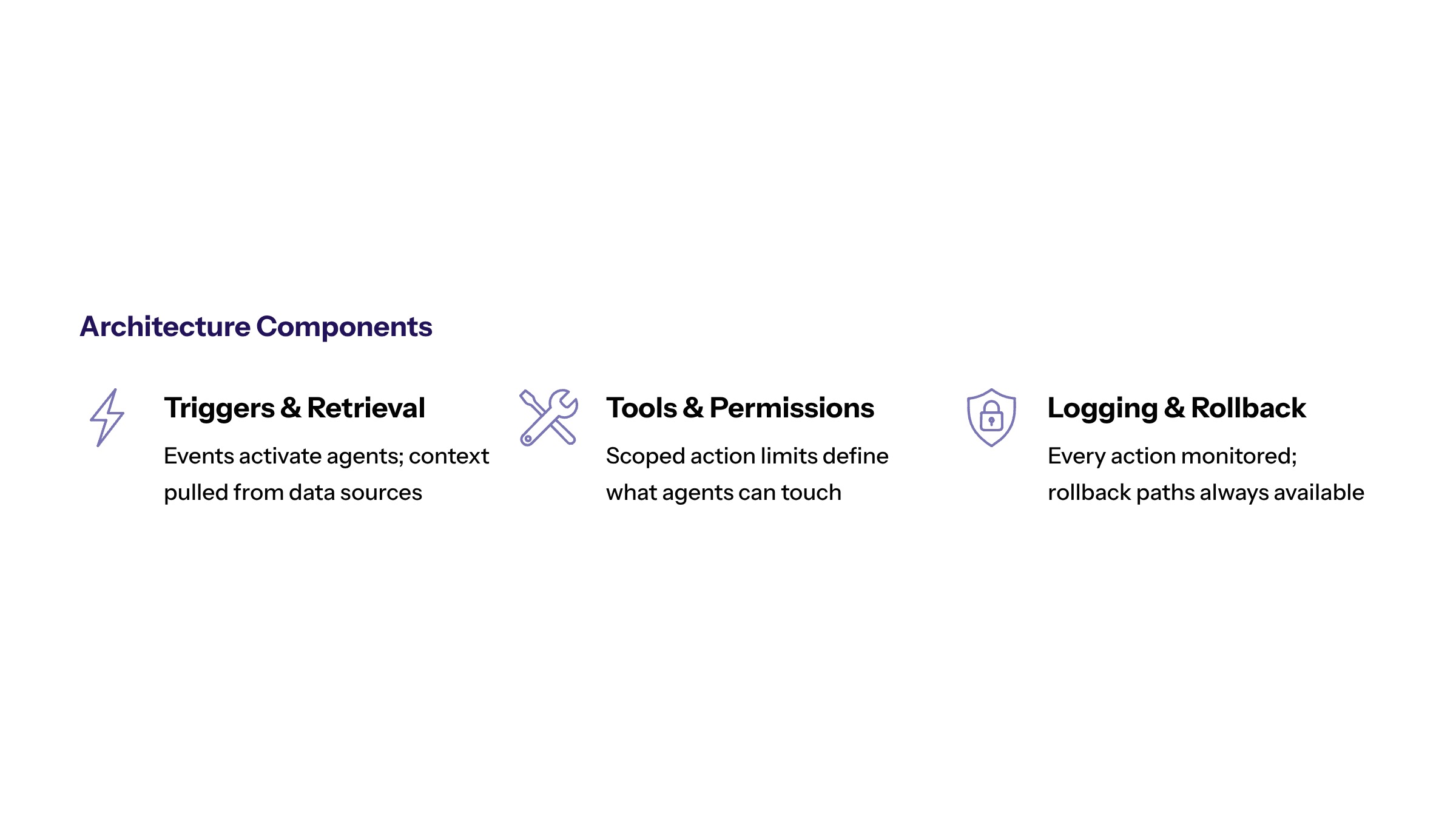
Agentic workflow automation needs an architecture that defines what the agent can observe and what it can do. Key components include triggers, data access, retrieval, tools, permissions, action limits, logging, monitoring, and escalation paths.
Tool access is especially important. If an agent can update a CRM record, send a message, create a ticket, or change a workflow state, the organization needs clear permissions and rollback plans. The agent should not have broad access simply because integration is technically possible.
Agentic AI enterprise workflow automation should also include environment separation for testing and production. Teams need a way to validate prompts, tools, and permission changes before those changes affect real business workflows.
Governance, Boundaries, and Human Review
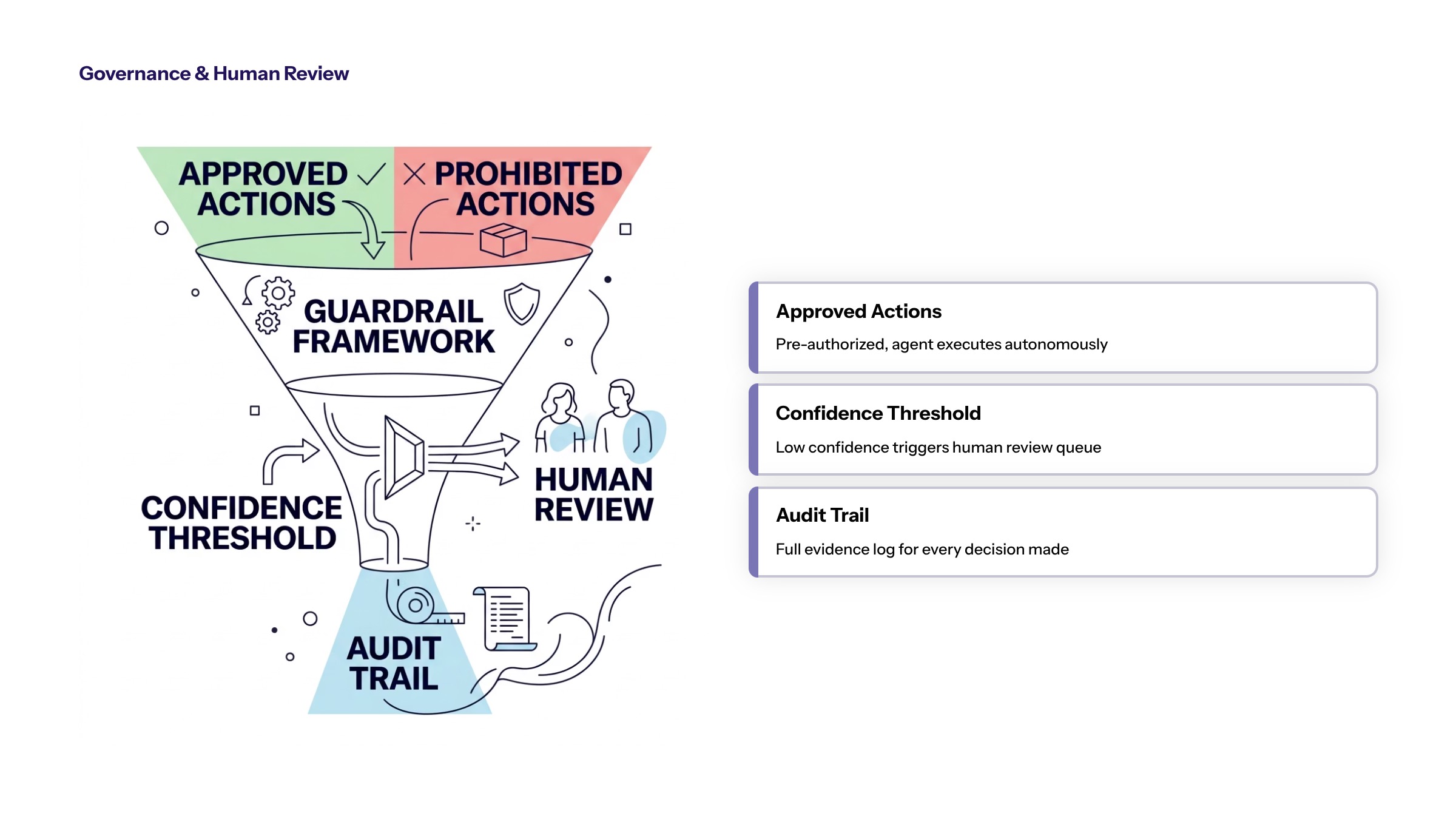
Agentic systems need governance before they need more autonomy. Boundaries should define approved actions, prohibited actions, confidence thresholds, human review points, and incident response. Audit logs should capture what the agent did, what information it used, and when it escalated.
Security is part of the workflow design. Agent permissions should follow least-privilege access, and sensitive data should be limited to what the workflow requires. Teams building agentic systems should apply secure development practices from the beginning.
Agentic Workflow Implementation Roadmap
Agentic AI workflow automation should start with a constrained pilot. Choose a workflow with enough volume to measure, enough structure to control, and enough value to justify the work.
Define the goal. Specify what the agent is expected to complete or support.
Map the workflow. Identify triggers, data, systems, owners, exceptions, and approvals.
Set boundaries. Define what the agent can read, suggest, change, and escalate.
Build and test. Validate behavior against real examples and edge cases.
Measure and decide. Use evidence to expand, adjust, or stop the workflow.
This phased approach fits well with RAPID thinking: research the constraint, analyze risk, plan the workflow, implement carefully, and decide based on evidence.
Designing Agent Roles and Action Boundaries
Agentic workflow automation needs role design before technical implementation. An agent role should describe the business purpose, the workflow scope, the data it can access, the tools it can use, the actions it can take, and the conditions that require human review. Without that definition, teams may give the agent broad capabilities without a clear reason.
A good role is narrow enough to test and broad enough to matter. For example, "support operations assistant" is too vague. "Classify incoming enterprise support requests, retrieve account context, draft the first response, and escalate billing or legal issues" is much more useful. It defines the work, the data, the output, and the boundary.
Action boundaries should separate observation, recommendation, drafting, and execution. Observation means the agent can read relevant data. Recommendation means it can suggest a next step. Drafting means it can prepare content for a user. Execution means it can change a system state or trigger a downstream action. Each level introduces more risk and should require stronger controls.
The safest implementation path is usually progressive. Start with observation and recommendation. Add drafting when the team trusts the inputs and outputs. Add execution only when the workflow is stable, the action is reversible or approved, and the organization has enough monitoring to detect problems quickly.
Exception Handling and Escalation Design
Agentic workflows are valuable because they can handle variation, but that does not mean they should handle every exception alone. Escalation design is one of the most important parts of enterprise agent architecture.
Exceptions should be defined before launch. Common triggers include missing data, conflicting records, low confidence, unusual customer requests, protected or regulated information, financial thresholds, legal language, security-sensitive actions, and repeated failures. When one of these triggers appears, the workflow should route to a human owner with enough context to act.
Escalation should not be treated as failure. In a well-designed agentic workflow, escalation is a control mechanism. It tells the organization where the system is uncertain, where business rules are incomplete, and where the workflow may need improvement. Over time, escalation patterns can reveal training needs, data quality issues, policy gaps, or integration weaknesses.
Human review should also be measurable. Teams should track how often escalations happen, why they happen, how long they take to resolve, and whether the agent provided useful context. Those metrics help leaders decide whether to expand autonomy, improve data access, revise prompts, adjust rules, or keep human control in place.
Testing Agentic Workflows Before Production
Testing agentic automation is different from testing a static workflow. Teams need to test the agent’s reasoning path, tool use, permission boundaries, escalation behavior, and logging. The goal is not only to see whether the agent can complete happy-path tasks. The goal is to understand how it behaves when the workflow is messy.
Test cases should include normal inputs, ambiguous inputs, missing information, conflicting records, sensitive data, unsupported requests, system errors, and edge cases. If the agent can call tools, testing should confirm that it cannot use unauthorized tools, update prohibited records, or bypass approval rules.
Logging should be tested as part of the workflow. The organization should be able to review the input, the retrieved context, the agent output, the action taken, the approval state, and the final result. This evidence is essential for debugging, compliance, user trust, and continuous improvement.
Production readiness should include rollback planning. If an agent creates a ticket, updates a field, routes a case, or sends a message, the team should know how to reverse or correct the action. The more business impact the agent has, the more important rollback and incident response become.
Measuring Value From Agentic Workflow Automation
Agentic automation should be measured through workflow outcomes. Useful measures include resolution speed, queue reduction, manual touches avoided, escalation quality, rework reduction, decision consistency, user adoption, and audit completeness. These metrics show whether the agent is improving real operations rather than only producing technically impressive outputs.
Agent performance metrics should sit underneath those business metrics. Teams can monitor accuracy, confidence, tool-call success, retrieval quality, refusal behavior, escalation rate, and failure modes. These signals help improve the agent, but they should always connect back to business value.
The most important value question is whether the agent helps the organization decide and act with more discipline. If the agent creates more complexity, more review burden, or more uncertainty, the implementation should be revised. If it reduces friction while preserving control, the workflow may be ready for expansion.
Enterprise Readiness Checklist for Agentic Automation
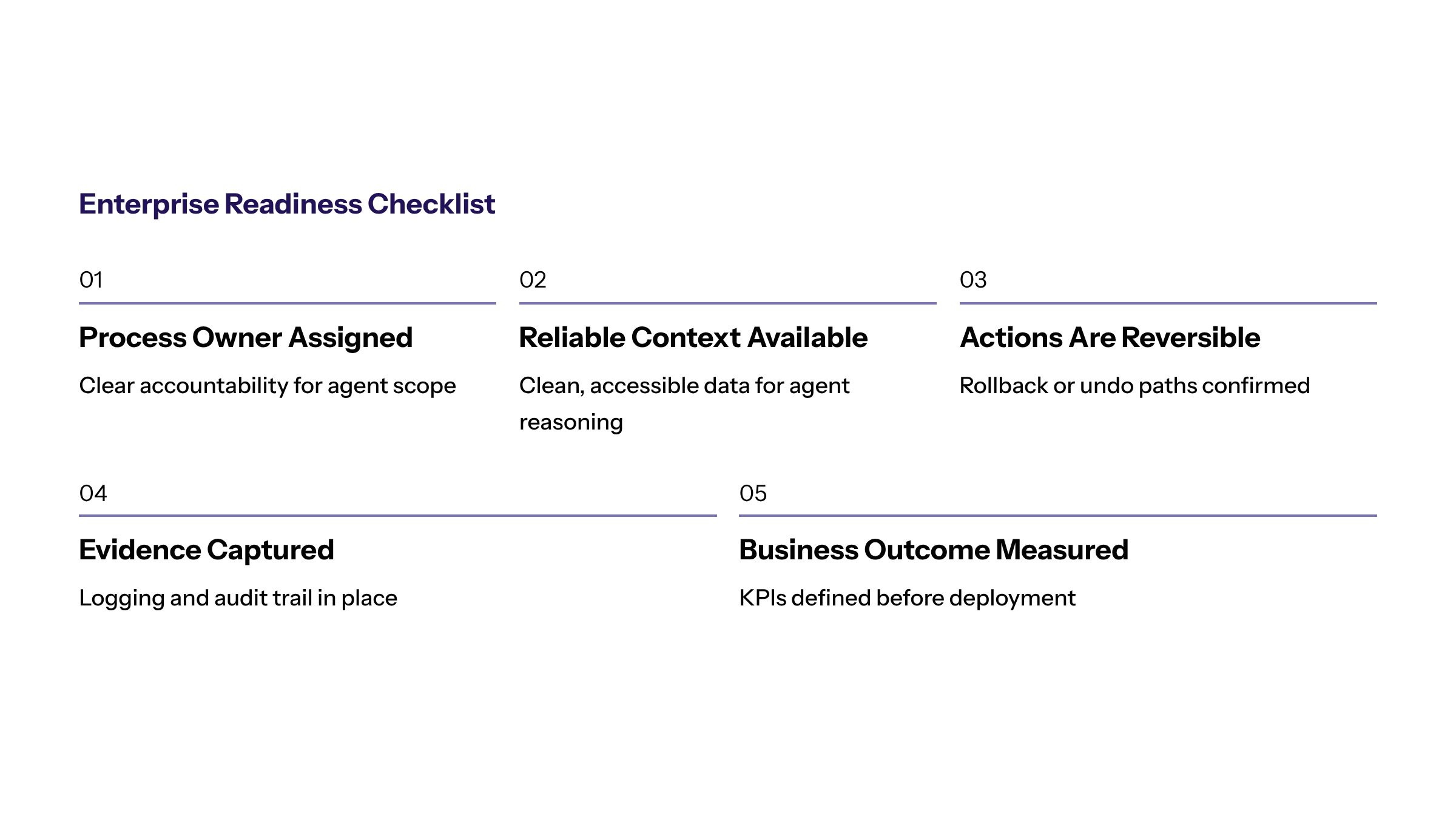
Before an enterprise expands agentic automation, it should confirm that the workflow has enough maturity to support autonomous or semi-autonomous behavior. The first readiness requirement is a clear process owner. If no one owns the workflow today, no one will own the agent’s outcomes tomorrow.
The second requirement is reliable context. The agent needs access to the right data, policies, documents, records, and system state. If that context is incomplete, the agent may still act confidently but incorrectly. Readiness work may include data cleanup, knowledge-base governance, integration mapping, and access-control design.
The third requirement is action reversibility. Some agent actions are low risk because they can be edited or undone. Others create downstream commitments that are harder to reverse. Teams should classify actions by reversibility and impact before allowing an agent to execute them.
The fourth requirement is evidence capture. The organization should be able to review what the agent did and why. That includes the input, retrieved context, tool call, output, approval state, action, and result. Evidence capture is essential for debugging, trust, compliance, and continuous improvement.
The fifth requirement is business measurement. Agentic automation should not be scaled because it feels advanced. It should be scaled because it improves a measurable workflow without weakening control. If the team cannot define the measurement model, the implementation should remain narrow until the value case is clearer.
Bottom Line for Agentic Workflow Strategy
Agentic automation is most useful when it is treated as a controlled execution layer. The agent should have a job, a boundary, a measurement model, and a clear path to human review. Without those elements, autonomy can add uncertainty to workflows that already need more clarity.
Enterprise teams should resist the temptation to judge agentic systems by how much they can do. The better question is whether the agent can improve a workflow while preserving accountability. If the answer is yes, the organization can expand carefully. If the answer is unclear, the next step is stronger workflow design before more autonomy.
When Agentic Automation Is Not the Right Fit
Agentic automation is not always the answer. If a workflow has no clear owner, no reliable data, no measurable outcome, or no safe escalation path, the organization should fix those issues first. A more autonomous system will not compensate for an unclear process.
Teams should also avoid agentic automation when the current process is still politically unresolved. If stakeholders disagree about who should approve work, what policy applies, or which system is authoritative, an agent may expose that conflict faster. Process alignment should come before autonomy. That protects the business from automating confusion.
The practical next step is to identify where interpretation and action create value, then design the guardrails needed to make that value safe. Agentic AI is strongest when autonomy follows architecture, governance, and operational readiness. That sequence gives teams room to learn without turning every workflow into an uncontrolled experiment. It also keeps accountability visible throughout.
Frequently Asked Questions About Agentic AI Workflow Automation for Enterprise Teams
Agentic AI workflow automation uses bounded AI agents to pursue workflow goals across steps, tools, and systems while following permissions, approvals, audit logs, and escalation rules. For related reading, see generative AI development.
Enterprise teams should use agentic automation when a workflow needs context interpretation, multi step coordination, and measurable outcomes, but still has clear boundaries and human review. For related reading, see AI and ML development.
Teams need defined agent roles, least privilege access, approval thresholds, audit evidence, rollback planning, monitoring, and named owners before expanding agentic workflow automation. For related reading, see AI implementation planning.
An agentic workflow should only have enough autonomy to complete a defined workflow role. Higher impact actions should stay behind approval thresholds, escalation rules, and audit evidence. For related reading, see AI automation services.
Agentic workflow agents should access only the data needed for the task, such as approved records, policies, tickets, documents, or workflow state. Least privilege access keeps the agent useful without making it too broad. For related reading, see enterprise AI services.
Teams should expand agentic automation only when the pilot improves workflow outcomes, keeps evidence complete, and shows that exceptions are handled consistently. Expansion should follow measured performance, not demo excitement. For related reading, see AI consulting services.