
AI Automation Workflow Diagram: How Enterprise AI Workflows Should Be Designed
An AI automation workflow diagram maps how work moves from a trigger to data access, AI interpretation, human review, approved system action, monitoring, and feedback. For enterprise teams, the diagram is not decoration. It is a planning tool that shows what the AI system can do, what people still approve, and where evidence is captured.
CTOs, operations leaders, product managers, process owners, and enterprise teams planning AI workflow automation need diagrams that show ownership, controls, and system flow. A useful AI workflow automation diagram shows the workflow pattern, how agent diagrams differ, and which controls should appear before production implementation.
A useful AI automation workflow diagram separates the AI role from the business decision. AI may classify, retrieve, summarize, recommend, draft, or monitor. The organization still defines access, review thresholds, approved actions, escalation paths, logs, and ownership.
An enterprise-ready diagram should focus on implementation logic: triggers, systems, owners, decisions, controls, escalation paths, and evidence capture. The tool used to draw the diagram matters less than whether the workflow can be governed.
What an AI Automation Workflow Diagram Shows
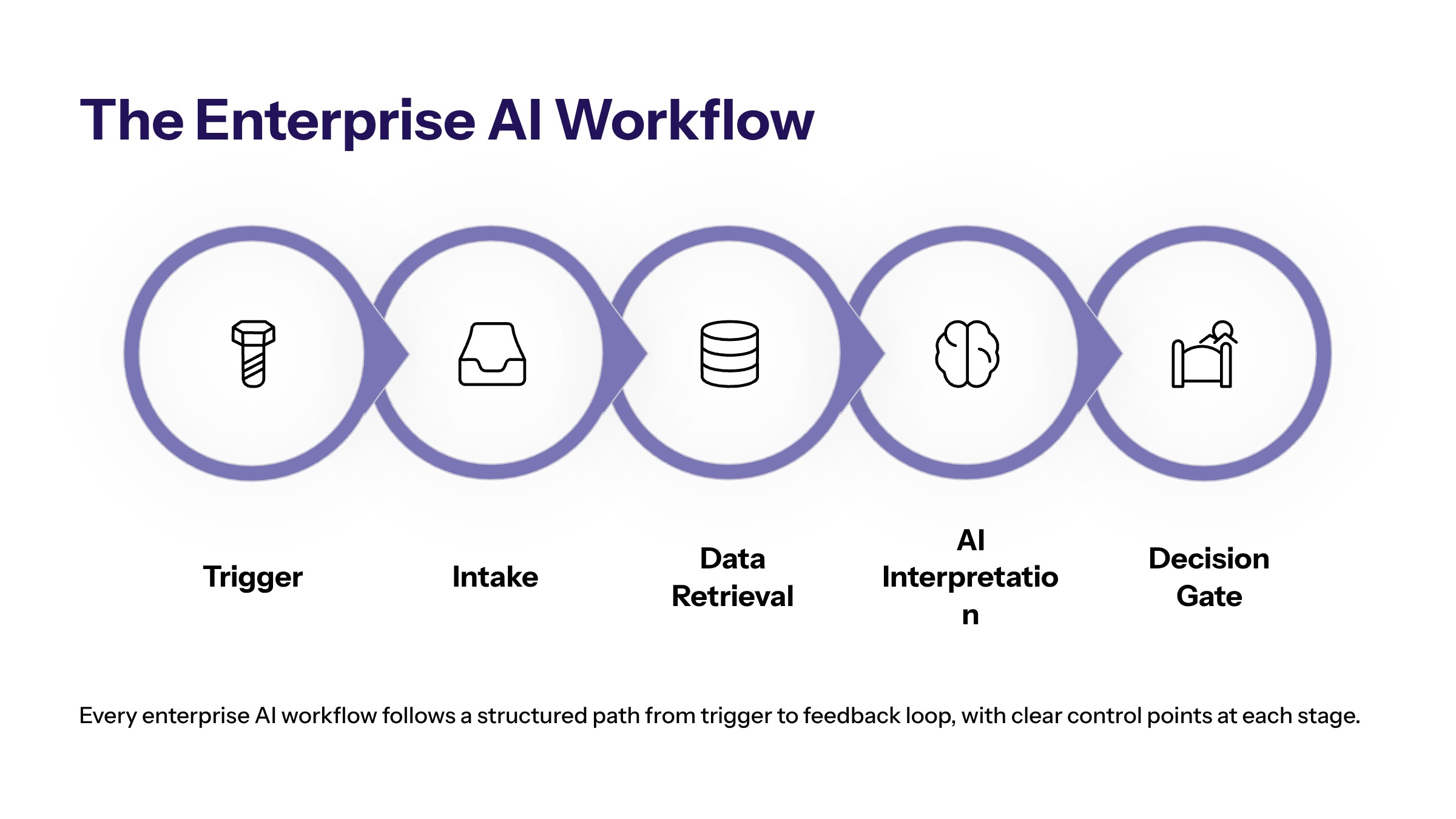
An AI automation workflow diagram shows how a business process changes when AI is added. It should include the trigger, input, context sources, AI task, decision gate, human review, system action, monitoring, and improvement loop. If those elements are missing, the diagram may look clean but fail as an implementation plan.
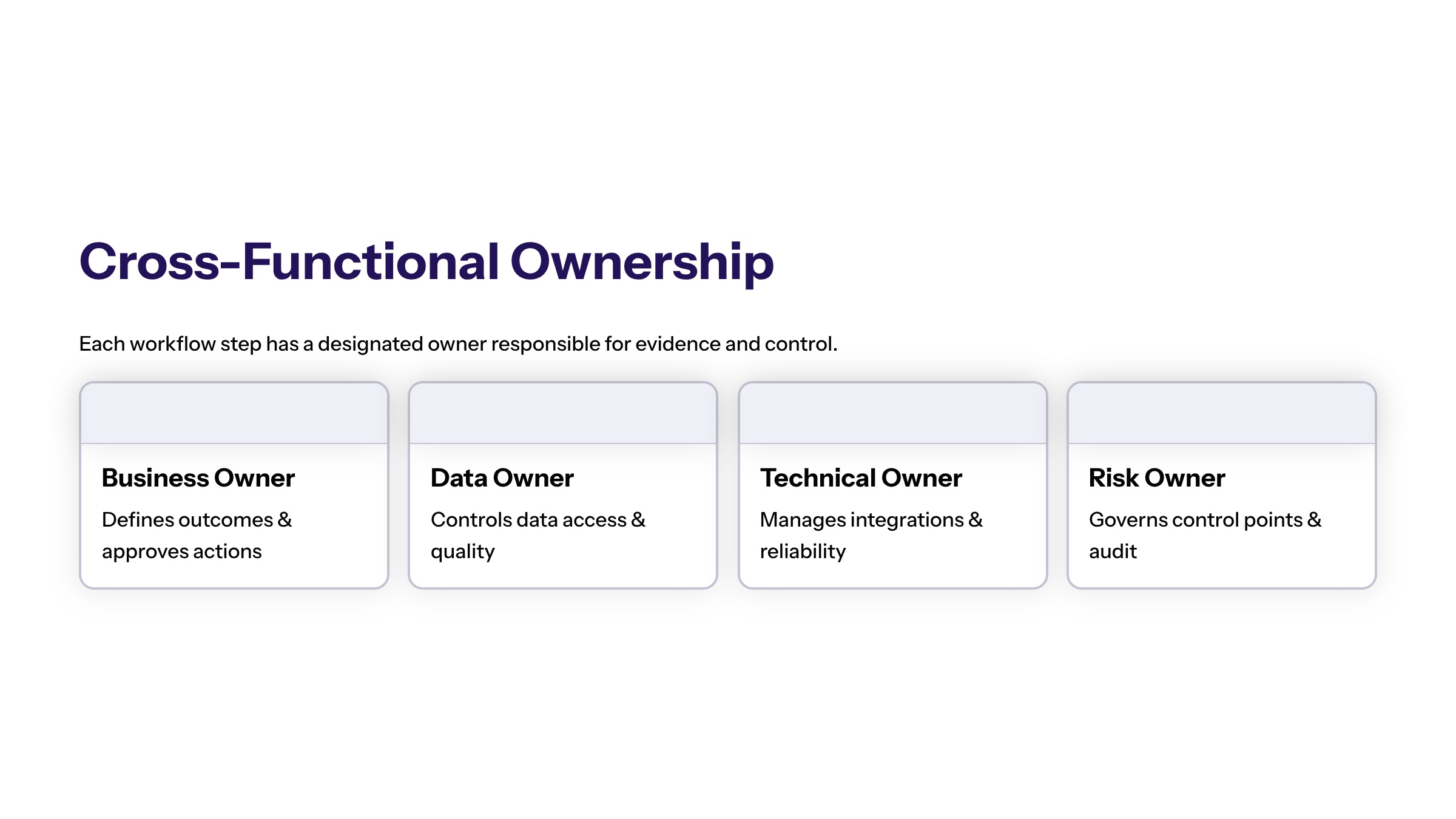
The diagram should also show ownership. Who owns the workflow? Who owns the data? Who reviews exceptions? Who approves system actions? Who monitors results? These questions turn a diagram from a generic flowchart into an operating model.
In enterprise environments, the diagram should make risk visible. A workflow that only drafts an internal summary has different controls than a workflow that updates customer records or routes financial approvals. The diagram should show those differences before the team builds.
The diagram should also reduce translation errors between stakeholders. Business teams often describe the desired outcome, technical teams think in systems and APIs, and risk teams focus on approvals and evidence. A strong AI workflow automation diagram gives each group the same operating picture before requirements become code.
That shared picture is especially useful when a workflow includes multiple owners. A support leader may own the customer experience, a data owner may own source quality, an engineering team may own integration, and a security stakeholder may own access rules. The diagram should show where those responsibilities meet.
Core Components of an AI Automation Workflow
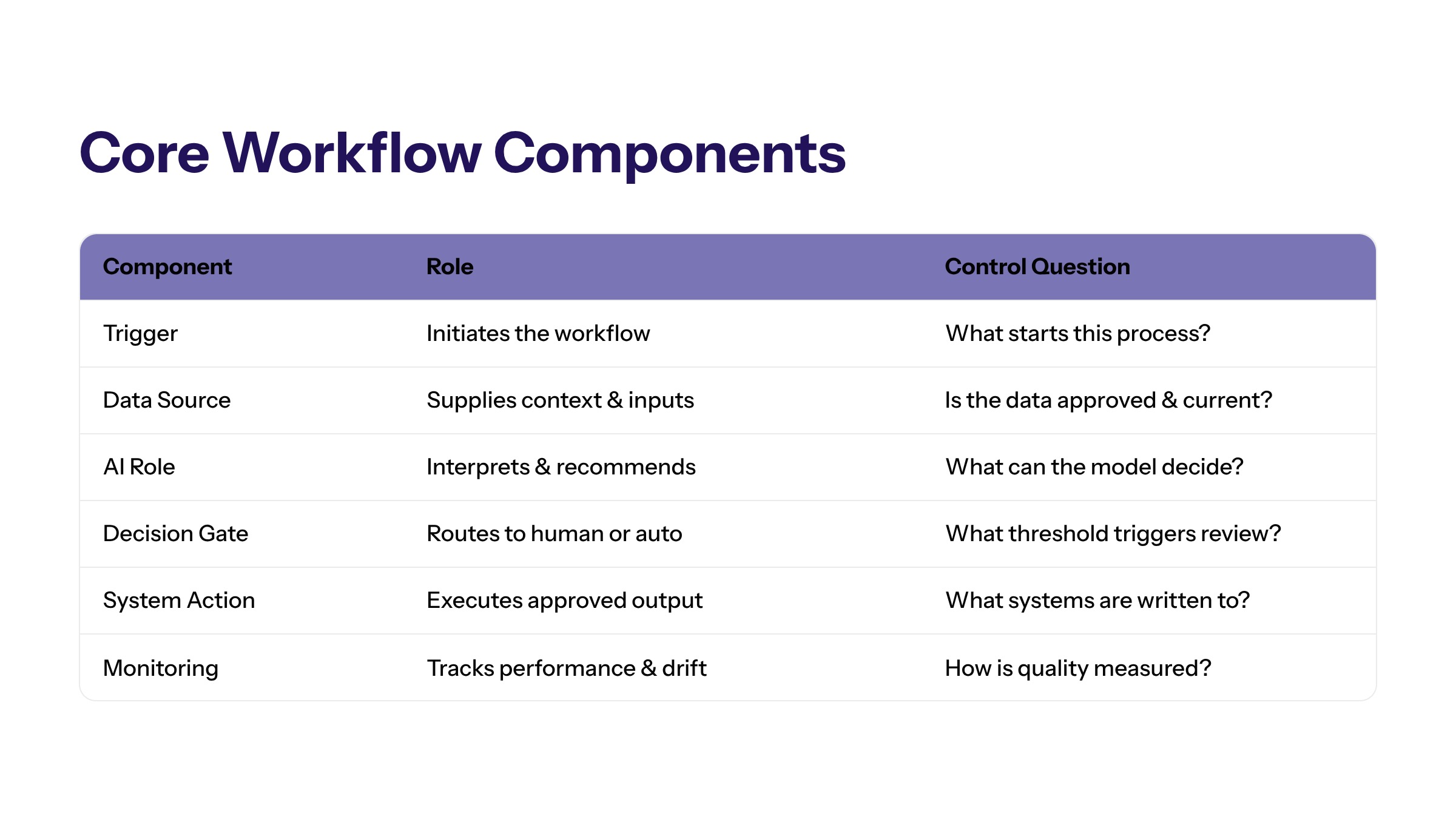
Every AI workflow automation diagram should define the components that make the workflow executable. These components help business, technical, and risk teams understand the same process.
Component | Purpose | Control Question |
|---|---|---|
Trigger | Starts the workflow from a request, event, record, or schedule. | Is the trigger reliable and observable? |
Data source | Provides the context the AI system can use. | Is the source approved, current, and permissioned? |
AI role | Classifies, retrieves, summarizes, recommends, drafts, or monitors. | What is the AI explicitly allowed to do? |
Decision gate | Determines whether the workflow needs review, escalation, or action. | Who approves high-impact outputs? |
System action | Updates records, routes tasks, creates tickets, or sends approved output. | Can the action be logged and reversed? |
Monitoring | Tracks performance, exceptions, and control quality. | What evidence proves the workflow is working? |
A diagram that includes these components helps teams avoid vague automation plans. It shows what must be built, approved, tested, and measured.
These components should be drawn as separate boxes or swim lanes when possible. Combining trigger, AI processing, review, and action into one shape makes the workflow look simpler than it is. Separate components help teams ask sharper questions about ownership, data access, failure paths, and acceptance criteria.
The component view also helps with phased implementation. A team may start with trigger, intake, retrieval, AI summary, and human review only. Later it may add approved action, monitoring automation, or feedback loops. The diagram can show the target state without pretending every layer should launch on day one.
AI Workflow Automation Diagram Step by Step
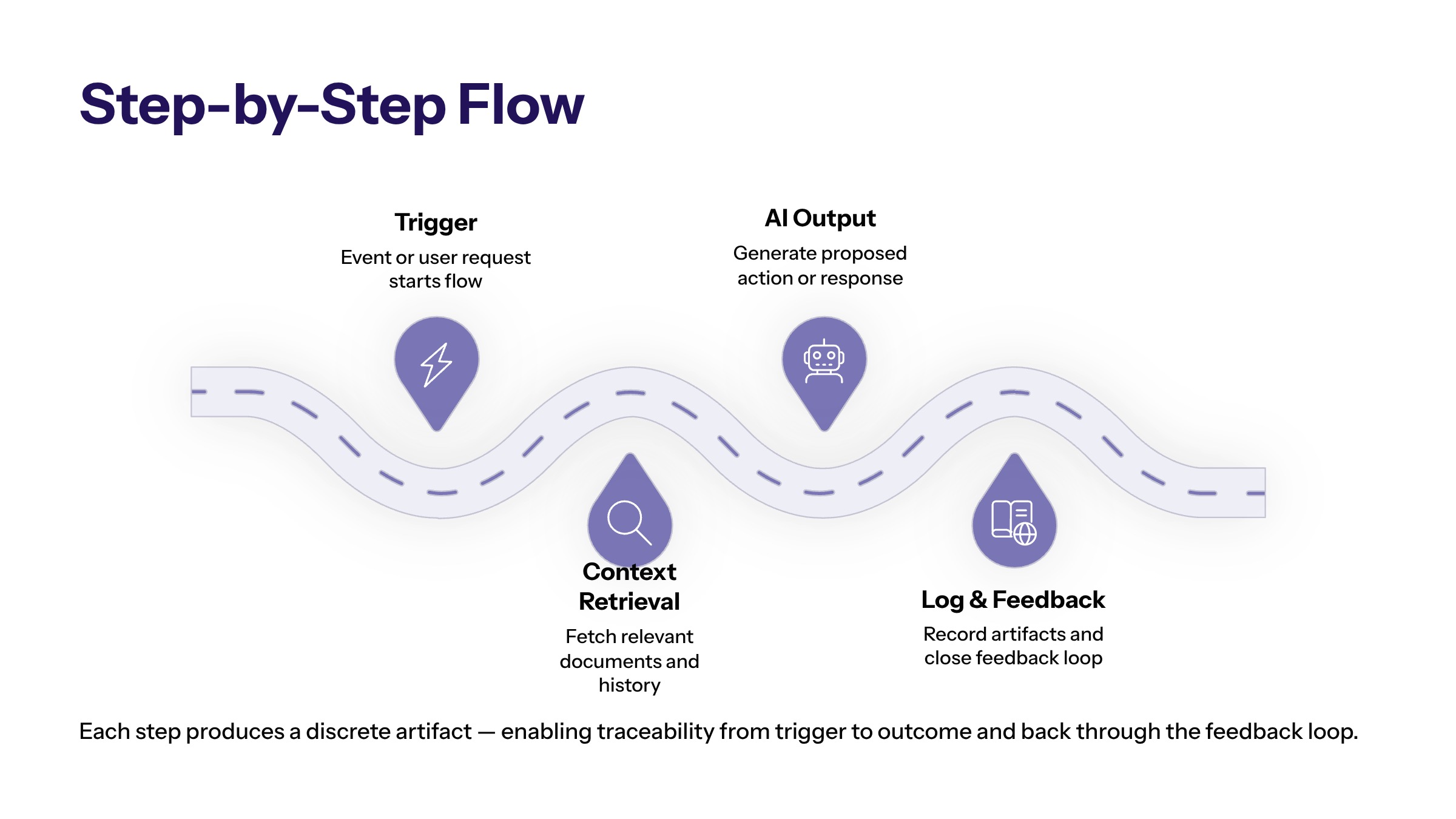
A practical AI workflow automation diagram begins with a trigger. The trigger might be a new support ticket, invoice, contract, lead, internal request, operational exception, or scheduled report. The trigger should be specific enough that the workflow can start consistently.
The next step is intake. Intake collects the record, request, document, or event. The workflow then retrieves approved context from systems such as CRM, ERP, ticketing, document management, knowledge base, or analytics tools.
After context retrieval, AI performs its defined task. It may classify the request, summarize the record, identify missing fields, draft a response, recommend a route, or flag an exception. The diagram should not imply that AI owns every next step.
The decision gate decides what happens next. Low-risk outputs may move forward with light review. High-risk or uncertain outputs should escalate. Approved actions may then update a system, create a task, route a case, or notify an owner. Monitoring and feedback complete the loop.
Each step should include an expected output. The trigger produces an event or request. Intake produces a normalized record. Retrieval produces approved context. AI interpretation produces a classification, summary, recommendation, or draft. Review produces approval, correction, rejection, or escalation. The action step produces a logged system change or routed task.
When outputs are defined, testing becomes easier. The team can test whether the trigger fires correctly, whether the right sources are retrieved, whether the AI output is reviewable, whether the approval step is captured, and whether the final action is reversible. That is far stronger than testing whether the diagram "looks right."
AI Agent Workflow Automation Diagram
An AI agent workflow automation diagram adds one important layer: the agent may work through multiple steps toward a bounded goal. Instead of only classifying one input, the agent may retrieve context, choose a tool, draft a recommendation, and prepare a system action for approval.
The diagram should show the agent boundary. Which tools can the agent use? Which sources can it read? Which actions require approval? Which actions are blocked? Which exceptions force escalation? This boundary is the difference between a governed agent and an unmanaged automation risk.
AI agents workflow automation diagrams should also show state. The workflow should know whether a task is new, waiting for review, escalated, approved, completed, or failed. Without workflow state, the agent may produce output but fail to coordinate operational work.
An agent diagram should make tool use explicit. If the agent can search a knowledge base, call an API, create a task, draft a message, or compare documents, each tool should be visible. Hidden tool access makes review difficult and can lead stakeholders to underestimate the permissions required.
The diagram should also show stop conditions. An agent should stop when required data is missing, when confidence is low, when a policy conflict appears, when an action exceeds its permission, or when the user asks for something outside the approved workflow. Stop conditions are part of enterprise readiness, not edge-case detail.
Data, Permissions, and System Integration Layers
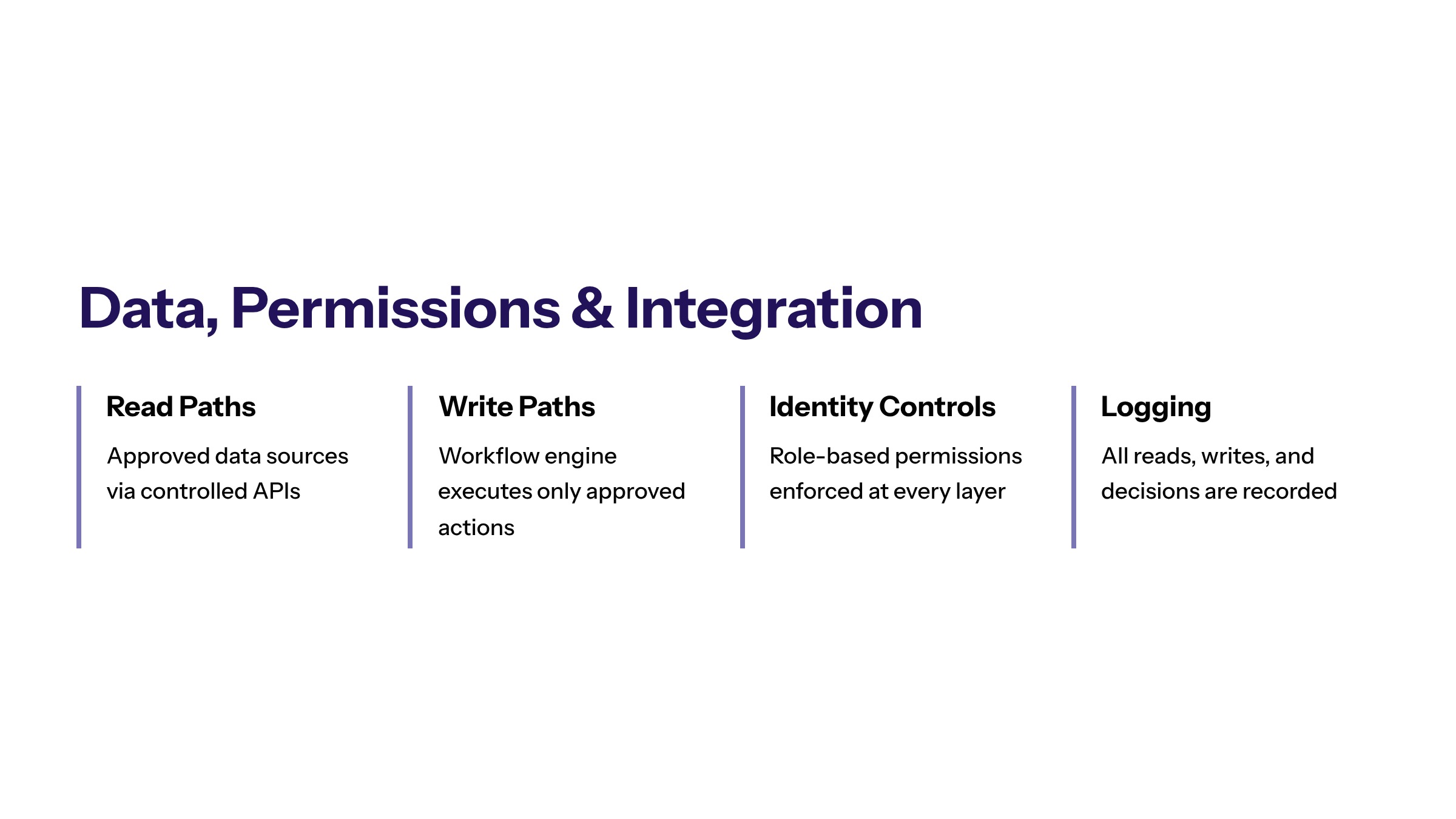
Enterprise AI automation diagrams should include data and permission layers. A diagram that only shows "AI" between input and output hides the real implementation work. The AI system needs approved data, identity controls, integration paths, and monitoring.
Data sources should be labeled by type and sensitivity. Customer records, financial data, employee information, contracts, policies, and operational metrics may require different access rules. The diagram should not imply that all data is available to the AI system by default.
AI software development should connect the diagram to implementation details: APIs, workflow engine, retrieval layer, role-based permissions, logging, test environment, and deployment process. The diagram becomes more useful when it can become a build plan.
System integration should distinguish read paths from write paths. Reading a record to summarize context is lower risk than updating the record, creating a ticket, sending a message, or changing a status. The diagram should show which actions are read-only, which are draft-only, which require approval, and which are blocked.
Permission layers should also include user identity. The AI workflow should not become a shortcut around normal access controls. If a human user could not see a record, the AI workflow should not expose it through a summary. This rule should be visible in the diagram through identity, role, or access-boundary notation.
Human Review, Escalation, and Audit Evidence
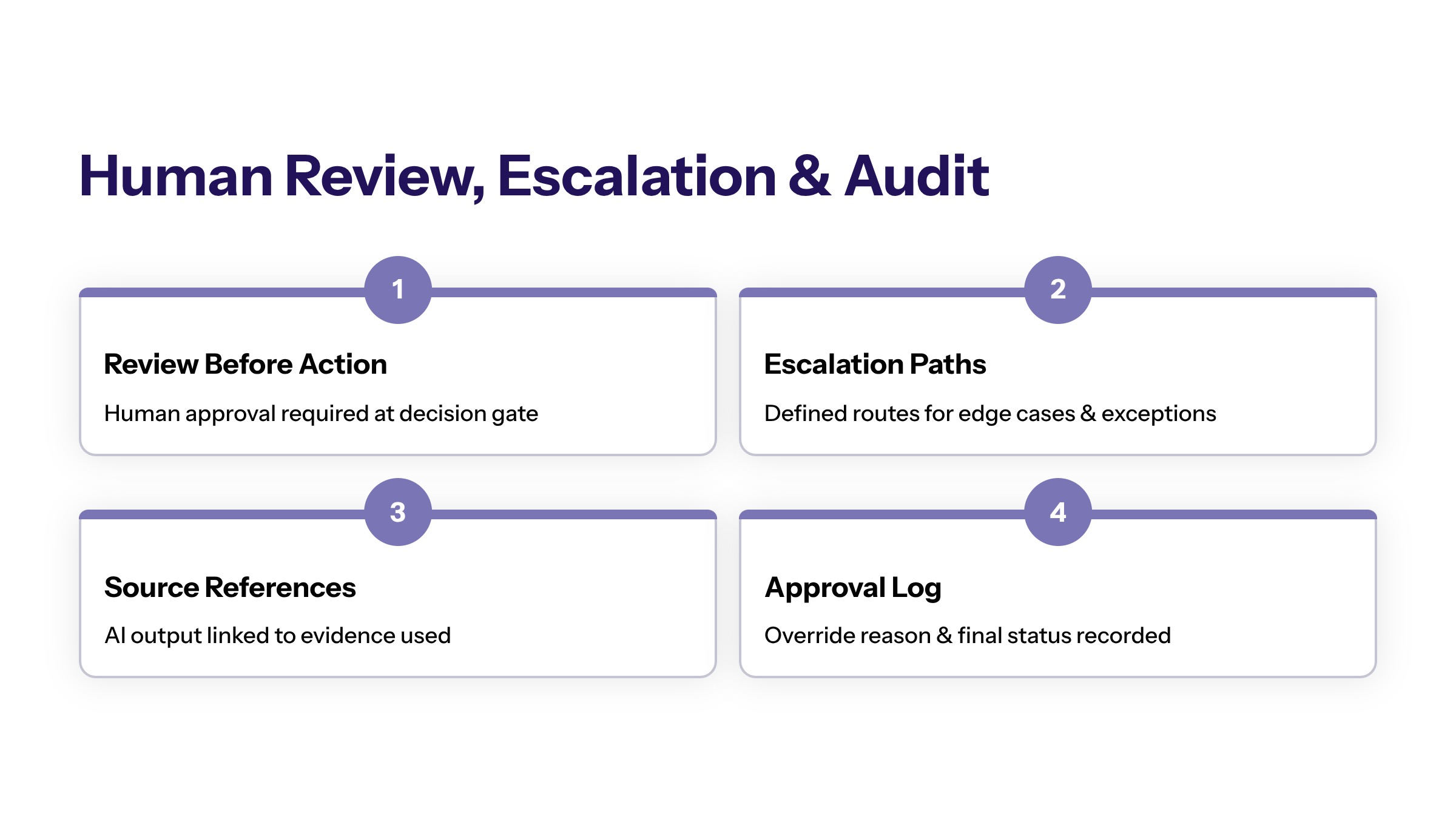
Human review should appear as a designed part of the workflow, not an afterthought. Review may happen before customer-facing output, before financial action, before system updates, or when confidence is low. The diagram should show which review points are mandatory.
Escalation paths should be visible. If AI cannot classify a request, if a data source is missing, if an output conflicts with policy, or if the action is high-impact, the workflow should route to a defined owner. Escalation protects the business from silent failure.
Audit evidence should also be explicit. The workflow should record trigger, input, source references, AI output, user review, approval, system action, override reason, and final status where appropriate. Evidence makes the workflow reviewable.
Review points should be located before irreversible or customer-impacting actions. A diagram that places review after a message is sent or a record is changed is not showing a true approval gate. It is showing a post-action inspection. That may be acceptable for low-risk work, but high-impact workflows need review before action.
Audit evidence should be useful to business owners, not only technical teams. It should answer practical questions: what happened, why did the workflow choose that path, who approved it, what changed, and what should be improved? If the evidence cannot answer those questions, the diagram should be revised.
AI Workflow Automation Interface Considerations
An AI workflow automation interface should help users understand what the AI did and what needs human attention. It should not hide uncertainty behind a polished response. The interface should show source context, recommendation, confidence or review reason, next step, and escalation option where useful.
Interfaces should also support correction. Users need a way to mark outputs as useful, incomplete, incorrect, unsafe, or not relevant. That feedback should become part of the improvement loop, not disappear inside the UI.
For operational teams, the interface should match the workflow. A support team may need queue context and response drafts. A finance team may need document comparisons and approval notes. A field operations team may need exception status and owner assignment.
The interface should also avoid false confidence. A polished AI response can make uncertain work look complete. Useful interfaces show missing inputs, unresolved assumptions, source references, and review requirements. They help users decide, not just accept.
For managers, the interface may need a different view. Operators need case-level context. Managers need queue health, exception patterns, approval bottlenecks, and control issues. The workflow diagram should identify whether one interface is enough or whether different roles need different views.
How to Use the Diagram for Implementation Planning
The diagram should become an implementation planning artifact. Teams can use it to define requirements, assign owners, identify missing data, estimate integration work, design testing, and set acceptance criteria.
A good planning review asks: what starts the workflow? Which systems are touched? What does AI do? What does AI not do? Who reviews the output? What evidence is logged? What failure paths exist? How will success be measured?
Secure development should be part of this planning review. If the diagram introduces new access, action, or data movement, security controls should be designed before the pilot, not patched in after launch.
Implementation planning should also identify the smallest useful pilot. A team does not need to automate the entire target diagram immediately. It can pilot the trigger, retrieval, AI summary, review, and evidence layers first, then add approved actions when the control model is proven.
The diagram becomes a requirements artifact when each shape has an owner, input, output, test condition, and failure path. That level of detail helps teams estimate work realistically and prevents broad AI ambitions from becoming vague technical tickets.
Common AI Workflow Diagram Mistakes
A common diagram mistake is drawing AI as a single black box. This hides whether the system is classifying, retrieving, summarizing, recommending, drafting, monitoring, or acting. The diagram should name the AI role clearly.
The second mistake is omitting human review. Teams may draw an elegant end-to-end automation path, but the real workflow may require approval, escalation, or exception handling. Leaving those out creates false confidence.
The third mistake is ignoring data permissions. If the AI system cannot access approved data safely, the workflow cannot operate as drawn. Data boundaries and identity controls should be visible.
The fourth mistake is leaving out monitoring. An AI workflow that cannot be measured cannot be responsibly improved. Monitoring should show both performance metrics and control signals.
A fifth mistake is drawing the happy path only. Enterprise workflows need exception paths for missing data, conflicting sources, user rejection, failed integrations, permission denial, and escalated risk. These paths may be less visually tidy, but they are where production readiness is proven.
How to Turn the Diagram Into a Pilot
To turn an AI automation workflow diagram into a pilot, choose one bounded workflow, confirm data access, define the AI role, set review thresholds, and decide which metrics prove value. The pilot should test both workflow performance and control quality.
The diagram should make implementation clearer before code is written. If the team cannot explain the workflow on a diagram, it is probably not ready for production AI automation.
Frequently Asked Questions About AI Automation Workflow Diagram: How Enterprise AI Workflows Should Be Designed
It is a process map with AI-specific layers. It should include data access, AI role, review thresholds, approved actions, audit evidence, and monitoring. For related reading, see generative AI development.
No. Some workflows only need AI classification, extraction, or summarization. Agent workflows are useful when the system needs to coordinate multiple steps inside defined boundaries. For related reading, see AI and ML development.
An enterprise-ready diagram shows owners, systems, permissions, review points, escalation, logs, and measurable outcomes. It does not show AI as a magic step between input and output. For related reading, see AI implementation planning.
A useful diagram should show triggers, inputs, owners, systems, decisions, approvals, exceptions, and outputs before AI is added. That baseline helps teams see where automation actually fits. For related reading, see AI automation services.
Diagrams help reviewers see what the AI can access, what it can change, where humans approve work, and where evidence is captured. This makes governance easier to discuss and audit. For related reading, see enterprise AI services.
Teams should update the diagram when systems, permissions, policies, owners, metrics, or escalation paths change. The diagram should reflect how the workflow really operates. For related reading, see AI consulting services.