AI Workflow Automation: A Practical Guide for Enterprise Teams
AI workflow automation uses artificial intelligence to interpret information, route work, support decisions, and trigger business actions across defined workflows. For enterprise teams, the goal is not to add AI everywhere. The goal is to reduce manual handoffs, improve process visibility, and create workflows that can be governed, measured, and improved over time.
CTOs, operations leaders, IT directors, and business teams evaluating AI workflow automation should start with process fit, not tool excitement. This article covers workflow fit, common use cases, architecture requirements, governance, implementation steps, and measurement. The practical question is simple: which workflows are structured enough to automate, valuable enough to improve, and controlled enough to trust?
This approach works best when it connects business rules, data, system actions, human review, and measurable outcomes. It fails when it is treated as a tool purchase before the workflow, ownership model, and risk boundaries are understood.
Teams usually evaluate AI-enabled workflow programs to improve:
Manual routing, triage, and approval workflows.
Document review, extraction, and classification.
Customer support, internal service desks, and escalation paths.
Reporting, exception monitoring, and operational decision support.
Cross-system updates between CRM, ERP, finance, operations, and analytics tools.
For search and planning clarity, leaders may describe the same initiative as workflow automation AI, AI-driven workflow automation, or enterprise AI workflow automation. The label matters less than whether the workflow has defined owners, clear data access, safe action boundaries, and a measurable business outcome.
What AI Workflow Automation Means
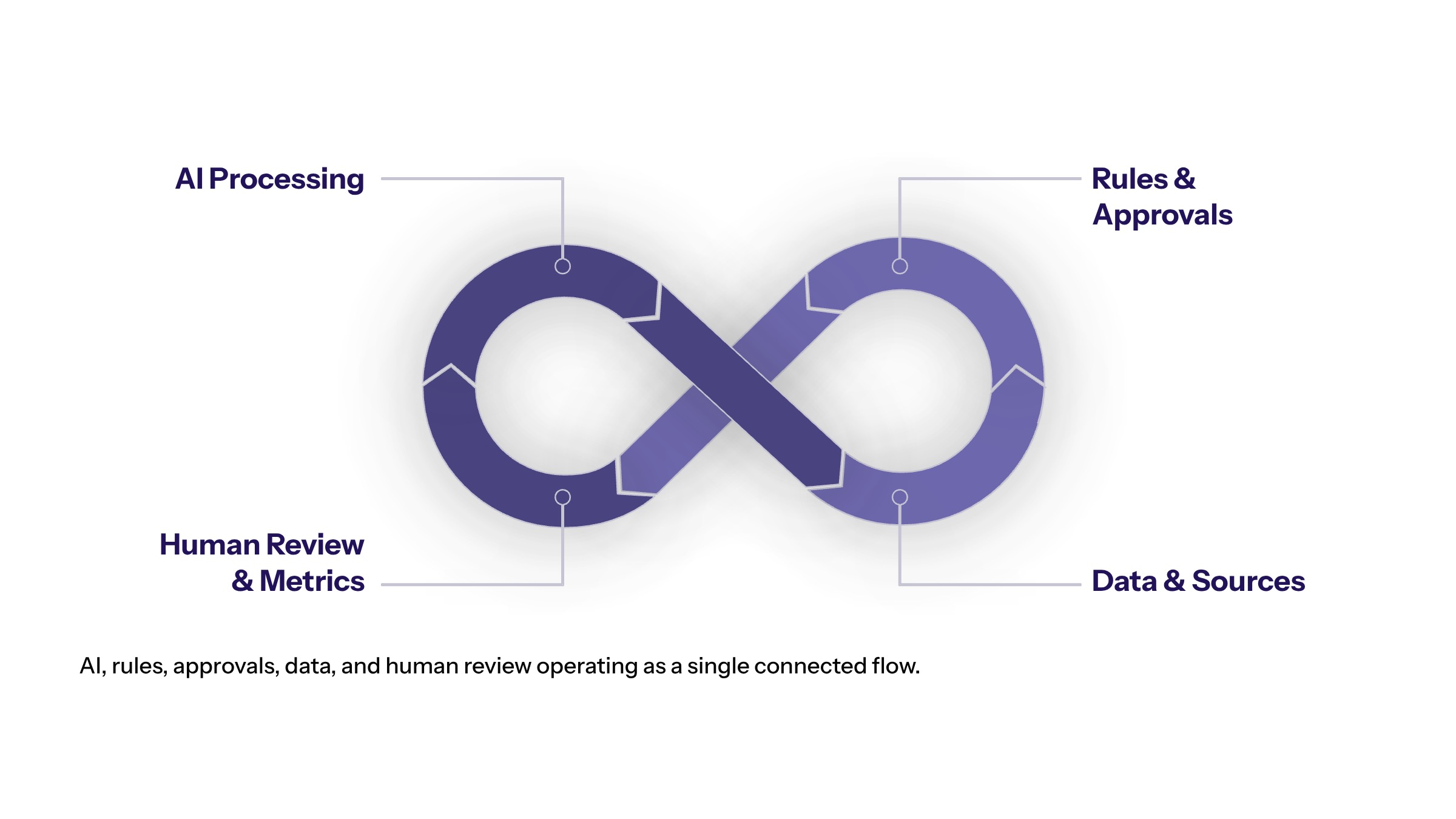
Workflow automation traditionally follows predefined rules: if a form is submitted, route it to a queue; if a field changes, update a record; if an approval is missing, notify a manager. AI-enabled automation extends that model by using AI systems to interpret unstructured inputs, classify context, suggest next actions, summarize information, and support decisions before a workflow moves forward.
That distinction matters. AI is useful when the workflow contains judgment, language, messy data, prioritization, or exceptions. It is less useful when a simple deterministic rule already solves the problem. A mature automation strategy uses both: fixed rules where predictability matters and AI where interpretation creates value.
In enterprise settings, this capability should be designed as part of AI-first architecture, not as a disconnected tool. The architecture needs clean data access, integration paths, permission rules, monitoring, and a clear path for human review.
Where AI Fits Inside Business Workflows
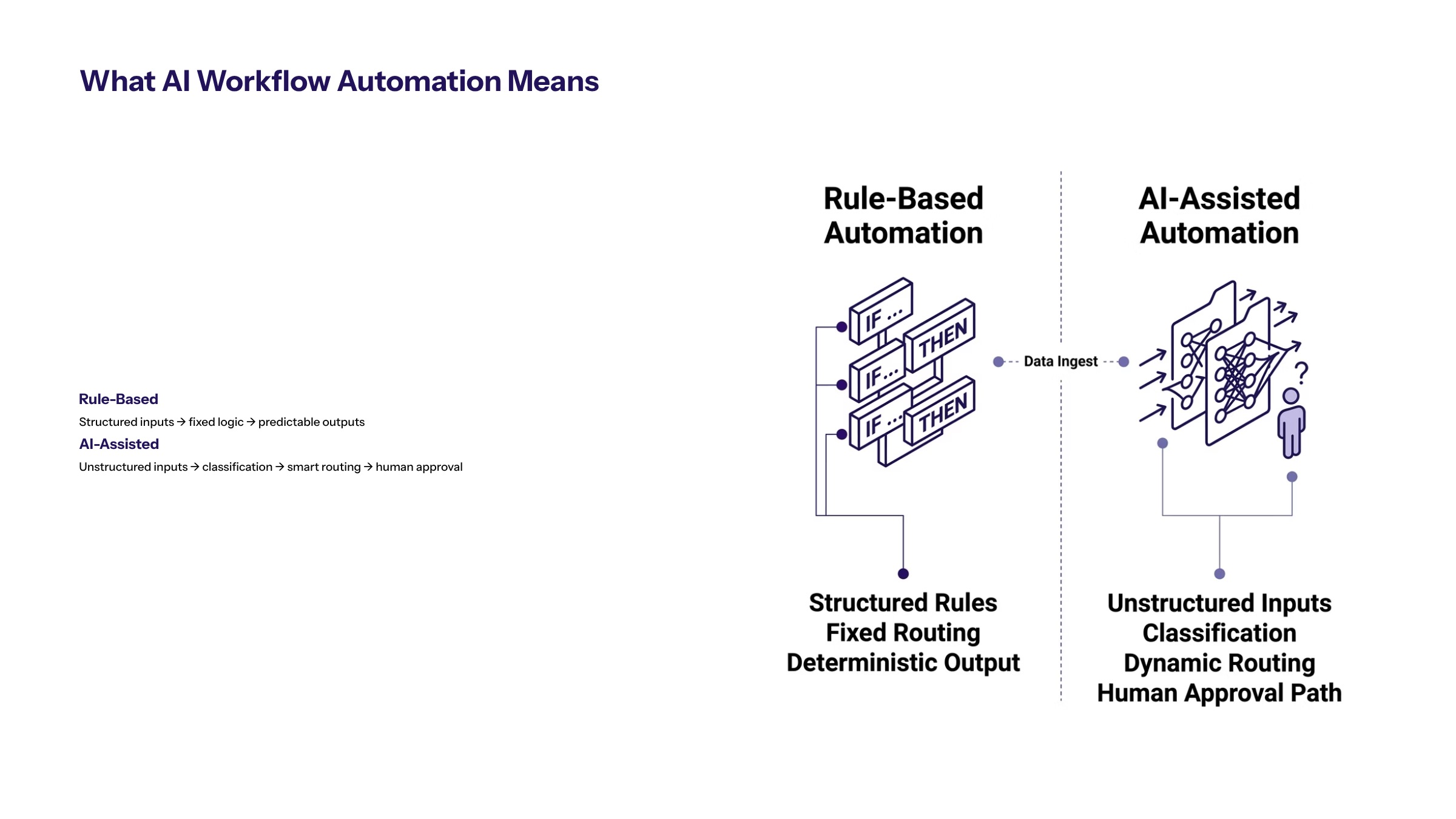
AI can enter a workflow at several points. It can read an input, classify a request, retrieve relevant context, recommend a decision, draft a response, trigger a system action, or create an audit note. The right role depends on business risk and workflow maturity.
Workflow Role | AI Contribution | Human Control Needed |
|---|---|---|
Intake | Classifies requests, documents, messages, or tickets. | Review for ambiguous or high-risk cases. |
Routing | Chooses queue, owner, urgency, or next step. | Escalation rules and owner override. |
Decision support | Summarizes data and recommends actions. | Approval thresholds and auditability. |
Execution | Updates records, drafts responses, or triggers actions. | Permission boundaries and rollback paths. |
Monitoring | Detects exceptions, delays, or risk signals. | Clear ownership for response. |
The strongest workflows usually combine AI interpretation with deterministic controls. For example, AI may classify a contract clause, but the approval threshold and routing rule should still be explicit.
Common AI-Enabled Workflow Use Cases
High-value use cases usually share three traits: they happen often, they consume human time, and they create measurable delay or risk. Document-heavy workflows are a natural starting point because AI can extract fields, summarize content, identify missing information, and route exceptions for review.
Customer service workflows are another common fit. AI can classify requests, retrieve policy or account context, recommend replies, and escalate sensitive cases. This is not only a chatbot problem. Many customer operations teams need AI to improve the full workflow behind the conversation.
Operations and finance teams can use AI workflow automation for invoice review, reconciliation support, exception queues, report generation, and approval routing. These AI workflow automation examples show why the business value depends on whether the AI output is connected to the systems where work actually happens.
Architecture Requirements for AI-Enabled Workflows
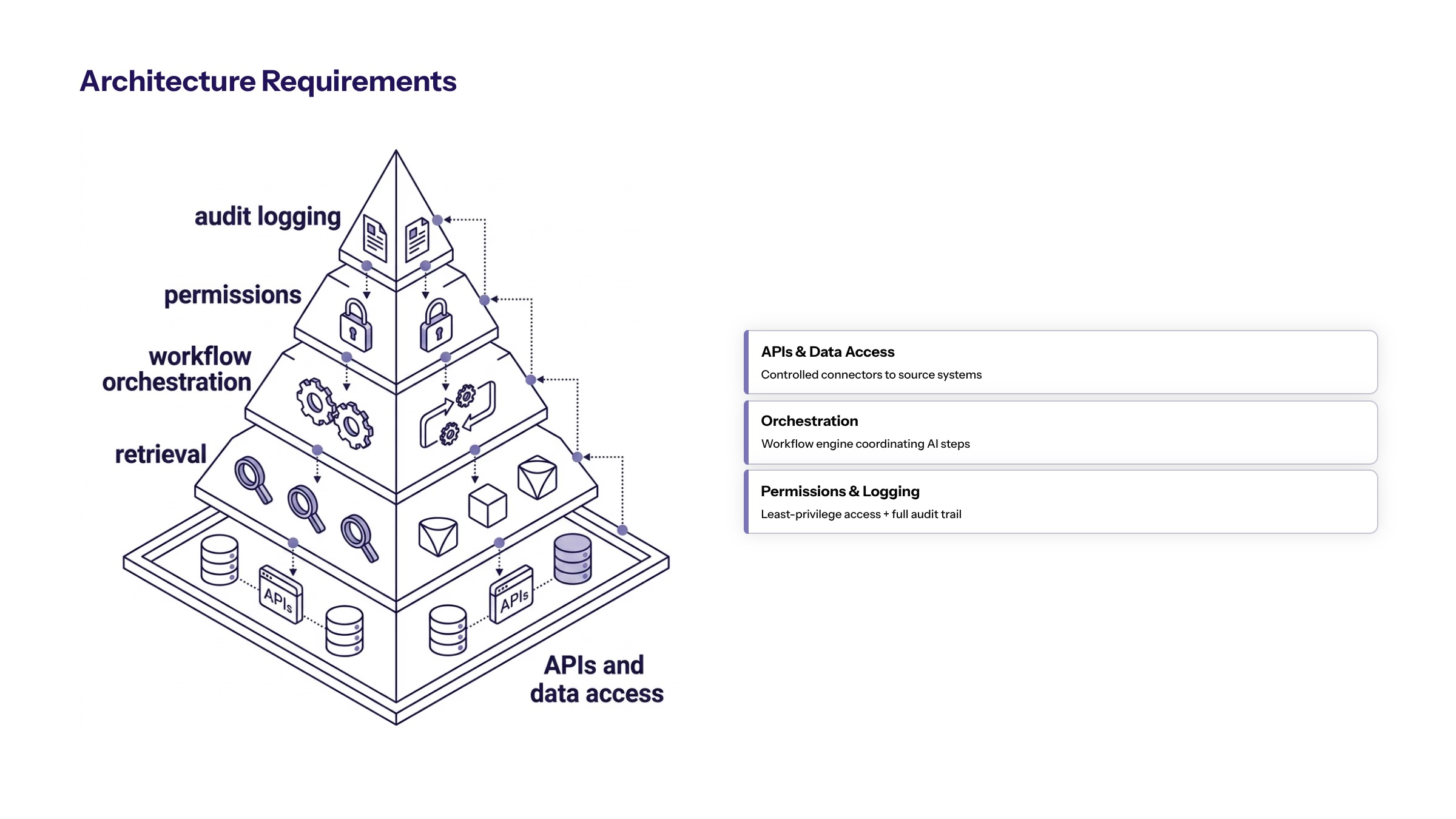
The automation model depends on architecture. A workflow that needs five manual exports, inconsistent spreadsheet data, and unclear ownership is not ready for reliable automation. Before implementation, teams should map the current workflow, data sources, systems, decision points, and exception paths.
Important architecture components include APIs or integration layers, secure data access, workflow orchestration, model or agent services, retrieval systems, logging, and monitoring. For workflows that affect customers, revenue, compliance, or employee records, the architecture should include access control and evidence capture from the beginning.
This is where AI automation connects with broader business strategy. The right question is not only whether AI can automate a task. It is whether automating that task advances a business goal and can be governed in production.
Governance, Security, and Human Review
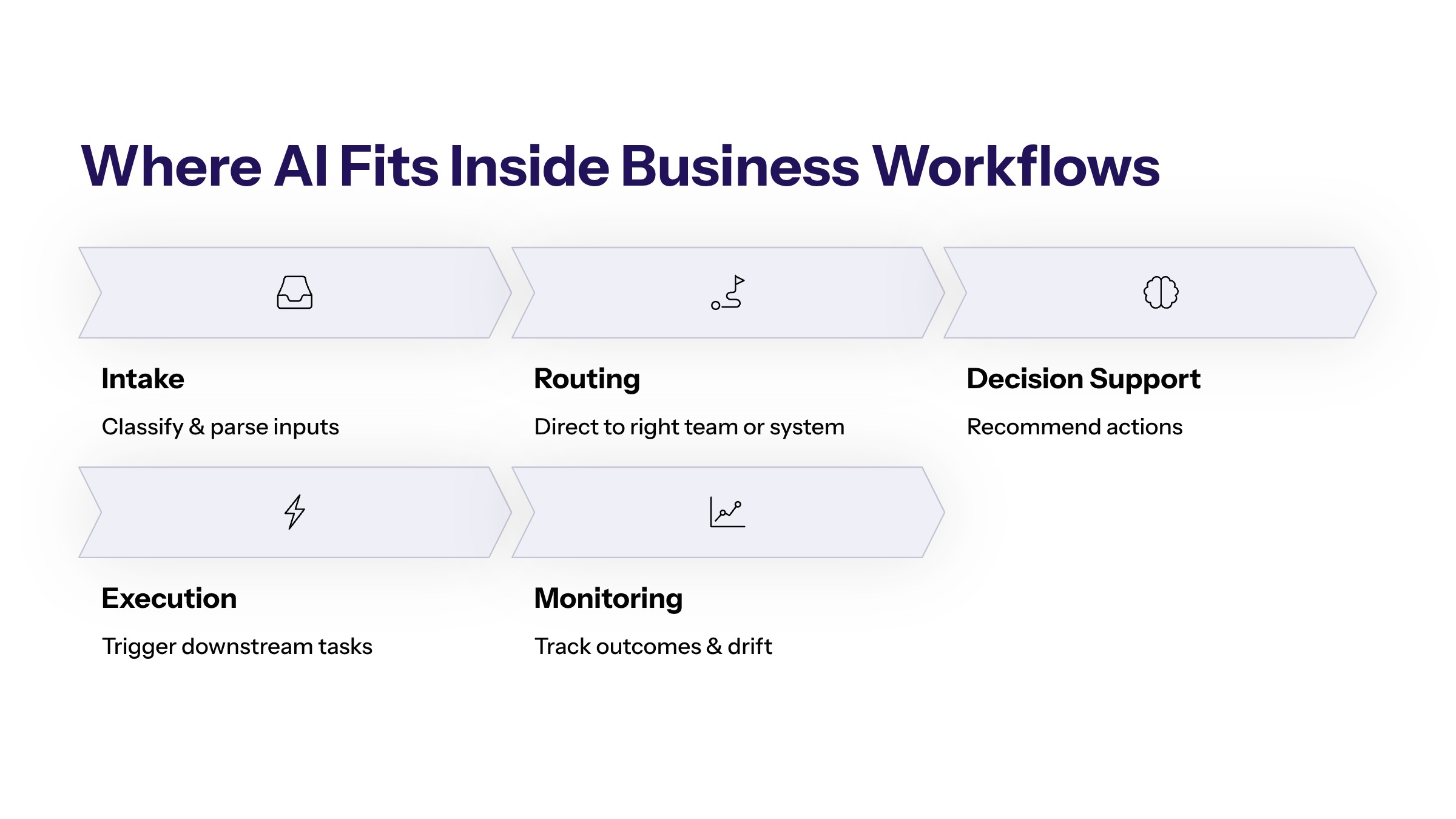
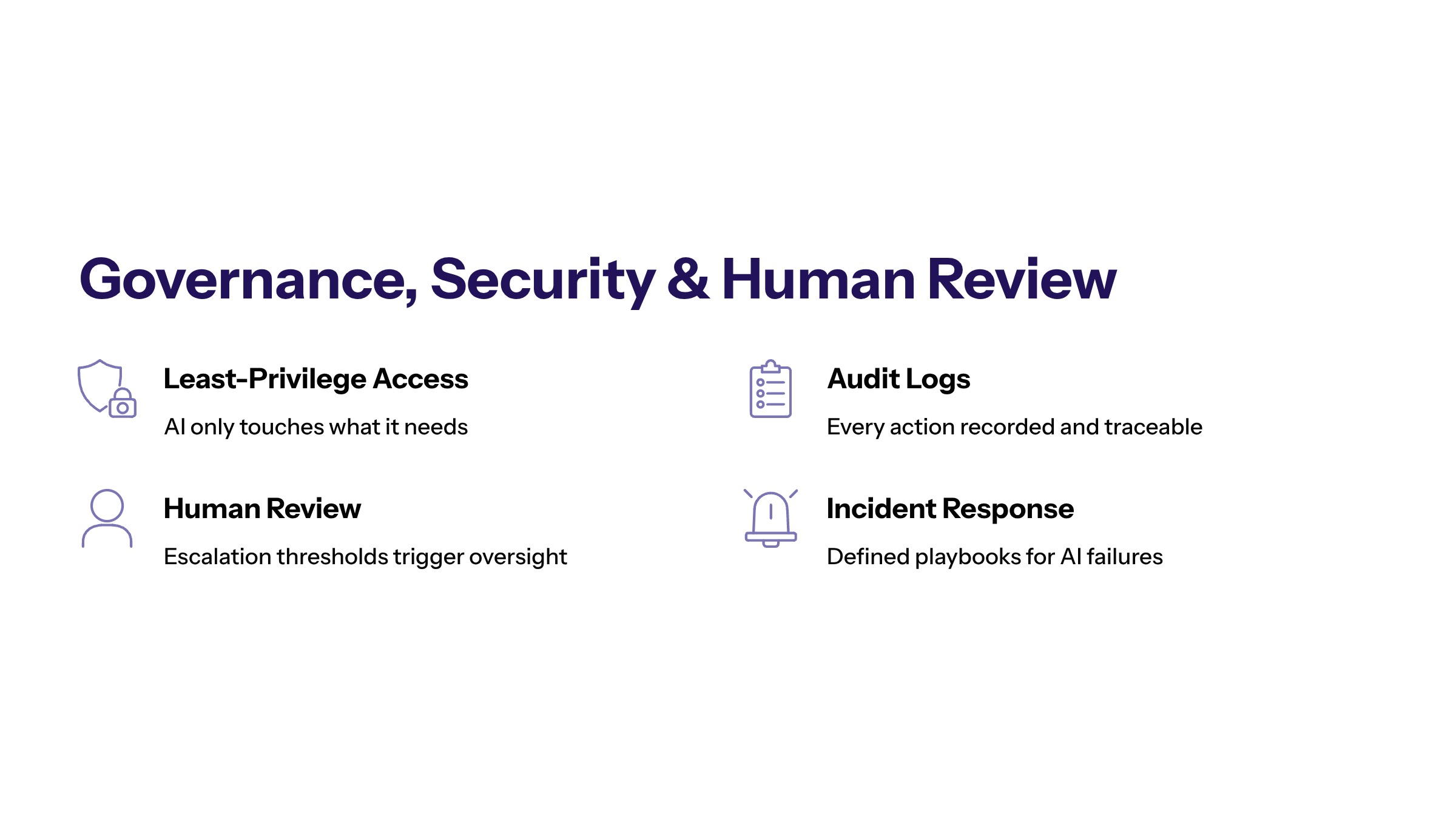
AI-enabled workflow execution creates risk when an AI system can act without clear boundaries. Governance should define what the system can read, what it can change, when it needs approval, how decisions are logged, and who owns the outcome.
Human review does not mean slowing every workflow. It means placing review where risk is highest: unusual requests, financial decisions, regulated data, customer-impacting actions, and low-confidence outputs. Routine, low-risk steps can often run with lighter supervision once they are tested.
Security controls should include least-privilege access, audit logs, data minimization, monitoring, and incident response. If a workflow cannot explain what happened, who approved it, and which data was used, it is not ready for enterprise trust.
AI Workflow Automation Implementation Roadmap
Start with one workflow where the value is visible and the risk can be contained. A focused pilot is usually better than a broad automation program with unclear ownership.
Map the workflow. Identify triggers, owners, systems, data, approval points, and exceptions.
Define the outcome. Choose measurable goals such as cycle time, error reduction, backlog reduction, or response speed.
Design controls. Set access permissions, escalation rules, review thresholds, and logging requirements.
Build the pilot. Connect AI to a narrow workflow with limited scope and clear rollback.
Measure and expand. Scale only after the workflow is reliable, adopted, and useful.
How to Prioritize AI Workflow Automation Opportunities
Prioritization is where many automation programs either become useful or drift into disconnected experiments. A workflow should not be automated only because it is repetitive. It should be automated because the organization can define the value of improving it, access the data required to run it, and control the risk created by changing how work moves.
A practical scoring model should consider volume, cycle time, error rate, manual effort, customer impact, compliance exposure, system readiness, and business ownership. High-volume workflows with clear inputs and measurable outcomes are usually stronger candidates than low-volume workflows with unclear responsibility. A workflow that touches regulated data or customer-facing decisions may still be valuable, but it needs stronger controls before automation expands.
The first filter is business value. Teams should ask what will improve if the workflow changes: faster response time, fewer missed handoffs, lower backlog, more consistent decisions, better reporting, or reduced operational cost. If the answer cannot be measured, the workflow may need more discovery before implementation.
The second filter is workflow clarity. AI can help with messy inputs, but it cannot fix a process where no one agrees who owns the decision, what the correct outcome is, or when exceptions should be escalated. If the current workflow depends on tribal knowledge, the first step is documentation and ownership design.
The third filter is data readiness. Automated AI workflows need reliable access to records, documents, messages, tickets, approvals, and business rules. If the data is scattered across spreadsheets and disconnected tools, integration work may be more important than model selection. This is why the strongest projects often begin with system mapping rather than prompt design.
Operating Model for AI-Enabled Workflows
Once a workflow is selected, the operating model determines whether automation becomes durable. The operating model defines who owns the workflow, who owns the data, who approves changes, who responds to exceptions, and who measures performance after launch.
AI workflow automation services should make those operating responsibilities explicit before implementation begins. A service partner can help map workflow constraints, but the enterprise still needs accountable owners for adoption, controls, performance, and long-term improvement.
At minimum, the operating model should include a business owner, a technical owner, a risk owner, and an escalation owner. The business owner defines the outcome and confirms that the automation is improving real work. The technical owner maintains integrations, model behavior, logging, and monitoring. The risk owner reviews privacy, security, compliance, and audit needs. The escalation owner ensures that uncertain or high-impact cases do not sit in a queue without accountability.
This structure matters because AI-enabled workflows can cross departmental boundaries. A customer support workflow may depend on product data, account history, billing rules, CRM permissions, and legal language. A finance workflow may depend on vendor records, approval limits, procurement systems, and reporting logic. Without explicit ownership, automation can speed up one step while exposing weaknesses elsewhere.
RAPID-style execution can help keep this work controlled. Research maps the workflow and constraints. Analyze identifies where AI creates value and where deterministic controls are safer. Plan defines architecture, ownership, metrics, and risk boundaries. Implement builds the pilot and integrations. Decide reviews evidence and determines whether to scale, revise, or stop. The value is not the acronym; the value is the decision rhythm that prevents teams from leaving automation in an unowned pilot state.
Metrics That Prove AI-Enabled Automation Is Working
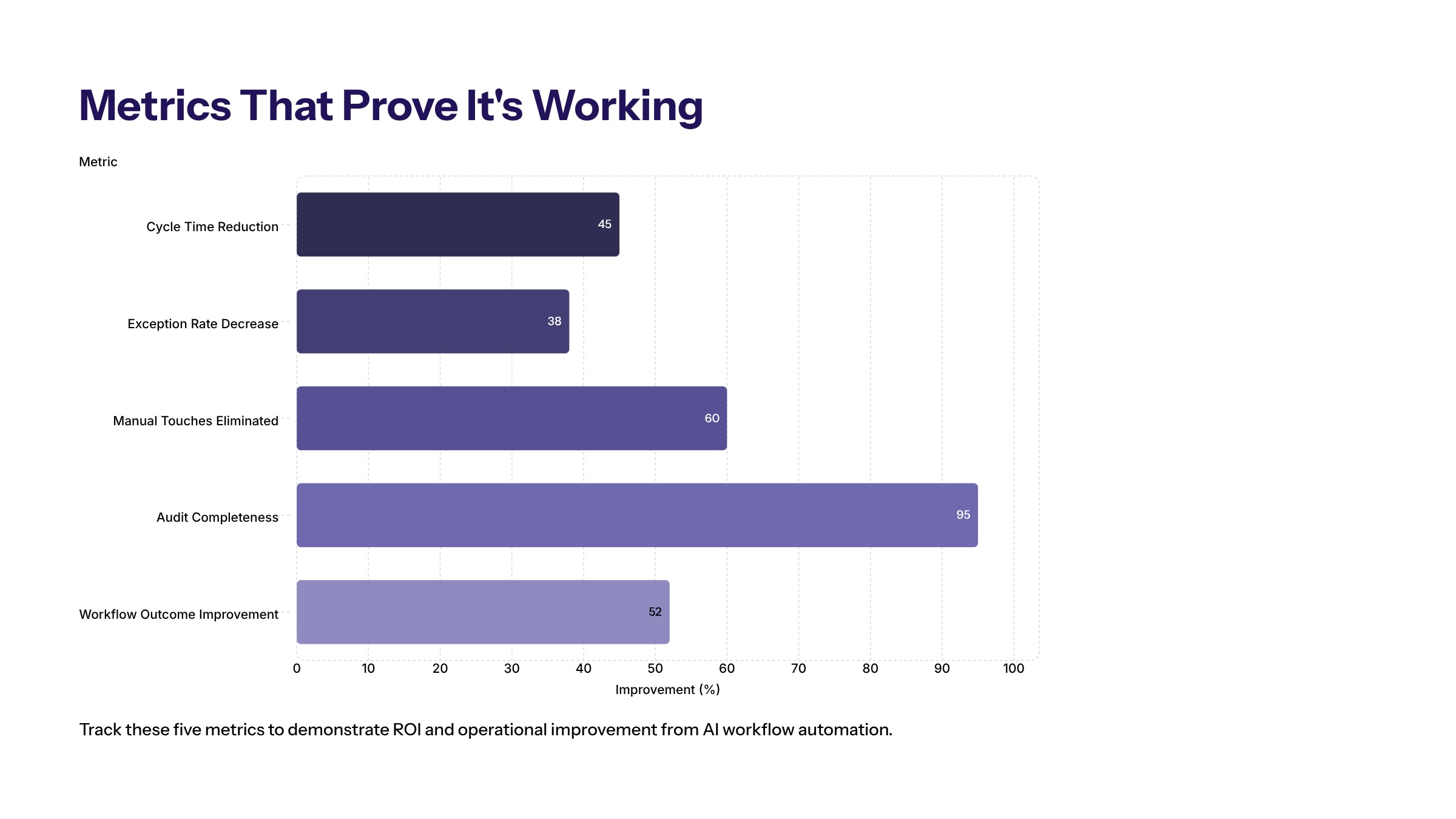
AI-enabled automation should be measured through operational outcomes, not only model accuracy. Model quality matters, but the business needs to know whether work is moving better. Useful metrics include cycle time, queue age, exception rate, rework rate, approval latency, manual touches per case, customer response time, user adoption, and cost per completed workflow.
Teams should separate leading indicators from outcome metrics. A leading indicator might show that the system is classifying requests with fewer manual corrections. An outcome metric might show that the average time to resolve a support request has decreased or that finance approvals are no longer waiting in unmanaged queues. Both views matter because an AI system can look accurate in isolation and still fail to improve the workflow.
Auditability should also be measured. For workflows that affect customers, revenue, employee records, or regulated data, teams should be able to reconstruct what happened: the input received, the data accessed, the AI output generated, the action taken, the human reviewer involved, and the final result. If the workflow cannot produce that evidence, it may create hidden risk even when it appears faster.
A practical reporting dashboard should show value and control together. Speed without control is not an enterprise outcome. Control without improvement is not a business case. The goal is a workflow that is faster, clearer, easier to audit, and easier to improve over time.
Common Rollout Mistakes to Avoid
The first rollout mistake is automating too broadly. A team may try to improve an entire department instead of one workflow with clear boundaries. That creates too many dependencies, too many stakeholders, and too many unanswered control questions. A narrower workflow gives the team a better chance to test assumptions and prove value.
The second mistake is ignoring the users who live inside the workflow. Operators, analysts, support teams, finance teams, and managers often understand edge cases that are not visible in process diagrams. If those users are not involved, the automation may handle the easy cases and fail where human judgment is actually needed.
The third mistake is treating exceptions as rare. Exceptions are usually where workflow automation either proves its value or creates frustration. Teams should design exception queues, escalation paths, and review rules before launch. Otherwise, the AI system may reduce visible manual work while pushing unresolved cases into a new backlog.
The fourth mistake is scaling before measurement. A pilot should show evidence that the workflow is faster, cleaner, safer, or easier to manage. If the data is inconclusive, the right decision may be to revise the design before expanding. Expansion should follow evidence, not enthusiasm.
Next Steps for AI Workflow Automation
This work is most valuable when it is treated as an operating capability, not a feature experiment. The work starts with the constraint: the manual handoff, the slow approval, the missing data, the inconsistent decision, or the repeated exception that keeps the business from moving faster.
For enterprise teams, the next step is to choose one workflow, define success, and design the architecture and governance required to run it safely. Cognativ’s role is to help connect AI services, business strategy, and implementation discipline so automation creates measurable business outcomes instead of another disconnected system.
Frequently Asked Questions About AI Workflow Automation: A Practical Guide for Enterprise Teams
AI workflow automation uses AI to interpret information, route work, support decisions, and trigger approved actions across defined business workflows. For related reading, see generative AI development.
The best workflows are repeatable, measurable, and bounded, with clear owners, reliable data, visible bottlenecks, and a practical path for human review. For related reading, see AI and ML development.
Enterprise ready AI workflow automation needs secure data access, integrations, governance, audit logs, monitoring, approval rules, and measurable business outcomes. For related reading, see AI implementation planning.
Standard automation follows predefined rules, while AI workflow automation can interpret language, summarize context, classify inputs, and support decisions. It still needs workflow controls and human review. For related reading, see AI automation services.
Common blockers include incomplete records, unclear system ownership, inconsistent documents, weak access controls, and missing policy sources. The workflow should not scale until the agent has reliable context. For related reading, see enterprise AI services.
Teams should scale only when the pilot improves workflow metrics, keeps audit evidence complete, and handles exceptions predictably. If the pilot creates more review burden, the design should be revised first. For related reading, see AI consulting services.