What Is RAMageddon? The AI-Driven Memory Crisis Affecting Your Next Device Purchase
RAMageddon is an informal name for memory-supply pressure associated with growing AI infrastructure demand and its effects on device costs and availability. It covers several related markets, including DRAM working memory and NAND flash storage. These markets interact, but they do not have identical manufacturing requirements, pricing cycles, or recovery timelines.
For a laptop buyer, the practical issue is whether a device still offers enough memory, storage, and support for its intended workload at an acceptable price. For an IT team, it also includes supplier availability, refresh schedules, compatibility, and the cost of keeping existing systems operational.
This guide explains why AI demand can affect memory supply, how to interpret price reports, and how to compare device specifications without panic-buying. It is not a guarantee that a particular product will become more expensive or that waiting will produce savings.
The short answer: measure your workload, compare exact configurations, and separate a necessary purchase from a speculative one. More RAM is useful when memory is the constraint; it cannot fix every performance or support problem.
By the end of this guide, you will be able to:
- Distinguish DRAM, HBM, and NAND flash.
- Separate component-price changes from retail device prices.
- Identify specification reductions and upgrade limitations.
- Evaluate repair, upgrades, refurbished devices, and replacement.
- Plan business purchases using workload evidence and current supplier terms.
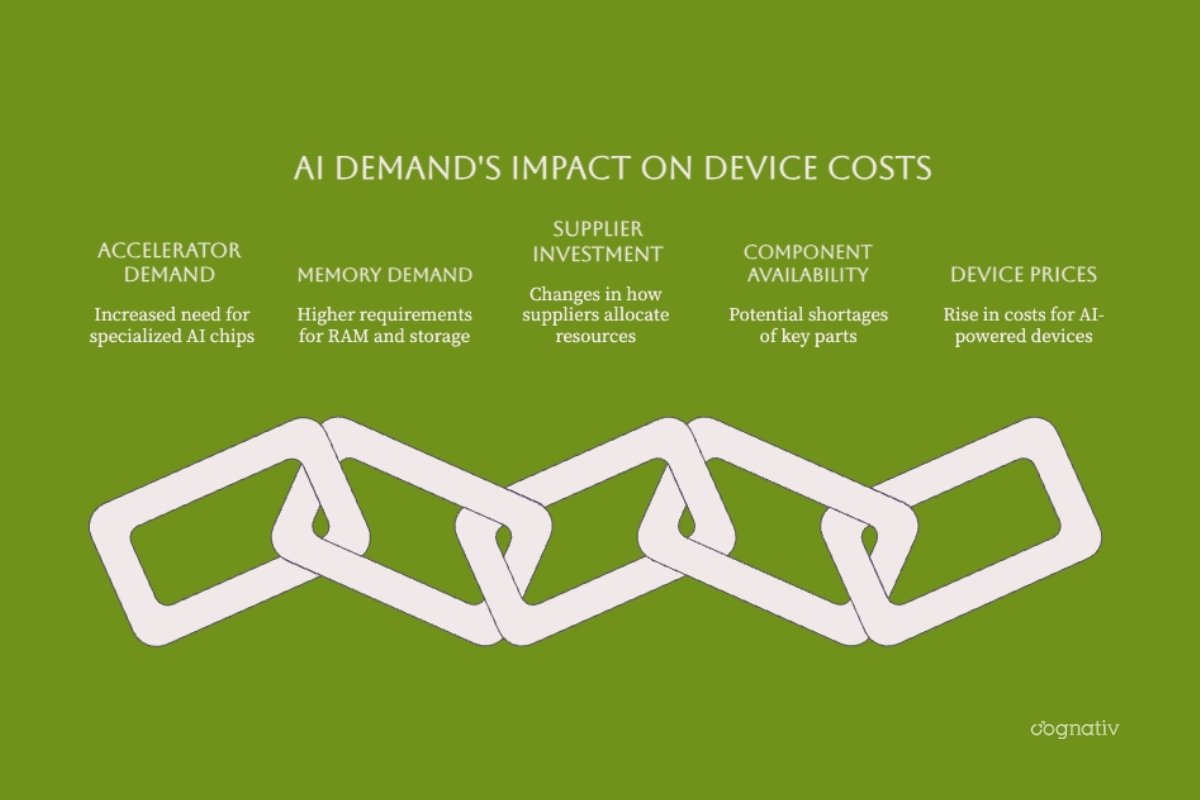
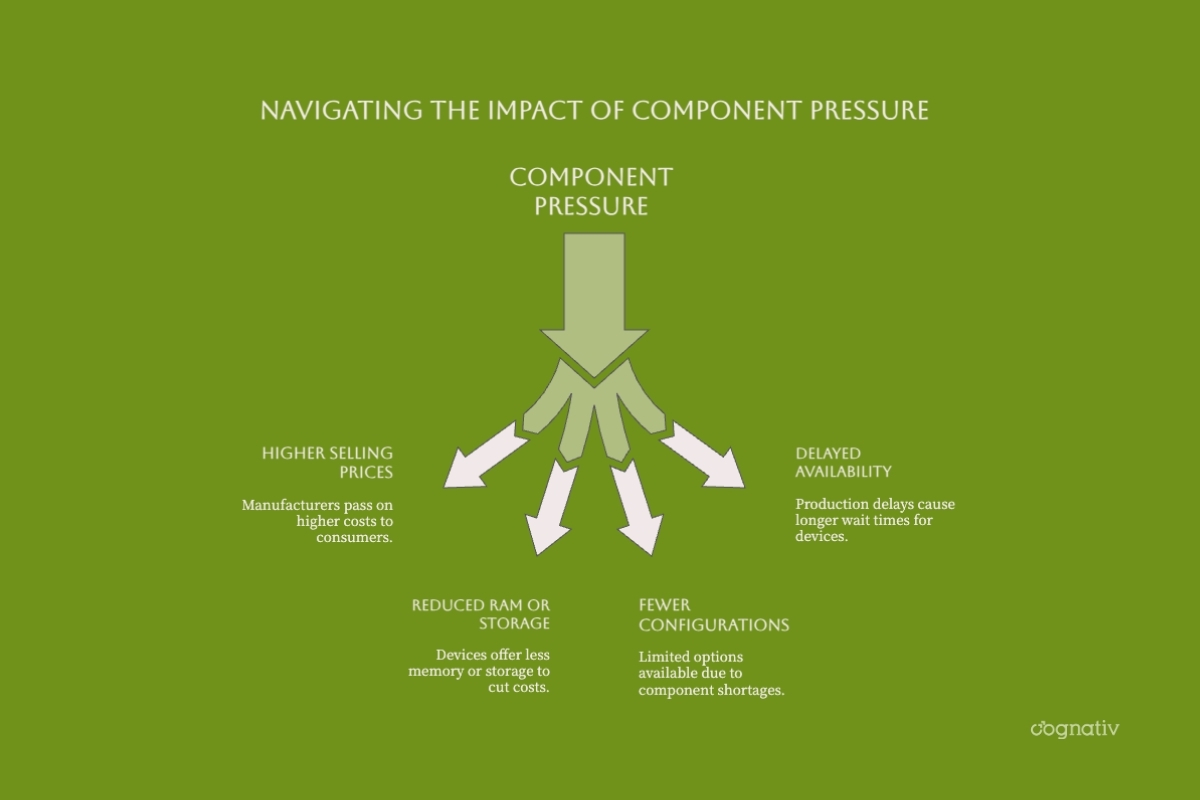
The diagram illustrates potential supply-chain effects; price changes are not limited to AI-branded devices and are not guaranteed for every product.
Understanding the Memory Shortage Fundamentals
A memory shortage does not mean every memory product is unavailable everywhere. Supply can be tight for particular capacities, technologies, customer categories, or delivery windows while other products remain obtainable. Buyers need to distinguish the component they require from the broader market headline.
DRAM, HBM, and NAND Serve Different Purposes
DRAM holds data that active applications need to access quickly. DDR memory is used in many computers and servers, while LPDDR is common in mobile and power-constrained systems. HBM is also DRAM, packaged in stacked configurations for high bandwidth alongside compatible processors and accelerators. It is not an alternative RAM module that can be installed in an ordinary laptop.
NAND flash retains data without power and provides the underlying storage technology for SSDs and many mobile devices. Increasing SSD capacity does not increase physical RAM. A system may use storage for paging, but this is not equivalent to having enough working memory for an active workload.
| Technology | Primary role | What to check |
|---|---|---|
| DDR DRAM | Working memory in compatible PCs and servers | Capacity, supported generation, module format, and upgrade limits |
| LPDDR DRAM | Working memory in mobile and power-efficient systems | Installed capacity and whether the exact device permits replacement |
| HBM | High-bandwidth working memory for compatible accelerators | Accelerator configuration, usable capacity, and workload fit |
| NAND flash | Persistent storage in SSDs and other devices | Usable capacity, endurance, performance, and replaceability |
Capacity Is Only One Part of Performance
Memory bandwidth, CPU or accelerator capability, cooling, software behavior, and storage performance also matter. A larger memory specification alone does not establish that one device will complete a task faster than another.
For local inference, model size, precision, context length, and concurrent requests affect the required capacity. Cognativ's local AI server architecture and capacity-planning guide explains how to evaluate those requirements before selecting hardware.
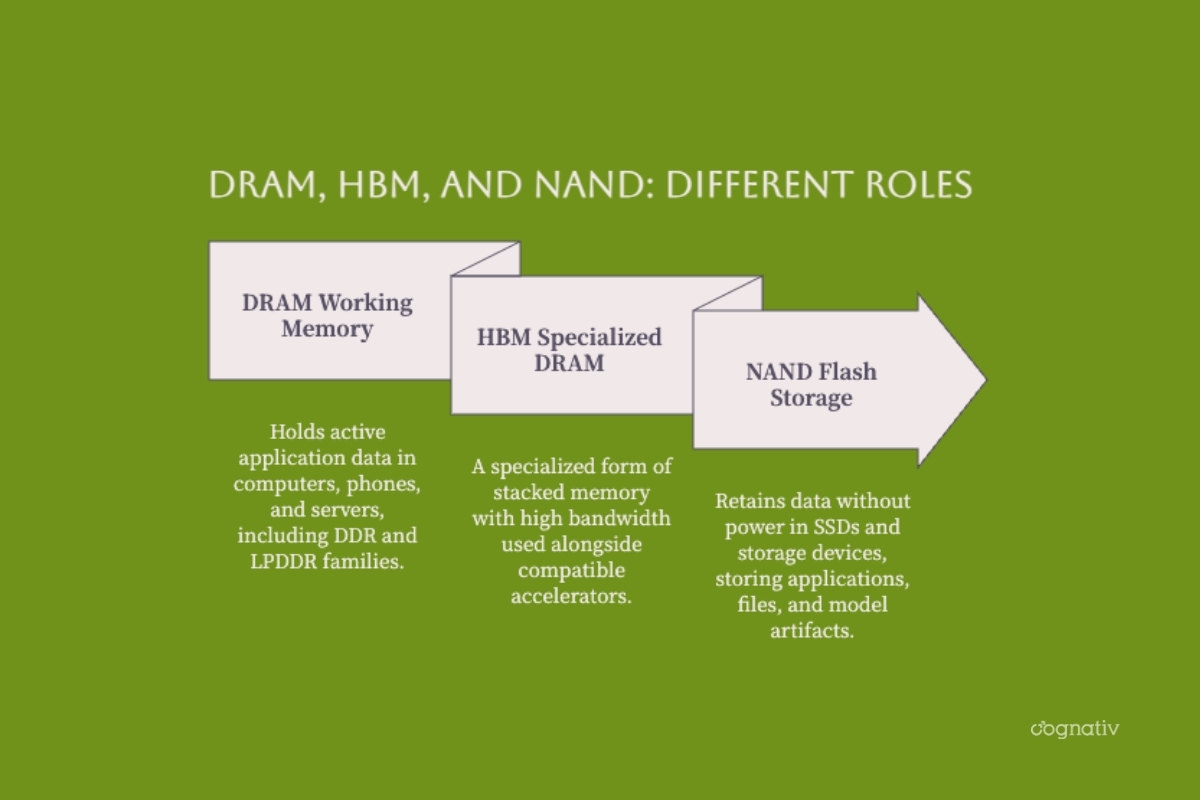
These are functional categories, not successive stages: HBM is a type of DRAM, while NAND provides persistent storage.
Why AI Infrastructure Can Put Pressure on Memory Supply
AI systems require more than accelerator memory. Training and inference deployments also use server working memory and storage for model artifacts, datasets, retrieval, and operating services. Suppliers therefore respond to demand across several product categories rather than a single chip type.
Product Allocation and Manufacturing Constraints
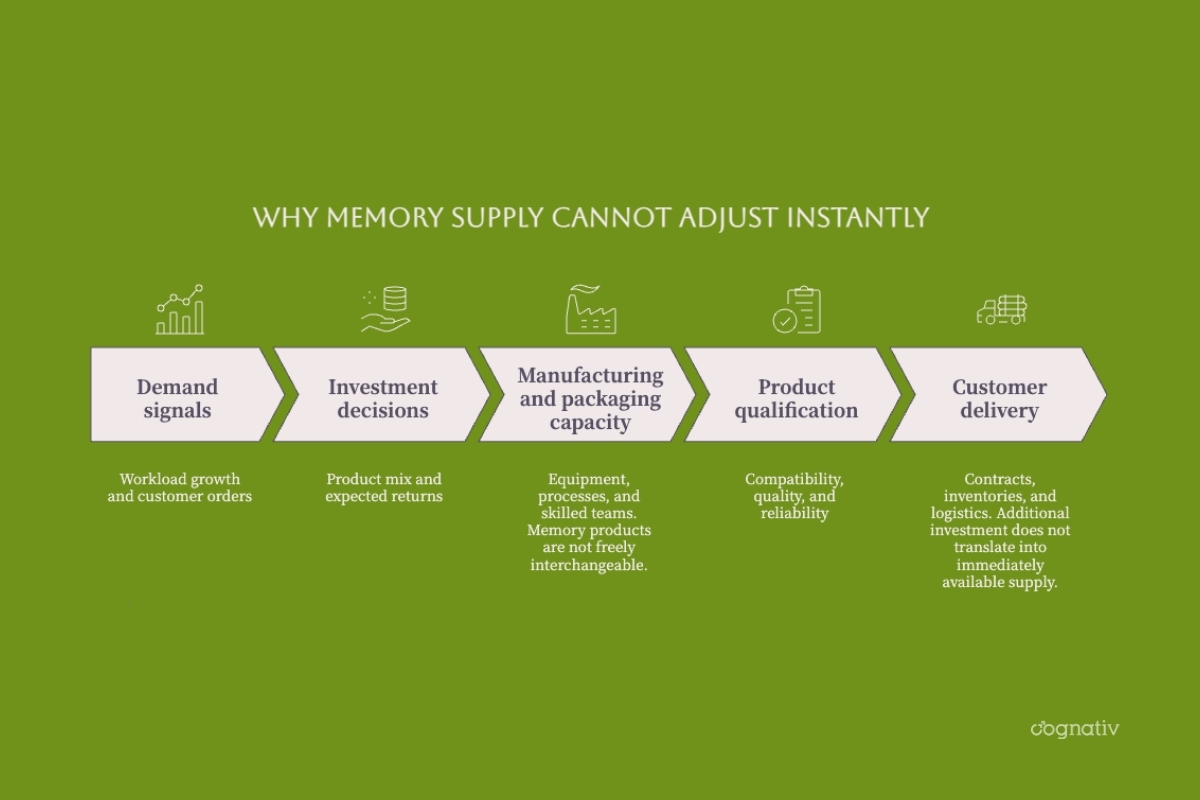
Manufacturers make investment and allocation decisions across products and customers. Those decisions operate within physical constraints: process technology, packaging, equipment, qualification, and production yields. A factory cannot necessarily switch from one memory product to another immediately or without trade-offs.
In its September 7, 2026 DRAM market update, TrendForce reported low supplier inventories and additional supply directed mainly toward servers. It also projected slower conventional DRAM contract-price growth in Q3 than earlier in the year. Slower growth is not the same as falling prices, and neither statement determines the price of an individual laptop.
Supplier Concentration and Retail Availability
Samsung, SK hynix, and Micron are major DRAM suppliers, but their combined importance should not be confused with a claim that Samsung and SK hynix alone control almost the entire market. Market-share comparisons also require a defined period and measure, such as revenue rather than production volume.
One documented change in retail supply was Micron's December 2025 announcement that it would exit the Crucial consumer business. That concerns a particular branded consumer business. It does not mean Micron stopped manufacturing memory or that all consumer memory channels disappeared.
What Memory Price Reports Actually Tell You
Before applying a percentage to a purchase decision, identify the product, market, measurement period, and publication date. Contract prices paid through supply agreements are not the same as spot prices or retail prices for finished devices.
Distinguish Forecasts From Reported Results
On February 2, 2026, TrendForce forecast a 90-95% quarter-over-quarter increase in conventional DRAM contract prices for Q1. That was a forecast for a specific component market and quarter, not a prediction that every computer would nearly double in price.
A subsequent June 1 report on Q1 DRAM results put the conventional DRAM contract-price increase at approximately 93-98%. Keeping those dates and definitions visible prevents an older forecast from being presented as a current retail quotation.
There Is No Single Recovery Date
In its July 30 outlook for DRAM and NAND in 2027, TrendForce expected DRAM to remain constrained while NAND supply conditions could loosen in the second half of 2027. These are different forecasts, not a universal end date for a memory crisis.
New capacity, demand changes, inventories, and product transitions can alter the outlook. Statements that all memory will remain scarce until 2029, or that today's device price must be the lowest available for several years, are too absolute to guide a purchase.
How RAMageddon Can Affect Laptops, Phones, and Gaming Devices
Component pressure can reach buyers through higher prices, reduced specifications, fewer configurations, or longer delivery times. The effect depends on the manufacturer, its inventory and contracts, the device category, and local market conditions.
Laptops and Desktop Computers
Compare the exact configuration, not just the product family or advertised starting price. Two machines with similar names can differ in installed RAM, SSD capacity, display, processor, warranty, or upgrade options. A lower starting price may describe a configuration that does not meet your needs.
Pay particular attention to soldered or otherwise non-upgradeable memory. If the capacity cannot be changed later, the initial choice becomes more consequential. Cognativ's Mac mini local AI server planning guide provides a specific example of evaluating unified memory and workloads before purchase; it is not a universal recommendation to buy that platform.
Smartphones, Tablets, and Gaming Systems
For phones and tablets, compare the precise RAM and storage tier, software-support period, battery condition, and repair options. A headline about component inflation does not establish a confirmed price increase for an unreleased model.
For gaming, distinguish system RAM from graphics memory and storage. More system RAM will not necessarily resolve a graphics-memory limitation. Check performance in the games and settings you actually use rather than treating a larger memory number as a complete performance assessment.
Recognizing Specification Shrinkflation
Specification shrinkflation means receiving less hardware capability at a similar price point. Confirm it through like-for-like specifications rather than assuming every newer model has been downgraded. Record the model identifier, memory configuration, storage size, support terms, and total price before comparing offers.
Should You Buy, Upgrade, or Wait?
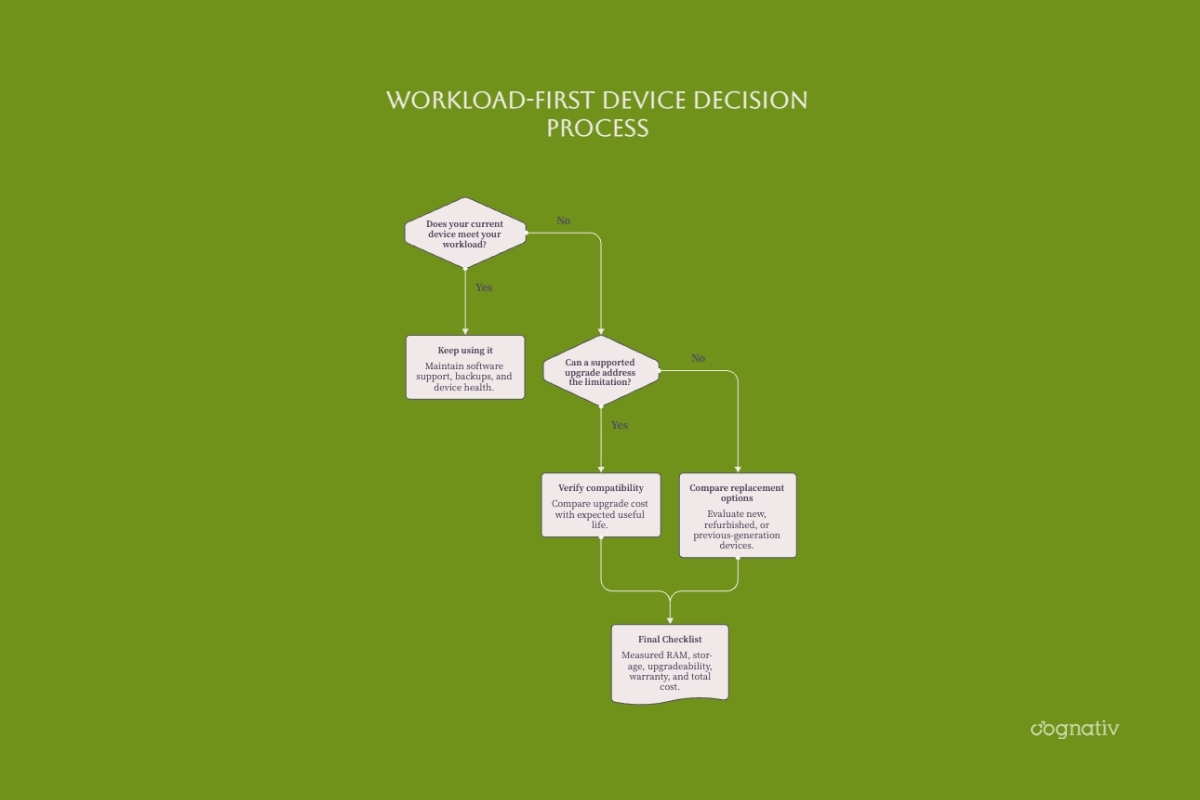
Start with the limitation you need to solve. Check memory use during a representative session, storage availability, application requirements, and remaining security support. Persistent paging and responsiveness problems may indicate memory pressure, but diagnose the workload before attributing every slowdown to RAM.
| Situation | Practical next step | Verify before spending |
|---|---|---|
| Current device meets requirements | Continue using it and monitor condition | Security support, backups, reliability, and expected workload changes |
| A supported upgrade could solve the constraint | Compare the upgrade with replacement | Compatibility, installation cost, warranty, and remaining useful life |
| Device is unsupported or limits essential work | Compare qualified replacements | Exact configuration, delivery date, support, and return terms |
| Budget does not cover a suitable new device | Assess refurbished or previous-generation alternatives | Battery and storage condition, seller warranty, and software eligibility |
| Future requirements remain uncertain | Measure or pilot before committing | Real workload demand rather than speculative capacity targets |
Choose Memory for the Workload
There is no RAM minimum that suits every device and application. Basic office work, large development environments, creative workloads, and local models place different demands on a system. Evaluate the operating system, applications, typical concurrency, and reasonable headroom together.
Check storage separately. Capacity, endurance, performance, and the ability to replace an SSD affect its suitability. External storage can help with some files and backups, but it is not a substitute for adequate working memory or a complete backup strategy.
Avoid Panic-Buying and Unsupported Savings Claims
A necessary purchase should be assessed against the cost of delay, including downtime and lost productivity. A discretionary purchase can usually be evaluated more slowly. Neither choice requires predicting the bottom of a market cycle. Request current quotes and compare equivalent specifications, including taxes, delivery, and warranty coverage.
How Businesses Can Plan Around Memory-Supply Uncertainty
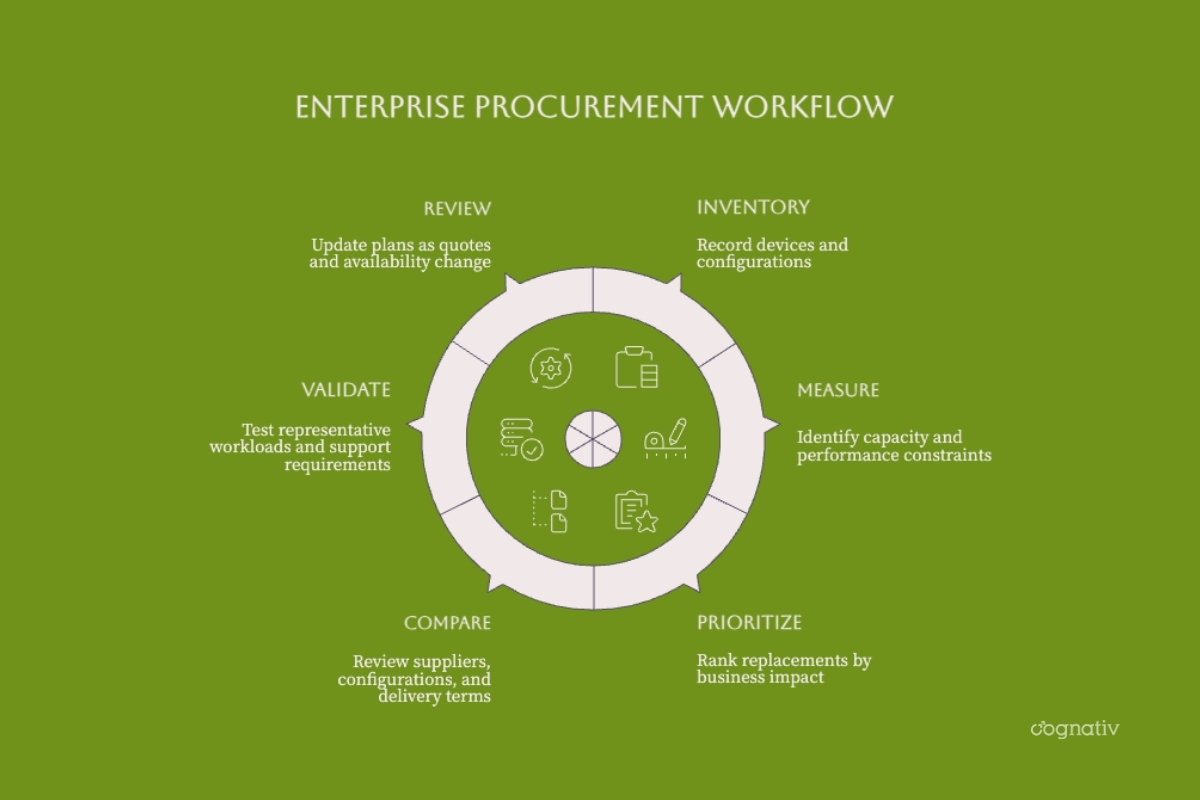
Business planning should connect hardware decisions to application requirements and operational risk. Replacing an entire fleet because of a price headline can consume budget without addressing the systems that actually constrain delivery.
Audit, Prioritize, and Validate
Inventory devices and configurations, identify unsupported systems, and rank replacements by business impact. Ask suppliers for configuration-specific availability, quote validity, substitution rules, warranty coverage, and delivery commitments. Treat lead times as supplier evidence to refresh, not as permanent industry averages.
When application behavior is driving resource demand, software development consulting for application and modernization decisions can help evaluate the software requirements behind an infrastructure purchase. This is distinct from component sourcing or a hardware price guarantee.
Compare Local, Cloud, and Hybrid Options
Moving a workload to the cloud changes how capacity is acquired and paid for; it does not eliminate hardware costs from the system. Compare usage charges, data transfer, access controls, latency, operational ownership, and portability alongside local capital and maintenance costs.
For AI workloads, AI-first architecture planning should establish which functions belong locally and which can use managed services. Test a representative workload before committing to a device fleet or a long-running service contract.
Use staged purchases where operationally appropriate, retain tested alternatives, and review quotes as requirements change. The objective is continuity and workload fit, not simply obtaining the largest memory configuration available.
Conclusion: Buy for Evidence, Not the Headline
RAMageddon describes a real purchasing concern, but it is not a precise forecast for every device. Working memory and storage serve different roles, supplier conditions vary, and component-price changes do not translate directly into identical retail increases.
Measure current needs, check upgrade options, compare exact configurations, and include support and reliability in the decision. For businesses, connect refresh priorities to application performance, security obligations, and the cost of interruption.
If your organization is reassessing the software and AI workloads behind its infrastructure requirements, contact Cognativ to discuss application architecture and capacity-planning priorities.