
Local AI Hardware: Complete Guide to Hardware Requirements for Running AI Models
Local AI Hardware Requirements at a Glance
Local AI hardware is the physical compute, memory, storage, networking, power, and cooling used to run AI models on equipment an organization controls. It can support a developer workstation, an offline application, a shared inference server, or a production platform. The right configuration depends on the complete workload, not on a single GPU name or model parameter count.
This guide covers hardware requirements for local AI inference across discrete GPUs, unified-memory systems, AMD platforms, and CPU-only deployments. It focuses on model loading, interactive inference, retrieval-augmented generation (RAG), agents, and multi-user serving. Large-scale model training and hyperscale data center design are outside its scope.
Five variables establish the starting point: the exact model artifact, quantization, context length, concurrency, and workload type. A configuration that works well for one user with an 8K context may fail under long prompts, multiple simultaneous requests, or a RAG pipeline that loads additional models. Teams building operational applications should connect hardware selection to the broader AI software development plan instead of treating infrastructure as an isolated purchase.
After reading this guide, you will be able to:
- Estimate model-weight memory and identify the additional allocations that affect real capacity.
- Match hardware to interactive chat, coding, RAG, agent, and multi-user workloads.
- Compare NVIDIA, Apple Silicon, AMD, and CPU-only platforms using consistent criteria.
- Plan server memory, storage, power, cooling, and network requirements.
- Separate a configuration that can load a model from one that meets measured service targets.
Understanding Local AI Hardware Fundamentals
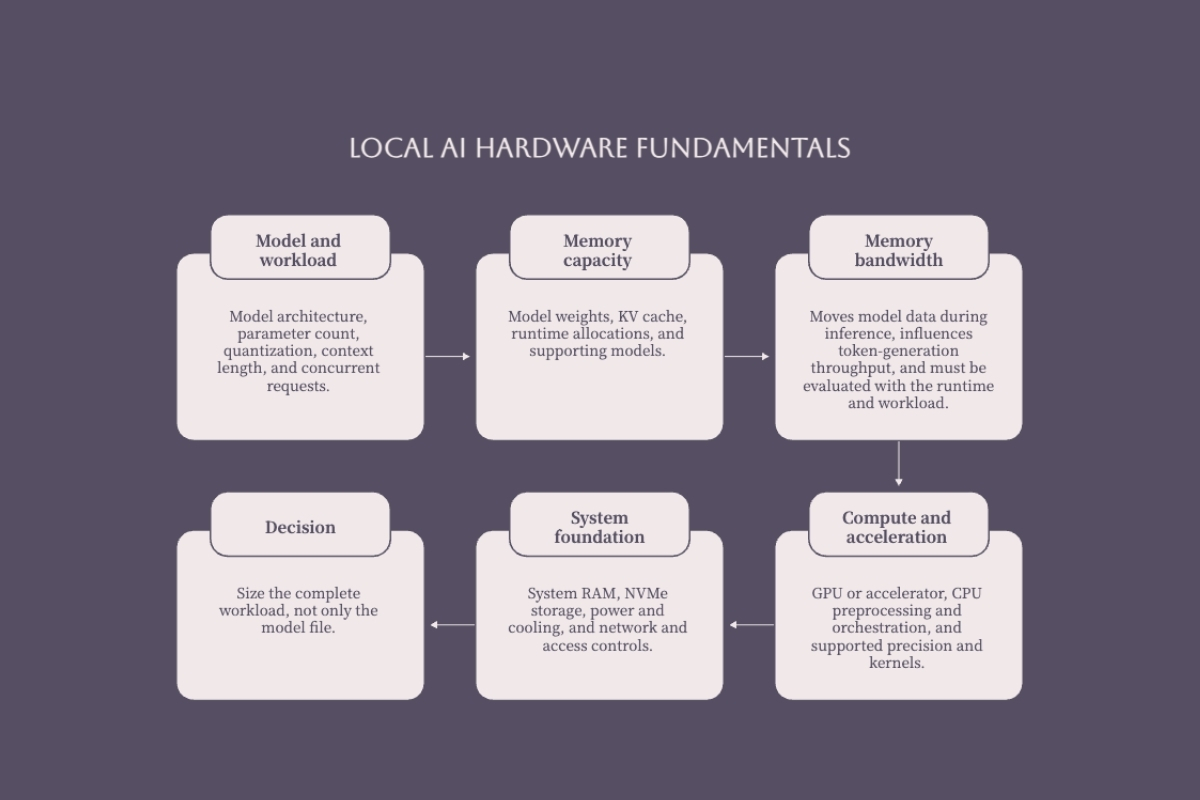
A local AI system combines an inference accelerator with CPU resources, memory, storage, and a compatible software stack. GPUs are common because transformer inference uses highly parallel matrix operations, but accelerator support is only useful when the chosen runtime can use the hardware and precision format. NPUs can accelerate supported on-device workloads, while CPUs remain important for tokenization, retrieval, request handling, tool execution, and general orchestration.
Memory Architecture and Model Loading
Three memory arrangements appear frequently in local AI deployments:
- Dedicated VRAM: Discrete NVIDIA and AMD GPUs use their own high-bandwidth memory. Model weights, the KV cache, activations, and runtime buffers compete for this capacity during accelerated inference.
- System RAM: The CPU uses main memory for the operating system, inference processes, retrieval services, and CPU inference. Some runtimes can offload part of a model between GPU and system memory, but performance depends on the interconnect and offload pattern.
- Unified memory: Systems such as Apple Silicon and integrated AI platforms allow CPU and GPU components to address a shared memory pool. This can make larger model artifacts accessible without copying every allocation between separate pools, but the operating system and applications also consume that memory.
Capacity is therefore not interchangeable across architectures. A model fitting into 24 GB of dedicated VRAM does not prove that every 24 GB configuration will deliver the same speed, and a 128 GB unified-memory system does not make all 128 GB available to model weights. Measure usable memory after the operating system, runtime, cache, and supporting services are loaded.
Memory Bandwidth and Inference Speed
Autoregressive token generation is often constrained by how quickly model data can move through memory, especially for low-batch interactive inference. Prompt processing, large batches, speculative decoding, and specialized kernels can shift the bottleneck toward compute or software overhead. Memory bandwidth is an important selection criterion, but it is not a stand-alone predictor of tokens per second.
Compare systems with the same model artifact, quantization, runtime version, context, batch settings, and prompt set. A bandwidth specification can help explain results, but throughput does not scale linearly across different architectures because kernels, cache behavior, memory access, thermal limits, and runtime maturity also matter.
Quantization and Model Compression
LLM quantization reduces the precision used to store or execute model weights. Lower-precision artifacts can reduce memory use and may improve throughput, but quality, runtime support, and hardware acceleration vary by model and format.
- FP16 or BF16: Common higher-precision inference formats with a larger memory footprint.
- FP8 or INT8: Lower-precision formats that require compatible hardware, kernels, and model conversion.
- 5-bit and 6-bit: Intermediate quantization levels available in formats such as GGUF.
- 4-bit: A common local-inference target that can substantially reduce weight storage, with quality and speed depending on the quantization method and runtime.
Do not assume that every 4-bit format has the same size, quality, or acceleration path. Inspect the exact downloadable artifact and test representative tasks before using quantization as the basis for a hardware purchase.
Hardware Requirements by Model Size and Workload
Model size establishes a capacity floor. Context length, concurrent sequences, cache precision, multimodal components, and supporting services determine how much headroom the deployment needs above that floor.
Model Memory Footprint Calculations
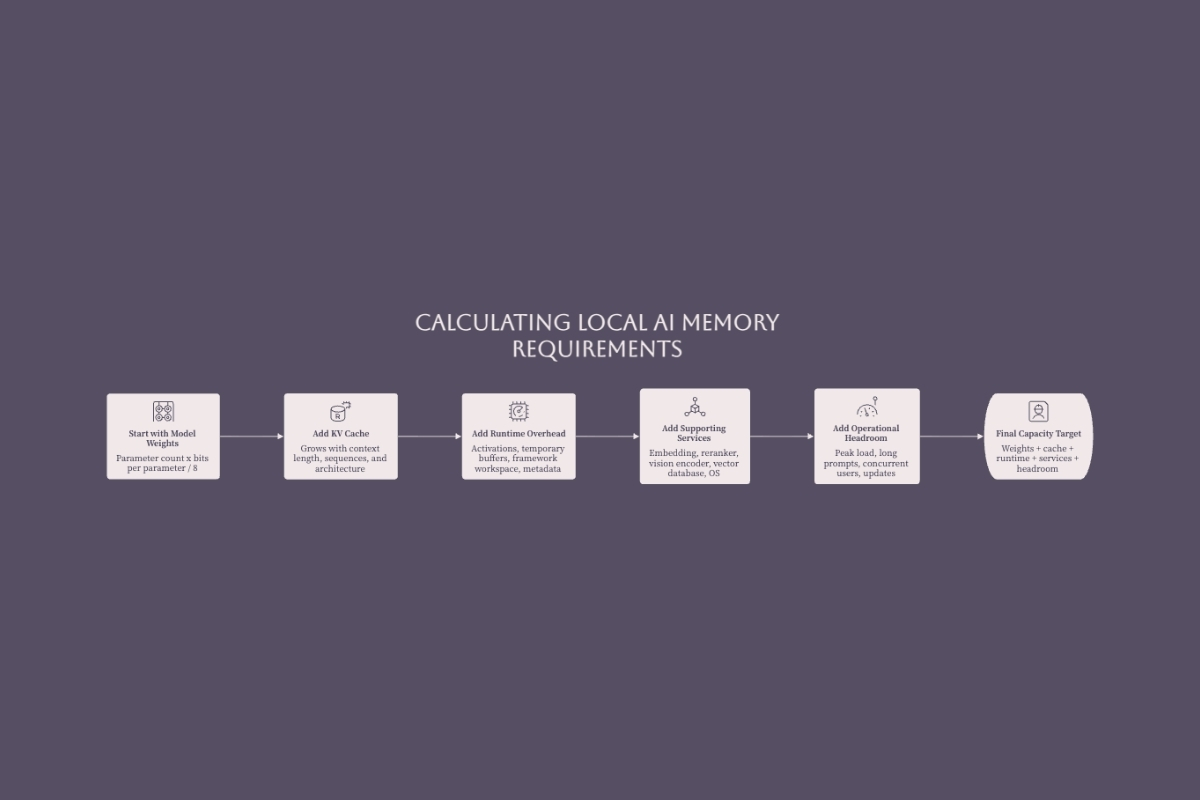
The theoretical storage required for model weights can be estimated with this formula:
Weight memory in GB ≈ parameter count × bits per parameter ÷ 8 ÷ 109
Illustrative raw-weight estimates at four bits per parameter are approximately 4 GB for 8B parameters, 7 GB for 14B, 16 GB for 32B, and 35 GB for 70B. Actual files can differ because quantization formats add metadata, scales, tensors stored at other precisions, or architecture-specific components.
Raw weights are not a complete system requirement. Add capacity for:
- KV cache: Varies with model architecture, context length, concurrent sequences, batch policy, and cache precision.
- Runtime allocations: Includes temporary buffers, activations, graph or kernel workspaces, and model metadata.
- Operating system and services: Includes the inference server, API layer, monitoring, retrieval, and security processes.
- Additional models: Embedding, reranking, vision, speech, or safety models may run alongside the primary model.
Use the formula for early screening, then use the exact model file and runtime telemetry for procurement. A fixed percentage of headroom is not reliable across all architectures; measure peak memory under the longest expected context and realistic concurrency.
Inference Workload Categories
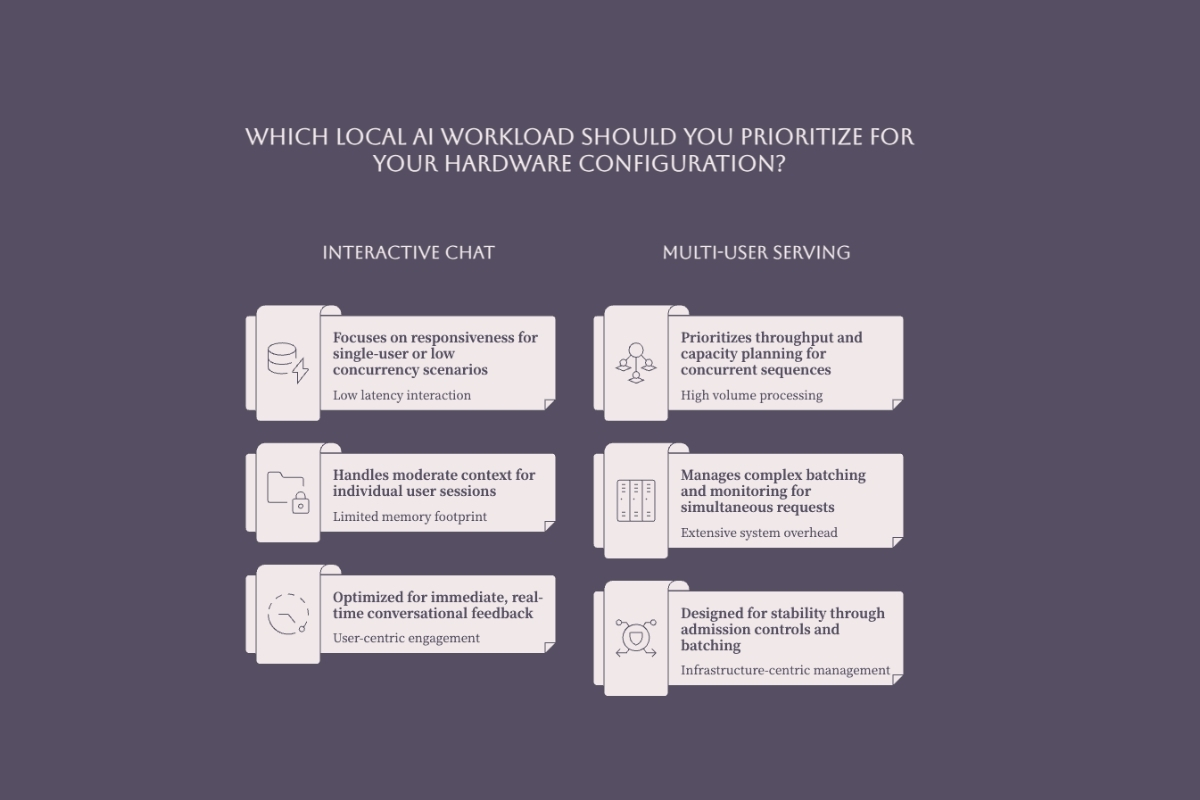
Different AI workloads stress different parts of the system:
- Single-user interactive chat: Prioritizes time to first token, steady token generation, and enough memory for the expected context.
- Coding and document assistance: Often uses larger prompts, repository or document retrieval, and longer sessions.
- RAG pipelines: Add embedding, retrieval, reranking, storage I/O, and database memory to the primary model workload.
- AI agents: Add orchestration, tool calls, persistent state, and potentially multiple models or worker processes.
- Multi-user serving: Requires capacity controls for concurrent sequences, KV cache growth, batching, and queue behavior.
Benchmark prompt processing and token generation separately. A system can produce tokens quickly after a short prompt yet respond poorly when a long document must first be ingested, or when several users compete for the same memory.
Hardware Tier Recommendations
The following ranges are planning guides, not compatibility guarantees. They assume quantized inference and must be checked against the exact model artifact, runtime, context, and concurrency target.
| Fast-Memory Tier | Indicative Model Range | Typical Workloads | Planning Notes |
|---|---|---|---|
| 8–16 GB | Compact and small quantized models | Experimentation, classification, lightweight assistants | Limited context and concurrency headroom; inspect the exact artifact before deployment. |
| 16–24 GB | Many 7B–14B models and selected larger quantized artifacts | Development, coding assistance, single-user RAG | Strong general-purpose range, but long context and supporting models can consume capacity quickly. |
| 24–32 GB | Mid-size quantized models | Power-user workflows, richer context, limited shared serving | Model architecture and quantization determine whether a larger model leaves usable cache headroom. |
| 48–64 GB | Larger quantized models or multiple services | RAG, agents, team workstations, controlled concurrency | Can support some 70B-class quantized artifacts, subject to cache, runtime, and model-specific overhead. |
| 96–128 GB and above | Large models, long context, or multi-model workloads | Shared servers, high-memory workstations, production evaluation | Capacity alone does not guarantee throughput; bandwidth, interconnect, software support, and operations remain critical. |
Mixture-of-experts models require special care: active parameters can describe compute per token, while total stored parameters influence the weight footprint. Use the actual model package rather than sizing from the active-parameter figure alone.
Platform Comparison and Hardware Selection
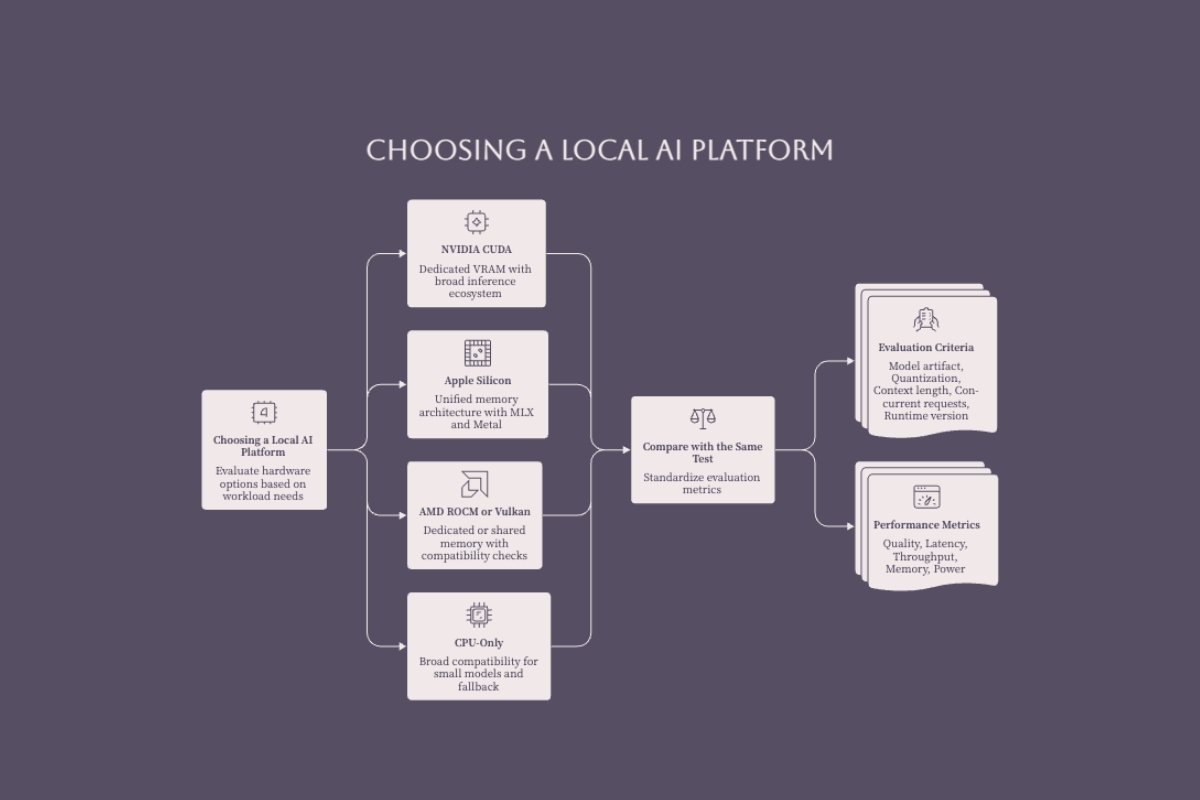
Once the memory target is known, platform selection determines the available runtimes, precision formats, expansion path, power envelope, and operating model. A sound AI-first architecture decision connects those technical trade-offs to data location, service levels, governance, integration, and support ownership.
NVIDIA GPU Platforms
NVIDIA offers the broadest CUDA-based inference ecosystem across common libraries and serving runtimes. The current GeForce RTX 5090 specifications list 32 GB of GDDR7 memory, a 575 W total graphics power rating, and no NVLink support. NVIDIA also notes that system power requirements vary by configuration, which makes case clearance, connectors, power delivery, and sustained cooling part of the procurement decision.
A 32 GB GPU can be a strong single-device option when the full runtime workload fits in VRAM. It is not a universal model-size guarantee: weight format, cache, context, batch policy, and fine-tuning method all change capacity. Remove retail price and tokens-per-second comparisons from selection criteria unless the benchmark documents the exact model, runtime, settings, hardware, and test procedure.
For workloads beyond a single GPU, verify that the runtime supports model sharding or the required parallelism strategy. Current consumer RTX 5090 cards communicate across PCIe rather than NVLink. Some professional and data center platforms provide different interconnects, so multi-GPU architecture must be based on the exact cards and chassis rather than the NVIDIA brand alone.
Apple Silicon Systems
Apple Silicon provides a shared memory architecture that can make large model artifacts accessible in a compact workstation. Apple's 2025 Mac Studio specifications list M4 Max configurations with up to 128 GB of unified memory and up to 546 GB/s memory bandwidth, while M3 Ultra configurations reach 256 GB and 819 GB/s. Usable model capacity is lower than installed memory because macOS, the runtime, and other applications share the pool.
MLX and Metal-backed runtimes support a growing set of local inference workflows. Apple systems can be attractive when memory capacity, acoustics, and system integration matter more than expansion. They should still be benchmarked with the target model because kernel support, quantization format, prompt processing, and token generation differ from CUDA implementations.
AMD GPU and CPU-Only Options
AMD provides discrete Radeon GPUs, professional accelerators, and high-memory Ryzen AI platforms. Support changes by device, operating system, driver, and framework release, so teams should verify the exact combination in AMD's current ROCm compatibility matrix before procurement or upgrades. Community Vulkan paths can broaden options, but community support should not be confused with a vendor-supported production configuration.
CPU-only inference remains useful for compact models, functional testing, low-volume background work, and fallback operation. Performance depends heavily on memory bandwidth, vector instruction support, core topology, runtime optimization, and quantization. It should not be dismissed categorically, but it needs workload-specific testing before use in an interactive or production service.
Comparison Table: Platform Trade-offs
| Criterion | NVIDIA CUDA | Apple Metal / MLX | AMD ROCm / Vulkan | CPU-Only |
|---|---|---|---|---|
| Memory model | Dedicated VRAM | Unified system memory | Dedicated VRAM or integrated shared memory | System RAM |
| Primary strength | Broad acceleration and serving ecosystem | High-capacity integrated workstation options | Multiple hardware classes and improving software support | Broad availability and simple fallback path |
| Primary constraint | Installed VRAM, power, cooling, and expansion | Fixed configuration and model-specific runtime performance | Exact support matrix and framework compatibility | Lower throughput for demanding workloads |
| Best validation step | Measure the exact CUDA runtime and model artifact | Compare MLX and Metal-backed runtimes | Confirm device, OS, driver, and framework support | Test prompt processing and token generation separately |
| Expansion model | Replace or add supported GPUs and infrastructure | Select memory capacity at purchase | Depends on discrete or integrated platform | Add system memory or move to acceleration |
Local and cloud inference should be compared by architecture and total operating cost, not by blanket claims. Local deployment can reduce third-party data transfer and usage-based API exposure, but it adds hardware, energy, maintenance, access control, monitoring, and recovery responsibilities. Hybrid designs may be appropriate when sensitive or latency-critical workloads stay local and occasional high-capacity work uses controlled cloud infrastructure.
Local AI Server Hardware Considerations
A dedicated server differs from a personal workstation because it must support sustained operation, predictable access, concurrent requests, monitoring, and recovery. Hardware selection should therefore include service behavior and secure software development controls, not only model-loading capacity.
Multi-GPU Server Configurations
When a model or concurrency target exceeds one accelerator, a team can choose a smaller model, stronger quantization, controlled offload, multiple GPUs, or a hybrid deployment. Multi-GPU capacity is not automatically a single contiguous memory pool.
- Runtime support: Confirm that the inference engine can shard the exact architecture across the selected devices.
- Parallelism strategy: Tensor, pipeline, and data parallelism solve different capacity and throughput problems.
- Interconnect and topology: PCIe generation, lane allocation, switch layout, and peer-to-peer support affect cross-device traffic.
- Failure and maintenance: More accelerators increase power, cooling, driver, scheduling, and replacement complexity.
Two 32 GB GPUs provide 64 GB of aggregate physical VRAM, but the usable model and cache allocation depends on the sharding strategy and duplicated runtime data. Benchmark the complete server rather than adding card capacities on a spreadsheet.
Server Infrastructure Requirements
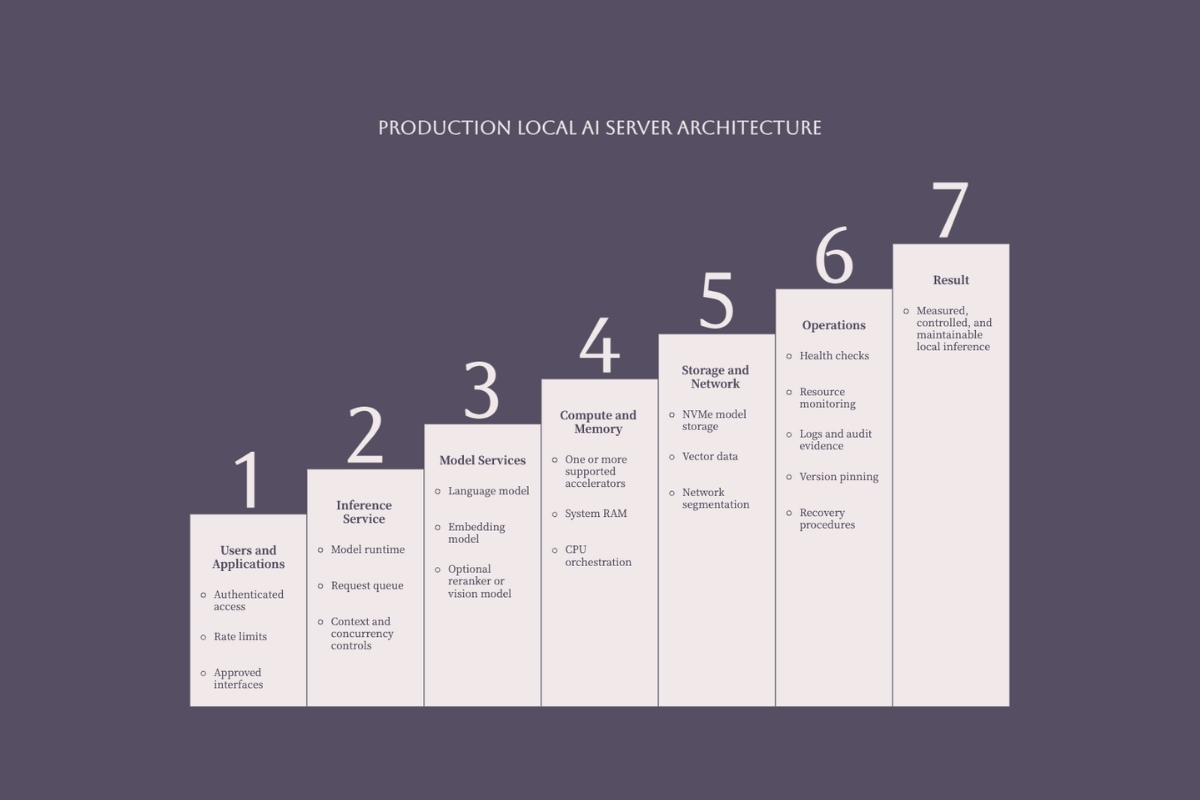
A production-oriented local AI server should be sized across the full system:
- CPU: Size cores and single-thread performance for tokenization, retrieval, request handling, tool execution, and data preprocessing.
- System RAM: Include the operating system, model loading, offload strategy, vector search, caches, and observability services.
- Storage: Use adequate NVMe capacity and throughput for model artifacts, indexes, logs, staging, and rollback versions.
- Power: Calculate sustained and transient demand from the exact GPUs, CPU, drives, fans, and power-conversion overhead.
- Cooling: Validate temperatures and clocks under long inference runs, not only short synthetic tests.
- Networking: Choose bandwidth, segmentation, and redundancy from model size, client count, retrieval traffic, and availability targets.
There is no universal requirement for a 16-core CPU, 128 GB of RAM, or 10 GbE networking. Those can be appropriate in some deployments, but procurement should follow measured workload demand and the expected failure model.
Agent and RAG Workload Considerations
Agent and RAG systems can require more than the primary language model. A deployment may include an embedding model, reranker, vector database, document parser, API gateway, worker queue, browser or code sandbox, and monitoring services. Some components use the GPU; others compete for CPU, RAM, storage, or network resources.
Define limits for context, concurrent workers, tool execution, retrieval volume, queue depth, and timeouts. Local operation can continue without a public model API, but it does not guarantee low latency or resilience. Offline requirements still need local dependencies, model availability, authentication behavior, backups, and recovery procedures to be tested.
Common Hardware Challenges and Solutions
Most local AI hardware failures come from sizing only the weight file, comparing unrelated benchmarks, or purchasing before validating the runtime. The following controls keep model, hardware, and service assumptions visible.
Insufficient VRAM for Model Size
When the active workload exceeds accelerator memory, the runtime may fail, reduce context or concurrency, evict cache, or offload work to slower memory. The performance impact varies by architecture and transfer pattern; it should be measured rather than expressed as a universal percentage.
- Use a validated quantization: Compare quality and performance on representative tasks.
- Select a smaller model: A smaller model that remains in fast memory can outperform a larger model with heavy offload.
- Reduce cache demand: Limit context, batch size, or concurrent sequences when the service permits it.
- Add supported capacity: Move to a higher-memory device or a validated multi-GPU or unified-memory configuration.
Memory Bandwidth Bottlenecks
If capacity is sufficient but generation is slow, profile memory utilization, GPU activity, prompt processing, cache behavior, offload, and runtime kernels. A higher advertised bandwidth can help, but architecture and software determine how much of that bandwidth the workload actually uses.
Compare systems with a reproducible test package: exact model hash, quantization, runtime and driver versions, prompts, context, batch settings, concurrency, warm-up procedure, power mode, and measured temperatures. Record time to first token, prompt-processing rate, generation rate, peak memory, error rate, and power where relevant.
Software Compatibility Issues
Hardware is only deployable when the driver, operating system, model format, quantization, and runtime are compatible. Support may differ between inference and fine-tuning, and an experimental community backend may not provide the same lifecycle or incident support as a vendor-supported stack.
- NVIDIA CUDA: Verify compute capability, driver, CUDA, runtime, and quantization support.
- Apple Metal or MLX: Verify model conversion, quantization, operation coverage, and macOS requirements.
- AMD ROCm or Vulkan: Verify the exact GPU or APU, operating system, driver, framework, and runtime release.
- CPU backends: Verify instruction-set support, optimized kernels, memory bandwidth, and packaging.
Pin a validated software bill of materials, test updates before rollout, and retain a rollback path. A hardware platform that benchmarks well but cannot be maintained safely is not production-ready.

Conclusion and Next Steps
Select local AI hardware from the workload outward: define tasks and service targets, select the exact model artifact, calculate weight and cache demand, add supporting services, choose a compatible runtime, and then compare hardware with a reproducible benchmark. This sequence prevents a product specification from becoming a substitute for architecture.
A 16–24 GB accelerator or a 32–64 GB unified-memory system can be a productive development range for many quantized models, but it is not a universal recommendation. Larger models, long context, RAG, agents, and shared serving can move the requirement substantially. Capacity should be expressed as a tested configuration with known limits.
- Inventory the workload: Record model artifacts, context, users, latency, quality, data, tools, and availability needs.
- Build the memory budget: Include weights, KV cache, runtime allocations, the operating system, and supporting models.
- Confirm compatibility: Check the hardware, operating system, driver, runtime, model format, and quantization together.
- Benchmark the real path: Use representative prompts, retrieval, tools, concurrency, and sustained load.
- Plan operations: Define access control, monitoring, updates, rollback, capacity limits, and recovery.
For the deployment sequence after hardware selection, use the local AI server setup guide to plan the runtime, model access, testing, and operating steps.
Local AI Hardware Evaluation Checklist
- Workload: Exact model, quantization, context, users, concurrent sequences, RAG, agents, and multimodal services.
- Memory: Weight file, KV cache, runtime buffers, supporting models, operating system, and measured headroom.
- Performance: Time to first token, prompt processing, generation throughput, peak memory, stability, and power.
- Compatibility: Operating system, driver, framework, runtime, model format, and supported precision.
- Infrastructure: CPU, RAM, NVMe capacity, PCIe topology, power delivery, cooling, and network.
- Operations: Authentication, segmentation, monitoring, logs, updates, rollback, backup, and recovery.
- Decision evidence: Preserve the configuration, model hash, test procedure, results, limits, owner, and approval date.