MCP Server for Local Business AI Agents: Setup and Implementation Guide
An MCP server gives an AI application a standardized way to discover and use approved business capabilities. A local or privately operated server can expose narrowly defined access to CRM records, databases, file repositories, internal APIs, development tools, or operational workflows without forcing every AI host to implement a different connector.
MCP does not make an integration secure by itself. It does not perform model reasoning, decide business policy, verify every tool result, or automatically provide governance. The host application, MCP client, server implementation, identity layer, connected system, and human approval process all retain separate responsibilities.
This guide explains how to design, secure, evaluate, test, and operate an MCP server for business AI agents running on local or privately controlled infrastructure. It focuses on practical implementation boundaries: what the protocol standardizes, what your architecture must add, which capabilities to expose first, and how to prevent a useful connector from becoming an uncontrolled path into business systems.
The short answer: start with one low-risk workflow, one trusted system, and a small set of read-only capabilities. Keep the server on the narrowest viable transport and network boundary, validate identity and permissions again at the downstream system, record every consequential operation, and add write actions only after denial, approval, timeout, and recovery behavior have been tested.
By the end of this guide, you will be able to:
-
Separate the responsibilities of the MCP host, client, server, model, and business system.
-
Choose between a local subprocess and an HTTP deployment from operating requirements.
-
Design focused resources, prompts, and tools around one business workflow.
-
Apply identity, least privilege, validation, human approval, logging, and recovery controls.
-
Evaluate an existing MCP server or define when a custom implementation is justified.
How MCP Connects Local Business AI Agents
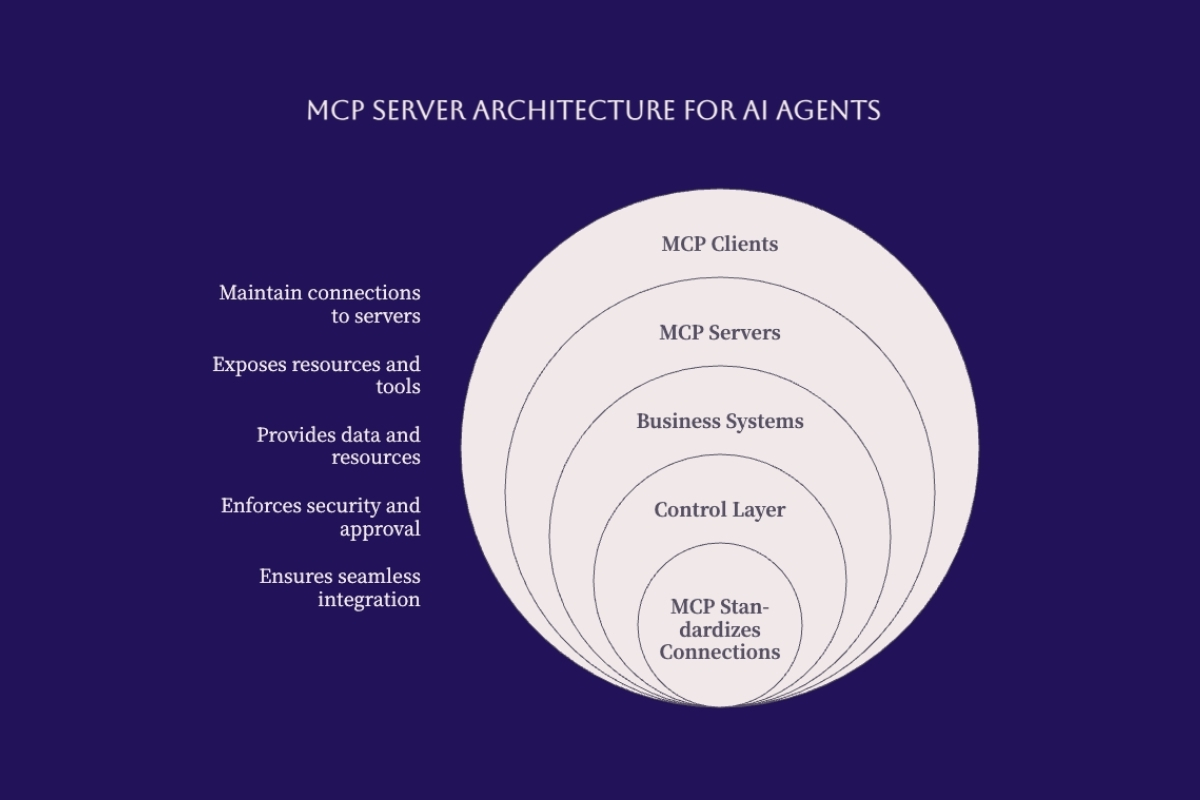
The Model Context Protocol is an open protocol for connecting language-model applications to external context and capabilities. The latest official MCP specification defines JSON-RPC communication between hosts, clients, and servers. Servers can expose resources, prompts, and tools; the host controls how those capabilities enter the model interaction and user experience.
The protocol standardizes the connection contract. It does not replace the underlying CRM API, database permissions, document repository, business rules, identity provider, or application policy. An MCP tool that wraps an unsafe API remains unsafe. A resource that exposes excessive data remains excessive. A local server launched from an untrusted package can execute with the privileges of the process that started it.
Cognativ's guide to MCP in the context of local AI models provides a complementary introduction to the protocol. The implementation guidance below focuses on turning that connection into a bounded business service.
Separate Host, Client, and Server Responsibilities
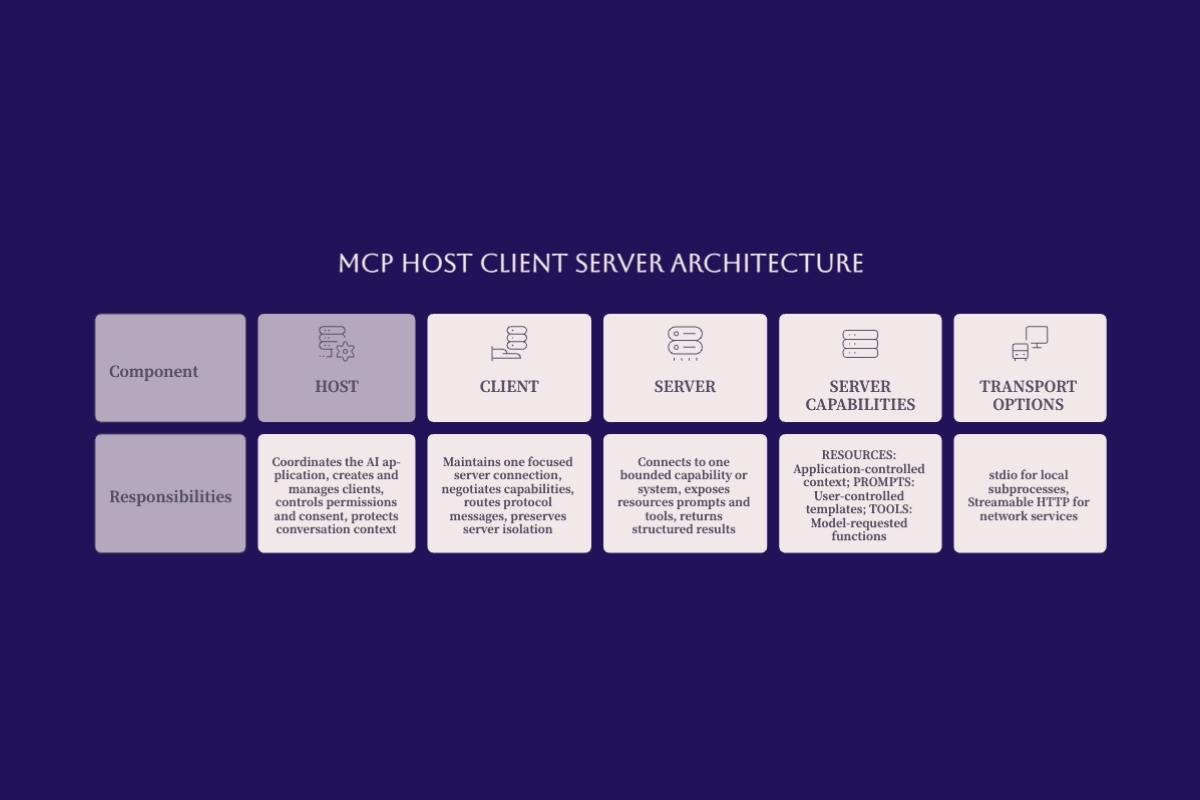
The host is the AI application that coordinates the model, user interaction, permissions, consent, and multiple MCP connections. It creates clients and controls what context each connection receives. The model may suggest a tool call, but the host determines whether the request is permitted, requires review, or must be rejected.
An MCP client operates inside the host and communicates with one server. It handles protocol messages, capability discovery, errors, and transport behavior. Keeping each connection focused helps prevent one server from automatically seeing the complete conversation or the capabilities of another server.
The MCP server exposes a bounded set of capabilities and translates accepted requests into downstream operations. It must validate inputs, enforce authorization applicable to its boundary, call the business system safely, normalize errors, and return structured results. The downstream system remains responsible for its own authorization and data rules.
BUSINESS USER
      |
AI HOST AND MODEL
      |
MCP CLIENT FOR ONE SERVER
      |
BOUNDED MCP SERVER
      |
CRM / DATABASE / FILES / INTERNAL API
Understand Resources, Prompts, and Tools
|
Capability |
Primary purpose |
Example |
Control question |
|---|---|---|---|
|
Resources |
Provide contextual data identified by the server |
Approved policy document or account schema |
Which user and workflow may receive this data? |
|
Prompts |
Provide reusable workflow templates |
Prepare a support-case review |
What context and actions can the template request? |
|
Tools |
Perform a function or retrieve a result |
Find an account or update a ticket |
Can the operation change state or disclose sensitive data? |
Capability names, descriptions, schemas, and annotations help the host and model understand what is available, but they are not a security boundary. Treat metadata from a server as untrusted until the server, package, owner, permissions, and downstream behavior have been reviewed.
Choose the Transport From the Deployment Boundary
The current official MCP transport specification defines standard bindings for stdio and Streamable HTTP. With stdio, the client launches the server as a subprocess and exchanges newline-delimited JSON-RPC messages through standard input and output. This is often the simplest path when the host and server run on the same machine.
With Streamable HTTP, each message is sent to an MCP endpoint through HTTP. Responses can be returned as JSON or through a request-scoped event stream. HTTP is appropriate when the server must run as an independently managed service or support approved clients across a network, but it adds authentication, TLS, origin validation, rate limiting, routing, and service-availability requirements.
Local does not mean risk-free, and remote does not automatically mean scalable. A local process inherits local privileges and package risk. A remote service adds a network and identity boundary. Choose the transport that creates the fewest necessary trust relationships for the workflow.
Design the MCP Server Around One Business Workflow
Begin with a workflow rather than a catalog of every system the agent might eventually use. Define the business request, user, source system, allowed data, expected result, side effects, approval owner, latency boundary, and failure response. This keeps the first server small enough to test and prevents broad tool discovery from becoming an implicit access policy.
A good initial workflow is useful but recoverable. Reading an approved knowledge source, retrieving the status of a support case, or drafting a proposed update creates less operational risk than deleting records, issuing refunds, modifying payroll, or executing arbitrary commands.
For systems that must connect models to CRM, ERP, documents, identity, and internal APIs, AI integration services for governed production workflows should define the complete data and permission path rather than treating the MCP server as the entire integration.
Map the Complete Request and Result Path
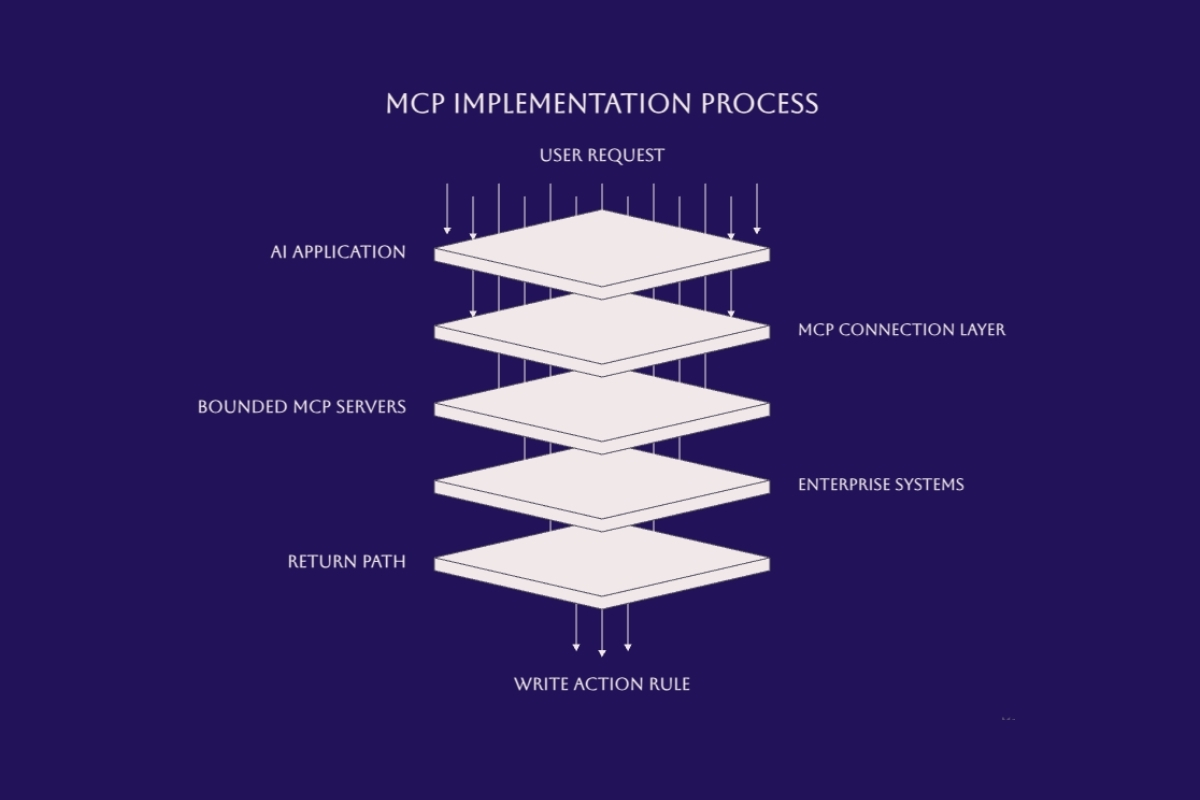
Document every boundary from the initiating user to the final system of record. The map should identify where identity is established, where policy is evaluated, which credentials are used downstream, what data reaches the model, and which component confirms the final state.
-
The user or application submits a business request to the host.
-
The host determines which server capabilities may be considered for that user and workflow.
-
The model proposes a resource access or tool invocation with structured arguments.
-
The host and server validate policy, identity, arguments, and any required approval.
-
The server invokes the downstream system using a narrowly scoped identity.
-
The downstream result is validated, recorded, and returned through the MCP connection.
-
The host presents the result and distinguishes confirmed system state from generated explanation.
Do not collapse these steps into a single statement that the agent has access. Each boundary can fail independently and needs an owner, observable result, and denial path.
Select a Bounded Capability Set
A focused server should expose only the capabilities required by the approved workflow. Separate unrelated systems and trust levels. A read-only customer lookup server should not also expose file deletion, shell execution, and production deployment tools merely because the same host can connect to them.
Use specific tool names and descriptions. Prefer crm_get_account_summary over run_query, and support_propose_status_change over update_anything. Constrain enumerations, lengths, identifiers, and allowed transitions in the schema, then validate those constraints again in server code.
This implementation record is not a complete MCP wire payload. It is an internal design artifact that makes the business contract reviewable before coding:
{
  "capability": "support_propose_status_change",
  "business_owner": "support-operations",
  "allowed_from_states": ["new", "triaged"],
  "allowed_to_states": ["triaged", "pending-review"],
  "required_identity": "authenticated-employee",
  "approval": "required-before-write",
  "downstream_scope": "tickets.status.write",
  "timeout_seconds": 10,
  "audit_fields": ["actor", "ticket_id", "before", "after", "approval_id"]
}
Keep the design record with the server version and test evidence. A future schema change should trigger review when it expands data exposure, adds a write, broadens a scope, or changes approval behavior.
Separate Read, Propose, Approve, and Execute
Business workflows often become safer when one broad action is split into smaller capabilities. A read tool can retrieve current state. A proposal tool can prepare a candidate change without applying it. An approval step can show the target, before-and-after values, and expected consequence. A separate execution tool can apply the approved change using an approval identifier and an idempotency key.
This separation limits accidental writes and gives the operator a meaningful decision. Approval should not be a generic button after the action has already occurred. The reviewed arguments must be bound to the eventual execution so that a different target or value cannot be substituted after approval.
Choose Business Integrations by Risk and Value
|
Integration area |
Useful first capability |
Delay until controls are proven |
|---|---|---|
|
CRM |
Retrieve an account summary within the user's existing access |
Bulk changes, deletions, financial adjustments |
|
Databases |
Run a parameterized, allowlisted read operation |
Arbitrary SQL or unrestricted schema access |
|
Documents |
Search an approved repository and return source references |
Broad filesystem writes or cross-repository movement |
|
Internal APIs |
Read status from one documented endpoint |
Generic proxy tools that can call any route |
|
Development tools |
Read repository status or run an approved test |
Unrestricted shell, credential access, direct production deployment |
Secure the MCP Server and Connected Systems
MCP enables paths to data access and code execution, so the server must be treated as application code at a privileged integration boundary. The official MCP security best practices cover risks including confused-deputy behavior, token passthrough, server-side request forgery, local server compromise, state-handle hijacking, and unsafe authorization URLs.
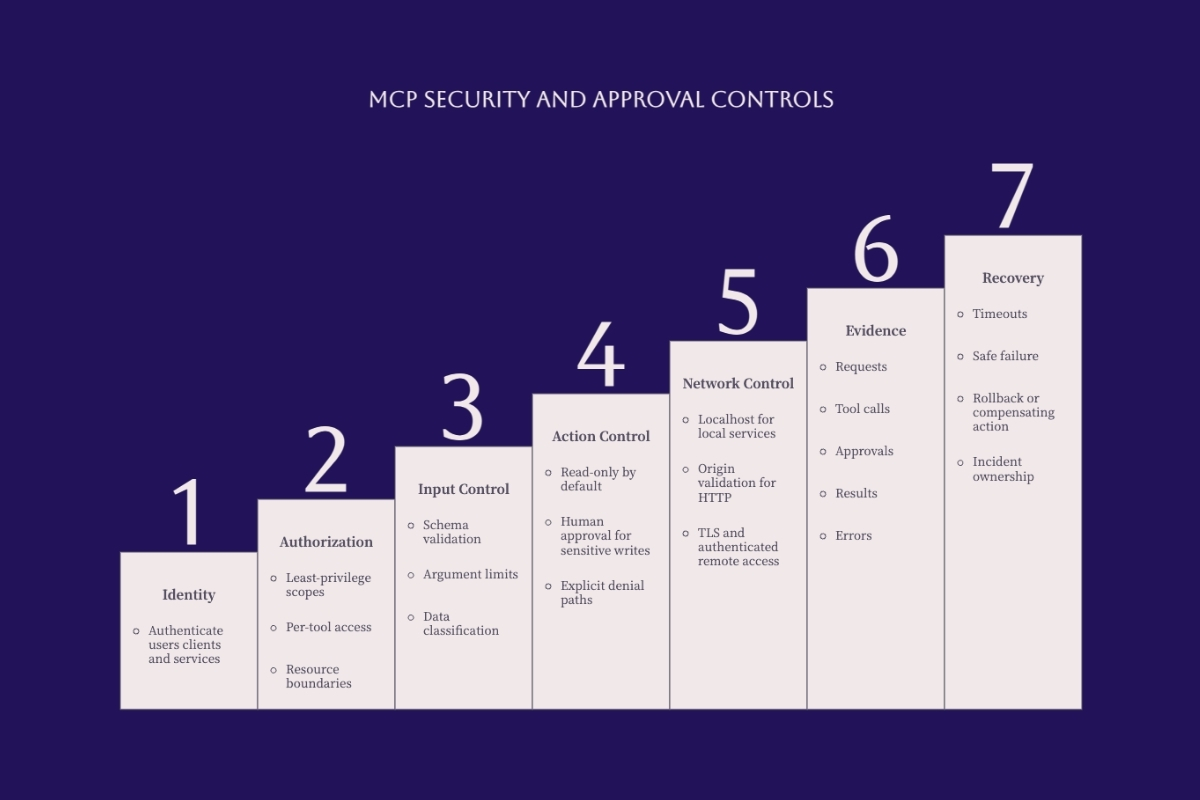
Security must exist at every layer. The host limits which capabilities the user and model can consider. The server authenticates and authorizes requests applicable to its boundary. The downstream system independently enforces its own permissions. Network and process isolation reduce blast radius. Audit evidence connects the initiating identity, proposed action, approval, downstream request, and confirmed result.
Design Identity and Authorization for the Transport
Authorization in the MCP specification applies to HTTP-based transports and is optional for implementations. It does not declare SAML to be an MCP protocol feature, and it does not automatically map corporate roles into tool permissions. Your architecture may integrate an existing identity provider, but the MCP server still needs a clear resource, scope, subject, and downstream identity model.
For stdio, the process boundary and environment usually provide credentials. That is convenient but dangerous when the host carries broad user or machine permissions. Launch the server with a dedicated identity where possible, restrict filesystem and network access, avoid secrets in command-line arguments, and grant only the environment variables required by that server.
For HTTP, validate tokens for the MCP server and their intended audience. Do not accept a token issued for another resource and pass it unchanged to a downstream API. If the server calls another protected system, use a documented delegation or server-side credential flow that preserves the initiating identity and least privilege.
Enforce Permissions at Execution Time
Tool descriptions and annotations are hints, not enforcement. Before every invocation, verify the authenticated principal, permitted tool, target resource, requested operation, current system state, and required approval. The downstream API or database should repeat the authorization decision appropriate to its own boundary.
Do not expose a generic filesystem path, URL, SQL statement, shell command, or API route when the workflow can use an allowlisted identifier. Normalize and validate paths, block traversal, constrain outbound destinations, parameterize database access, and set explicit request and result-size limits.
Teams building agents that can affect business systems need more than connector configuration. Custom AI agent development for bounded workflows should define tool authority, human review, testing, monitoring, and accountable operating ownership together.
Protect Against Prompt and Tool Manipulation
Instructions inside documents, web pages, database fields, tool results, and server metadata are untrusted data. A retrieved document must not be allowed to grant permissions, change the active policy, reveal credentials, or authorize a second tool call. Separate data from instructions and keep authorization outside model-generated text.
Review server provenance before installation. A local MCP server is executable code and may inherit the host's files, network access, and credentials. Pin reviewed versions, inspect startup commands and arguments, use a package allowlist, isolate the process, and require explicit approval before a host installs or launches a new server.
Capture Useful Audit Evidence Without Copying Everything
Record a correlation identifier, initiating identity, host, server version, capability, validated arguments or a protected representation, policy decision, approval identifier, downstream result status, duration, and error category. For writes, preserve the before state, intended change, confirmed after state, and any rollback or compensating action.
Do not log secrets, bearer tokens, complete prompts, or sensitive records by default. Apply field-level redaction, access controls, retention limits, and deletion procedures. Audit evidence is useful only when it is complete enough to investigate and constrained enough not to become another sensitive data store.
Evaluate an MCP Server Before Adoption
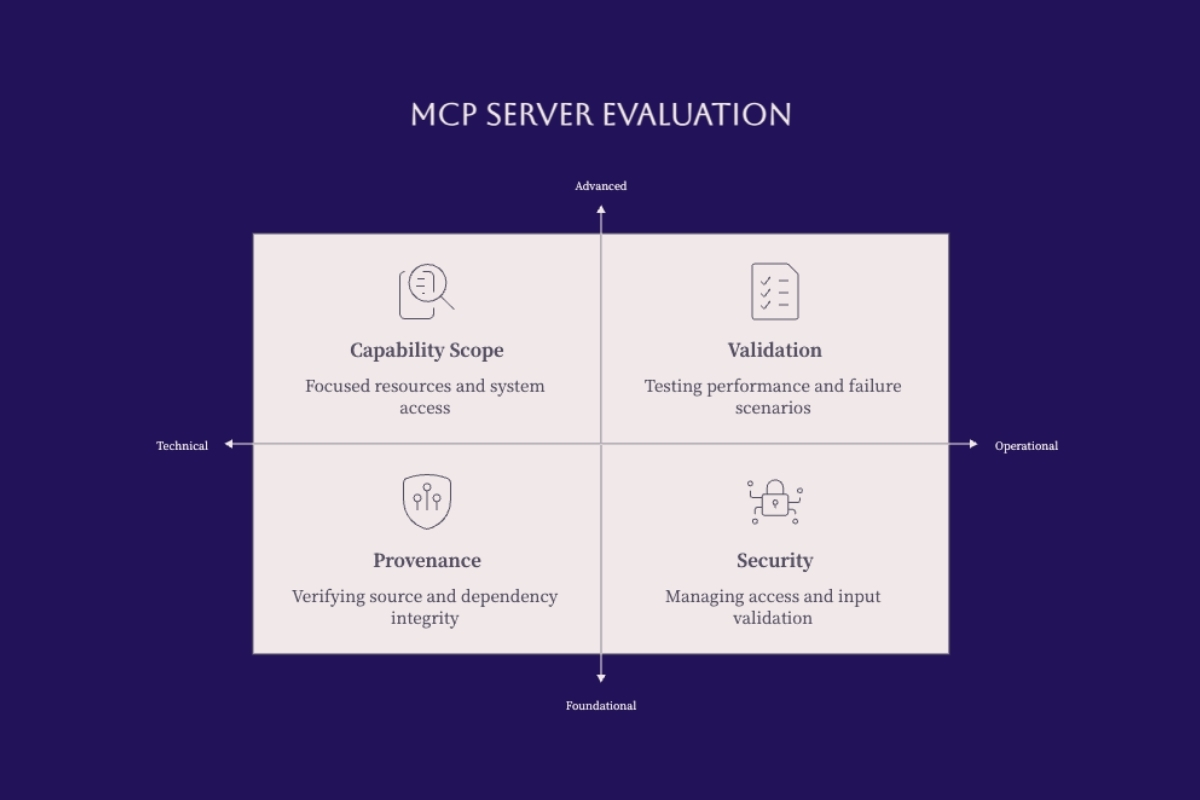
A public package, vendor listing, or working demonstration does not prove that an MCP server is appropriate for business use. Evaluate the source, maintainer, dependency chain, startup command, permissions, capability scope, transport, authentication, error behavior, observability, and update process before connecting it to real systems.
Begin in an isolated environment with synthetic or non-sensitive data. Compare the server's declared capabilities with the network, filesystem, environment, and downstream permissions it actually receives. Reject hidden downloads, unexplained subprocesses, broad mounts, unbounded outbound access, and credentials that exceed the documented workflow.
Use a Technical and Operational Scorecard
|
Assessment area |
Evidence to collect |
Decision question |
|---|---|---|
|
Provenance |
Owner, repository, release history, license, signed or verified artifacts |
Can the organization identify and review what will execute? |
|
Capabilities |
Resources, prompts, tools, schemas, side effects, data returned |
Is every exposed capability required by the workflow? |
|
Permissions |
Process identity, scopes, files, network, secrets, downstream roles |
Can access be reduced without breaking the approved use case? |
|
Compatibility |
Host, protocol revision, transport, runtime, operating system |
Has the exact combination been tested together? |
|
Security |
Input validation, authentication, token handling, isolation, advisories |
Does the design preserve each trust boundary? |
|
Operations |
Health checks, logs, metrics, timeouts, updates, rollback, recovery |
Can the team detect, contain, and recover from failure? |
Decide Whether to Adopt, Wrap, Fork, or Build
Adopt a server when its scope, maintenance, security, and operating model match the requirement. Wrap it behind a gateway or policy layer when the implementation is sound but needs centralized authentication, rate limits, logging, or data transformation. Fork only when the organization can own security updates and merge relevant upstream changes. Build a focused server when the business API is unique or existing servers expose unnecessary authority.
A custom server should not be justified merely because a small demonstration is easy to write. Production ownership includes schema evolution, authentication, error handling, tests, dependency maintenance, monitoring, documentation, incident response, and compatibility with the chosen hosts.
Define Approval Criteria Before the Pilot
Set pass, remediate, restrict, and reject conditions before stakeholders become attached to a demonstration. A server should not progress because it completed one successful tool call. It must also deny unauthorized requests, reject malformed inputs, prevent scope expansion, handle downstream failures, respect timeouts, and produce enough evidence to explain what occurred.
Preserve the evaluation with the exact server version, dependencies, host, transport, configuration, downstream test environment, and results. Re-run the relevant controls when any of those components changes.
Test, Deploy, and Operate the Integration
Move from isolated testing to production in explicit stages. Start with synthetic data and read-only capabilities, then test one authorized user in a non-production system. Add realistic data, additional roles, write proposals, approvals, and controlled execution only after each earlier boundary produces the expected evidence.
Run Positive, Negative, and Failure Tests
|
Test |
Expected behavior |
Evidence |
|---|---|---|
|
Authorized read |
Returns only permitted fields for the correct subject |
Identity, scope, target, field set, result status |
|
Unauthorized tool |
Denied before downstream execution |
Policy decision and denial reason |
|
Malformed arguments |
Rejected with a bounded error |
Schema failure without sensitive echo |
|
Write without approval |
No state change |
Approval-required result and unchanged record |
|
Downstream timeout |
Stops within the configured limit |
Timeout category, duration, no uncontrolled retry |
|
Duplicate approved request |
Idempotent result or explicit duplicate handling |
Idempotency key and final state |
|
Server or dependency failure |
Fails closed and preserves recoverability |
Error, alert, restart or rollback result |
Deploy in Controlled Stages
-
Inventory: document the workflow, systems, users, data classes, and current manual controls.
-
Design: define the host, server boundary, transport, capabilities, identities, schemas, approvals, and logs.
-
Prototype: implement one read-only path using synthetic or non-sensitive data.
-
Validate: run quality, security, permission, failure, performance, and recovery tests.
-
Pilot: limit users, tools, systems, volume, and duration while collecting operator feedback.
-
Release: approve a versioned configuration with ownership, monitoring, support, and rollback.
-
Expand: add one capability or trust boundary at a time and repeat the affected tests.
For a complementary local deployment pattern, review Cognativ's guide to local AI with Ollama and MCP for enterprise. Confirm its runtime-specific steps against current documentation before using them in production.
Monitor the Business Operation, Not Only the Protocol
Track request volume, result status, latency, timeouts, denials, approval completion, downstream errors, retries, and queue depth. Also monitor the business outcome: correct records retrieved, proposed changes accepted or rejected, operator corrections, exceptions, and confirmed state changes.
Define thresholds for disabling one tool, isolating one server, revoking one credential, or returning the workflow to manual operation. A health endpoint can show that a process is running while its credentials are expired, downstream data is stale, or results are semantically wrong.
Maintain Version and Recovery Evidence
Record the host version, MCP server version, protocol compatibility, runtime, dependencies, startup configuration, capability schemas, authorization policy, downstream API version, and test result. Pin or approve updates according to the risk of the workflow.
Back up configuration and application state separately from replaceable packages. Test server restart, credential rotation, dependency rollback, downstream outage, and restoration of the last approved configuration. Assign owners for the server, business workflow, connected system, identity policy, monitoring, and incident response.
Conclusion and Next Steps
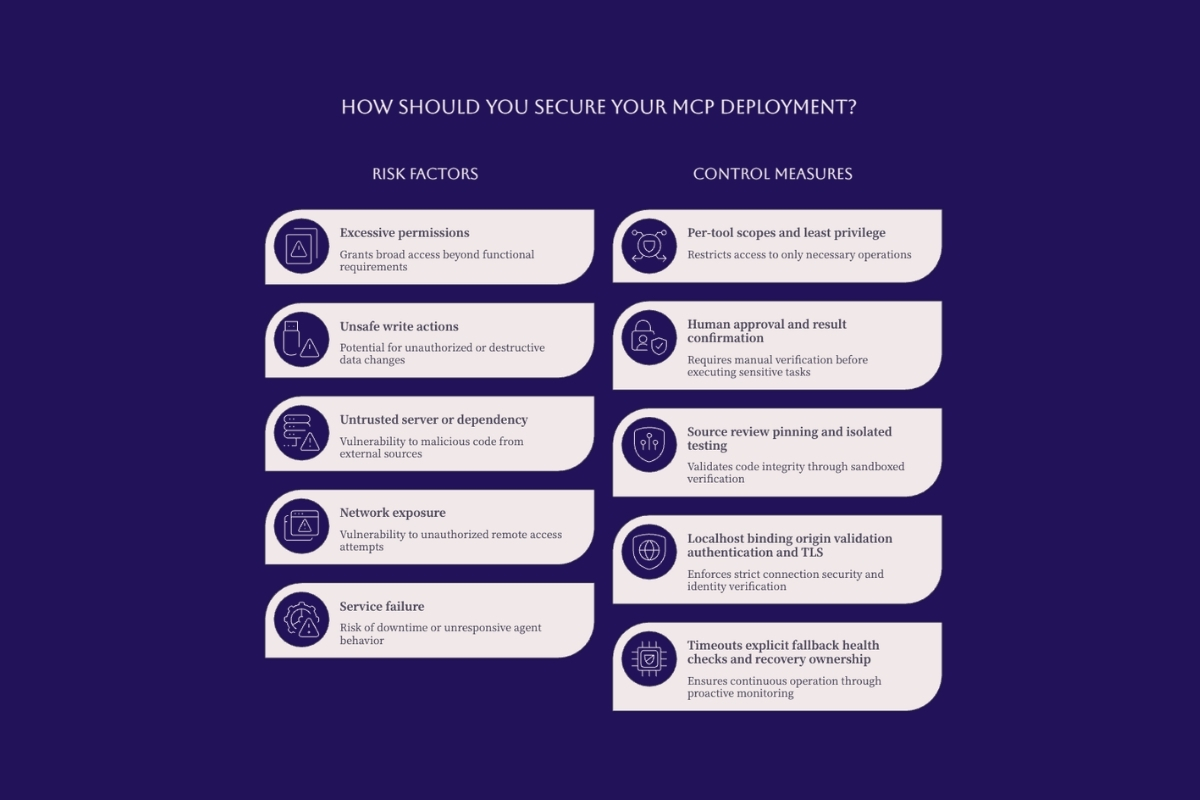
An MCP server can reduce repeated connector work by giving AI hosts a common way to discover and invoke business capabilities. Its value comes from a clear contract and disciplined implementation, not from the protocol name alone. Security, authorization, approval, data governance, observability, and recovery remain responsibilities of the complete system.
Start with one workflow, one trusted server, one system, and a read-only capability. Document the request path, use a narrow identity, validate every argument, preserve denial behavior, and measure the result. Add write actions only when approval is bound to the exact operation and the resulting state can be confirmed or recovered.
If your organization needs to connect local AI agents to CRM, databases, documents, or internal APIs, discuss a governed MCP implementation with Cognativ. Bring the target workflow, systems, user roles, data sensitivity, and current approval process so architecture and implementation decisions can be evaluated against real operating constraints.