What is Local AI: Guide to On-Device Artificial Intelligence
Local AI means running AI inference on a device or infrastructure you control, rather than sending that inference request to a hosted model service. Inference is the process of using a trained model to produce an output, such as a transcript, prediction, image classification, or generated answer. The model can run on a laptop, workstation, dedicated server, or organization-managed environment.
On-device AI is a narrower case: computation happens on the device being used. A laptop application that calls a model on an office server uses locally managed infrastructure, but the inference is not on the laptop. A desktop chat window connected to a hosted model is still using remote inference, regardless of where the interface runs.
This guide explains the components behind local AI, how models differ from runtimes, and where retrieval, agents, and Model Context Protocol (MCP) fit. It focuses on language-model applications while recognizing that local AI also includes speech, vision, and predictive systems. It is a conceptual and decision guide, not a hardware shopping list or installation tutorial.
Local execution gives you more control over where computation happens. It does not automatically make the complete application offline, private, secure, open source, or cheaper to operate.
By the end of this guide, you will be able to:
Distinguish local, on-device, offline, and local-first AI.
Identify the roles of model artifacts, runtimes, applications, and agents.
Understand how Ollama fits into a local inference deployment.
Explain what RAG and MCP add, and which controls remain your responsibility.
Compare local, cloud, and hybrid options using a representative workload.
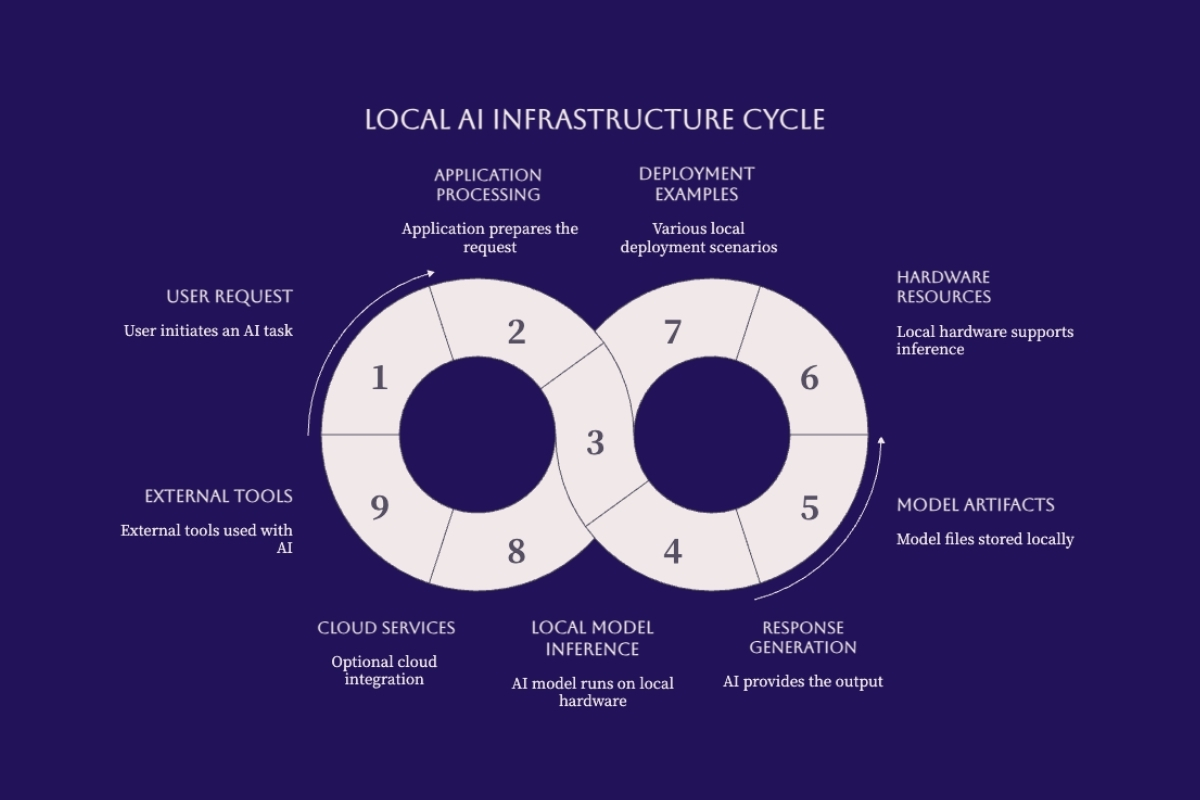
This overview groups system components and optional connections; the circular arrangement is not a request sequence.
Understanding Local AI
The useful question is not simply whether an application is installed locally. Ask where the model executes, where its inputs come from, and where its outputs go. An otherwise local workflow can still send data to an external embedding service, search tool, analytics endpoint, or cloud backup.
Hardware ownership is not the only relevant boundary. A dedicated server managed by your organization differs from a third-party model API, even when both are reached over a network. Describe the actual arrangement rather than relying on the word local to explain isolation, location, or administrative control.
| Term | What it describes | What it does not establish |
|---|---|---|
| On-device | Inference runs on the user's device. | That the application has no external connections. |
| Local | Inference runs on controlled devices or infrastructure. | That every workflow component is local. |
| Offline | The defined workflow operates without an external network connection. | That stored data and local access are protected. |
| Local-first | The design prefers local processing and storage where practical. | That remote fallbacks never occur. |
| Open-weight | Model weights are available under stated terms. | Unrestricted use or an open-source AI release. |
Read the model license before using or redistributing an artifact. Available weights do not by themselves establish access to the training code, data information, or freedoms associated with an open-source AI definition. Model licensing and deployment location are separate decisions.
Local vs Local-First AI
Running one model locally is a deployment choice. Local-first is a broader design preference covering inference, context, storage, and behavior when connectivity fails. A local-first assistant might answer from approved local documents and offer a remote route only when the user and organizational policy allow it.
Fallback behavior must be explicit. If a local model fails or lacks capacity, silently forwarding the prompt to a hosted service changes the data boundary. The application should identify the destination, check whether the data may leave, and provide a clear failure path when no approved route is available.
Example: an internal drafting assistant can summarize a public document locally and allow an approved cloud model for a harder editing task. A restricted document should remain on its permitted processing path even when that path is slower or temporarily unavailable.
Component Hierarchy
A language-model application combines several responsibilities. Model artifacts contain learned weights and supporting configuration. A runtime loads compatible artifacts and performs computation. An application handles the interface, context, state, and output. Hardware supplies memory, storage, and processing resources.
Agents and MCP are optional additions, not prerequisites for local inference. An agent adds a control loop and potentially tools. MCP supplies a standardized connection between an application and external capabilities. These are logical boundaries: one product can package several roles, and a workflow can mix local and remote components.
Keeping those responsibilities explicit helps teams decide what to build, reuse, and operate. Cognativ's AI software development services address the application engineering needed to turn model access into a defined business workflow.
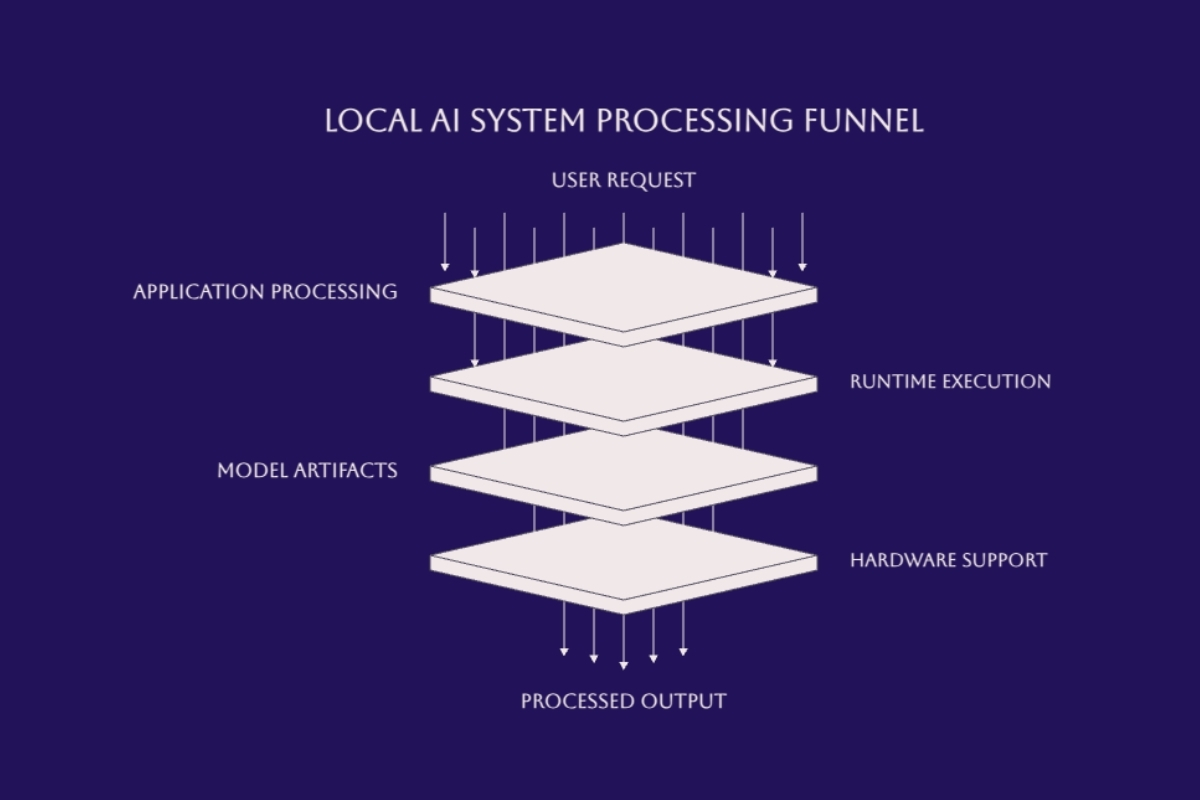
Read these as responsibility layers, not processing stages: the runtime loads model artifacts and uses hardware, then returns output through the application.
Local AI Models and Runtimes
A model and the software serving it are related but not interchangeable. Choosing a model without checking runtime compatibility can leave you with an artifact you cannot load. Choosing a runtime without evaluating the task can produce a working interface that gives unreliable answers.
Understanding Models vs Runtimes
A model's weights encode learned patterns; they are not a searchable database of verified facts. Language-model deployments also need supporting assets such as a tokenizer, configuration, and sometimes input processors. Formats vary. GGUF is common in parts of the local language-model ecosystem, but it is not the universal format for local AI.
A runtime executes supported model operations and manages resources. Quantization represents weights or other tensors at lower precision to reduce resource requirements, with possible quality and compatibility trade-offs. Some workflows load already-quantized artifacts; others support quantization during preparation or loading. Do not assume every runtime converts every model automatically.
| Software | Primary role | What to evaluate |
|---|---|---|
| Ollama | Model management and inference serving. | Supported models, API features, and local versus cloud selection. |
| llama.cpp | C/C++ inference tools with multiple hardware backends. | Model format, build, and hardware compatibility. |
| LM Studio | Desktop application for working with local language models. | Supported engines, application features, and serving options. |
| MLX | Array framework for machine learning on Apple silicon. | Compatible model tooling and the intended application workflow. |
| vLLM | Language-model inference and serving engine. | Supported hardware, model features, and concurrent workload behavior. |
| Transformers | Library for model loading, inference, and training workflows. | Framework dependencies, model implementation, and deployment needs. |
These products do not all operate at the same level of abstraction. A desktop application may wrap an inference engine, while a framework needs additional serving or application code. Switching between them can require format conversion, prompt-template changes, and new tests even when the underlying model family stays the same.
Ollama as a Local AI Platform
Ollama is software for managing and serving models, not a model itself. Its default local service uses a loopback address on port 11434. It also supports cloud features, so selecting a local endpoint does not prove that the chosen workload executes locally. The Ollama deployment FAQ explains local-only configuration and network settings.
Ollama supports parts of the OpenAI API. Applications must still check the exact endpoints, parameters, streaming behavior, and model capabilities they use. A successful basic chat request is not evidence that every feature of a hosted provider will work unchanged.
The local API does not require authentication by default. Keep initial experiments restricted to the local machine; shared access needs deliberate authentication, authorization, and network controls. Local model selection and network exposure are separate configuration decisions.
Choosing Local AI Models
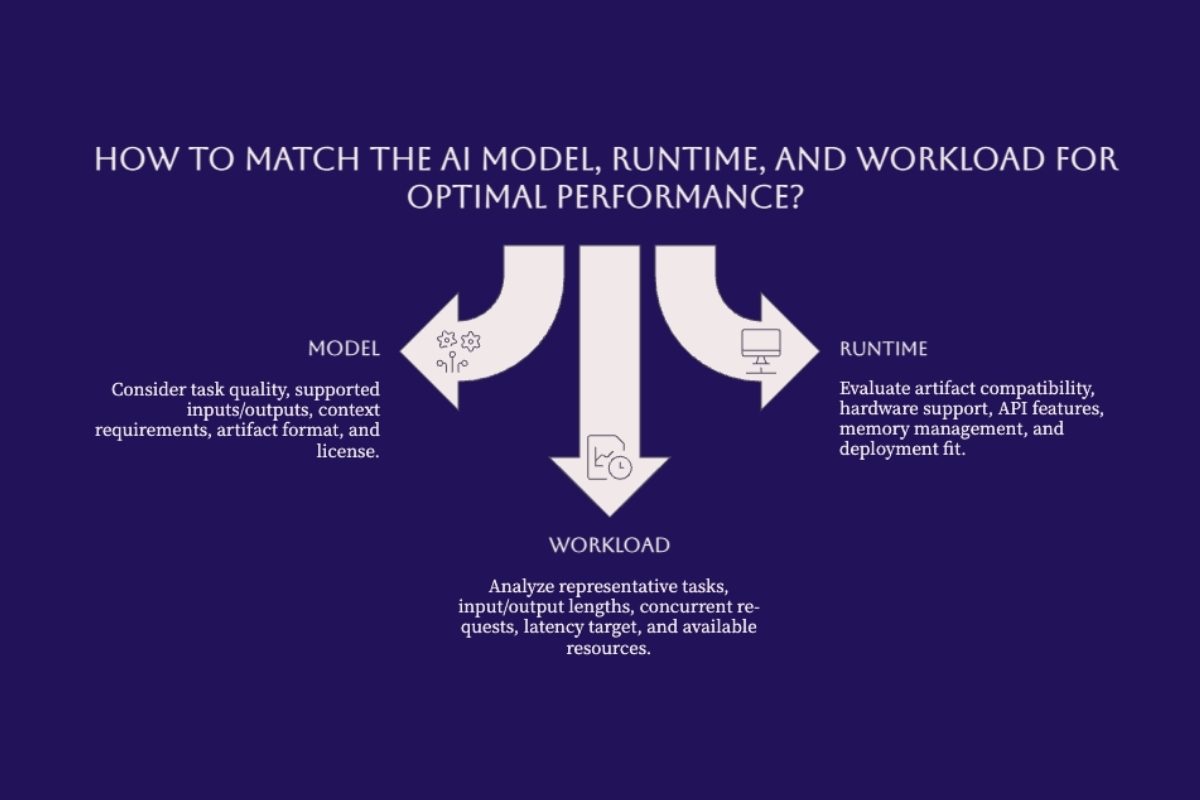
Start with the output you need: a faithful summary, a code suggestion, a classification, or an answer supported by a document. Select an artifact that supports the task and fits the intended runtime, then test it with representative inputs. Parameter count alone does not establish accuracy, reasoning quality, or suitability.
Quality: inspect correct answers, unsupported claims, formatting failures, and refusal behavior.
Capacity: include model weights, context cache, runtime buffers, concurrent requests, and the operating system.
Compatibility: check the artifact format, precision, supported inputs, and required runtime version.
Governance: record the source, license, artifact identity, and approved use.
There is no universal minimum RAM or storage figure for all local AI. Small classifiers and large multimodal models have very different requirements. Even within language models, the same weights can behave differently under short interactive requests and long concurrent conversations.
Example: a document classifier may only need a short label from a small input. A repository assistant may need substantial context and accurate code edits. A model that is sufficient for the first task is not automatically a sensible choice for the second.
Advanced Local AI Applications
Once basic inference works, add capabilities according to the problem. Missing document knowledge, inconsistent output behavior, and a need to perform actions are different requirements. They should not all be solved by adding an agent or selecting a larger model.
Local RAG Implementation
Retrieval-augmented generation supplies relevant external information when a model answers. A local RAG design keeps the required retrieval and inference components within the intended local boundary. The application still needs to verify that document parsing, embeddings, reranking, storage, and logging do not introduce an unintended external dependency.
A vector-based implementation has two paths. During indexing, approved documents are parsed into passages, embedded, and stored with source and permission metadata. During a question, the application retrieves authorized passages, assembles context, and asks the model for an answer. Keyword and hybrid search are also options; a vector database is not a requirement for every RAG system.
Example: an employee asks which travel policy applies to a trip. The system retrieves the current policy that employee may access, presents relevant passages to the model, and returns an answer with references. It should flag insufficient evidence rather than invent a policy. A citation is useful only when the cited material actually supports the answer.
RAG does not retrain model weights. Fine-tuning changes parameters or trained adapters to influence behavior or task performance. The local fine-tuning versus RAG decision guide explains when each approach addresses the problem and when combining them adds unnecessary complexity.
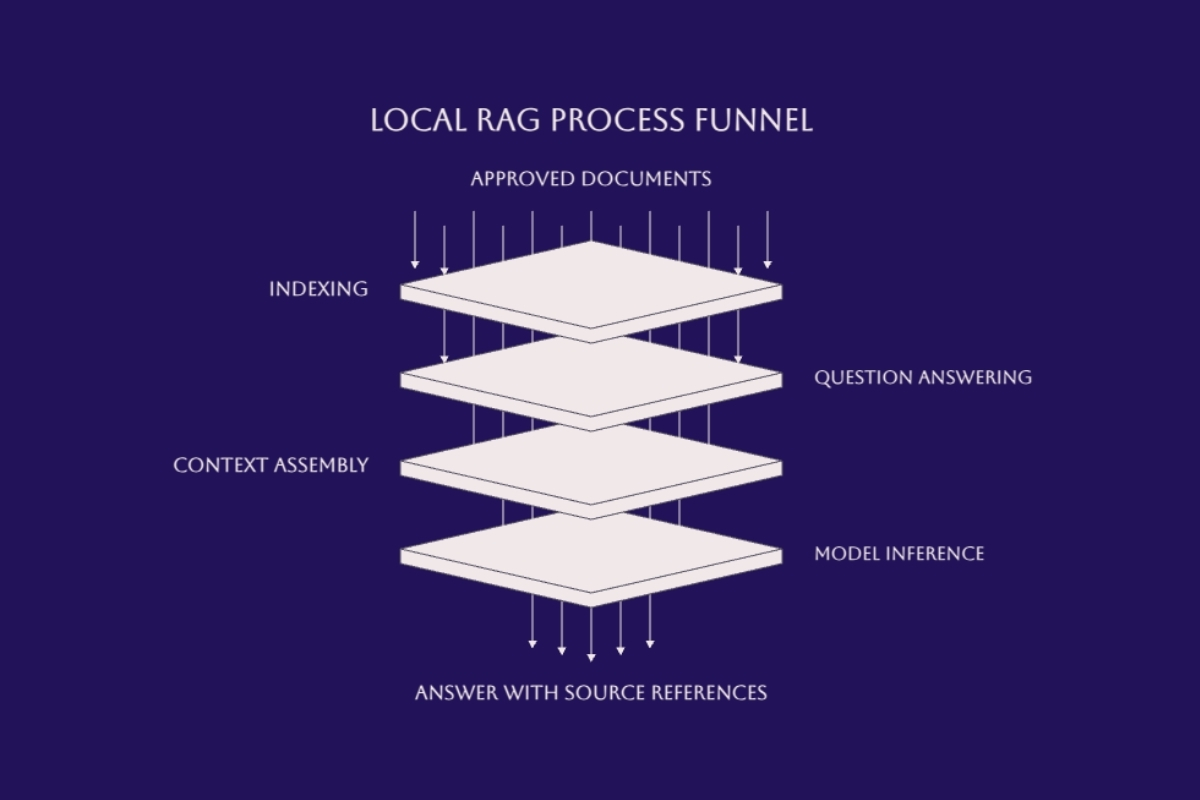
Indexing prepares the document collection. At question time, authorized retrieval and context assembly precede model inference; documents do not need to be reindexed for every answer.
Local AI Agents
An agent combines a model with application-managed state, instructions, tools, and a loop that evaluates what to do next. A basic chat interface generates a response; an agent may propose another action, inspect its result, and continue until a stopping condition is reached. Some tasks are better handled by a fixed workflow with fewer possible actions.
Example: a read-only support assistant can search approved incident notes and summarize likely causes. Creating a ticket or changing a production setting is a separate capability with different permissions and approval requirements. The model's request to perform an action is not permission to execute it.
Define maximum steps, time limits, allowed tools, and escalation behavior outside the prompt. Preserve enough evidence to understand a failed run without indiscriminately retaining sensitive inputs. A locally running model can still call a remote tool through its application, so the label local agent must not hide those data paths.
Model Context Protocol (MCP)
MCP standardizes how an AI application connects to capabilities provided by servers. The application acts as the host and manages MCP clients; servers expose tools, contextual resources, and reusable prompts. A server may run locally or remotely. The official MCP architecture overview describes these roles.
User <-> AI application / MCP host
                |
                +-> Local runtime + model
                |   Response or proposed action returns to host
                |
                +-> Permission and approval checks
                    -> MCP client <-> MCP server
                                      |
                                      +-> Approved data or tools
The host uses the model's output to decide what to request through a client. The model and runtime do not become MCP servers merely because they generate a tool call. Tool execution and access checks belong in application and server controls, not in a presumed direct connection from weights to business systems.
MCP reduces integration-specific work, but it does not grant permission to access data or make a tool safe. Cognativ's AI integration services for production workflows focus on connecting these capabilities with explicit business rules and operating responsibilities.
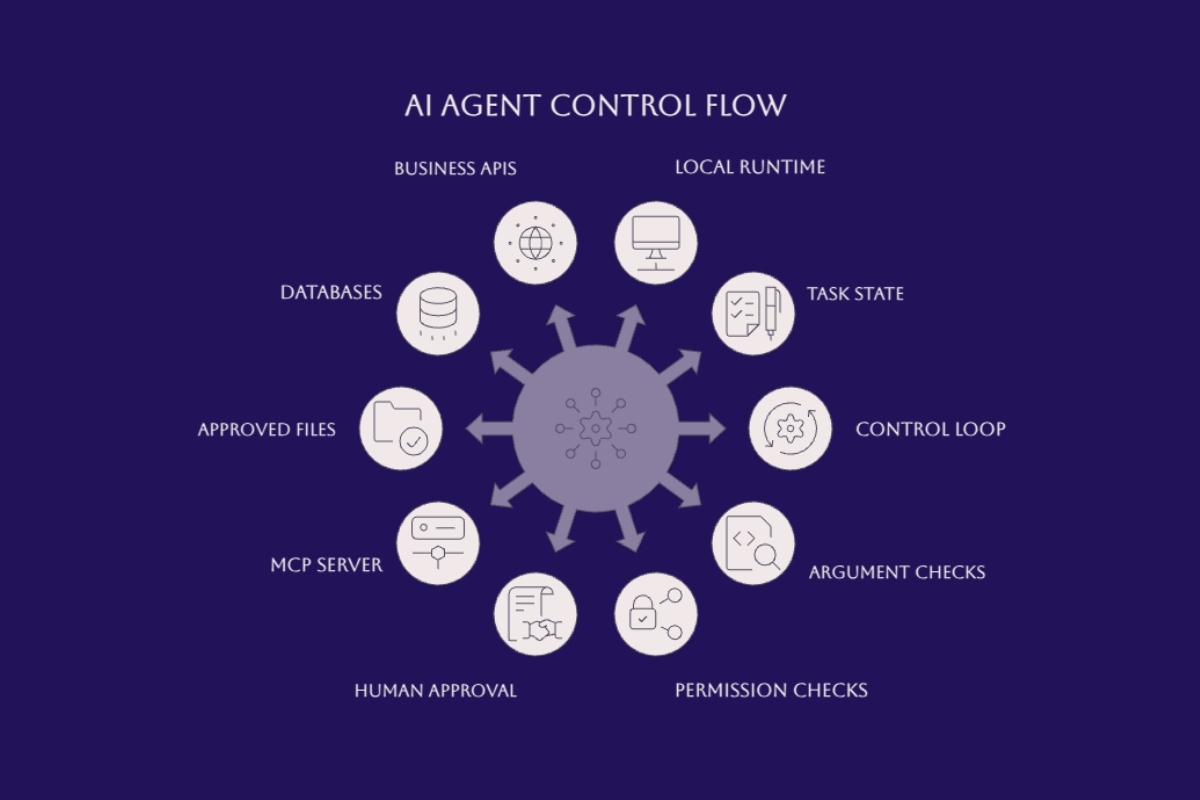
These are related capabilities and controls, not a fixed action sequence. The host, client, and server connections are shown in the text diagram above.
Common Challenges and Solutions
A local deployment moves responsibilities onto the people operating it. Capacity, access, updates, and recovery matter even when the initial installation is simple. The right response is a bounded pilot with measurable acceptance criteria, not a larger system chosen before the workload is understood.
Hardware and Resource Constraints
Model files occupy storage; execution consumes memory and compute. For transformer language models, retained context and simultaneous requests can add substantial cache requirements. A model loading successfully does not prove the machine can sustain the intended workload while leaving capacity for other applications.
Quantization may reduce memory use, but its quality and speed effects depend on the model, implementation, and hardware. The Transformers quantization overview documents the variety of methods and compatibility requirements rather than a single universally suitable format.
Mixture-of-Experts models activate selected experts for a token, which can reduce computation relative to activating every parameter. That does not mean memory planning can use only the active-parameter count. Account for the full artifact and the loading or offloading strategy actually used.
Measure startup delay, time to the first useful output, task completion time, memory pressure, and failures under representative concurrency. Repeat tests after model or runtime changes. A faster response is not an improvement when it fails the task more often.
Security and Access Control with MCP
Treat retrieved content and tool output as untrusted input. Instructions embedded in a document can try to redirect the model, but they must not change the application's authorization policy. Restrict each tool to the smallest useful set of operations and data.
Identity and permissions: enforce who may read a source or invoke an action on both application and service boundaries.
Human approval: present the actual proposed action and target before sensitive or irreversible changes.
Input validation: check arguments, paths, and allowed operations independently of model instructions.
Credentials: keep secrets outside model context and use narrowly scoped service access.
Evidence and recovery: log relevant decisions with appropriate retention and test failure handling.
Read-only access lowers some risks but can still expose confidential information. A tool annotation describing an operation as safe is not an enforcement mechanism. For implementation detail, the MCP server guide for local business AI agents covers the boundaries between host, client, server, and approved business operations.
Performance vs Cloud AI Trade-offs
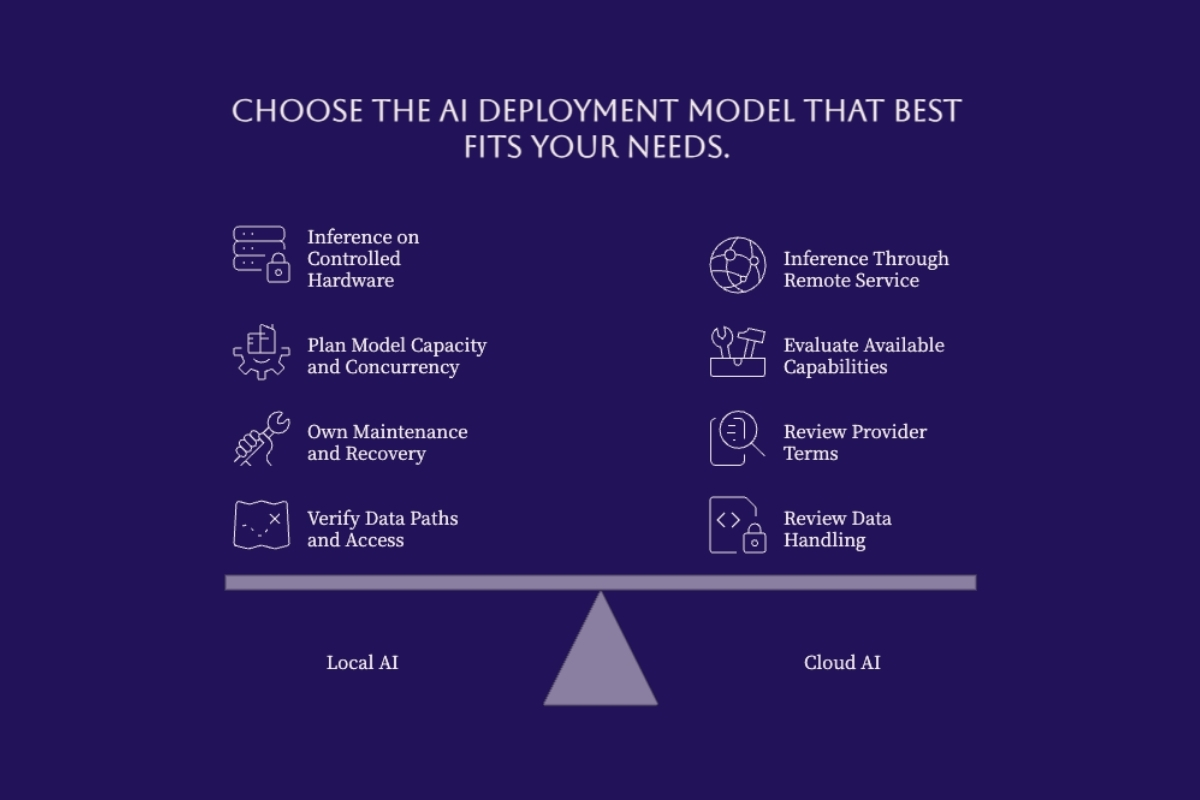
Local processing removes the network trip to a hosted model, but overall response time also includes queueing, input processing, generation, and application work. A remote service can still finish a demanding task sooner. Likewise, avoiding a per-request model bill does not eliminate hardware, electricity, administration, evaluation, or downtime costs.
| Approach | Potential fit | Decision test |
|---|---|---|
| Local | A bounded workload on controlled infrastructure. | Can the approved model meet quality and capacity targets with a named operating owner? |
| Cloud | Workloads suited to available hosted capabilities and service capacity. | Do provider terms, data handling, connectivity, limits, and total cost meet requirements? |
| Hybrid / local-first | Different tasks need different approved execution paths. | Can routing enforce data restrictions and handle unavailable destinations without silent fallback? |
A useful pilot records the task, approved inputs, acceptable answer quality, latency target, expected load, data boundary, and responsible operator. Test ordinary requests alongside missing context, unavailable services, denied access, and invalid outputs. Those results provide a stronger decision basis than a generic claim that one deployment style is best.
Conclusion and Next Steps
Local AI is a way to place inference under your control, not a single application or a guarantee about privacy. Models, runtimes, interfaces, retrieval, agents, and protocols have different responsibilities. Understanding those boundaries makes it easier to select a simple design and see where additional controls are needed.
Choose one task: define the input, expected output, and how success will be judged.
Review one compatible model and runtime: record licensing, artifacts, hardware requirements, and configuration.
Test the basic path: use approved nonsensitive examples before adding shared users or business data.
Add only necessary capabilities: retrieval for relevant evidence, tools for approved actions, and an agent loop only when the task benefits.
Assign operating ownership: define access, updates, monitoring, and recovery before routine use.
For teams moving from evaluation to a business deployment, talk with Cognativ about your local AI requirements. Start with the workload and its constraints, then choose the architecture that can meet them.