
How to Set Up Local AI Workers on Your Own Hardware
Setting up local AI workers means creating controlled processes that accept tasks, invoke local AI models with tools and system instructions, manage state, and return structured results, all on infrastructure you operate. This guide walks you through the progression from understanding local AI architecture to deploying multiple concurrent workers against a shared inference server.
This article covers worker architecture, runtime selection (Ollama, LM Studio, vLLM, and llama.cpp), implementation patterns, and scaling considerations. It is written for developers and enterprise teams that need secure, measurable custom AI agent development with more control over their infrastructure. It does not cover model training, hardware purchasing decisions, or video generation pipelines. The focus is execution: getting local AI workers running reliably.
Local AI workers combine a local inference server, optional task queues, system instructions, approved tools, and state management to perform bounded work with language models running on controlled infrastructure. Multiple workers can share the same inference server without requiring separate model copies or dedicated GPUs for every worker.
By the end of this guide, you will understand:
-
The difference between a model, a runtime, an inference server, and a worker
-
How to choose and configure a local AI runtime for worker integration
-
How to implement shared inference patterns where multiple workers call one model
-
How to configure task queues, concurrency, structured outputs, and tool permissions
-
How to manage worker state, security, and scaling for production use
Understanding Local AI Workers and Infrastructure
Before building workers, you need a clear picture of the complete local AI architecture, from user applications through task queues and workers down to model inference on your GPU or CPU.
What Are Local AI Workers
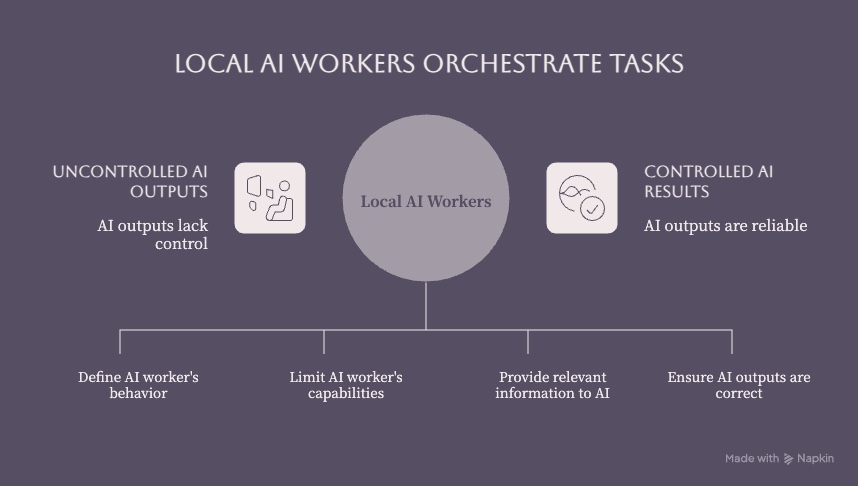
A local AI worker is a local process or service that accepts a task, invokes one or more local models and tools, and returns a result. Workers are not the same as running a prompt against a model. A worker wraps business logic around inference: it validates incoming tasks, loads relevant context or conversation history, constructs prompts with system instructions, calls the inference server, parses structured outputs, handles errors and retries, logs results, and optionally routes outputs for human approval.
Think of the distinction this way: running a model is like having a calculator. A worker is the accountant who knows which numbers to pull, which formulas to apply, and where to file the results. Workers add task orchestration, tool calling, state persistence, and domain-specific logic on top of raw model inference. Establishing clear roles for local AI workers aids in avoiding process overload and keeps each worker focused on a bounded set of responsibilities.
Local AI Architecture Components
The complete flow from application to generated output follows this path:
TASK QUEUE / APPLICATION
       ↓
     WORKER
  ├── SYSTEM INSTRUCTIONS
  ├── LOCAL MODEL (via inference server)
  ├── TOOLS
  ├── CONTEXT / STATE
  └── OUTPUT
       ↓
  RESULT / EVIDENCE
Here are the key terms and components in that chain:
-
Model weights: The trained parameters of large language models stored as model files in formats such as GGUF or safetensors. These files contain learned parameters but require a compatible runtime to perform inference.
-
Inference runtime: The software that loads model weights into memory and executes computations against them. Examples include Ollama, llama.cpp, vLLM, LM Studio, and Hugging Face Transformers.
-
Tokenizer: Converts text into tokens (numerical representations) that the model processes. Different AI models use different tokenization schemes; the runtime typically bundles the correct tokenizer with the model.
-
Context window: The maximum number of tokens (prompt + history + completion) a model can process in a single call. Larger context windows demand significantly more VRAM and system RAM.
-
Quantization: Reducing the precision of model weights, such as from FP16 to 4-bit, to lower memory and storage requirements. The actual reduction and quality trade-off depend on the model, quantization method, runtime, and workload. Labels such as Q4, Q6, and Q8 indicate different quantization levels.
-
CPU/GPU offloading and unified memory: When VRAM is insufficient, runtimes such as llama.cpp can distribute model layers across CPU and GPU resources. Unified-memory systems, including Apple Silicon Macs, make one memory pool available to both processors, although usable capacity and performance still depend on the model and workload.
-
Local API: An HTTP endpoint (typically OpenAI-compatible) exposed by the inference server so workers and applications can send prompts and receive responses over localhost or LAN.
-
Worker: The orchestration layer that receives tasks, manages instructions and tools, calls the local API, and handles outputs, errors, and state.
Workers vs Models vs Runtimes
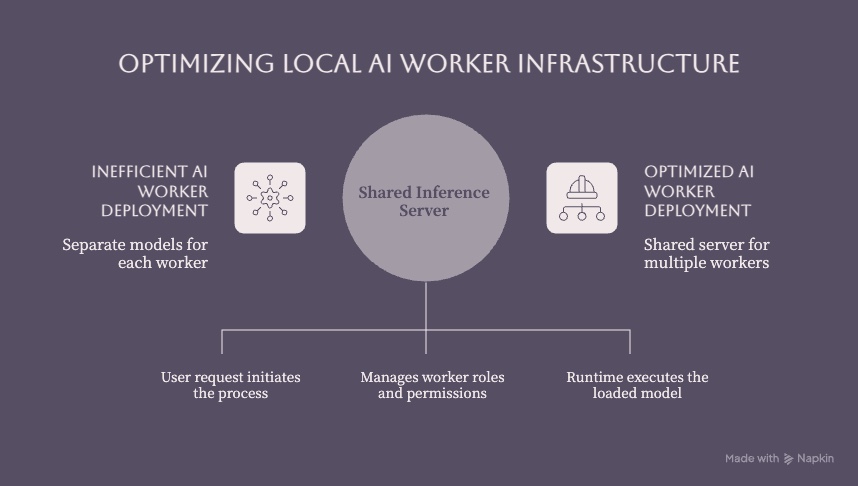
A critical architectural insight: multiple workers can share the same inference server without requiring separate model copies. This is the shared inference pattern:
WORKER A ─┐
WORKER B ─┼→ LOCAL AI SERVER → MODEL
WORKER C ─┘
In a shared model pattern, one inference server loads one model into GPU memory, and several workers send requests to it through the local API. This is memory-efficient and works well when workers perform different tasks (summarization, classification, extraction) but can all use the same base model. For enterprise workflows processing diverse tasks, this is typically the right starting point.
In a dedicated model pattern, separate inference server instances each load different models, perhaps a smaller model for fast classification and a larger model for complex tasks such as document analysis. This uses more memory but lets you match model capability to task requirements. You might run AI models locally with a smaller model for simple routing and a larger model for deeper analysis, each on its own server instance.
The choice depends on task diversity, latency requirements, and how much memory your hardware provides. Most teams should start with shared inference and split to dedicated servers only when workload profiling shows a clear need.
For broader enterprise planning, an AI-first architecture should define data boundaries, model access, integrations, ownership, and governance before worker deployment expands.
Choosing Your Local AI Runtime and Models
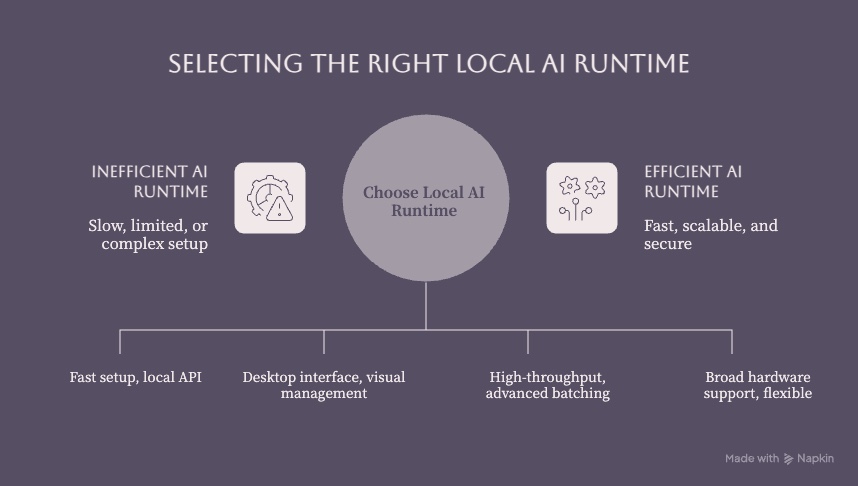
Runtime selection determines how your workers interact with local models, how much throughput you can achieve, and how much operational complexity you take on. Each runtime has distinct strengths for different worker deployment patterns.
Ollama for Simple Setup
Ollama simplifies running AI models with one command. The common integration pattern for workers looks like this:
APP / WORKER
     ↓
OLLAMA HTTP API
     ↓
LOCAL MODEL
     ↓
GPU / CPU
After installation, Ollama exposes a local API at http://localhost:11434/api that workers call to run inference. It handles model download and management: you select a model by name, and Ollama pulls the weights, loads them, and serves them. Ollama also provides official Python and JavaScript libraries for programmatic integration, making worker development straightforward.
Ollama works well for developers getting started with local AI and teams that need low friction. Its limitations appear at scale: batching and parallelism are less optimized than engines built specifically for throughput, and model switching between requests can incur loading delays. For small to medium concurrency with a few workers sharing one model, Ollama is a practical choice.
LM Studio for GUI Users
LM Studio offers a desktop app with visual model browsing and an integrated server mode. It can expose models through localhost or a local network using its REST API and OpenAI-compatible endpoints, and it supports headless operation via lms server start for server environments.
For worker integration, LM Studio provides REST endpoints and OpenAI-compatible routes. It supports stateful chat sessions and tool use through its API, which is valuable for workers that need to call external functions or APIs during task execution. Teams that prefer a GUI for browsing models while retaining programmatic access may find LM Studio suitable.
For multi-worker deployments across multiple machines, LM Studio can bind to 0.0.0.0 via lms server start --bind 0.0.0.0, allowing other devices on the network to reach the inference server. This requires careful attention to network security, a topic covered in the challenges section below.
vLLM for High-Throughput Scenarios
vLLM is a high-throughput, memory-efficient inference engine designed for multi-user serving and higher concurrency worker patterns. Its vllm serve command exposes an OpenAI-compatible HTTP server that supports tensor parallelism, pipeline parallelism, configurable GPU memory utilization, and advanced batching.
For enterprise workloads where multiple workers need to hit the same inference server simultaneously with constrained latency SLAs, vLLM provides the most control. A typical production command might look like:
vllm serve <MODEL_ID> --tensor-parallel-size 4 --gpu-memory-utilization 0.95This distributes model weights across four GPUs and maximizes VRAM usage. vLLM supports configuring --max-num-seqs to limit concurrent sequences, --max-model-len to cap context window sizes, and various quantization and dtype options. The trade-off is a steeper learning curve and more operational complexity compared to Ollama or LM Studio. Choose vLLM when your worker count and request volume justify the additional configuration effort.
Setting Up Your First Local AI Worker
With architecture and runtime concepts established, here is how to implement a working local AI worker from hardware preparation through worker deployment. A correctly configured local deployment can process approved workloads without sending inference requests to a hosted model API, although updates, model downloads, telemetry settings, and external tools must be assessed separately.
Hardware and System Preparation
Local AI workers can run on CPU-only, GPU-accelerated, or unified-memory systems, while the workers themselves are usually lightweight processes. The main constraint is the inference server: it needs enough available memory for model weights, the KV cache, runtime overhead, and concurrent requests.
Memory requirements vary significantly by model architecture, parameter count, precision, context length, runtime, and concurrency. A quantized model may fit within a few gigabytes, while a full-precision model or long-context workload can require substantially more. Use the model card and runtime documentation to estimate storage and memory, then leave operational headroom for the KV cache and parallel requests.
Large language model inference is often constrained by memory capacity and bandwidth as well as compute. These specifications matter when evaluating hardware. Apple Silicon systems can use unified memory across CPU and GPU resources, but practical performance still depends on the model, precision, context, and runtime.
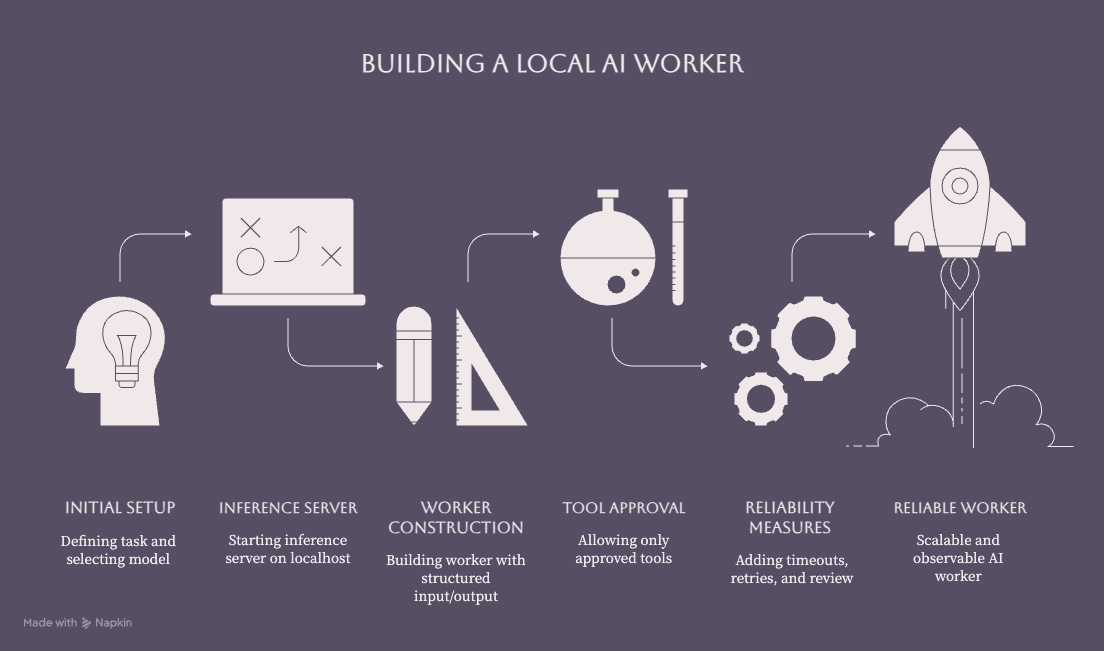
Follow these steps to prepare your system:
-
Verify hardware compatibility and memory allocation: Check your GPU's VRAM, system RAM, and storage space. Use the model card, runtime guidance, and a representative test to confirm that the selected model and quantization fit. CPU-only inference can be practical for some smaller or quantized models but is generally slower than suitable GPU acceleration.
-
Install runtime dependencies and GPU drivers: Follow the selected runtime's official installation instructions. For an NVIDIA GPU, verify the supported driver and CUDA requirements. For Apple Silicon, verify current macOS and Metal or MLX compatibility before building a runtime from source.
-
Configure network binding and firewall rules: Decide whether your inference server serves only localhost (127.0.0.1) or needs LAN access. Set firewall rules before starting any server.
-
Add queue infrastructure when needed: A first worker can receive tasks directly from an application. Introduce Redis, RabbitMQ, or another broker when asynchronous processing, prioritization, retries, or multiple worker instances justify the added operational component.
-
Test basic model loading and API connectivity: Start your chosen runtime, load a smaller model, and send a test prompt via the local API. Confirm you receive a structured response before building worker logic.
Installing and Configuring Runtimes
Choosing the right model and runtime combination is foundational. Smaller instruction-tuned models can balance capability with manageable memory requirements for bounded worker tasks. Model catalogs such as Hugging Face provide model cards, licenses, formats, and evaluation details that help teams compare options for their domain.
Quantization reduces model size and memory use, but the quality and performance trade-offs vary by method, model, runtime, and workload. For each model, check its model card and runtime documentation for supported quantization variants, then evaluate the target tasks before production use.
|
Runtime |
Ease of Setup |
Headless / Server Use |
Throughput & Concurrency |
Quantization Support |
Best Suited For |
|---|---|---|---|---|---|
|
Ollama |
Very easy; download models in one command |
Local HTTP API built in |
Moderate; good for small to medium scale |
Supports quantized models via llama.cpp backend |
Developers getting started; workflows needing low friction |
|
LM Studio |
GUI-centric; easy model switching |
lms server start for headless; REST/OpenAI endpoints |
Good for LAN/localhost concurrency |
Supports quantized model files through loaded models |
Teams preferring visual model management with API access |
|
vLLM |
More configuration; CLI/config driven |
Designed for server environments; multi-node support |
High throughput; optimized for multi-GPU |
Strong quantization and dtype options; tensor parallelism |
Enterprise workloads needing high concurrency and constrained latency |
|
llama.cpp |
Maximum control; direct GGUF use or conversion when required |
Common backend; often wrapped with API servers |
Less batch throughput; excellent on constrained hardware |
GGUF format; 2–8 bit quantization; CPU offloading |
Edge devices, modest hardware, privacy-sensitive setups, and CPU-only inference |
Choose based on your worker concurrency needs, technical expertise, and deployment environment. If you need to run AI models locally on modest hardware, Ollama or llama.cpp with quantized GGUF models can provide a practical starting point. If you need to serve larger models to many workers simultaneously, vLLM offers controls designed for higher-throughput workloads. Local inference can reduce hosted per-request charges, but total cost still includes hardware, electricity, engineering, maintenance, software licenses, and capacity limits.
Worker Implementation Patterns
A well-designed worker handles far more than prompt-in, text-out. Here is the architecture each worker should implement:
TASK QUEUE / APPLICATION
       ↓
     WORKER
  ├── SYSTEM INSTRUCTIONS (role, constraints, output format)
  ├── LOCAL MODEL (via shared inference server)
  ├── TOOLS (permitted integrations, APIs, functions)
  ├── CONTEXT / STATE (conversation history, task metadata)
  └── OUTPUT (structured JSON, validated results)
       ↓
  RESULT / EVIDENCE
Minimal Python Worker Example
Start with one bounded worker before adding tools, queues, persistent state, or autonomous actions. This example sends one task to Ollama, requests JSON output, applies a timeout, and validates the result before returning it. Replace <MODEL_NAME> with a model already available in your local Ollama installation.
import json
from urllib.error import URLError
from urllib.request import Request, urlopen

OLLAMA_URL = "http://127.0.0.1:11434/api/chat"
MODEL = "<MODEL_NAME>"

def run_worker(task: str) -> dict:
    payload = {
        "model": MODEL,
        "stream": False,
        "format": "json",
        "messages": [
            {
                "role": "system",
                "content": (
                    "Classify support requests. Return JSON with "
                    "category, priority, and needs_human_review. "
                    "Do not call tools or perform external actions."
                ),
            },
            {"role": "user", "content": task},
        ],
    }

    request = Request(
        OLLAMA_URL,
        data=json.dumps(payload).encode("utf-8"),
        headers={"Content-Type": "application/json"},
        method="POST",
    )

    try:
        with urlopen(request, timeout=60) as response:
            body = json.load(response)
        result = json.loads(body["message"]["content"])
    except (URLError, TimeoutError, KeyError, json.JSONDecodeError) as error:
        raise RuntimeError("Local AI worker failed") from error

    required = {"category", "priority", "needs_human_review"}
    if not required.issubset(result):
        raise ValueError("Worker returned an invalid result")

    return result

print(
    run_worker(
        "Customer cannot access the invoice dashboard after an SSO change."
    )
)
The worker remains intentionally limited: it has one role, no external tools, a fixed timeout, and a validated output contract. Production implementations should add authentication where supported, bounded retries, safe logging, concurrency controls, and human review for consequential actions.
System instructions define the worker's role, output format, and behavioral constraints. These are equivalent to system prompts but should be versioned and stored in configuration files. Using YAML/JSON files for configuration improves manageability of local AI projects and makes worker behavior reproducible.
Tool permissions control which external functions or APIs a worker can invoke during task processing. Treat local AI workers as untrusted programs; never grant a worker arbitrary command execution. Define an explicit allowlist of tools per worker role. Clear roles and workload boundaries keep each worker focused on limited capabilities.
Context and state management enables multi-turn reasoning. Workers load relevant history from a database or state store before constructing prompts, and persist results after completion. For agent-style workflows, state persistence across multiple steps is essential.
Structured outputs should be enforced through prompt engineering and schema validation. Instruct the model to return JSON conforming to a defined schema, then validate the output before passing it downstream. This makes worker results machine-readable and integrable with existing business workflows.
Concurrency and queues decouple task production from processing. A Redis or RabbitMQ queue sits between applications and workers, handling task prioritization, retry scheduling, and load distribution. Multiple workers pull from the same queue, each calling the shared inference server independently.
Retries and timeouts should be bounded and matched to specific failure types. Model inference calls can fail because of out-of-memory errors, context-length overflows, hardware contention, or malformed outputs. Workers should classify failures, retry only recoverable requests, route work to a preconfigured smaller model when appropriate, and escalate after a defined number of attempts. Set timeout caps aligned with acceptable latency.
Human approval workflows add a checkpoint for high-impact tasks. Workers can flag outputs that exceed confidence thresholds or involve sensitive domains (legal, compliance, financial) for human review before final delivery.
Logging and observability: Logging and metrics are important for debugging local AI workers. Record per-request latency, token counts, model versions, tool invocations, and error rates without exposing sensitive prompt content. Test prompt injection and unauthorized-action scenarios, and add unit tests for local tools so updates do not silently change expected behavior.
Common Challenges and Solutions
Scaling from running one model to operating production worker environments surfaces predictable issues. Here are the most common and how to address them.
Memory and Performance Issues
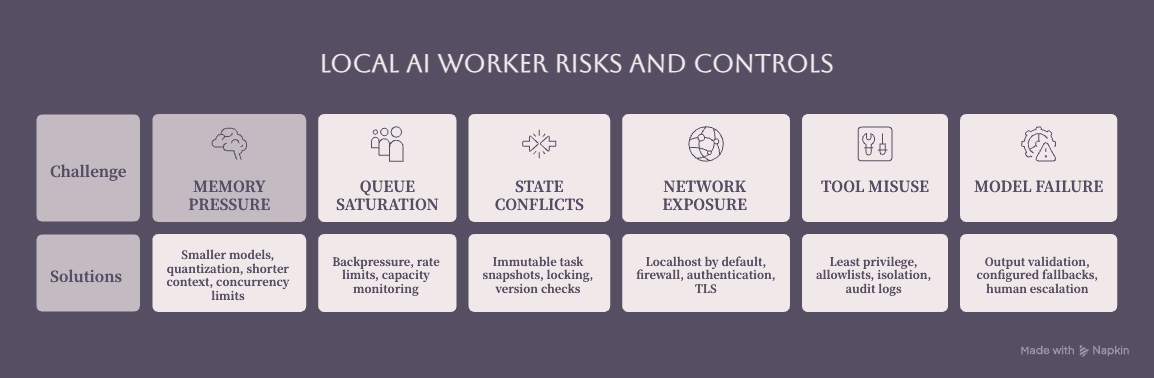
Choosing models for local AI worker tasks should start with verified memory fit. When a model does not fit, available options include selecting a smaller model, using a supported quantization, reducing context length, lowering concurrency, or distributing work across suitable hardware. Benchmark the target model and task because memory savings and output quality vary across quantization methods.
For shared inference servers supporting multiple workers, VRAM pressure increases with concurrent requests because each active request maintains its own KV cache. Configure your runtime to limit concurrent sequences, such as with --max-num-seqs in vLLM, to reduce out-of-memory failures. If your discrete GPU has limited VRAM, consider using a smaller model for high-frequency tasks and reserving larger models for complex tasks that justify the resource cost.
Context-window expansion can substantially increase memory usage. Be deliberate about configured context sizes and trim conversation history to what the worker genuinely needs.
Worker Concurrency and State Management
A shared inference server can become a bottleneck or single point of failure when multiple workers send concurrent requests. Solutions include running multiple inference server instances behind a load balancer, using vLLM's data parallelism features, or implementing request queueing at the worker level to smooth traffic spikes.
State conflicts arise when multiple workers reference the same conversation history or task state. If two workers simultaneously update the same state record, data can corrupt. Address this by designing workers to copy state per task (immutable snapshot pattern), or implement locking and versioning in your state store. For workflow automation, transactional state management prevents cascading failures.
Retry logic must be thoughtful: detect specific failure types (OOM versus timeout versus malformed output) and apply different recovery strategies. For OOM, retry with a shorter context or a more aggressively quantized model. For timeouts, check if the inference server is overloaded and back off. Set maximum retry counts and report persistent failures to monitoring systems rather than retrying indefinitely.
Networking and Security Considerations
Local inference can improve control over data flows when models, logs, tools, and dependencies are configured to remain within approved infrastructure. It does not guarantee privacy or security. Running a local API on 127.0.0.1 limits direct network access to the local machine. Binding to 0.0.0.0 or a LAN address allows other devices and workers to reach the inference server, but also increases exposure.
LM Studio explicitly warns that binding beyond 127.0.0.1 increases risk. If workers run on separate machines from the inference server, pair LAN binding with API authentication, firewall restrictions, network segmentation, TLS where appropriate, and monitoring. Review the authentication coverage of the selected runtime; a reverse proxy such as Nginx or Caddy may be one part of the control set, but it does not replace network and identity design.
Choose an isolation boundary that matches the threat model. Containers, virtual machines, restricted operating-system accounts, and application sandboxes can isolate dependencies and constrain resource, network, and filesystem access. Whichever mechanism you select, expose only the files and services the worker needs.
Tool permission boundaries require equal attention. If a worker can invoke filesystem operations, API calls, or database queries, restrict permissions to the minimum necessary. Apply secure development practices to tool allowlists, input validation, secrets handling, and audit logs. Never allow model output to trigger arbitrary commands without validation and an explicit control boundary.
Local AI models work fully offline without an internet connection once model weights, the runtime, and all required dependencies are installed locally. However, do not assume every local AI deployment is automatically offline: model discovery, downloading new models from Hugging Face, updates, or external tool calls may still require connectivity. Plan for which operations need an internet connection and which can function in offline access mode.
Conclusion and Next Steps
Local AI workers provide a practical path to controlled AI automation using infrastructure you operate. They can combine open-weight models with enterprise requirements for privacy, auditability, and cost governance. Running inference locally may reduce reliance on hosted model APIs and keep approved data flows within controlled environments, but teams still need to account for hardware, electricity, engineering, maintenance, licensing, security, and finite capacity.
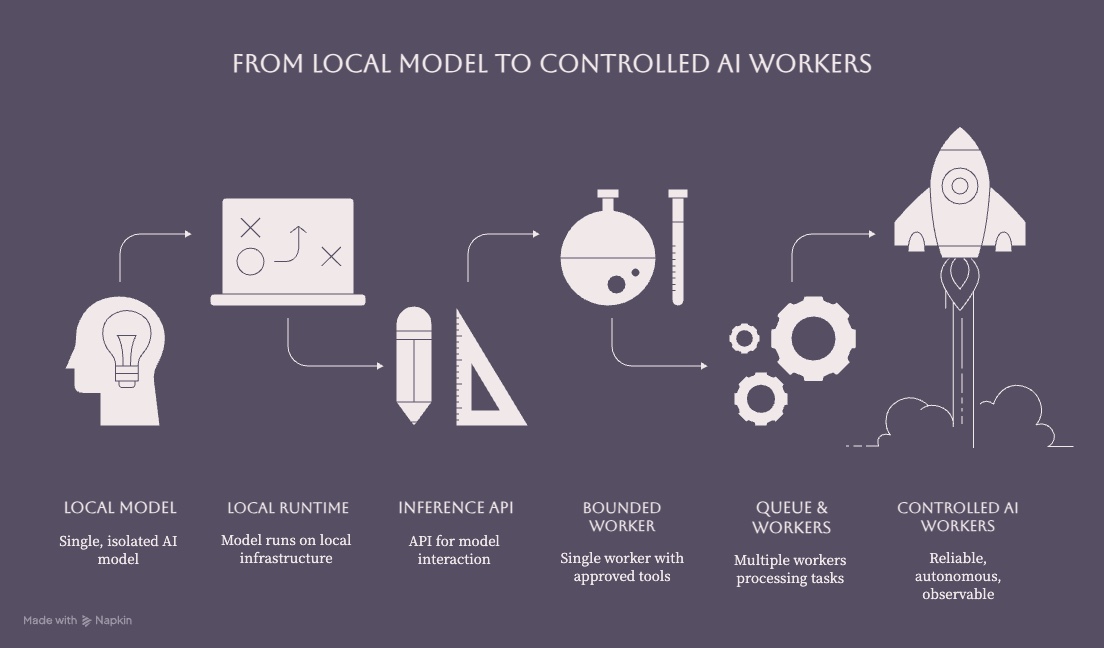
The progression you have learned follows a clear chain: model → runtime → local inference → API server → application → worker → multiple workers. Each layer adds capability without requiring you to duplicate the layers below it.
To get started immediately:
-
Choose a runtime based on your throughput needs and team expertise (Ollama for simplicity, vLLM for scale)
-
Set up a shared inference server with a quantized model that fits your VRAM budget
-
Implement your first worker with basic task handling, system instructions, and structured output validation
-
Add tool permissions and state management once the basic worker operates reliably
-
Scale to multiple workers with proper queue infrastructure, monitoring, and security controls
From here, explore advanced worker orchestration patterns, fine-tune models when task evidence supports it, and plan AI integration services around existing business workflows. As your deployment matures, invest in worker-level metrics, model-version tracking, controlled prompt logging, and review evidence to maintain reliability at scale.
Additional Resources
-
Ollama: Official documentation for API integration and model management
-
LM Studio: Developer documentation for REST APIs, authentication, and server configuration
-
vLLM: Official documentation for CLI usage and serving configuration
-
llama.cpp: Official repository for GGUF usage, quantization options, and CPU/GPU offloading
-
Worker frameworks: Local AI agents implementation guide for practical worker patterns
-
Hardware sizing: VRAM requirement calculators for estimating how much memory your model, context window, and worker count will demand
-
Security: Guidelines for local AI server deployment, API authentication, network binding, and tool permission management