
Ollama Architecture Diagram: How the Ollama Server Works
Follow one request through the Ollama server, from API and scheduler to GGML runners, then see how to deploy it on a workstation, team server or container.
An Ollama architecture diagram is easiest to read as three planes: a thin client, a long-running HTTP server that owns scheduling and model lifecycle, and runner processes that do the arithmetic on a CPU or GPU. Everything else in a local AI stack, from user accounts to document permissions, sits outside that box and belongs to the application you build around it.
This guide maps each component, follows one request from the moment it leaves a client until the last token streams back, and then shows how the same pieces are arranged in four deployment shapes: a single workstation, a shared team server, a container and an application backend with retrieval. Defaults are taken from the Ollama documentation as read in November 2026; they change between releases, so confirm them against your installed version before you size hardware or write runbooks.
Ollama Architecture at a Glance
Ollama is a client-server program distributed as a single binary. Running ollama serve, or launching the desktop app, starts a server process. The ollama command you type in a terminal is only a client: ollama run, ollama pull and ollama ps all send HTTP calls to that server rather than loading weights themselves.
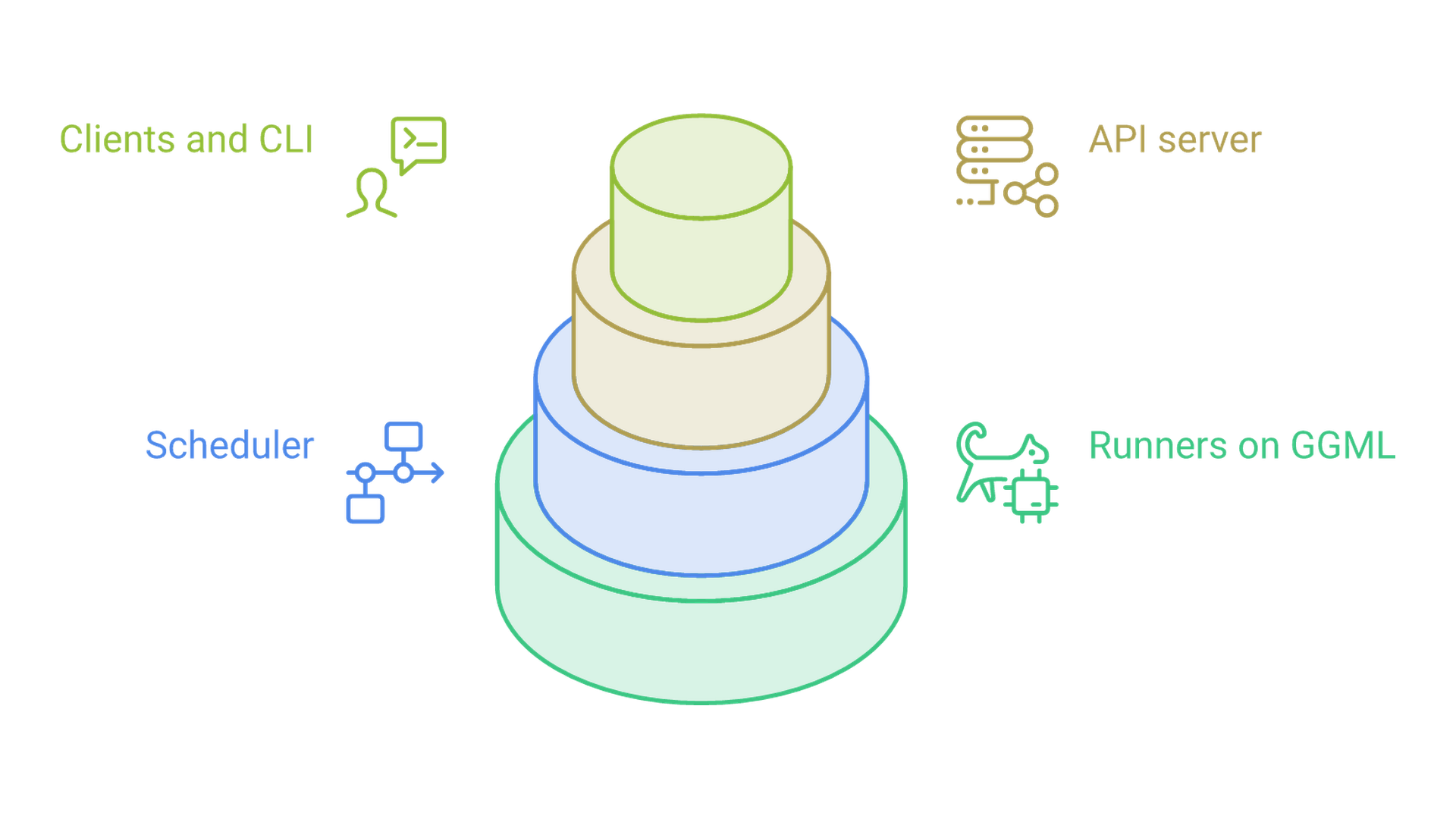
The four layers
- Clients. The CLI, the desktop app, SDKs, editors, chat front ends and any program that can send JSON over HTTP.
- API server. Written in Go, it listens on 127.0.0.1 port 11434 by default, validates requests, resolves model names and exposes both the native
/apiroutes and OpenAI-compatible/v1routes. - Scheduler. Decides whether a request can use a model that is already resident, must wait in a queue, or needs another model evicted to free memory before a load.
- Runners and backend. Each loaded model runs in a runner subprocess that evaluates the prompt and generates tokens through the GGML tensor library on CUDA, ROCm, Metal, Vulkan or the CPU.
Independent source walkthroughs describe the runner as a separate operating-system process that the server talks to over localhost. That isolation is the practical reason a crashed model load usually leaves the API server alive, and why memory returns to the system when a runner exits after its keep-alive timer expires.
Resources that are not steps
Two components appear on most diagrams without being stages in the request path. The model store on disk holds downloaded weights and metadata; GPU discovery reports which accelerators and how much memory exist at startup. Drawing them as side resources, rather than arrows in the sequence, avoids the common misreading that every request reads weights from disk.
How Ollama Works: Following One Request
A chat call to POST /api/chat names a model tag, a list of messages and optional generation settings. The path through the server has four hops.
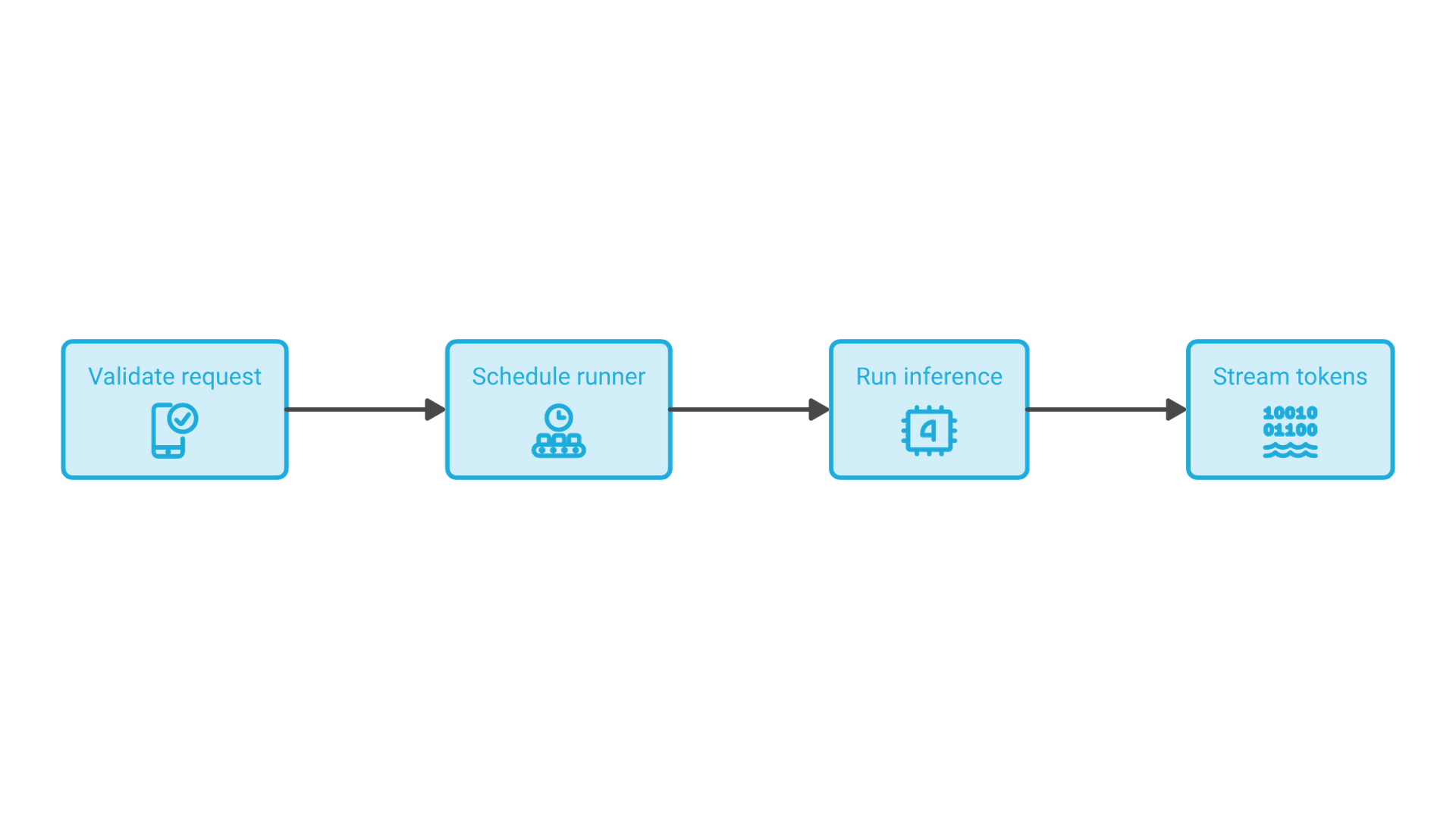
1. Validation and model resolution
The server parses the body, checks the endpoint contract and maps the tag to a manifest in the local store. A misspelled tag or a model that was never pulled returns an error immediately; no runner is touched.
2. Scheduling
The scheduler looks for a runner that already holds this model with compatible settings. If it finds one with a free slot, the request is attached to it. If all slots are busy, the request joins a pending queue. If the model is not loaded, the scheduler estimates the memory it needs, may unload an idle model to make room, and starts a new runner. A change in context length or other load-time options can force a reload even when the model name is identical.
3. Inference
The runner applies the model's chat template, evaluates the prompt tokens, fills the key-value cache and then generates output one token at a time. Layers that fit in GPU memory run on the accelerator; layers that do not can be placed on the CPU, which is slower but keeps the model usable.
4. Streaming the response
Native endpoints stream by default: the client receives a sequence of JSON objects and a final object marked done that carries counts and timings. Sending "stream": false returns one object instead. After the response, the model stays resident for the keep-alive window, five minutes by default, so the next call is warm. A request with keep_alive set to 0 unloads it right away.
The distinction between a cold and a warm call is the single most useful thing an Ollama server architecture diagram can show. A cold call pays for reading weights into memory before the first token; a warm call skips that cost entirely.
Model Store, Modelfile and the Inference Engine
How models are stored
Pulled models live as content-addressed blobs plus small manifests that point to them, an approach that lets related tags share layers on disk. The default directory is ~/.ollama/models on macOS, /usr/share/ollama/.ollama/models for the Linux service and C:\Users\%username%\.ollama\models on Windows; OLLAMA_MODELS relocates it, which matters when the system disk is small. GET /api/tags lists what is on disk, while GET /api/ps lists what is loaded right now, including how much of each model sits in VRAM and when it expires. Treat those as two separate questions in monitoring.
What a Modelfile controls
A Modelfile is the build recipe for a named model. FROM is required and can reference an existing tag, a GGUF file or a Safetensors directory for a supported architecture. Optional instructions such as PARAMETER, TEMPLATE, SYSTEM and MESSAGE fix sampling options, the prompt format, a default system prompt and seed conversation turns. ollama create turns the file into a new manifest in the store, so a team can version a tuned assistant without copying the weights.
llama.cpp, GGML and the newer engine
Ollama originally relied on the llama.cpp project for model support. In May 2025 the project announced its own engine built directly on the GGML tensor library, first to support vision models, with each model implementation kept self-contained so changes to one architecture do not ripple through shared code. Third-party code walkthroughs report that a llama.cpp-based runner remains for architectures the newer engine does not cover. For architecture purposes, the boundary is the same either way: Go handles HTTP and scheduling, and compiled tensor code does the math.
GPU detection
At startup the server inventories accelerators. The documentation lists NVIDIA cards with compute capability 5.0 or higher on recent drivers, AMD cards through ROCm v7, Apple silicon through Metal, and Vulkan as an additional path on Windows and Linux. CUDA_VISIBLE_DEVICES and ROCR_VISIBLE_DEVICES restrict which devices Ollama sees, and UUIDs are safer than numeric IDs because numbering can change.
Concurrency, Queueing and Memory Settings
Most surprises on a shared Ollama server come from scheduler defaults rather than from the model. The variables below are set in the server's environment, for example in a systemd override on Linux, and apply to every client.
| Setting | Documented default | What it governs |
|---|---|---|
| OLLAMA_HOST | 127.0.0.1:11434 | Bind address and port of the API server |
| OLLAMA_NUM_PARALLEL | 1 request per model | Simultaneous requests one loaded model serves |
| OLLAMA_MAX_LOADED_MODELS | 3 per GPU, or 3 on CPU | How many models may be resident at once |
| OLLAMA_MAX_QUEUE | 512 requests | Pending requests before the server returns 503 |
| OLLAMA_KEEP_ALIVE | 5 minutes | Idle time before a model is unloaded |
| OLLAMA_CONTEXT_LENGTH | 4k, 32k or 256k by VRAM tier | Default context window for loads |
| OLLAMA_KV_CACHE_TYPE | f16 | Precision of the key-value cache |
Two interactions deserve attention. Raising parallelism multiplies the context memory a runner reserves, because each slot needs its own cache, so a model that fits comfortably with one slot may spill to the CPU with four. Context length works the same way: the documentation sets the default by available VRAM, from 4,096 tokens under 24 GiB up to 256k at 48 GiB or more, and recommends at least 64,000 tokens for agents and coding tools. Quantizing the cache to q8_0 roughly halves its footprint compared with f16, at the cost of a small precision loss, and requires flash attention, which Ollama enables automatically where the hardware supports it.
Native API and OpenAI-Compatible Endpoints
The server exposes two request contracts on the same port. The native routes under /api cover generation, chat, embeddings and model management: /api/generate, /api/chat, /api/embed, /api/pull, /api/create, /api/show, /api/tags, /api/ps and /api/version, among others. They return Ollama-specific fields such as load and evaluation durations, which makes them the better choice for monitoring.
The compatibility routes under /v1 accept OpenAI-style calls, including chat completions, completions, models, embeddings and a non-stateful responses endpoint. Existing SDK code usually needs only a new base URL. Two caveats apply: compatibility covers a documented subset, so check streaming, structured output and tool-call behavior your code relies on; and the API key a client library insists on is ignored by a local server, so it is not an access control. Teams wiring a local model into CRMs, ticketing tools or internal portals often find that this AI integration work is where most of the engineering effort goes, because the model call is the easy part and error handling, retries and data mapping are not.
Ollama Server Deployment Architectures
The same four layers can be arranged in very different ways. Choosing among them is mostly a question of who is allowed to reach port 11434.
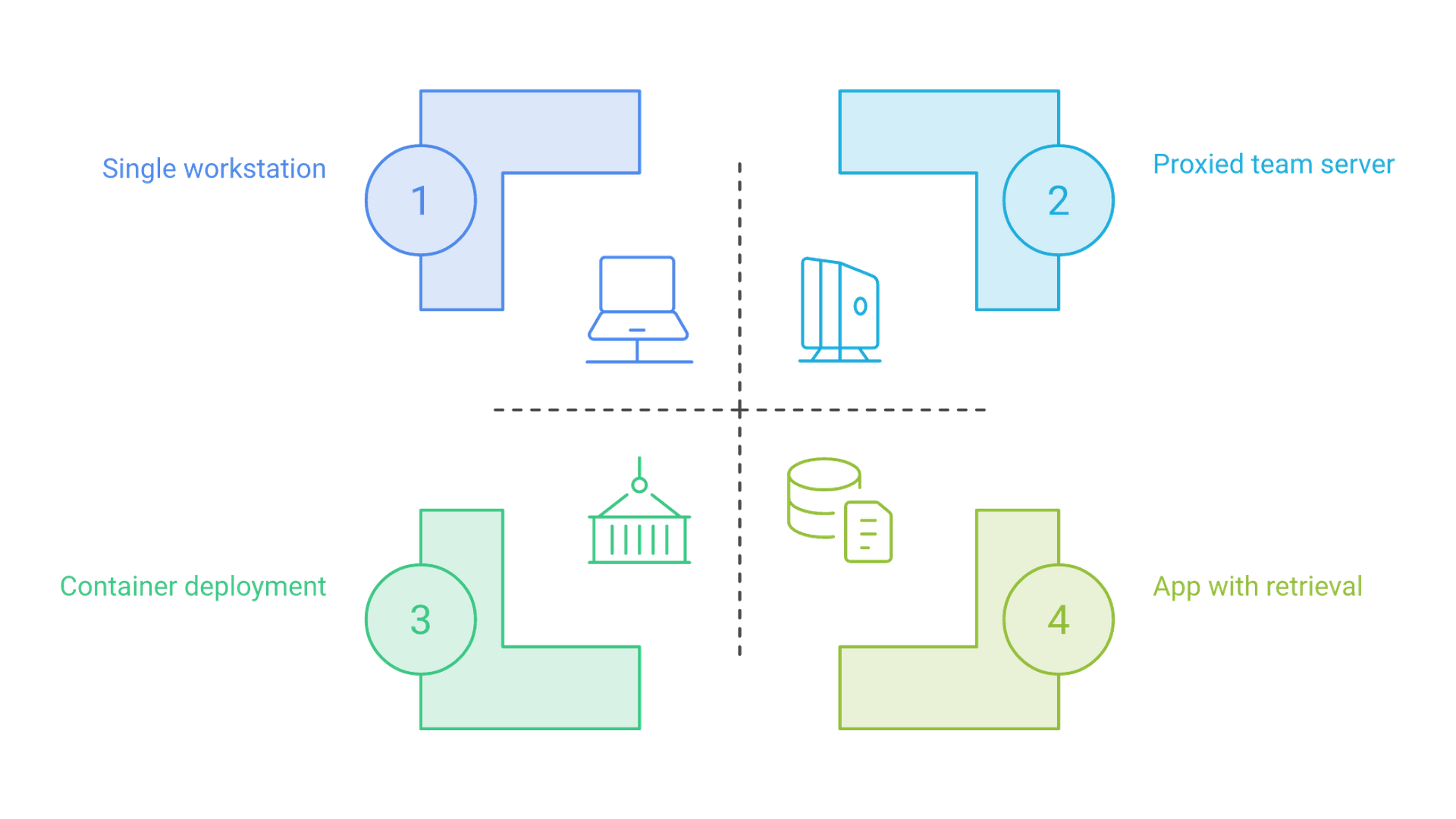
Single workstation
The default install binds to loopback, so only programs on the same machine can connect. For one developer with an editor plugin and a chat app, nothing more is needed.
Shared team server behind a reverse proxy
Setting OLLAMA_HOST=0.0.0.0 makes the server reachable from the network, and the local API has no authentication of its own. Cisco Talos researchers reported finding 1,139 publicly reachable Ollama servers through Shodan in September 2025, roughly a fifth of them actively hosting models. The safer pattern keeps Ollama on loopback or a private interface and puts a reverse proxy such as Nginx in front to terminate TLS, authenticate users, apply rate limits and log access. The Ollama FAQ notes that the proxy should forward to http://localhost:11434 and set the Host header to match.
Container deployment
The official image runs with a named volume mounted at /root/.ollama and port 11434 published; NVIDIA hosts need the NVIDIA Container Toolkit and the --gpus=all flag, and AMD hosts use the rocm image tag with the kernel devices passed through. Persist the volume, or every container restart re-downloads models. Kubernetes operators exist that split model storage from inference pods, which helps once several nodes share a model catalog.
Application backend with retrieval
In a retrieval-augmented setup, the application calls /api/embed to index documents, stores vectors in its own database, retrieves passages the user is permitted to see and sends them in the chat request. Ollama never sees the permission model; it receives text and returns text. Designing GPU hosts, networking, backups and monitoring around that split is the core of AI infrastructure planning for teams moving from a laptop prototype to a shared service.
Using the Diagram to Diagnose Problems
When something breaks, the diagram tells you which boundary to inspect first.
Read the timing fields correctly
The final response object reports total_duration, load_duration, prompt_eval_duration and eval_duration, all in nanoseconds, plus token counts. Generation speed is eval_count divided by eval_duration, multiplied by one billion. If eval_duration is zero or missing, report the rate as unavailable rather than dividing by total time. These fields describe the server only; user-visible latency also includes the proxy, queue wait, retrieval and network, so measure it at the client too.
Match symptoms to components
- Connection refused: the server process or bind address. Check that it is running and which interface
OLLAMA_HOSTnames. - Model not found: the store. Compare the exact tag against
/api/tags. - Slow first answer, fast later ones: a cold load. A large
load_durationconfirms it; a longer keep-alive or preloading fixes it. - HTTP 503 under load: the queue limit. Add parallel slots, capacity or client backoff.
- Sudden slowdown on a larger prompt: memory placement.
/api/psshows whether part of the model moved off the GPU. - Fluent but wrong answer: usually retrieval or prompt construction in the application, not the server.
Frequently Asked Questions
What is the architecture of Ollama?
Ollama is a client-server system. A Go HTTP server handles the API, model management and scheduling, and spawns runner processes that execute models through the GGML tensor library on the available CPU or GPU. The CLI and other apps are clients of that server.
What port does the Ollama server use?
By default it listens on 127.0.0.1 port 11434, so only the local machine can connect. The OLLAMA_HOST environment variable changes the address and port.
Is Ollama built on llama.cpp?
It began by relying on llama.cpp for model support. Since 2025 it has also run models on its own engine built directly on GGML, the tensor library that llama.cpp itself uses.
Can Ollama handle multiple requests at the same time?
Yes. Each loaded model serves one request at a time by default, more if OLLAMA_NUM_PARALLEL is raised, and extra requests wait in a queue of up to 512 before the server returns a 503 error. Several models can also be loaded at once if memory allows.
Does Ollama have authentication?
The local API does not require a key. To share a server, keep it on a private interface and add authentication, TLS and rate limits in a reverse proxy, gateway or VPN in front of it.
Where does Ollama store models?
In ~/.ollama/models on macOS, /usr/share/ollama/.ollama/models for the Linux service and the user's .ollama\models folder on Windows. Set OLLAMA_MODELS to move it.
Conclusion: Draw the Boundaries Before You Scale
The Ollama architecture is compact: a client, an API server with a scheduler, runner processes on GGML and a model store beside them. Its behavior under load follows from a handful of defaults, one request per model, a 512-request queue, a five-minute keep-alive and a context window set by available VRAM, and from one firm fact: the server does not authenticate callers or enforce document permissions. Put those boundaries on your diagram and most design decisions, from proxy placement to GPU sizing, become straightforward.
If you are turning a local Ollama prototype into a service your team depends on, talk with Cognativ about your local AI architecture.