


AI in Architecture: Generative Design, AI Tools for Architects and Practice in 2026
From generative design loops to fast energy estimates and BIM checks, see where AI fits each stage of architectural practice and what architects still own.
AI in architecture is no longer a speculative topic. Architects use machine learning, generative design and large language models to test site options, draft concept imagery, check building performance earlier and cut the hours spent on documentation. What has not changed is who is responsible for the building: the architect still signs the drawings, answers to the client and carries the professional liability.
This guide explains what artificial intelligence in architecture means, how it fits the design process, which AI tools for architects exist, how generative design, BIM and energy modeling connect, what recent adoption data says, and how firms implement AI safely.
What Is AI in Architecture?
AI in architecture is the use of software that learns from data, generates options or interprets language and images to support the design, analysis, documentation and operation of buildings. It is not one product. It is a family of techniques that show up at different stages of a project, often inside tools architects already use.
Three technique groups cover most of what firms encounter:
- Machine learning models that predict outcomes, such as a fast estimate of wind comfort, daylight or energy use for a massing option, trained on the results of slower physics simulations.
- Generative models, including image diffusion models and 3D shape generators, that turn text prompts, sketches or simple massing into concept images and variations.
- Language models that summarize briefs, search specifications and codes, draft reports and, increasingly, act as assistants that can query a building model.
Generative design and parametric design are older than the current wave of generative AI. Algorithmic tools such as Grasshopper, a graphical algorithm editor integrated with Rhino, have let designers script form for well over a decade. The difference in 2026 is that learned models now sit alongside those rule-based scripts, making some analyses near-instant and making image and text generation part of everyday early design.
How AI Works in the Architectural Design Process
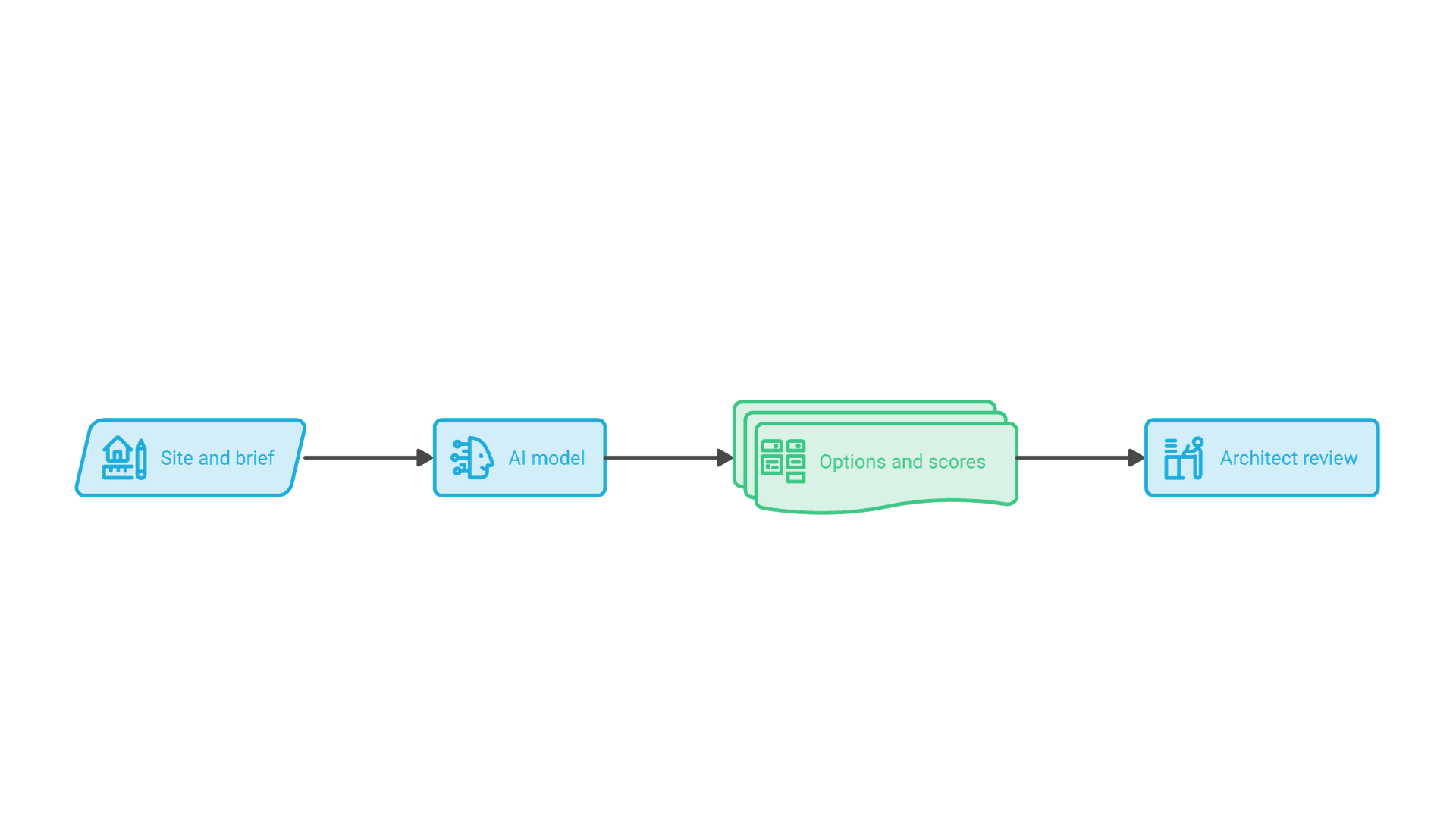
The clearest way to understand AI in the architectural design process is to follow the data. Every useful AI feature takes structured project inputs, runs a model, and returns something a designer must review.
Inputs: site, brief and constraints
Inputs include site geometry, climate files, zoning envelopes, program areas, budget targets and the firm's own past projects. A model fed an outdated zoning layer or an incomplete brief will produce confident but wrong options.
Models: rules, learned predictions and generation
Rule-based parametric scripts encode relationships the designer defines. Learned surrogate models approximate the outputs of detailed simulations so that each design change can be scored in seconds rather than hours. Generative image and language models produce new content from patterns in their training data, which is why their outputs need closer scrutiny.
Outputs: options, scores and drafts
The outputs are design options, performance scores, renderings and draft text. None of them is a decision. The architect weighs them against goals the model cannot see, such as the client's culture and the neighborhood's character, then selects, edits or discards.
Generative Design in Architecture
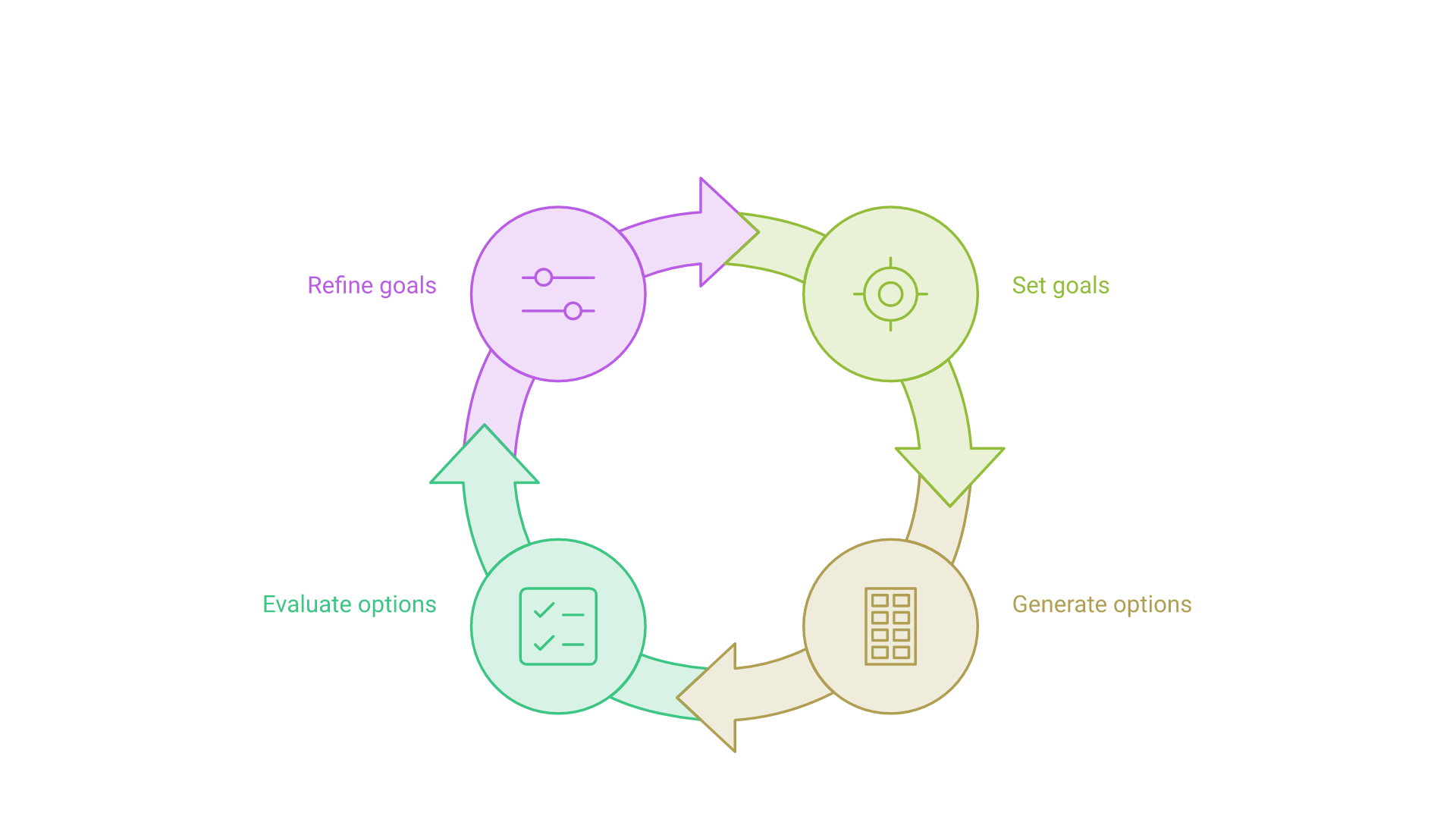
Generative design in architecture is a process in which the designer defines goals and constraints, software produces many candidate solutions, and each candidate is evaluated against measurable criteria. The designer then steers the search by adjusting goals, tightening constraints or picking promising families of options to refine.
How a generative design loop works
A typical loop starts by setting objectives, for example maximizing daylight in living spaces, keeping a target floor area and staying inside the zoning envelope. The software generates variations of massing, floor plates or layouts, evaluates each one, ranks them and presents the trade-offs. The designer reviews the strongest candidates, adjusts the goals and runs the loop again.
Parametric design versus AI-driven generation
Parametric design changes geometry through explicit rules the designer writes. AI-driven generation adds two things: learned models that score options faster, and generative models that propose forms or images without explicit rules. In practice the two are combined: scripts keep options buildable, while learned models speed up evaluation.
Where generative design pays off
Generative design is most useful where many variables interact and the goals can be measured: site massing for multifamily housing, unit mix and layout testing, facade panelization, and early sustainability studies. It is least useful where the deciding factors are qualitative, such as civic meaning.
AI Tools for Architects by Project Stage
Most AI tools for architects fit a few categories. Product names change quickly, so choose by workflow stage and by how well a tool exchanges data with your BIM environment.
| Project stage | Typical AI capability | What the architect still owns |
|---|---|---|
| Site analysis and feasibility | Massing options, fast wind, noise and sun studies | Choosing goals and validating results |
| Concept design | Text-to-image and sketch-to-render generation | Design intent and authorship |
| Schematic design | Layout and unit-mix generation, area checks | Program fit and code compliance |
| Performance analysis | Surrogate energy, daylight and carbon estimates | Detailed simulation for final decisions |
| Documentation | Model checking, clash detection, spec and report drafting | Accuracy of every issued document |
| Operations | Sensor-driven building management and fault detection | Occupant comfort and privacy policy |
BIM-connected tools
The most valuable tools read from and write back to the building information model. Open exchange through Industry Foundation Classes (IFC), the buildingSMART standard published as ISO 16739, reduces lock-in and lets analysis tools work across Revit, Archicad and other authoring platforms.
When off-the-shelf tools are not enough
Larger practices often find that commercial tools cover generic tasks but not their own standards, project archives or reporting formats. In those cases, firms build focused internal tools: a search assistant over past specifications, a model-checking script tied to house rules, or a pipeline that connects BIM data to cost and carbon dashboards. That kind of work is closer to product engineering than to plugin shopping, and custom AI software development is how teams turn a promising prototype into a tool staff can rely on.
AI, BIM and Energy Modeling for Sustainable Design
Sustainability is where AI in architecture has the most measurable leverage. The Global Status Report for Buildings and Construction 2024/2025, published by UNEP and GlobalABC in March 2025, attributes roughly a third of global energy use and CO2 emissions to buildings. Decisions taken in the first weeks of design, such as orientation, massing, window ratio and structural system, lock in much of a building's operational and embodied carbon.
Surrogate models for early energy and carbon checks
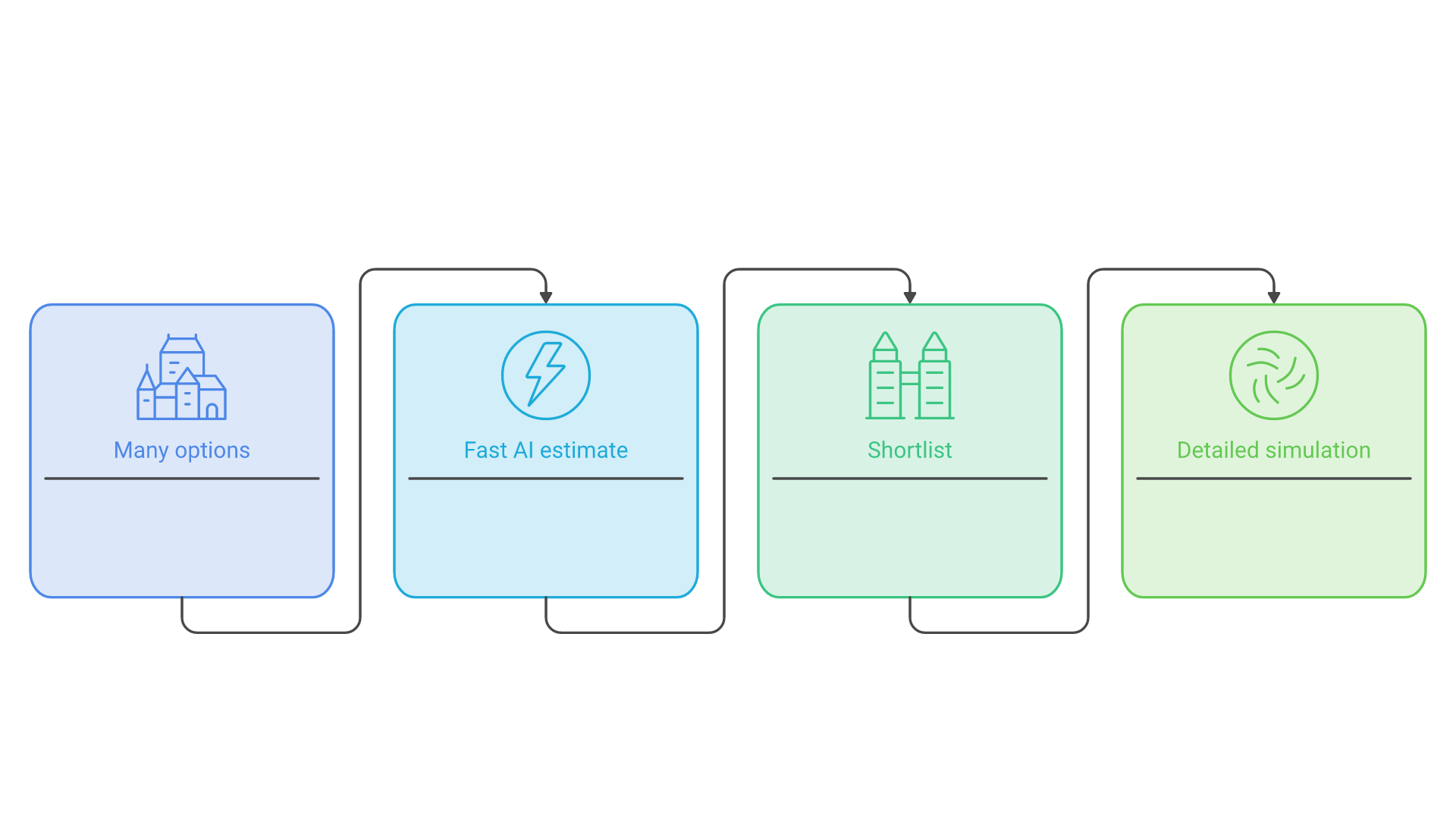
Detailed simulation engines such as EnergyPlus are too slow to run for every sketch. Machine learning surrogates are trained on thousands of simulation runs and then predict results for new options almost instantly. Peer-reviewed work, including a 2025 study in the journal Buildings that compared surrogates with EnergyPlus for early-stage energy and cost prediction, reports large speed gains with acceptable accuracy inside the range of the training data.
Know the limits of fast analysis
Surrogates are only reliable for the kinds of buildings and climates they were trained on. Vendors have adjusted features as a result; Autodesk, for example, retired a beta rapid operational energy analysis in Forma in 2024 while keeping faster wind and noise analyses tied to physics simulation. The sound practice is to use fast AI estimates to narrow options and then confirm the shortlisted design with a detailed simulation before it informs a permit set or a client commitment.
AI Adoption in Architecture: Where the Profession Stands in 2026
Adoption is rising but uneven, and survey results depend on how questions are framed. Two professional bodies offer the most cited data.
The Royal Institute of British Architects reported in June 2025 that the share of UK practices using AI rose from 41% in 2024 to 59% in 2025. In the same survey, 65% of respondents expected AI to help the sector meet net-zero targets, while 67% worried that AI would increase the risk of their work being imitated and 44% were concerned it could let people without sufficient professional knowledge design buildings.
In the United States, the American Institute of Architects published Artificial Intelligence Adoption in Architecture Firms: Opportunities and Risks in March 2025. It found that only 6% of architecture professionals used AI regularly in their jobs and 8% of firms had implemented AI solutions, with another 20% working toward it. Chatbots, image generators and text tools were the most common, and 84% of respondents were optimistic about AI automating manual tasks.
The gap is largely one of definition: occasional experimentation is widespread, while integration into standard workflows remains limited. As of November 2026, the sensible posture is to experiment broadly, integrate narrowly and govern carefully.
How to Implement AI in an Architecture Practice
Firms that get value from AI treat it as a change in how work is done, not a software purchase.
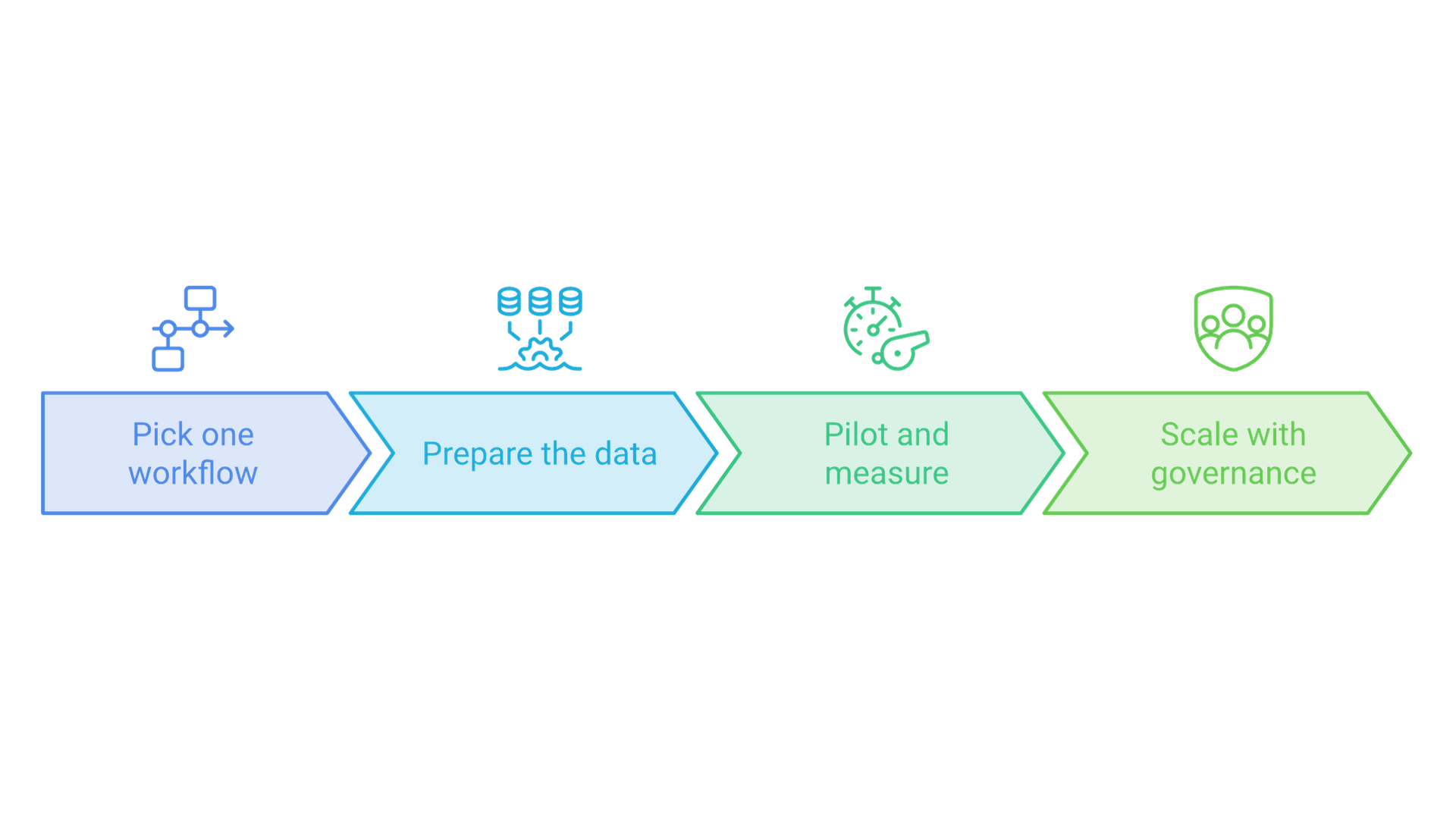
Start with a workflow, not a tool
Pick one repeatable task with a clear cost, such as feasibility massing, door and room schedules, or specification review. Document the current steps and the time they take, so you can tell whether the AI-assisted version is genuinely better.
Prepare the data
Clean BIM standards, consistent naming and an accessible project archive matter more than the choice of model. Decide which project data may be used with which tools, especially when client confidentiality agreements restrict uploads to third-party services.
Pilot, measure and set review rules
Run a bounded pilot on live but low-risk work, measure hours and error rates, and define who reviews AI outputs before they leave the studio. Decide when AI use is disclosed to clients.
Scale with governance and training
Expand only the use cases that proved their value, train staff on both the tools and their failure modes, and keep a register of approved tools and data rules. Firms weighing several use cases at once benefit from an explicit AI strategy that ranks use cases by value and risk before committing budget to platforms or custom builds.
Mistakes to Avoid and Risks to Manage
The risks of AI in architecture are practical, and most can be managed with clear rules.
- Treating generated output as design. Concept images can imply details that are not feasible. Treat them as mood references.
- Trusting fast analysis outside its range. Surrogate predictions degrade on unusual geometry, climates or building types. Confirm decisions with detailed simulation.
- Ignoring authorship and copyright. The US Copyright Office concluded in January 2025 that prompts alone do not make AI output copyrightable; protection depends on sufficient human creative control, arrangement or modification. Record the human contribution.
- Leaking client data. Uploading drawings or briefs to consumer AI tools can breach confidentiality. Approve tools and data flows in advance.
- Skipping code review. AI can help search codes and flag issues, but code compliance remains the licensed professional's responsibility.
Frameworks such as the NIST AI Risk Management Framework give firms a neutral structure for mapping these risks, assigning owners and reviewing tools on a schedule, without requiring a large compliance team.
Frequently Asked Questions
How is AI used in architecture?
Architects use AI for site and massing studies, concept image generation, layout testing, fast energy, daylight and wind estimates, model checking, and drafting specifications and reports. In operations, AI supports building management systems that adjust heating, cooling and lighting from sensor data.
Will AI replace architects?
Current evidence points to AI changing tasks rather than replacing the profession. AI automates repetitive drafting, analysis and documentation, but architects remain responsible for design judgment, client relationships, code compliance and professional liability, none of which current tools can assume.
What are the best AI tools for architects?
The best tool depends on the stage and your BIM platform. Common categories are site and massing tools, text-to-image and sketch-to-render generators, layout generators, performance analysis tools, and model-checking or documentation assistants. Favor tools that exchange data through IFC or your authoring platform's API.
What is generative design in architecture?
Generative design is a process where the designer sets goals and constraints, software generates many candidate solutions, and each is scored against measurable criteria such as daylight, area or carbon. The designer reviews the trade-offs and refines the goals to steer the next round.
Can AI-generated architectural designs be copyrighted?
In the United States, the Copyright Office has said that prompts alone are not enough. Copyright can protect the human-authored parts of a work, including creative selection, arrangement or modification of AI output. Firms should document the human contribution to their designs.
How do architects start using AI?
Pick one repeatable workflow, clean the underlying project data, run a measured pilot on low-risk work and set review rules before scaling.
Conclusion: AI as a Design Partner, Not a Replacement
AI in architecture works best as a fast, tireless partner for the parts of design that can be measured and repeated: exploring options, estimating performance and producing first drafts. Adoption data shows the profession moving from experiments toward selective integration. The firms that benefit most pair those tools with clean data, careful review and a clear view of where human judgment must lead.
If you are deciding where AI fits in your design workflows, data or internal tools, talk to Cognativ about your AI project.