


Mastering Local AI Models: Your Guide to Seamless Implementation
One model on one laptop is easy; a local AI service for a whole team is not. See the roadmap, runtimes and checks that turn a pilot into a dependable rollout.
For years, most organizations accessed artificial intelligence through cloud services, relying on remote servers to handle training and inference. That is changing. Open-weight models have become capable enough, and inference runtimes mature enough, that many teams now run AI models locally on hardware they operate: a developer workstation, a shared GPU server in their own data center, or a device at the edge.
Getting one model to answer a prompt on one laptop is the easy part. Implementing local AI models across an organization is a different job. Someone has to decide which model to trust with which task, how people and applications will reach it, how to prove its answers are good enough, and who keeps it patched, monitored and within policy once it is live.
This guide is written for that second job. It covers the benefits and limits of local AI, a step-by-step implementation roadmap, how to choose models and licenses, the popular local LLM tools and serving runtimes in 2026, common deployment patterns, how to evaluate a model before rollout, and what it takes to operate local inference in production.
Benefits of Local AI Models
Running AI models locally gives an organization more control over data, cost structure and model behavior than a pure API approach. Each benefit comes with a condition, and implementation succeeds when those conditions are understood up front.
1. Privacy and Security
When inference runs on infrastructure you operate, prompts and documents do not have to travel to a third-party model provider. That is why local models appeal to teams handling health records, financial data, legal files or unreleased product information. Ollama's documentation, for example, states that the project does not see prompts or data when models run locally.
Local execution is not automatically private, though. Logs, retrieval indexes, connected tools, backups and the people who can reach the server all remain part of the data path. Privacy by design still has to be designed.
2. Cost Savings
Cloud AI costs can add up quickly when usage is high and steady. Running models locally replaces per-token charges with hardware, power, maintenance and staff time. For heavy, predictable workloads that trade can pay off; for light or bursty usage, a hosted API may still be cheaper. The honest comparison is cost per accepted task, not cost per download.
3. Full Control
When you own the stack, you also own the process. You decide which model version is in service, when it changes and how it is configured. You can apply quantization to fit larger models into available memory, offload layers to a GPU, pin a model for an audit period, or run smaller models for routine work and larger ones for harder tasks.
4. Versatility
Local AI is not limited to one type of application. The same infrastructure can generate and summarize text, power semantic search over internal documents, classify tickets, assist developers with code and feed retrieval-augmented applications, while sensitive workloads stay inside a controlled environment.
When Local AI Models Are the Right Choice
Not every workload belongs on local hardware. Before committing budget, check the use case against a few practical questions.
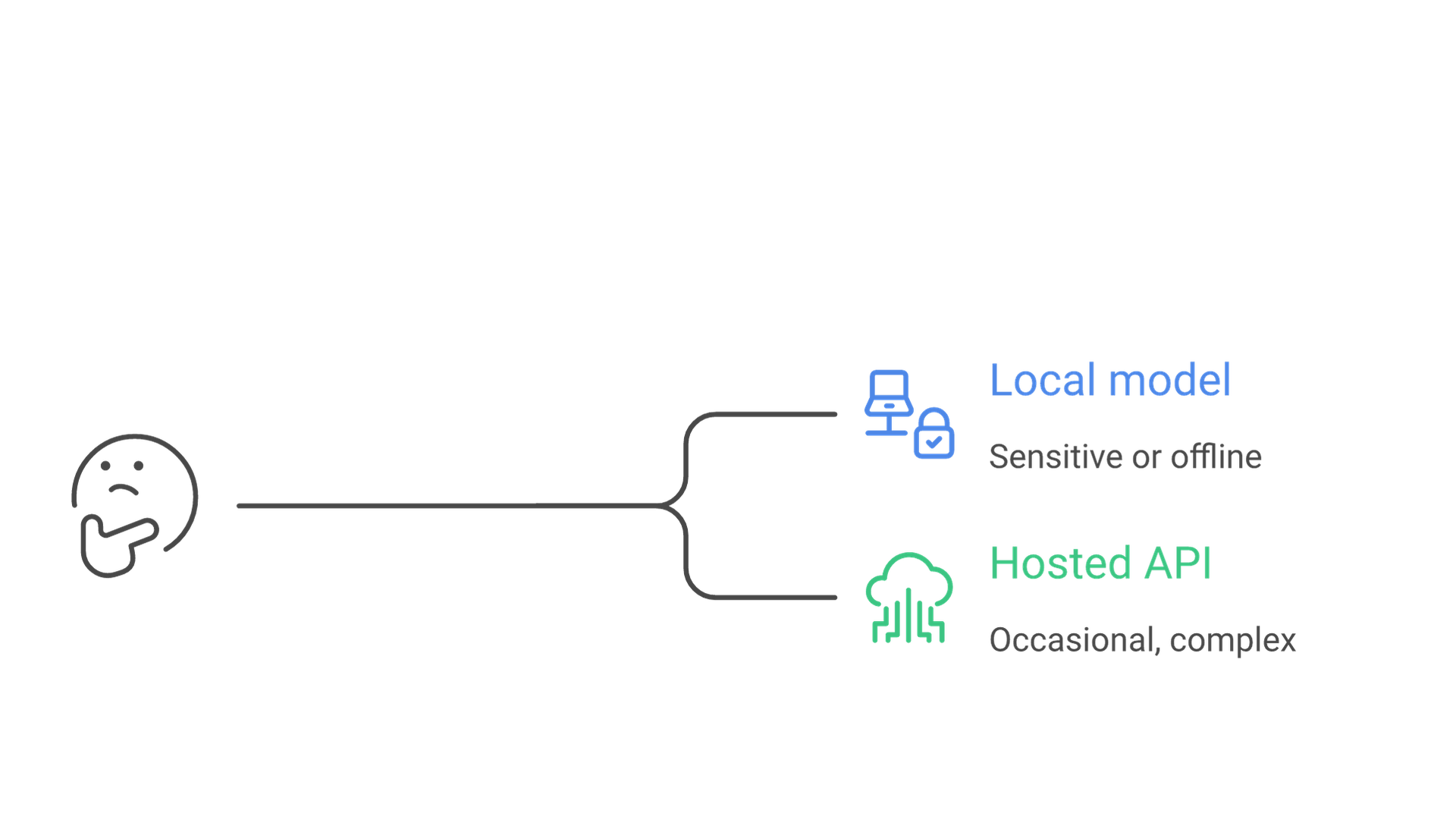
Local deployment is usually a strong fit when the data is sensitive or regulated, when the system must work offline or in an isolated network, when usage is high enough that per-token pricing becomes significant, or when the organization needs to freeze a model version for reproducibility. It is weaker when the task needs frontier-level reasoning, usage is occasional, or nobody can own hardware, updates and security.
Many organizations land on a hybrid answer: sensitive or high-volume tasks stay local, while rare, complex requests go to a hosted model under a reviewed data agreement. If you are still weighing the basic trade-offs, our explainer on what a local LLM is and how deployment, privacy and cost compare covers the fundamentals before you plan a rollout.
Getting Started with AI Models: An Implementation Roadmap
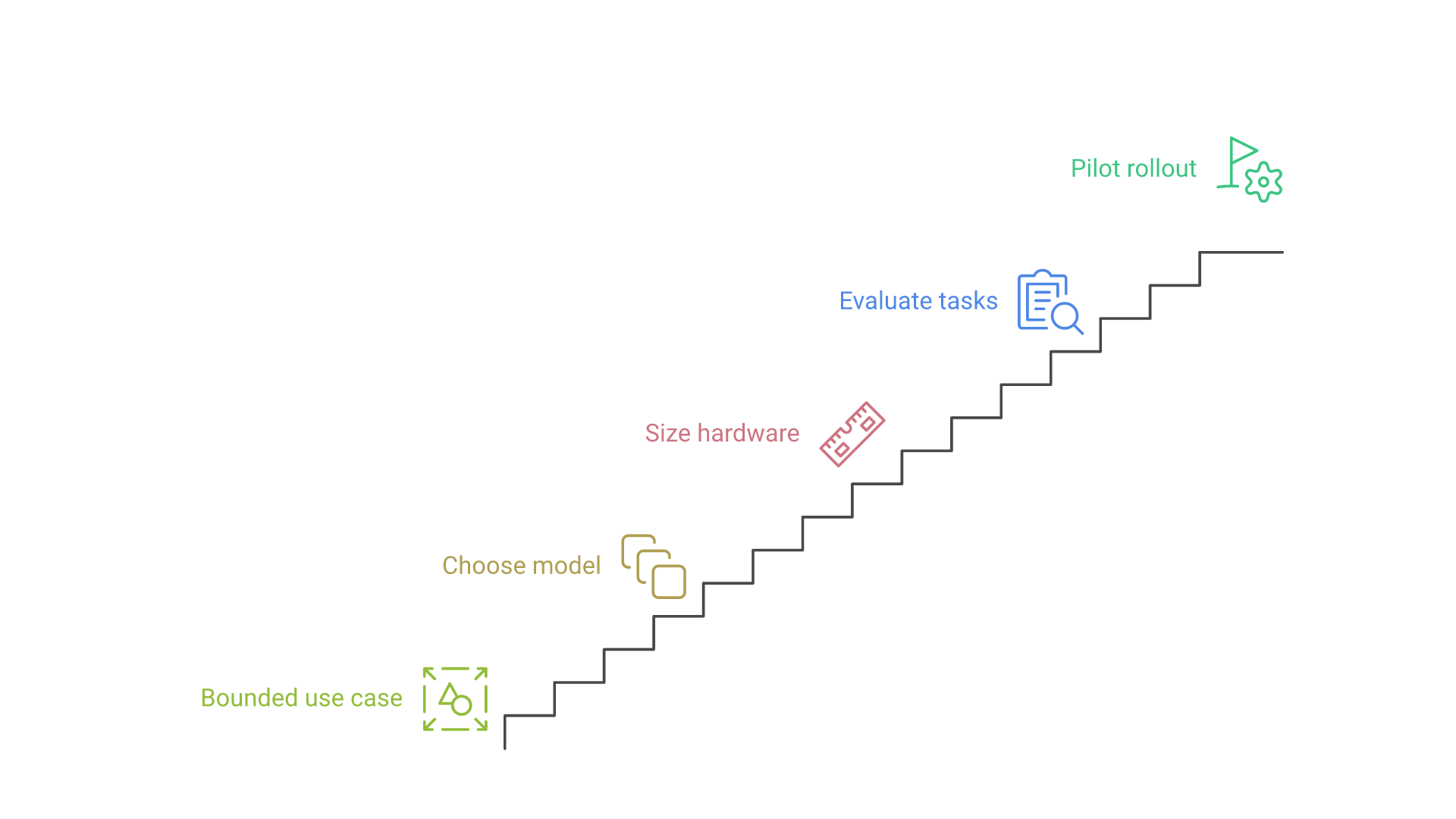
If your organization is new to running AI models locally, the process can feel daunting. Breaking it into five steps keeps the first project small enough to finish and specific enough to evaluate.
Step 1: Pick a Bounded Use Case
Start with one task that has clear inputs, an owner and a way to judge the output, such as summarizing internal procedures or answering questions over a defined document set. Write down who will use it, what a good answer looks like and what the system must never do. A narrow pilot produces evidence; a vague "internal ChatGPT" produces opinions.
Step 2: Choose a Model
Shortlist two or three candidate models that fit the task, license terms and hardware budget. Consider model size, whether the task needs general language understanding, code, embeddings or multimodal input, and whether a smaller specialized model could do the job. The next section covers model selection in more detail.
Step 3: Check Hardware Requirements
Running AI models locally demands resources. Model weights must fit in GPU memory or system memory, with headroom for the context window and concurrent requests. Plan for sufficient storage for model files, adequate processing power (CPU, GPU or Apple silicon) and enough memory for every model you intend to keep loaded. If resources are limited, start with smaller or quantized models and scale up once the use case proves its value.
Step 4: Download and Install
Most AI tools provide clear documentation for installation and model download. For a pilot, a single workstation is often enough; for a team, install a serving runtime on a shared machine and expose it through an internal endpoint. If you need a hands-on walkthrough for one computer, see our guide to running an LLM locally with LM Studio or Ollama. In an organization, also record where each model file came from and which version you installed.
Step 5: Run and Test
Once installed, test the setup against the task, not general chat. Run your evaluation examples, compare candidates and collect feedback from a small group of real users before widening access.
Choosing Local AI Models: Size, License and Fit
A model that tops a public leaderboard may be too large for your hardware, licensed in a way your legal team will not accept, or weaker than a smaller model on your task.
Model Size and Quantization
Parameter count drives memory needs, and memory is usually the binding constraint on local hardware. Quantization reduces the precision of model weights to shrink memory use and speed up inference; the llama.cpp project lists integer quantization levels from 1.5 to 8 bits. Lower precision can reduce answer quality, so evaluate the quantized model you will actually serve rather than the full-precision original.
Mixture-of-experts designs change the math further. OpenAI's open-weight gpt-oss-20b has 21 billion total parameters but about 3.6 billion active per token, and its model card says it can run within 16 GB of memory; gpt-oss-120b, with 117 billion total and 5.1 billion active parameters, fits on a single 80 GB GPU. Figures like these are published by the model provider and describe what fits, not how well the model performs on your workload.
Licenses and Model Cards
Open-weight does not mean unrestricted: gpt-oss is released under the Apache 2.0 license, while other popular families ship under custom licenses with their own use policies and conditions. Read the license before a pilot. Hugging Face describes model cards as covering intended uses, limitations, training data, evaluation results and license metadata. Treat a vague model card as a risk signal.
Match the Model to the Task
Instruction-tuned chat models handle drafting and question answering; code models support developer tooling; embedding models power semantic search; small models classify or route requests cheaply. Many production systems combine several local models rather than relying on one large one.
Popular Local LLM Tools and Serving Runtimes
When it comes to local AI, a handful of tools stand out. They differ mainly in who they serve: a single desktop user, a developer integrating a model, or a platform team serving many users.
1. LM Studio
LM Studio is one of the most accessible desktop applications for discovering, downloading and chatting with local LLMs. In July 2025 the company announced that LM Studio is free to use at home and at work, removing the earlier requirement for a commercial license, and it offers paid plans for teams and enterprises that need features such as single sign-on and model gating.
2. Ollama
Ollama packages model download, management and serving behind a simple command line and REST API, and runs on macOS, Windows and Linux, with a Docker image available. Its GitHub repository shows roughly 185,000 stars as of October 2026. Ollama documents a subset of OpenAI-compatible endpoints, including chat completions and embeddings, which lets many existing applications point at a local server with little code change. By default it binds to 127.0.0.1 on port 11434, so exposing it to a network is an explicit decision.
3. LLaMa.cpp
llama.cpp is a C/C++ inference engine aimed at running LLMs with minimal setup across a wide range of hardware, including NVIDIA, AMD and Intel GPUs, Apple silicon through Metal, and optimized CPU paths. It provides the quantization formats many desktop tools build on, and its llama-server component exposes an OpenAI-compatible API. It suits teams that want advanced configurations and fine-grained control, including CPU-only or edge deployments.
4. vLLM
vLLM is a serving engine designed for throughput when many users or applications hit the same model. Its online serving documentation describes an HTTP server started with a single serve command, OpenAI-style chat, completions, responses and embeddings endpoints, and a Prometheus-compatible metrics endpoint for monitoring. It is a common choice when a local pilot graduates to a shared internal service on GPU servers.
When Choosing a Tool, Consider
- Audience: one person evaluating models, developers building features, or many concurrent users.
- Interface: desktop app, command line, or an OpenAI-compatible API your applications already speak.
- Hardware support: the GPUs, CPUs or Apple silicon you actually own.
- Operations: metrics, concurrency controls, license, maintenance activity and security updates.
Running Local LLMs: Deployment Patterns
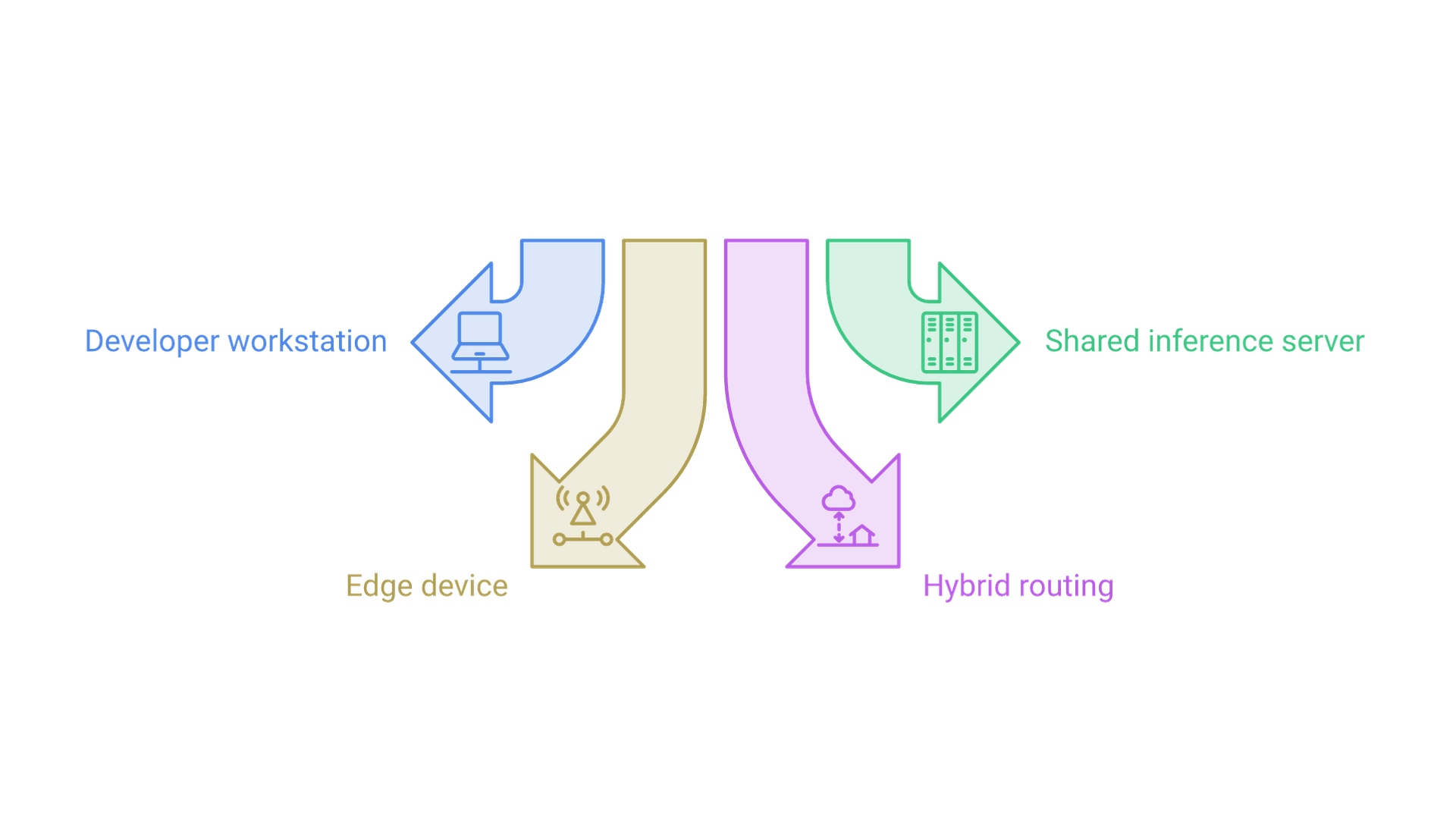
Running local LLMs for an organization means choosing where inference happens and who can reach it. Four patterns cover most implementations, and the right one depends on users, data sensitivity and latency needs.
Developer Workstation
Each developer or analyst runs a model on their own machine. It is the fastest way to explore, but it fragments versions and is hard to audit. Use it for exploration and individual productivity, not shared business processes.
Shared Inference Server
A platform team runs models on dedicated GPU servers behind an authenticated internal API. Models are versioned centrally, and logging and access control live in one place. This is the default pattern for team and department rollouts, and it is where serving runtimes such as vLLM, Ollama or llama-server fit. Our AI infrastructure services cover this kind of GPU capacity planning and private serving design.
Edge and Offline Devices
Small models run directly on field laptops, factory systems or kiosks where connectivity is unreliable or data must not leave the site. Edge deployments need careful model sizing, a plan for distributing updates, and monitoring that works when devices reconnect.
Hybrid Routing
A gateway routes each request by sensitivity and difficulty: sensitive or routine requests stay on local models, while requests that need stronger reasoning go to an approved hosted model. Hybrid designs require clear routing rules, consistent logging across both paths and a reviewed agreement for any data that leaves.
Hardware and Software Needs
Every pattern needs a supported operating system and accelerator drivers, enough GPU or unified memory for weights plus context and concurrent requests, fast storage for model files from a controlled internal source, and an authentication layer such as an API gateway in front of any shared endpoint.
Optimizing Performance
Start with smaller models for testing and scale up once your hardware proves stable. Tune concurrency deliberately: Ollama, for instance, processes one request per model at a time by default and queues the rest, with settings to raise parallelism and control how long models stay loaded in memory. Size capacity for peak usage rather than averages.
Evaluating Local Models Before Rollout
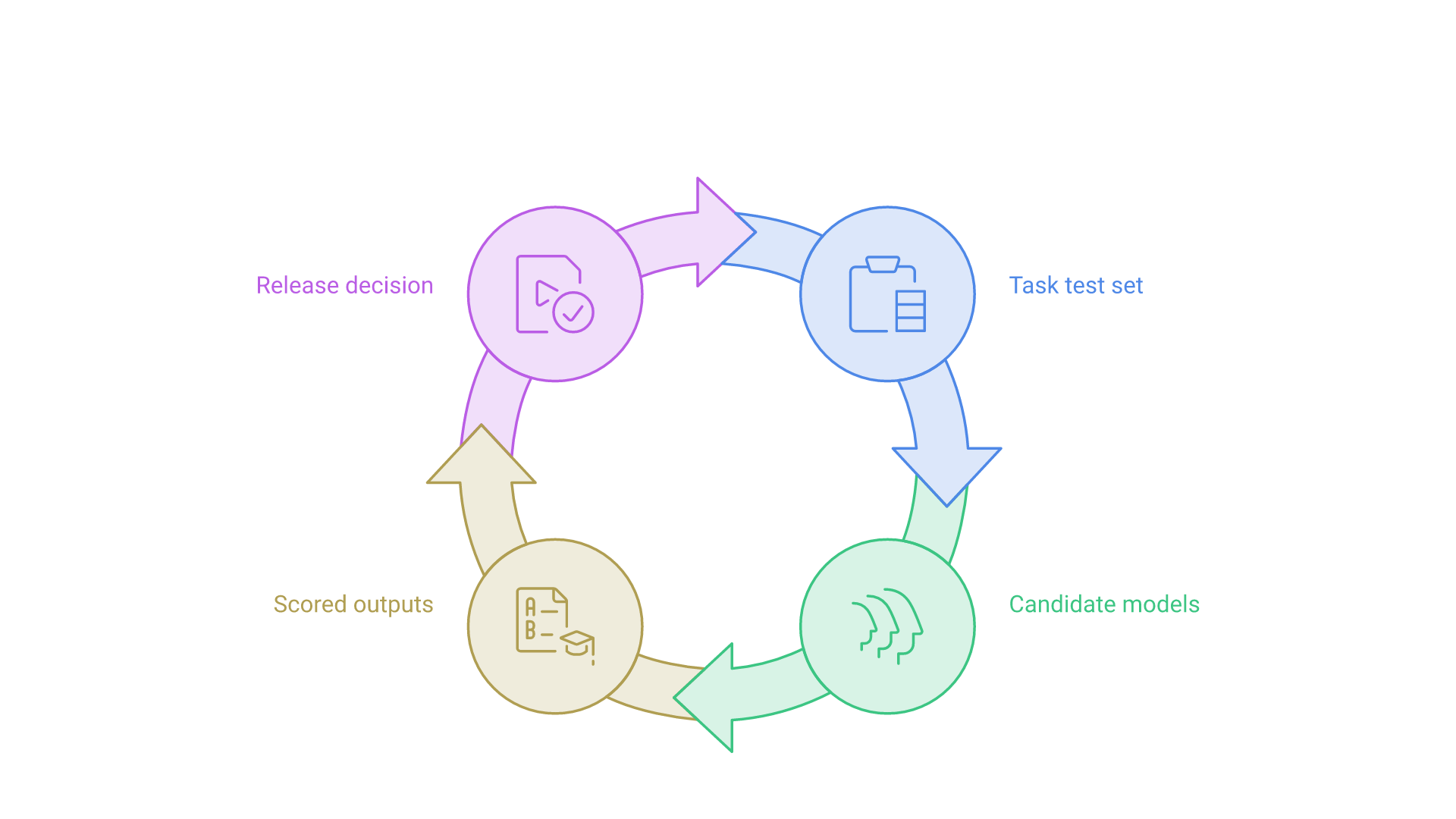
A working installation is not proof of a working system. Evaluation should answer a narrow question: does this model, at this quantization, on this hardware, perform the target task well enough for these users?
Build a Task Test Set
Collect realistic examples of the task with reference answers or acceptance criteria, including hard cases and inputs the system should refuse. Keep the set private so it measures your task, not what a model memorized from public benchmarks.
Compare Candidates Consistently
Run every candidate model through the same prompts, settings and retrieval context. Score outputs for correctness, completeness, format compliance and safety, and record latency and memory use on the target hardware. Where possible, include a hosted model as a reference point so the team understands what it gains or gives up by running locally.
Review Failures and Decide
Read the failures, not only the averages: a model that fails in predictable, catchable ways may be safer than one that is occasionally confidently wrong. Set an explicit release decision: ship, ship with human review, or keep iterating. Rerun the same test set whenever you change the model, quantization, prompt or runtime version.
Language Processing with Local AI
One of the most compelling uses of local AI models is language processing. With large language models running on infrastructure you control, organizations can apply language understanding and generation to internal data without sending it to third-party model providers.
Key Language Processing Tasks
- Text generation: drafting replies, reports and code snippets.
- Semantic search: searching knowledge bases or chat data by meaning using embeddings.
- Sentiment analysis: classifying reviews, survey responses or support tickets.
- Language translation: translating internal documents with locally hosted models.
- Text summarization: extracting key points from documents, research or meeting transcripts.
Custom Training and Fine-Tuning
Running models locally also lets you adapt them to your own data. Retrieval-augmented generation is usually the first step: the model answers from documents retrieved at query time, which keeps knowledge current and permissions enforceable. Fine-tuning comes later, when you need a format, tone or vocabulary that prompting and retrieval cannot deliver. Each fine-tuned model becomes another artifact to version, evaluate and secure.
Using LLMs in Business
Imagine a customer support team with years of ticket history. Instead of sending those logs to a cloud service, it could run local LLMs to search past tickets, draft replies for agents to edit and flag sentiment shifts. The value comes from the workflow: retrieval scoped to what each agent may see, human review before anything reaches a customer, and tracking how many drafts are accepted. Teams that need help designing these workflows end to end can look at our LLM solutions.
Operating Local AI Models in Production
The work does not end at launch. A local deployment makes your organization responsible for things a hosted provider would otherwise handle.
Monitoring and Capacity
Track request volume, latency, error rates, queue depth and GPU memory. Runtimes that expose Prometheus-style metrics, such as vLLM, connect easily to existing dashboards. Review usage so capacity grows before users feel the slowdown.
Versioning and Updates
Keep a registry of which model, quantization, prompt template and runtime version serve each application. Update runtimes for security fixes on a schedule, and treat model upgrades like software releases: evaluate against the test set, roll out gradually and keep the previous version available for rollback.
Security and Governance
Local models face the same application-level risks as hosted ones. The OWASP Top 10 for LLM Applications 2025 lists risks including prompt injection, sensitive information disclosure, supply chain weaknesses, excessive agency and unbounded consumption, and each applies to a self-hosted model. Download weights only from trusted sources, restrict who can reach the endpoint, enforce document permissions in retrieval rather than in the prompt, and require human approval for consequential actions. For a deeper look at the data side, read our guide on how to use an LLM with private data. For governance structure, NIST's Generative AI Profile (NIST AI 600-1) applies the AI Risk Management Framework to generative systems and is a practical reference for policies, roles and risk reviews.
Decentralization of AI Services
A broader movement sits behind these implementation details: the decentralization of AI services. For years, the AI ecosystem was concentrated in a small number of cloud providers, and developers relied on external APIs for nearly every model call. Capable open-weight models and mature local runtimes give organizations another option.
Why Decentralization Matters
- Privacy: organizations decide where data is stored and processed.
- Resilience: a local model keeps working during a provider outage or network loss.
- Independence: teams can switch models without rewriting applications when runtimes share an OpenAI-compatible interface.
Local AI as a Pillar of Decentralization
Running AI models locally embodies decentralization: the organization controls the model files, configuration and outputs, and can operate without a constant internet connection. It also makes security, availability and compliance your team's job.
Real-World Trends
Public signals show the momentum: llama.cpp's repository shows roughly 133,000 GitHub stars as of October 2026, alongside Ollama's 185,000, and OpenAI now publishes open-weight models under Apache 2.0. Popularity is not a quality guarantee, but it does mean a large community and broad hardware support.
Frequently Asked Questions
What are local AI models?
Local AI models are machine learning models, often large language models, that run on hardware you operate, such as a workstation, an on-premises server or an edge device, rather than through a third-party cloud API.
Are local AI models secure?
They can be, but running locally only removes the external model provider from the data path. Logs, retrieval indexes, network exposure, connected tools and model supply chain still need access controls, monitoring and review.
Which tool is best for running local LLMs for a team?
Desktop tools such as LM Studio suit individual evaluation, Ollama and llama.cpp suit developers and small shared servers, and vLLM is designed for higher-throughput serving to many users. The right choice depends on concurrency, hardware and operations needs.
How much hardware do local AI models need?
It depends on model size, quantization, context length and concurrency. Some mid-sized open-weight models are documented to run within 16 GB of memory, while larger ones need data-center GPUs. Test the exact model and quantization you plan to serve.
Should we fine-tune a local model or use retrieval?
Start with retrieval-augmented generation for knowledge-heavy tasks, because it keeps information current and permissions enforceable. Consider fine-tuning when you need a consistent format, tone or domain vocabulary that prompting and retrieval cannot achieve.
How do you evaluate a local LLM before rollout?
Build a private test set from real task examples, run every candidate with the same settings on the target hardware, score correctness and safety, review failures, and rerun the set after every model or runtime change.
Conclusion and Next Steps
Local AI models are no longer a niche experiment. Capable open-weight models, OpenAI-compatible runtimes and better hardware make it realistic for organizations to keep sensitive or high-volume AI workloads under their own control. The difference between a demo and a dependable service is implementation discipline.
Key Takeaways
- Start with one bounded use case with a clear owner and acceptance criteria.
- Choose models by task fit, license and the hardware you will actually use, and evaluate the quantized version you serve.
- Match the deployment pattern to your users: workstation, shared server, edge or hybrid.
- Operate local AI like any production service, with monitoring, versioning, security reviews and rollback.
The Future of Local AI
As hardware improves and open-weight models mature, more applications are likely to route some AI workloads to local or private infrastructure. Running AI models locally is a statement about ownership and control, with the responsibility ownership implies.
If you are planning a local or hybrid AI rollout and want help with model selection, serving architecture or production operations, contact Cognativ to discuss your implementation.