

BPA vs RPA vs Intelligent Automation vs AI Agents: How to Choose the Right Level of Automation
Four automation levels side by side, with a comparison table, published case results and a five-step framework for matching each process to the right approach.
The BPA vs RPA comparison is where most automation strategy conversations begin, but stopping there misses two layers that now determine whether automation programs scale or stall: intelligent automation and AI agents. This article breaks down all four levels, covering what each automates, where each breaks, what each costs, and how they combine in practice.
If you lead operations, IT, or transformation at a mid-market or enterprise organization, this piece is built for you. The goal is to give you a concrete framework for matching automation technology to process complexity, not a glossary of buzzwords.
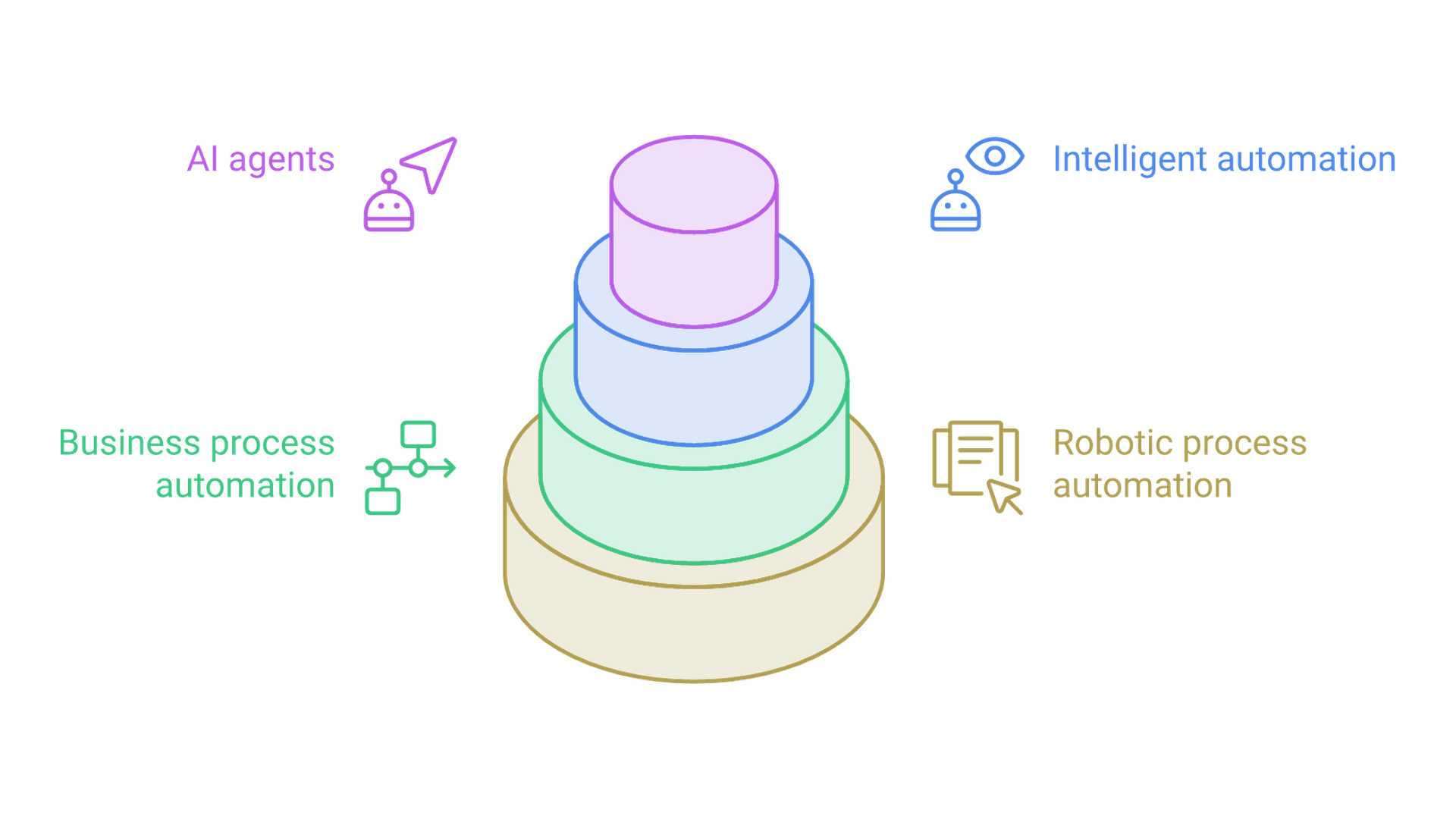
The short version: robotic process automation (RPA) handles discrete, rule-based tasks at the user interface level. Business process automation (BPA) orchestrates entire business processes across systems and departments. Intelligent automation layers in artificial intelligence (OCR, natural language processing, machine learning) to handle unstructured data and probabilistic decisions. AI agents add goal-driven autonomy, planning multi-step actions and self-correcting within guardrails. Most organizations need a deliberate mix of all four, not a single tool.
This article will help you:
- Distinguish BPA from RPA with concrete criteria, not abstract definitions
- Identify when intelligent automation or AI agents add measurable value on top of existing automation
- Use a decision framework to map process complexity to the right automation level
- Follow a migration path from RPA quick wins to AI-enhanced enterprise automation
- Understand where each level breaks, and what governance prevents those failures
Understanding Core Automation Concepts
Choosing between BPA, RPA, intelligent automation, and AI agents requires precise definitions. Conflating them leads to misallocated budgets: teams buy RPA licenses for problems that need process redesign, or pilot AI agents where a simple bot would deliver faster ROI. The distinctions below separate each layer by what it does, what inputs it handles, and where it fits in the broader automation stack.
What Is Robotic Process Automation (RPA)?
Robotic process automation (RPA) uses software bots to perform repetitive tasks at the UI level. An RPA bot mimics human interactions with applications: clicking buttons, copying data between fields, filling forms, and extracting reports. It operates on fixed, deterministic rules against structured data and stable interfaces. RPA mimics human actions for specific, rule-based tasks like data entry, policy updates, and reconciliations.
RPA is effective for quickly automating high-volume data entry tasks. It deploys fast (often in weeks), requires minimal changes to core systems, and works well against legacy systems that lack APIs. RPA enhances productivity by reducing human error in repetitive jobs, and it can eliminate lag time in processing business contracts.
The limitations are equally clear. RPA is sensitive to changes in user interfaces, making it fragile. When field labels shift or a web portal updates its layout, bots break. Traditional robotic process automation cannot interpret unstructured data, reason about exceptions, or learn from new patterns. Think of RPA as the "hands" layer: it executes instructions precisely but cannot decide what to do when conditions change.
What Is Business Process Automation (BPA)?
Business process automation (BPA) automates complete business processes and workflows, not just individual tasks. Where an RPA bot handles PO data entry, BPA orchestrates the entire procure-to-pay flow: from requisition through approval, purchase order creation, goods receipt, invoice matching, and payment. BPA integrates systems through APIs to streamline end-to-end workflows, and it facilitates multi-department coordination and approval workflows.
Core BPA capabilities include workflow modeling, rules engines, approval routing, SLA monitoring, and integration architecture across line-of-business systems. BPA provides end-to-end visibility across business processes, making it possible to measure cycle times, identify bottlenecks, and enforce compliance at every handoff point. BPA is designed for long-term operational efficiency and process optimization.
The key difference: BPA redesigns and orchestrates entire business processes; RPA automates discrete tasks within those processes. Implementing BPA often requires more planning than RPA, including process discovery, business process modeling, stakeholder alignment, and integration design. But the payoff is broader. BPA acts as the "spine" of an automation program, coordinating RPA bots, intelligent automation services, and AI agents across the entire organization.
What Is Intelligent Automation?
Intelligent automation combines RPA with AI capabilities: optical character recognition (OCR), intelligent document processing (IDP), natural language processing, machine learning, and predictive analytics. Where RPA handles structured inputs, intelligent automation processes unstructured data using AI; scanned invoices, customer emails, PDFs with inconsistent layouts, and handwritten forms.
Intelligent automation can process complex tasks like invoice handling by reading a document, extracting relevant fields, matching them against purchase orders, and flagging discrepancies for review. Other concrete examples: triaging support emails by sentiment and urgency, classifying insurance claims by type and severity, and verifying KYC documents by cross-referencing extracted data against databases. AI enhances RPA by enabling decision-making on unstructured data.
This layer adds "eyes and judgment" to deterministic automation. IA systems still depend on the process models from BPA and the execution bots from RPA, but they expand what can be automated by converting messy, unstructured inputs into a structured format that downstream systems can act on. This is a core focus of Cognativ's AI-driven process automation work.
What Are AI Agents in the Context of Process Automation?
AI agents are LLM-powered, goal-driven systems that plan multi-step tasks, call tools and APIs, coordinate other automations (including RPA bots and BPA workflows), and apply self-correction within defined guardrails. Agentic process automation uses autonomous agents for decision-making, targeting complex, goal-driven tasks that resist rigid workflow definitions.
Where intelligent automation follows a process model with AI-enhanced steps, agentic AI reasons about goals. An AI agent managing supply-chain exceptions would query carrier APIs, check ERP system data, evaluate delivery risk, and reroute shipments; all without a pre-built workflow for every scenario. It enables systems to adapt strategies based on real-time data. Agentic process automation can autonomously manage customer interactions, adjusting tone, offers, and escalation paths based on context.
Agentic process automation distinguishes itself by self-correcting and reasoning capabilities. When an agent encounters an unexpected result, it can re-plan rather than fail. This autonomy creates new risks (hallucination, tool misuse, governance gaps), which is why AI agent development must include narrow mandates, evaluation metrics, and clear escalation paths.
BPA vs RPA vs Intelligent Automation vs AI Agents: Key Differences
These four automation levels represent a maturity stack, not competing products. Each layer addresses a different combination of process scope, data complexity, and decision requirements. The key differences become actionable when mapped against specific criteria.
Side-by-Side Comparison Table
Criterion | RPA | BPA | Intelligent Automation | AI Agents |
|---|---|---|---|---|
Primary focus | Single task; UI-based actions (data entry, form filling) | End-to-end workflow across systems and roles | AI-enhanced subprocesses within workflows | Goal-driven coordination across multiple processes |
Data handled | Structured data, stable UIs | Structured or semi-structured; multiple systems | Unstructured inputs (documents, emails, images) | Multi-modal; uncertain or changing contexts |
Typical use cases | Invoice data entry, EHR updates, report export | Order-to-cash, employee onboarding, claims processing | Invoice capture and matching, email triage, KYC verification | Supply-chain exception handling, cross-channel retention campaigns |
Adaptability | None; fixed rules, defined parameters | Rule-based; requires manual workflow updates | Learns from training data; improves with feedback | Dynamic planning; adapts to novel situations |
Implementation effort | Low to moderate; 1-3 months for simple tasks | Higher; process discovery, integration, SLA definition; 3-9 months | Adds model building, validation, data infrastructure | Highest; agent architecture, tool chaining, guardrails, monitoring |
Breakage modes | UI changes, field label shifts, edge-case data | Process drift; rule changes that outpace model updates | Poor training data, unexpected document formats | Hallucination, tool misuse, governance gaps |
Cost structure | Bot licensing, script development, maintenance | Integration, workflow engine, change management, SLA monitoring | Added compute, ML model costs, retraining, human review | Model tuning, agent platform, oversight, continuous evaluation |
Governance/auditability | Execution logs per bot | Workflow audit trails, approval records | Confidence scores, human-in-the-loop checkpoints | Tool whitelists, approval thresholds, drift monitoring, audit logs |
Time-to-value | Weeks to months | Months; depends on process scope | Mid-to-long; includes model iteration | Pilot in months; scaling still emerging |
Best fit | High-volume, low-variability tasks against legacy systems | Cross-department processes with clear end-to-end flows and handoff delays | Document-heavy or communication-intensive workflows | Exception-heavy domains with clear measurable goals |
The most important distinction for decision-makers: RPA and BPA operate within deterministic boundaries; intelligent automation introduces probabilistic judgment; AI agents introduce autonomous planning. Each step up increases both capability and governance requirements.
What Each Level Actually Automates
Each layer covers a different granularity of work:
- RPA automates keystroke-level manual tasks: copying data from a CRM to a core banking system, syncing order records to an older ERP system, exporting daily reconciliation reports. The RPA bot follows a script against a specific task in a specific application.
- BPA automates entire cross-system workflows: customer onboarding from application submission through identity verification, account activation, and welcome communication. BPA connects the steps, routes approvals, enforces SLAs, and hands off to RPA bots where digital systems lack APIs.
- Intelligent automation handles decision-heavy subprocesses: reading and classifying insurance claims documents, extracting line items from invoices with variable layouts, interpreting data from customer emails to route them to the right team. IA systems convert unstructured inputs into structured data that BPA workflows and RPA bots can act on.
- AI agents pursue broader, goal-oriented scenarios: reducing delivery delays across a multi-carrier logistics network by reasoning about current shipment data and taking corrective actions, or managing a quarterly churn-reduction campaign by coordinating CRM updates, marketing automation triggers, and support team outreach.
Where Each Level Tends to Break
RPA bots break when the user interface they interact with changes. A portal redesign, a renamed field, or a new pop-up dialog can halt an entire automation. Organizations running 100+ bots face a constant maintenance cycle; every application update triggers script reviews. RPA also fails silently on edge-case data it wasn't programmed to handle.
BPA failures look different. They surface when documented workflows no longer match how the business actually operates. A change in approval authority, a new compliance requirement, or a departmental restructure can make a BPA orchestration route work to the wrong people or skip required steps. Business process management discipline is the main defense here.
Intelligent automation breaks on data quality problems. An IDP model trained on U.S. invoices will produce low-confidence results on European invoice formats. Ambiguous documents without human-in-the-loop checkpoints produce errors that propagate downstream. Evros Technology Group found that its initial AI model confidence for invoice processing was about 60%, which took 6-8 weeks of retraining to reach approximately 80%.
AI agents carry risks unique to autonomous systems: hallucination (generating plausible but incorrect outputs), tool misuse (calling an API with wrong parameters), and governance gaps when permissions are too broad. Without evaluation metrics and escalation paths, an agent operating across multiple processes can compound a single error across systems.
Governance and observability matter at all four levels. The AI agents for business operations guide covers how to structure oversight for agentic automation specifically.
Cost and ROI Patterns Across the Four Levels
RPA has the lowest entry cost and fastest local payback. According to Blueprint's 2023 report, average annual spend on RPA is approximately $490,000 per organization globally, with U.S. respondents averaging around $600,000. RPA can achieve ROI of 30%-200% in automation projects. Uber, for example, deployed around 100 RPA bots and reported approximately $10 million in annual cost savings with 350% ROI in year one.
BPA requires higher upfront investment in process discovery, integration architecture, and change management. The return is broader: Deloitte automated over 600 processes using BPA orchestration and saved more than 4 million labor hours. Combining BPA and RPA can improve workflow efficiency and process visibility across the organization.
Intelligent automation adds compute, model training, retraining, and human-review costs. It unlocks value where manual cognitive work dominates. Asklepios Kliniken automated over 1.7 million transactions in under 1.5 years using RPA combined with OCR and AI, achieving a 97.5% success rate and saving 5,000 working days across more than 120 processes.
AI agents carry the highest experimentation and oversight costs.
- Use RPA when you need payback in under 6 months on a narrow, repetitive process
- Use BPA when delays and handoffs across departments are the primary cost driver
- Add intelligent automation when manual document review or communication triage consumes staff hours
- Pilot AI agents when handling exceptions and cross-process coordination represents the largest efficiency gap
Examples of BPA, RPA, Intelligent Automation, and AI Agents in the Enterprise
The following examples ground each automation level in specific industries and measurable outcomes.
RPA in Practice: Task-Level Automation
Uber automated invoicing across seven portals and approximately 80 customers and shippers using classic RPA. The software robots bridged legacy systems that lacked APIs, standardizing data flows across incompatible platforms. Over three years, the program saved roughly $10 million annually with around 100 bots in production. Each bot handled a specific task: logging into a portal, downloading invoice data, entering it into a central system.
In healthcare, hospitals use RPA bots to automate EHR updates: pulling lab results from one system and entering them into patient records in another. The bots operate against stable interfaces with fixed field mappings. A single bot handling this workflow typically reduces manual clicks sharply for that step, freeing clinical staff from time-consuming data migration between digital systems.
In ecommerce, RPA handles nightly syncs of order data from a storefront platform to an older ERP system. The bot reads order records, maps fields to the ERP's structured format, and enters them one by one. No process redesign needed; the RPA bot simply replaces a human doing mundane tasks against a legacy interface.
BPA in Practice: End-to-End Workflow Automation
Deloitte's automation program illustrates BPA at scale. The firm automated over 600 processes spanning finance, HR onboarding, and benefits administration. BPA orchestration coordinates multiple automations, approval steps, and system integrations into coherent workflows. The result: more than 4 million labor hours saved, with end-to-end visibility into each process from initiation through completion.
In healthcare, prior-authorization workflows involve multiple handoffs: a provider submits a request, an insurer verifies coverage, a clinical reviewer evaluates medical necessity, and an approval or denial routes back. BPA models this entire flow, assigns SLAs to each step, escalates stalled requests, and calls RPA bots to handle structured data entry where the insurer's system lacks an API.
For a B2B SaaS company, a quote-to-cash BPA flow connects CPQ (configure-price-quote) output to contract generation, signature collection, provisioning, invoicing, and revenue recognition. Each step involves different teams and systems. BPA ensures nothing falls through the cracks; custom workflow automation is how organizations design these orchestrations to match their specific operational structure and compliance requirements.
Intelligent Automation in Practice: Using AI Inside Processes
Evros Technology Group processed approximately 21,000 invoices per year. By adding document understanding (IDP) to their RPA bots, they automated email extraction and invoice data capture. Initial AI model confidence started at around 60% and improved to roughly 80% after 6-8 weeks of retraining. The combined system cut invoice processing time from about 20 hours per week to approximately 4 hours per week; an 80% reduction.
Customer support organizations use intelligent automation to triage incoming emails. An NLP model classifies each message by intent (billing dispute, technical issue, cancellation request) and sentiment (frustrated, neutral, positive). The BPA workflow then routes each email to the appropriate queue with priority flags. Cognitive automation handles the classification; RPA handles downstream actions like updating ticket fields and notifying agents.
KYC verification in financial services combines IDP for document extraction with RPA for cross-referencing extracted data against compliance databases. The AI component reads passports, utility bills, and bank statements in varying formats. A human-in-the-loop checkpoint catches cases below confidence thresholds. This pattern extends existing RPA investments without replacing them. Cognativ's process automation practice implements these patterns with built-in governance.
AI Agents in Practice: Goal-Driven, Cross-Process Automation
Groupe UpCoop deployed intelligent agents to generate technical proposals in response to RFPs. The agents use AI-powered document understanding and tool integration to draft proposals, pulling from knowledge bases and past submissions. The result: an expected productivity gain of approximately 30% through shorter proposal preparation, with more than 90 automations live, roughly 6,400 hours per month saved, and ROI achieved in 8-9 months.
Supply-chain exception management is another strong candidate for agentic automation. An agent monitors shipment status across carriers and ERP systems. When a delay occurs, it reasons about alternatives: rerouting through a different carrier, adjusting downstream production schedules, and notifying affected customers. The agent pursues a measurable goal (minimize delivery delay cost) rather than following a fixed process. The AI agent workflow automation guide details how to structure these systems for enterprise operations.
Choosing Between BPA, RPA, Intelligent Automation, and AI Agents
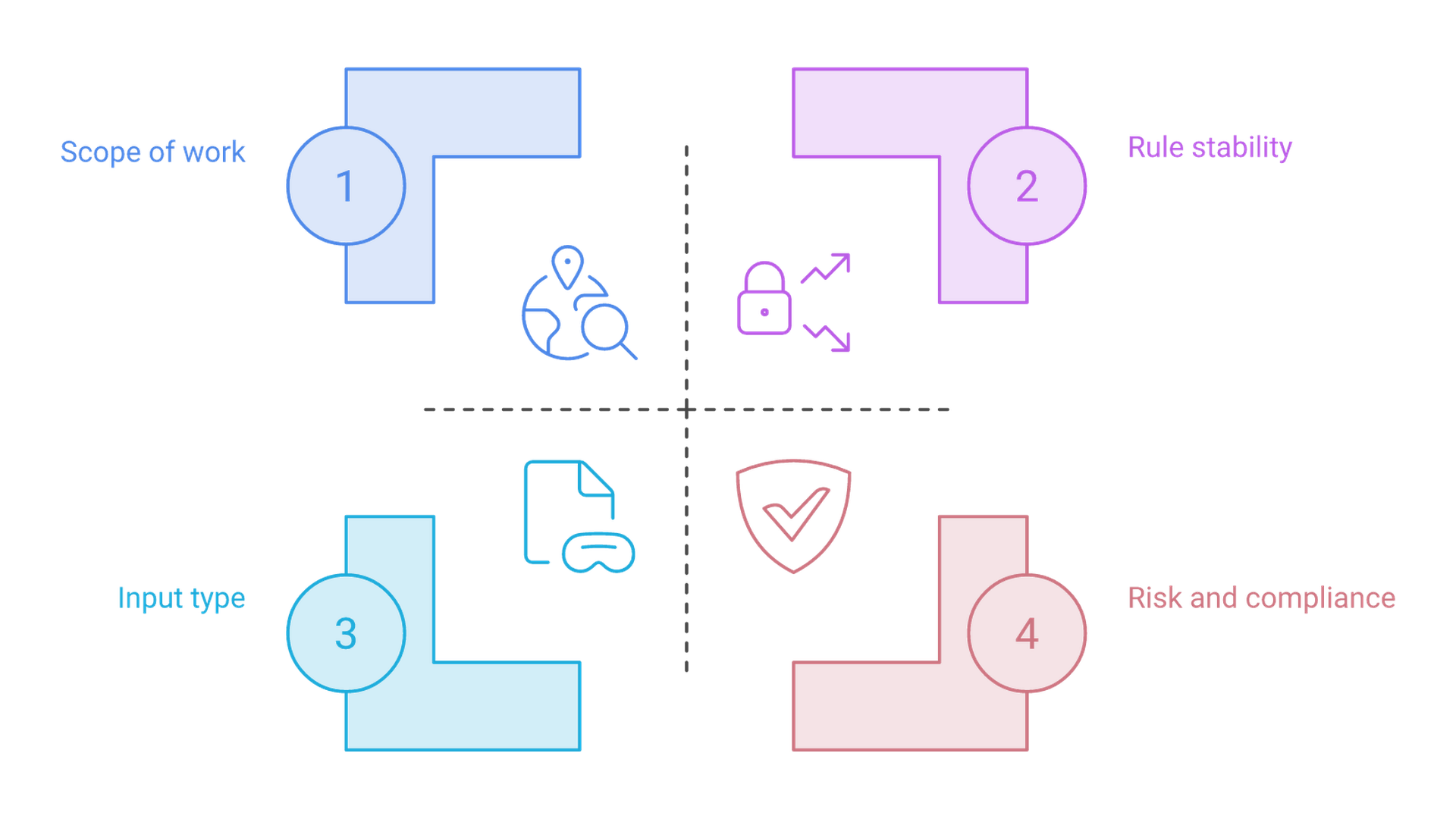
The right automation level depends on process complexity, data type, rule stability, and risk profile. Chasing the newest automation technology without matching it to the problem wastes budget and creates governance headaches.
Decision Framework: Map Process Complexity to Automation Level
Use these five steps to classify a candidate process:
- Scope the work. Is this a single, specific task (copying data between two screens) or an end-to-end process spanning multiple teams and systems? Single tasks point to RPA. Multi-step, multi-system flows point to BPA.
- Classify inputs. Does the process start with structured inputs (database records, form fields) or unstructured inputs (emails, scanned documents, free-text requests)? Structured data fits RPA or BPA. Unstructured data requires intelligent automation's cognitive capabilities.
- Assess rule stability. Are the business rules static and well-documented, or do they change frequently? Stable rules suit RPA. Frequent changes push toward BPA (for orchestration flexibility) or AI agents (for adaptive reasoning).
- Evaluate risk and compliance. Does the process involve regulated data, audit requirements, or safety-critical decisions? Higher regulatory burden increases the need for auditability, human-in-the-loop checkpoints, and governance structures at every automation level.
- Estimate ROI and experimentation tolerance. RPA delivers fast, narrow returns. Intelligent automation and AI agents require experimentation budgets and longer feedback cycles but can unlock larger savings where complex processes and cognitive tasks dominate.
When the framework points to structured, rule-based, stable tasks: RPA. When it points to cross-departmental flows with handoff delays: BPA. When unstructured data or classification decisions dominate: intelligent automation. When goals are complex, exceptions are frequent, and the process resists rigid definition: AI agents.
When to Use BPA vs RPA
This is the core "BPA vs RPA" question. The answer depends on scope and integration needs.
RPA is the right starting point when:
- The task is stable, high-volume, and isolated (e.g., automating repetitive data entry from one system to another)
- The target application is a legacy system without APIs, where software robots interacting with the user interface is the only viable integration
- No process redesign is needed; the existing steps are correct, just slow
- You need payback in weeks, not months
BPA is the better choice when:
- Complex business processes span multiple departments and require coordination, approvals, and SLA tracking
- Fragmented repetitive processes cause delays because handoffs between teams are manual or email-based
- You need end-to-end visibility into cycle times, bottlenecks, and compliance status
- The goal is long-term operational efficiency, not just task-level speed
In practice, many modernization projects start with BPA discovery and then use RPA surgically where APIs are unavailable. Combining BPA and RPA this way improves workflow efficiency and process visibility while avoiding the trap of building hundreds of disconnected bots.
When to Add Intelligent Automation on Top
Intelligent automation becomes necessary when:
- Manual review queues for documents, emails, or images consume staff hours at scale
- Error rates in interpreting data from variable-format inputs are high
- Cognitive tasks like classification, extraction, or sentiment analysis are bottlenecks
- Existing RPA bots can handle downstream actions, but cannot read or interpret the inputs that trigger those actions
Two patterns illustrate this. First: IDP extracts invoice data from PDFs and scanned images, converts it to structured fields, and hands it to an RPA bot for entry into the ERP system. Second: NLP classifies incoming support emails by type and urgency, and a BPA workflow routes each to the correct queue with priority flags.
This layer is often the most practical way to extend existing RPA investments without replacing them. It handles the more complex tasks that pure RPA cannot touch, while preserving the deterministic execution that operations teams trust.
Where AI Agents Are (and Aren't) Ready in 2026
Gartner's 2026 trends label multi-agent systems as a major development for enterprises needing systems that reason and coordinate across multiple tasks. Vendors like UiPath now ship agentic automation tools (Autopilot, Intelligent Agents), and production deployments exist.
Good early AI agent candidates share these characteristics:
- High human coordination overhead across systems and teams
- Many loosely defined steps that resist rigid workflow encoding
- Clear, measurable goals (reduce delivery delays by an agreed percentage, cut backlog by a set number of items)
- Moderate risk where errors are costly but not safety-critical
AI agents should be constrained or avoided for:
- Core financial postings where a hallucination could affect regulatory filings
- Safety-critical clinical decisions in healthcare without robust human oversight
- Processes where auditability requirements demand fully deterministic, reproducible outputs
Cognativ's approach: design agents with narrow mandates, evaluation frameworks, and clear escalation paths. The best AI agents for business evaluation guide covers the controls needed to deploy agents responsibly.
Migration Path: From RPA Quick Wins to AI-Enhanced Automation
Most enterprises start with RPA pilots and then need a structured path forward. Without deliberate progression, automation programs plateau: bots accumulate maintenance debt, and the organization misses opportunities where intelligent automation or AI agents would deliver greater returns.
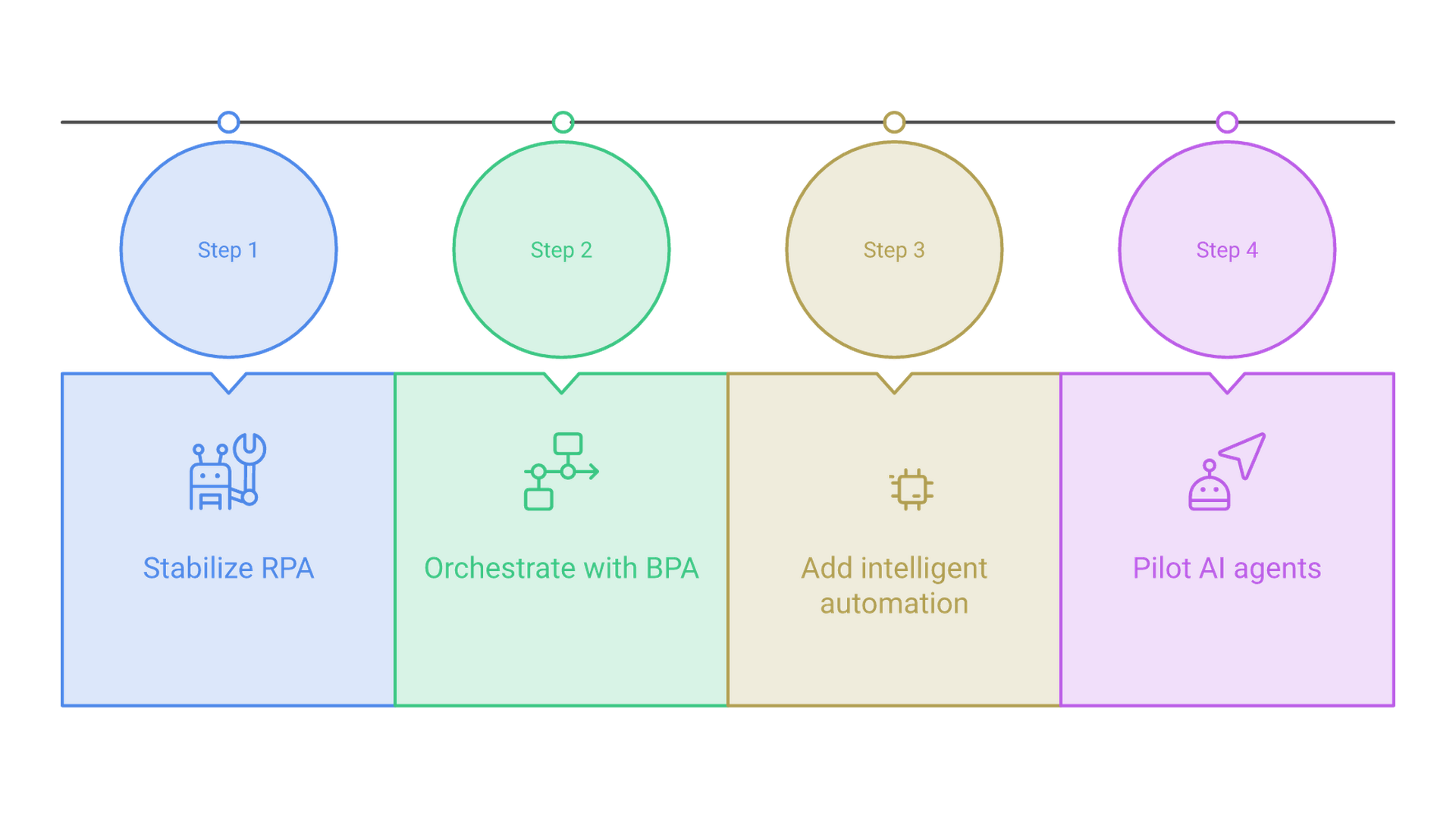
Step 1: Stabilize and Rationalize Existing RPA
Start by inventorying current bots. Mature programs often run hundreds of automated processes in production. For each bot, measure true maintenance cost, failure frequency, and business value delivered.
Retire low-value automations that consume monitoring effort but deliver marginal savings. Standardize development practices across remaining bots: consistent naming, error handling, logging, and version control. Measure baseline metrics (error rates, handle times, support tickets per bot) so that improvements in later stages are quantifiable. RPA tools alone cannot carry the full weight of enterprise automation; this step creates a clean foundation.
Step 2: Introduce BPA to Orchestrate End-to-End Flows
The next move wraps fragmented automations into coherent workflows. Conduct process discovery to map how work actually moves across teams and systems, not just how it's documented. Define SLAs for each handoff. Build orchestrations that call RPA bots where APIs are unavailable and use direct API integrations everywhere else.
This shifts the automation program from "bot projects" to business-aligned process modernization. Deloitte's orchestration of hundreds of bots and process engines across finance and HR illustrates what this looks like at scale. The Digital Transformation with the RAPID Framework describes how Cognativ structures this kind of transformation.
Step 3: Layer in Intelligent Automation Capabilities
Integrate AI building blocks where manual cognitive work creates bottlenecks. Deploy OCR/IDP for document-heavy processes, NLP for communication channels, and ML models for risk scoring or prioritization. The technical pattern: AI services convert messy inputs into structured data, which BPA and RPA then act on.
Governance at this stage means setting confidence thresholds, building human-in-the-loop review for low-confidence outputs, and creating feedback loops to improve models over time. Asklepios Kliniken's results (1.7 million transactions automated, 97.5% success rate, 5,000 working days saved) demonstrate what disciplined intelligent automation delivers at scale.
Step 4: Pilot AI Agents on Targeted, High-Value Domains
Select one or two constrained, high-impact use cases. Exception handling in logistics, backlog triage in support, or cross-system investigations are strong candidates. Define clear goals, equip the agent with a specific toolset (APIs, RPA bots, workflows), and set guardrails: tool whitelists, approval thresholds for high-risk actions, and observability dashboards.
Cross-functional participation matters: business, IT, security, and risk teams should all shape the pilot design. Cognativ's AI agent development practice follows a similar governance-first approach, fitting agent pilots into the broader modernization roadmap.
Common Challenges and How to Avoid Them
Automation programs stall or backfire due to predictable mistakes. The following four account for many of the failures seen across industries.
Over-Automating Broken Processes
Applying RPA to a flawed workflow produces fragile bots that encode existing inefficiencies. Solution: start with process discovery and simplification using BPA principles. Eliminate unnecessary steps first. Tie each automation to a measurable KPI (cycle time, error rate, customer satisfaction). Only then automate the tasks that remain.
Tool Sprawl and Fragmented Ownership
Multiple disconnected RPA tools, workflow engines, and AI point solutions create silos. Each tool has its own monitoring console, its own development framework, and often its own team. Nobody has a unified view of the digital workforce. Solution: consolidate around a coherent stack with a single orchestration layer. Define ownership models that assign each automation to a business process owner, not just a developer. Use platforms that can orchestrate across APIs, RPA, and AI from one control plane.
Underestimating Governance and Risk with AI
Adding machine learning or generative AI to processes without governance creates exposure. Data leakage, non-deterministic behavior, hidden bias, and compliance gaps compound when AI components operate without oversight. Solution: establish policies for model selection, data access, evaluation frequency, audit logging, and human-in-the-loop review before deploying intelligent automation or AI agents. The requirement for constant human intervention decreases over time as models prove reliable, but the governance structure should exist from day one.
Failing to Plan Migration from RPA to AI-Enhanced Automation
The "RPA forever" trap turns bots into legacy systems themselves. Solution: create a 2-3 year roadmap that deliberately moves suitable tasks from UI-based bots to API integrations, intelligent automation services, and agent-orchestrated flows. Review the portfolio quarterly. RPA increases data quality and employee satisfaction when applied correctly, but it should not become the permanent answer for every process.
Additional Resources
These resources help teams go deeper on implementing the four-layer automation stack with appropriate governance:
- AI-driven process automation services: operationalizing intelligent automation with OCR, NLP, and ML integrated into BPA and RPA workflows
- AI agent development: guidance for safely piloting and scaling agents on top of existing BPA and RPA infrastructure
- Request a focused assessment to map your current automation maturity and build a roadmap from RPA to AI-enhanced process automation
Conclusion and Next Steps
BPA, RPA, intelligent automation, and AI agents form a layered automation stack. RPA automates rule-based tasks using structured data at the UI level. BPA orchestrates complex processes across systems and departments. Intelligent automation adds AI capabilities to handle unstructured data and cognitive tasks. AI agents introduce autonomous decision-making for goal-driven, exception-heavy work. Choosing correctly depends on process scope, data type, rule stability, and risk tolerance.
To move forward:
- Inventory your current automation portfolio: count bots, map processes, measure maintenance cost and failure rates
- Classify candidate processes using the five-step framework (scope, inputs, rule stability, risk, ROI potential)
- Identify quick-win intelligent automation opportunities where document or communication processing consumes staff hours
- Shortlist one or two AI agent pilot domains with clear goals and moderate risk
- Contact Cognativ for a modernization and automation assessment that maps current maturity to a concrete roadmap
For deeper implementation detail, explore related topics like AI-first architectures, legacy system modernization, and secure workflow design in Cognativ's AI automation services overview.
To map your current automation maturity to a roadmap from RPA to AI-enhanced automation, talk to our US-based team.