


What Is LLM Quantization? Understanding Its Importance and Techniques
Learn how bits per weight set an LLM's memory needs, how GPTQ, AWQ, GGUF k-quants, FP8 and MXFP4 compare, and when 4-bit or 8-bit is the right call for you.
Quantization is the process of reducing the numerical precision used to represent a model's parameters and intermediate values, from high-precision floating-point representations such as FP32, FP16 or BF16 to lower precision formats such as FP8, INT8, 4-bit integers or floats, or even ternary and binary values. For large language models (LLMs), model quantization shrinks the memory footprint, improves throughput and cuts energy use, enabling deployment on resource-constrained hardware while keeping model accuracy within acceptable bounds.
In practice, quantization converts continuous real-valued model weights and activations into a small, fixed set of quantized data values. The quantization procedure can be applied after training (post-training quantization, PTQ), during training (quantization-aware training, QAT) or at runtime (dynamic quantization), depending on your latency and quality trade-offs.
Because LLMs are deep neural networks with billions of parameters, the impact of precision reduction is multiplicative: smaller tensors mean less memory traffic and lower computational costs, and memory traffic often dominates inference time. The challenge is to achieve quantization with minimal accuracy loss, which is the core of modern quantization methods research.
Short answer: quantization stores each weight in fewer bits. A model that needs about 16 GB at 16-bit needs about 8 GB at 8-bit and roughly 4.5 to 5 GB at a typical 4-bit format. Well-tuned 8-bit formats are close to lossless in published evaluations, 4-bit weight-only formats usually cost a little quality, and anything below about 3 bits per weight needs careful methods and testing.
What Is LLM Quantization?
An LLM is mostly a stack of large matrices. The linear layers in the attention and feed-forward blocks hold almost all of the parameters. Quantization replaces each high-precision number in those matrices with a short code plus a little shared metadata (a scale, and sometimes a zero point or minimum) that tells the runtime how to turn the code back into an approximate real value. Some methods quantize on the fly as the model loads; others need a calibration pass and produce a pre-quantized checkpoint, as the Hugging Face Transformers quantization guide explains.
Bits per weight, explained
The most useful number for any quantized model is its bits per weight (bpw): the average storage cost of one parameter, including shared scales. A "4-bit" format rarely costs exactly 4 bits. llama.cpp's Q4_K groups weights into blocks that share 6-bit scales and minimums, which the Hugging Face GGUF documentation lists as 4.5 bits per weight. MXFP4 stores 4-bit values plus one 8-bit scale per 32 elements, or 4.25 bits per weight. Bits per weight is what you multiply by parameter count to estimate memory, and it is the fairest way to compare formats.
Why Quantize Large Language Models?
Quantization addresses three practical issues that arise when serving LLMs at scale:
- Memory and bandwidth. Quantized weights require fewer bytes, reducing VRAM and memory bandwidth pressure. On many accelerators, memory movement rather than compute is the bottleneck during token generation.
- Latency and throughput. Low-precision matrix multiplies can be faster on hardware with matching kernels, and smaller weights speed up memory-bound decoding.
- Cost and energy. Lower precision reduces power draw and cloud spend, and lets capable models run on a single GPU, a laptop or an embedded device.
These gains unlock on-device assistants and low-latency chat, where computational power is limited, and allow multi-tenant serving of very large checkpoints. The underlying driver is parameter count; our guide to LLM parameters and their role in model size explains dense versus mixture-of-experts models and total versus active parameters. Quantization changes the bytes each of those parameters costs.
Memory Math: How Much VRAM Does a Quantized LLM Need?
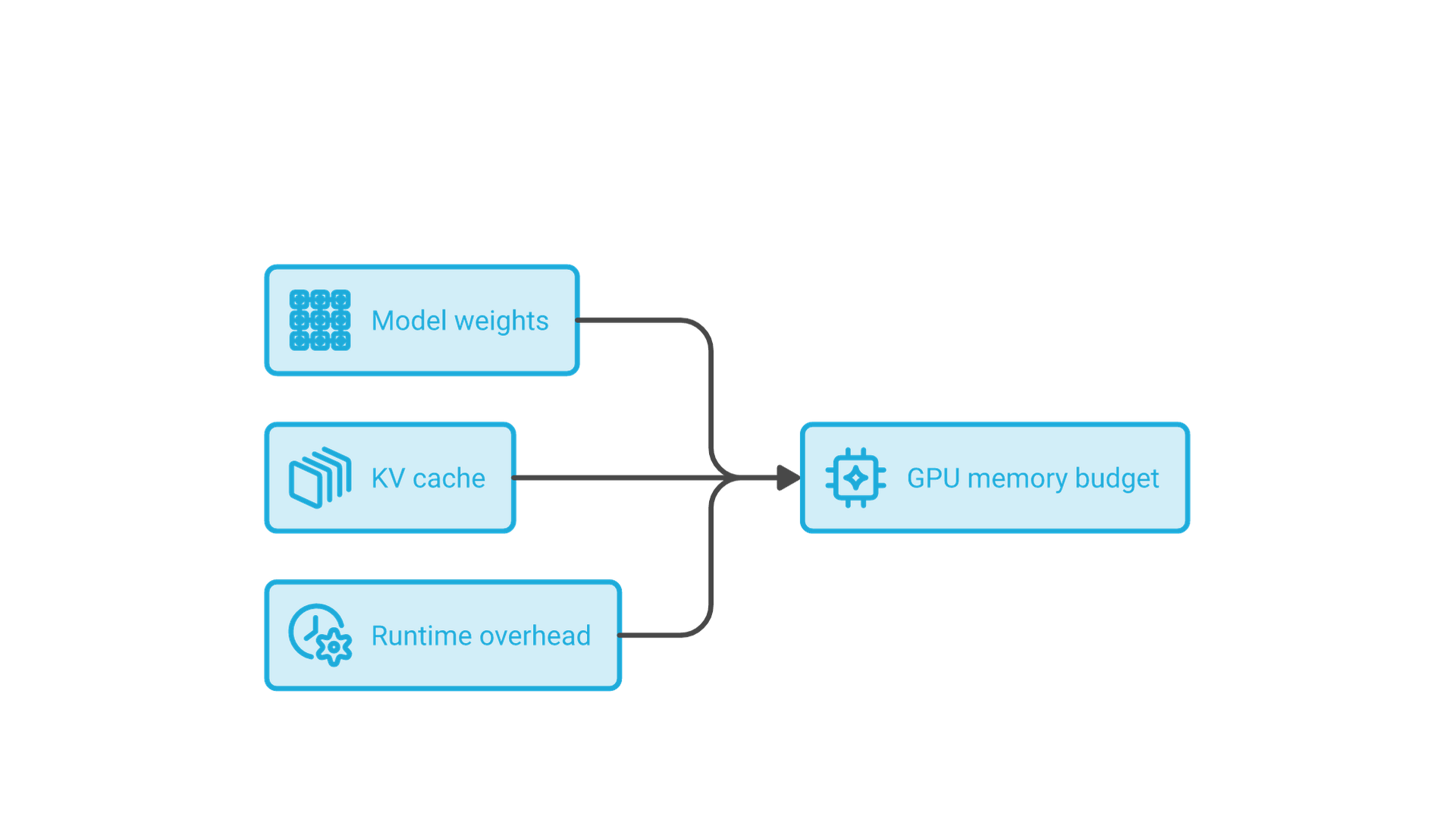
Most people look into quantization because a model does not fit. Separate the memory budget into weights, KV cache and runtime overhead.
Weight memory
weight bytes ≈ parameters × bits per weight ÷ 8
That gives the familiar rules of thumb: 2 bytes per parameter at 16-bit, 1 byte at 8-bit and about half a byte at 4-bit, plus scale overhead. These are weight-only estimates, not measured footprints:
| Model size | BF16 (16 bpw) | INT8 or FP8 (about 8 bpw) | 4-bit at 4.5 bpw |
|---|---|---|---|
| 8B dense | about 16 GB | about 8 GB | about 4.5 GB |
| 70B dense | about 140 GB | about 70 GB | about 39 GB |
| 117B total (MoE) | about 234 GB | about 117 GB | about 66 GB |
The formula matches published figures. The llama.cpp quantize documentation lists Llama 3.1 8B at 14.96 GiB in F16 and 4.58 GiB at Q4_K_M, an average of 4.89 bits per weight because some sensitive tensors stay at higher precision. The gpt-oss-120b model card states that MXFP4 quantization of the mixture-of-experts weights lets the 117B-parameter model run on a single 80 GB GPU, and that gpt-oss-20b runs within 16 GB of memory.
KV cache memory
During generation the model stores a key and a value vector for every past token in every layer. For a standard transformer:
KV bytes ≈ 2 × layers × KV heads × head dimension × bytes per element × tokens
Llama 3.1 8B has 32 layers, 8 key-value heads and a head dimension of 128 according to its published configuration. At BF16 that is 128 KiB per token, so one sequence at the full 131,072-token context needs about 16 GiB of KV cache, more than the 4-bit weights. An FP8 cache halves that, which is why KV cache quantization matters for long-context and high-concurrency serving.
Runtime overhead
Leave headroom for activations, buffers and the GPU runtime. Serving engines such as vLLM pre-allocate GPU memory and fill the remainder with KV cache blocks, so a model that fits on paper may still serve only a few concurrent requests. Treat the weight estimate as a floor, not a budget.
How Does Quantization Work? Affine Quantization
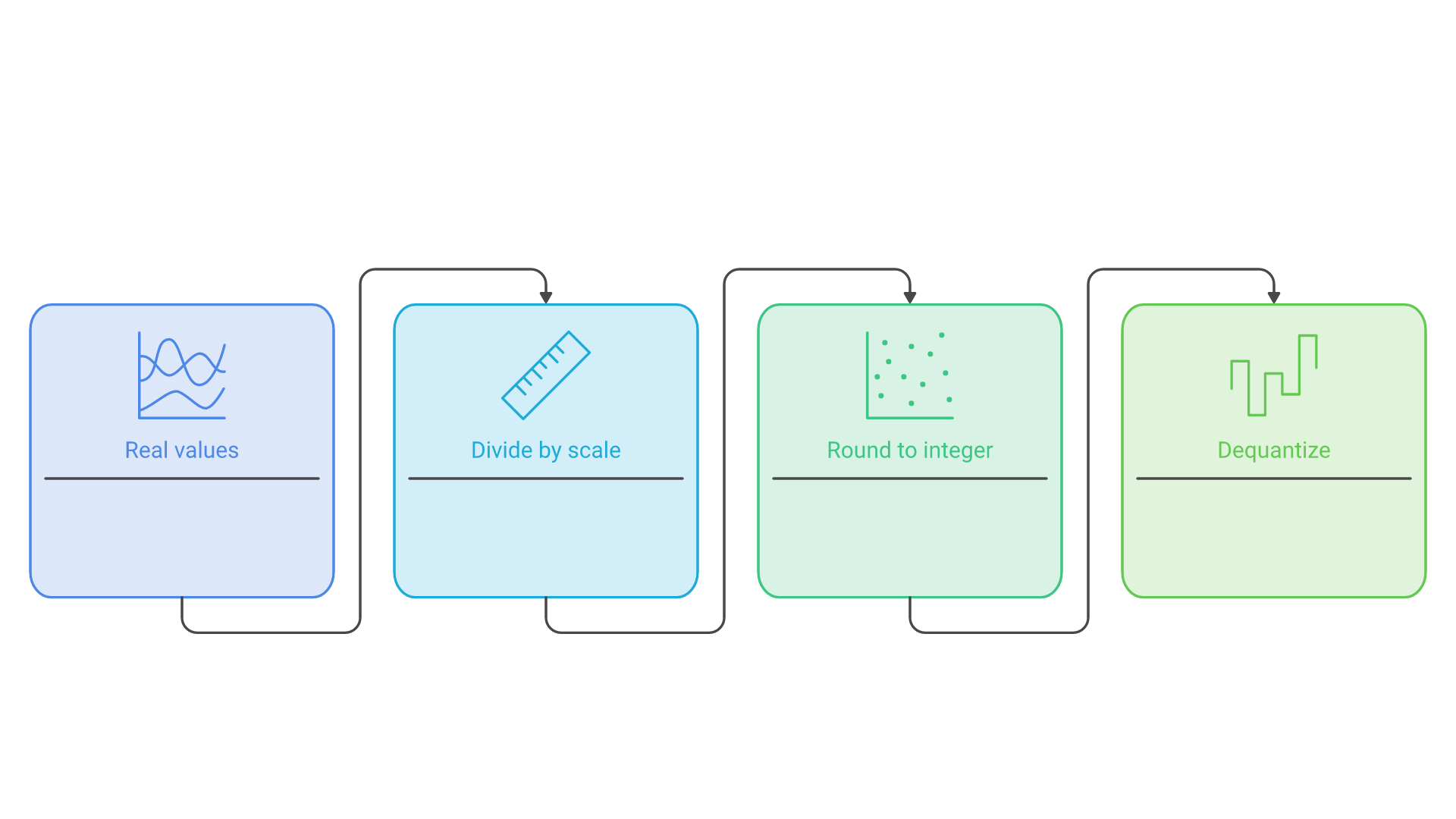
Most production systems use affine quantization. Real values x are mapped to integers q using a scaling factor s and a zero point z:
q = clamp(round(x / s) + z, q_min, q_max) and x̂ = s × (q − z)
Here, s stretches a discrete integer range (for example 0 to 255 for unsigned INT8) across a continuous interval, and z aligns the integer zero with the real zero. Choosing s and z requires range estimation from data: you determine minimum and maximum values (or robust statistics) for a tensor and map them to a symmetric range (−128 to 127) or an asymmetric range (0 to 255).
This mapping is applied to weight quantization (persistent parameters) and activation quantization (layer outputs). The inevitable quantization error, the difference between x and x̂, must be controlled to preserve model accuracy.
Where matrix multiplication fits
In a weight-only scheme such as W4A16, the kernel loads compact 4-bit weights, dequantizes them on the fly and multiplies them with 16-bit activations; because decoding is limited by how fast weights are read, moving fewer bytes is where most of the speedup comes from. In W8A8, both operands are low precision, so the multiplication itself can run on INT8 or FP8 tensor cores, which mainly helps long prompts and large batches.
Symmetric vs. Asymmetric Quantization
- Symmetric quantization: a range from −S to S mapped to signed integers with a zero point of 0; simple and fast, and a good fit for centered distributions such as most weights.
- Asymmetric quantization: adds a zero point to represent skewed ranges; helpful for activations with a strong positive bias.
A common starting point is symmetric for weights and asymmetric for activations. GGUF k-quants show both styles: Q6_K and Q3_K use a scale only, while Q4_K, Q5_K and Q2_K add a per-block minimum.
Affine Quantization in Practice: Scale and Zero-Point Tuning
Choose the scaling factor to map the observed range to the integer limits without letting outliers dictate it. Use percentile or MSE-based clipping instead of raw min and max, prefer per-channel or per-group scales for weights, and store scales in FP16 or FP32 while keeping fast low-precision kernels for the matmuls. These details are what keep quantized weights numerically stable.
Floating-Point vs. Lower Precision Formats
FP32, FP16 and BF16. Full and half precision floats are easy to train and serve but consume the most memory. Most open models are released in BF16, which is the usual accuracy baseline.
INT8, INT4 and below. Integers with a scale dramatically reduce size. INT8 is widely considered the safe default; 4-bit integer weights offer more savings with higher quantization difficulty; 2-bit, ternary and binary formats are extreme quantization.
FP8: E4M3 and E5M2
FP8 keeps floating-point semantics in 8 bits. The paper FP8 Formats for Deep Learning defines E4M3 (4 exponent bits, 3 mantissa bits) and E5M2 (5 exponent, 2 mantissa) and reports that FP8 matched 16-bit result quality across model types up to 175B parameters. Because floats spread precision across a wide range, FP8 tolerates outliers better than INT8, and on hardware with FP8 tensor cores it is a common serving default.
MXFP4 and NVFP4: block-scaled 4-bit floats
The Open Compute Project's microscaling (MX) formats attach one shared scale to a small block of narrow values. Per the Microscaling Data Formats for Deep Learning paper, MXFP4, MXFP6, MXFP8 and MXINT8 use a block size of 32 and an 8-bit power-of-two (E8M0) scale, with MXFP4 elements stored as E2M1. gpt-oss is the best-known model shipped this way. NVIDIA's NVFP4, introduced with Blackwell, uses 16-value blocks with an FP8 E4M3 scale plus a per-tensor FP32 scale; NVIDIA's NVFP4 announcement reports 1% or less degradation on key language modeling tasks when quantizing DeepSeek-R1-0528 from FP8 to NVFP4, a vendor result worth reproducing on your own tasks.
Native 4-bit weights also change how you adapt a model. Our guide to gpt-oss fine-tuning strategies explains why MXFP4 weights are typically upcast to BF16 for training and then re-quantized with PTQ or QAT before export.
| Format | Type | Approximate bits per weight | Typical use |
|---|---|---|---|
| BF16 / FP16 | Float | 16 | Training, baseline serving |
| FP8 (E4M3) | Float | 8 plus scales | GPU serving, KV cache |
| INT8 | Integer | 8 plus scales | W8A8 serving, CPU inference |
| INT4 (GPTQ, AWQ) | Integer | about 4.1 to 4.5, by group size | W4A16 GPU serving |
| GGUF Q4_K | Integer, block-scaled | 4.5 | llama.cpp, Ollama, LM Studio |
| MXFP4 | Float, block-scaled | 4.25 | gpt-oss MoE weights |
| NVFP4 | Float, two-level scaled | about 4.5 | Blackwell GPUs |
The further you move from 16-bit, the more you must invest in calibration, finer scaling or algorithmic tweaks to avoid larger quantization errors.
Sources of Quantization Error (and Why They Matter)
Quantization error arises because many different reals map to the same code. Coarse scaling or poor range estimation can saturate peaks (clipping) or waste bins (under-utilization), and error can accumulate across layers, corrupting attention scores or MLP outputs.
LLMs add a specific complication: outliers. The LLM.int8() paper describes systematic emergent outlier features in transformer activations that dominate attention and predictive performance. One large value forces a large scale and leaves too few levels for everything else. LLM.int8() runs outlier dimensions in 16-bit while more than 99.9% of values are multiplied in 8-bit. SmoothQuant instead migrates quantization difficulty from activations to weights with an offline, mathematically equivalent rescaling, enabling W8A8 with negligible accuracy loss in its tests.
Key levers to reduce error:
- Symmetric vs. asymmetric quantization to match the distribution.
- Per-tensor vs. per-channel or per-group scales; finer granularity reduces error.
- Outlier handling through mixed precision, smoothing or activation-aware scaling.
- Calibration dataset quality; representative inputs give stable ranges.
Common Quantization Techniques (The Landscape)
The most common quantization techniques you will encounter for LLMs are:
- Post-Training Quantization (PTQ): quantize a trained model; fast to deploy.
- Quantization-Aware Training (QAT): simulate quantization during training; best for maintaining accuracy.
- Dynamic quantization: quantize activations at runtime; convenient on CPUs.
- Static quantization: fix scales and zero points ahead of time using calibration.
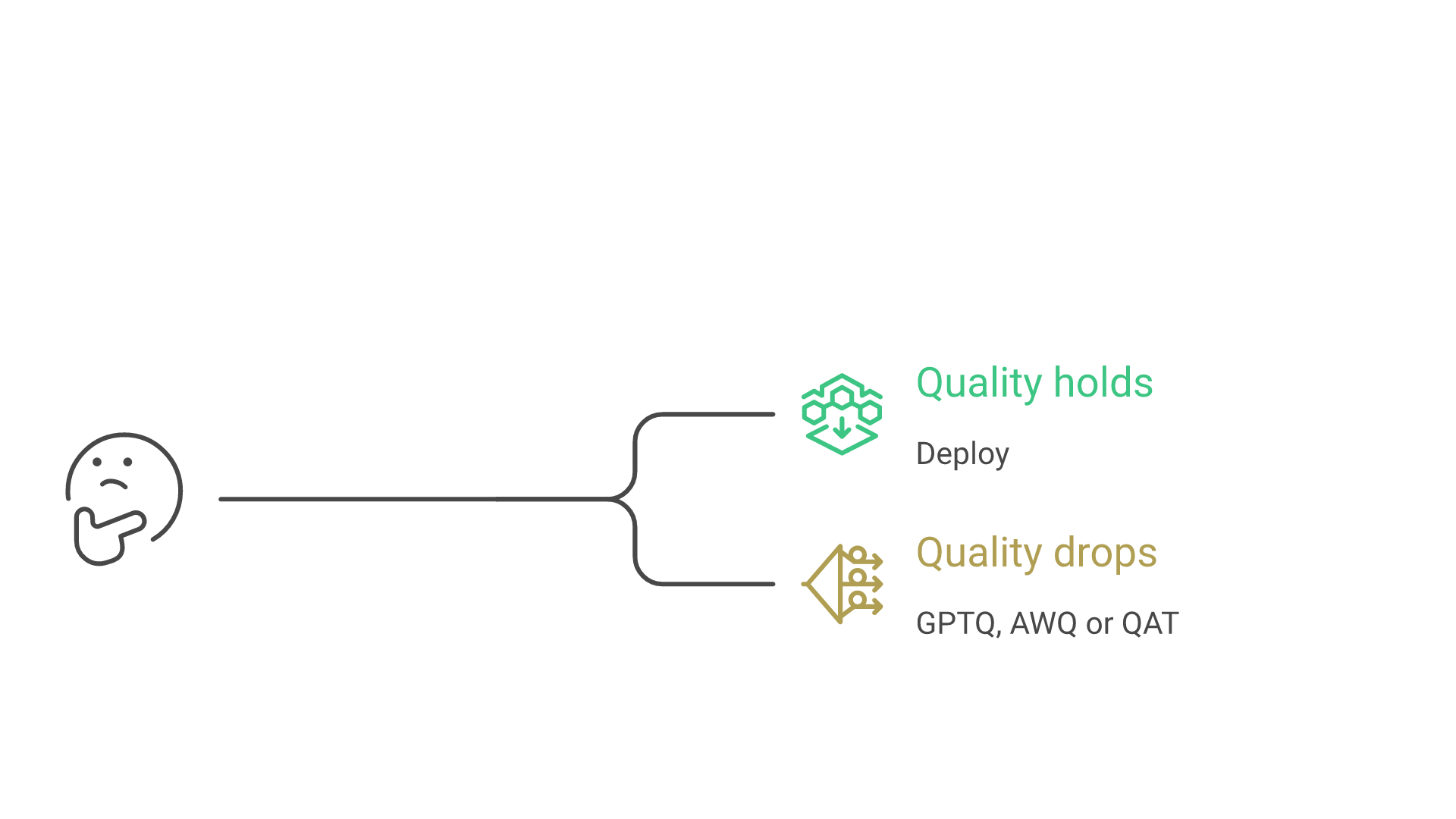
Most teams start with PTQ, move to an LLM-specific PTQ method such as GPTQ or AWQ if quality drops, and reserve QAT for cases where a low-bit model must closely match the original.
Post-Training Quantization (PTQ)
PTQ converts weights (and optionally activations) after training, using a small calibration dataset to estimate ranges, or none at all for simple round-to-nearest schemes. For LLMs it typically uses per-channel or per-group weight scales, KL, MSE or percentile range selection, and error-compensating algorithms. PTQ is attractive because you do not touch training data or retrain the model; the GGUF, GPTQ and AWQ files on the Hugging Face Hub are all produced this way.
Quantization-Aware Training (QAT)
QAT places "fake-quant" operators in the forward pass so the network learns under quantized conditions; gradients flow through straight-through estimators, and final weights are exported in low precision. PyTorch's torchao QAT write-up reports that QAT recovered up to 96% of the HellaSwag accuracy degradation and 68% of the WikiText perplexity degradation for Llama 3 8B compared with PTQ, using INT8 dynamic activations and INT4 grouped weights. The costs: it needs training data and compute, and the same post measured QAT fine-tuning at about 34% slower than regular full fine-tuning.
Dynamic vs. Static Quantization
Dynamic quantization converts weights offline (usually to INT8) and computes activation scales on the fly for each input. It is convenient for CPU inference and needs no calibration. Static quantization fixes weight and activation parameters ahead of time after a calibration pass, yielding more predictable latency and better throughput on accelerators.
Activation-Aware Weight Quantization (AWQ) and GPTQ
Two LLM-oriented PTQ approaches have become the standard for 4-bit GPU checkpoints, and both are supported by Transformers and vLLM.
GPTQ
GPTQ (Frantar et al., ICLR 2023) uses approximate second-order information to minimize each layer's output error, quantizing weights column by column and updating the rest to compensate. The authors report quantizing a 175B-parameter model in about four GPU hours at 3 or 4 bits with little accuracy loss, and end-to-end speedups over FP16 of about 3.25x on an A100 and 4.5x on an A6000. GPTQ depends on its calibration data, so mismatched calibration text is a common cause of regressions.
AWQ
AWQ (Lin et al.) observes that only about 1% of weights are salient and that protecting them greatly reduces error. It finds those channels from activation magnitudes, not weight values, and scales them up before quantization instead of keeping them in mixed precision, which stays hardware friendly. It needs no backpropagation or reconstruction, which the authors argue reduces overfitting to the calibration set.
Related methods: LLM.int8(), SmoothQuant and NF4
bitsandbytes offers on-the-fly 8-bit (LLM.int8()) and 4-bit loading in Transformers with no calibration. Its NF4 data type comes from the QLoRA paper, which also introduced double quantization and fine-tuned a 65B model on a single 48 GB GPU; the bitsandbytes guide notes nested quantization saves another 0.4 bits per parameter. These methods produce different file formats and need different kernels, so your serving runtime should drive the choice.
GGUF and llama.cpp K-Quants
If you run models on a laptop, a Mac or a CPU server, you will meet GGUF, a binary format from the creator of llama.cpp that stores tensors with standardized metadata and is used by llama.cpp, Ollama, LM Studio and GPT4All. Files are usually produced by converting a model to BF16 or F16 GGUF and running llama-quantize with a target type.
Reading names like Q4_K_M
The number is the nominal bit width, "K" marks the k-quant family with shared super-block scales, and the suffix (S, M or L) indicates how many sensitive tensors are kept at a higher type. Base costs per the Hugging Face GGUF reference: Q6_K 6.5625 bpw, Q5_K 5.5, Q4_K 4.5, Q3_K 3.4375 and Q2_K 2.625. Q4_0, Q5_0 and Q8_0 are older round-to-nearest types labeled legacy, though Q8_0 remains a common near-lossless choice.
| GGUF type | Bits per weight (Llama 3.1 8B) | Size (GiB) |
|---|---|---|
| F16 | 16.00 | 14.96 |
| Q8_0 | 8.50 | 7.95 |
| Q6_K | 6.56 | 6.14 |
| Q5_K_M | 5.70 | 5.33 |
| Q4_K_M | 4.89 | 4.58 |
| IQ4_XS | 4.46 | 4.17 |
| Q3_K_M | 4.00 | 3.74 |
| IQ2_XXS | 2.38 | 2.23 |
Figures are from the llama.cpp quantize documentation; whole-model averages run above the base type because embeddings and output tensors are often stored at higher precision.
I-quants and the importance matrix
The IQ types use an importance matrix (imatrix) computed from sample text to decide which weights deserve the most precision. llama.cpp's documentation says quality loss can be minimized with a suitable imatrix file, which matters most below 4 bits; like any calibration data, it should resemble your real prompts. For choosing a GGUF file, installing a runtime and sizing a machine, see our guide to setting up and using local LLM models.
Granularity: Layer-Wise, Block-Wise, Group-Wise
- Layer-wise (per-tensor) quantization: one scale per tensor; simplest but highest error.
- Per-channel: separate scales per output or input channel; a strong default for INT8 weights.
- Group-wise or block-wise: groups of 16 to 128 values with their own scales; the standard for 4-bit formats such as GPTQ, AWQ, GGUF and MX.
Finer granularity improves quality but adds metadata, visible in bits per weight: a group of 128 with a 16-bit scale adds 0.125 bpw, a block of 32 with an 8-bit scale adds 0.25, and NVFP4's 16-value blocks with 8-bit scales add 0.5.
Choosing Bit-Widths: W8A8, W4A16, W4A8 and Beyond
- W8A8 (INT8 or FP8): widely supported, strong accuracy, a straightforward win on modern GPUs.
- W4A16: 4-bit weights, 16-bit activations; the common format for GPTQ, AWQ and GGUF.
- W4A8: larger compute savings; needs specific kernels and careful outlier handling.
- Ternary or binary: research-grade extreme quantization with steep quality risk.
How much accuracy does quantization cost?
A large public study, "Give Me BF16 or Give Me Death"? Accuracy-Performance Trade-Offs in LLM Quantization (Kurtic et al., ACL 2025), ran more than 500,000 evaluations on the Llama 3.1 family. It found FP8 W8A8 effectively lossless, well-tuned INT8 W8A8 within roughly 1 to 3% degradation, and INT4 weight-only quantization more competitive than expected. In its vLLM tests, W4A16 was most cost-efficient for synchronous serving and W8A8 best for asynchronous continuous batching.
These are benchmark averages. Long reasoning chains, code, math, multilingual text and exact recall often degrade first, so test the tasks you actually ship.
Quantization for Attention and KV Cache
Attention is sensitive to small perturbations. Keep softmax-critical paths and layer norms at higher precision, and quantize K and V caches with per-tensor or per-head scales. vLLM supports an FP8 KV cache through kv_cache_dtype, with E4M3 and E5M2 variants; its quantized KV cache documentation lists a smaller footprint, more tokens in memory, higher throughput and longer context as benefits. By default its scales are 1.0 without calibration, and it recommends calibrating them with LLM Compressor for better accuracy.
Calibration Dataset and the Steps to Perform Quantization
Build a calibration dataset of representative prompts; avoid only "easy" text and include long contexts, code, structured output, your users' languages and domain jargon.
Quantization procedure (static PTQ)
- Collect calibration batches from real workloads.
- Run the unquantized model to gather activation statistics or importance scores.
- Set scales, or run GPTQ, AWQ or imatrix quantization.
- Convert weights to the target format.
- Validate on a held-out set and revisit layers with larger errors.
- Optionally fine-tune briefly to recover tail metrics.
Version the calibration set with the quantized artifact so the result can be reproduced.
Fine Tuning After Quantization (QAFT)
When PTQ alone underperforms, add a brief fine-tuning phase with fake-quant operations: freeze most layers, train sensitive blocks with a small learning rate, and consider leaving the first and last layers at higher precision. The PyTorch team found that for 2-bit weights, skipping the first three and last two layers of Llama 3 8B was necessary for QAT to work well. QLoRA is a related but different tool: it trains small LoRA adapters on a frozen 4-bit base, which is often the most practical way to adapt a model that will be served quantized.
Measuring Impact: Model Size, Latency, Energy
- Model size. 8-bit cuts storage about 2x versus FP16; 4-bit formats about 3.3x to 3.8x once scales are included.
- Latency and throughput. Less memory traffic lowers time per token, and freed memory becomes KV cache for more concurrent requests.
- Energy. Fewer bytes moved means less power, which compounds at scale.
Speed does not always follow size. In the llama.cpp Llama 3.1 8B table, generation speed rises from F16 to Q8_0 to Q4_K, but some low-bit IQ types, such as IQ3_S, are not faster than Q4_K_S because their decoding is more complex. Track gains alongside task quality.
Hardware and Kernel Support
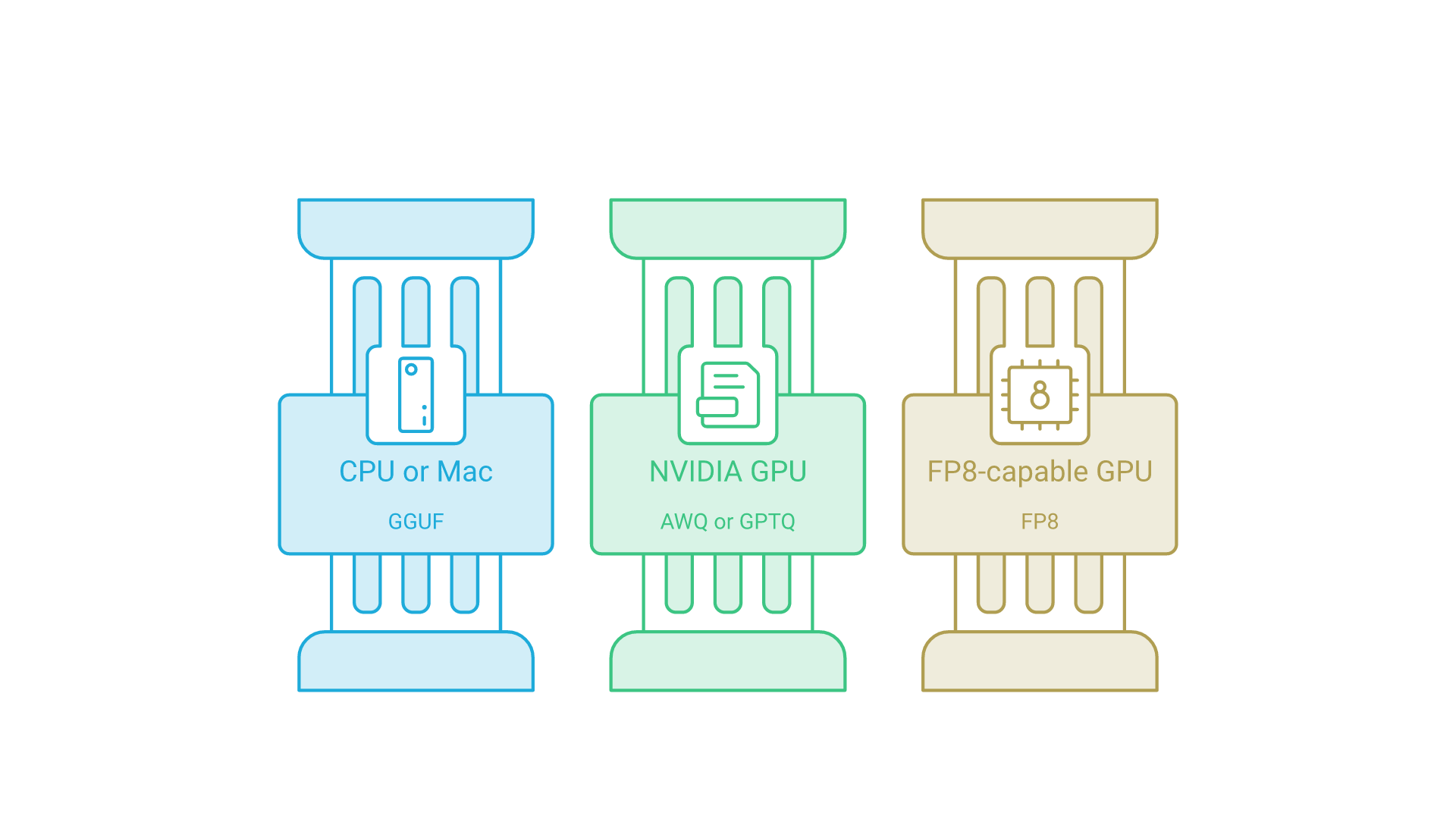
- CPUs and Apple Silicon: GGUF through llama.cpp and its derivatives is the mature path.
- NVIDIA GPUs: the vLLM documentation lists AWQ from Turing through Hopper, GPTQ from Volta through Hopper, INT8 W8A8 from Turing through Hopper and FP8 W8A8 on Ada, Hopper and AMD GPUs, with Marlin kernels for GPTQ, AWQ, FP8 and FP4 on Ampere and newer. Blackwell adds FP4 tensor cores for NVFP4.
- Other accelerators: support varies by method and changes often.
Check the vLLM quantization documentation before committing to a format; the fastest scheme on paper may underperform without matching kernels. Hardware, GPU memory and serving architecture are tightly coupled to these choices, which is the planning our AI infrastructure services cover for teams moving to production capacity.
Integration in a Machine Learning Pipeline
- Train or fine-tune in BF16, quantize, evaluate, then serve.
- Log method, bit-width, group size, calibration set and tool versions with each artifact.
- Re-run your evaluation suite on every quantized variant; recalibrate if inputs drift.
Quantization is now routine hygiene akin to pruning or distillation. When the model sits inside a product with retrieval, guardrails and integrations, set quantization against the whole system's latency and quality targets; our LLM solutions team builds that kind of evaluation and deployment pipeline.
Troubleshooting and Pitfalls
- Quality drops unexpectedly? Check calibration coverage; use per-channel scales or smaller groups.
- Unstable logits? Keep layer norms and residuals in higher precision.
- Outlier channels? Use AWQ, GPTQ, smoothing or a higher-precision type for those tensors.
- Attention problems at long context? Calibrate KV cache scales; keep softmax inputs at higher precision.
- Broken output after re-quantizing? llama.cpp warns that requantizing can noticeably reduce quality; start from the BF16 original.
Case Snapshot: Quantizing an 8B LLM
Published numbers for Llama 3.1 8B make the trade-off concrete. These come from the sources cited above, not from tests we ran:
- Baseline: about 15 GiB of F16 weights, plus about 16 GiB of BF16 KV cache at full 128K context.
- 8-bit: Q8_0 halves weights to 7.95 GiB; Kurtic et al. found FP8 W8A8 effectively lossless on Llama 3.1.
- 4-bit: Q4_K_M brings weights to 4.58 GiB and, in the llama.cpp table, generates text about 2.5 times faster than F16 on the same unspecified hardware.
- Below 3 bits: IQ2_XXS fits in 2.23 GiB, but PyTorch's experiments show how quickly quality collapses at 2 bits without layer exceptions and training.
The default curve: 8-bit is the conservative choice, 4-bit is the usual sweet spot for local and memory-limited serving, and lower settings are a bet to validate on your own tasks.
Research and Community (NeurIPS and Beyond)
Many advances appear at NeurIPS, ICLR, ICML, MLSys and ACL: LLM.int8() at NeurIPS 2022, GPTQ at ICLR 2023 and SmoothQuant at ICML 2023. Current directions include FP8 and FP4 training, block-scaled formats such as MX and NVFP4, KV cache compression and extreme 1- to 2-bit models. Progress lands quickly in llama.cpp, vLLM, LLM Compressor, torchao and bitsandbytes, whose documentation is often the most current reference.
Checklist: Best Practices to Achieve Quantization with Minimal Accuracy Loss
- Estimate memory first: weights plus KV cache plus overhead.
- Pick a format your runtime and hardware accelerate.
- Use per-channel or group-wise scaling for weights; symmetric for weights, test asymmetric for activations.
- Calibrate with representative, long-context prompts.
- Keep layer norms, softmax and sensitive layers in higher precision.
- Start with 8-bit or a 4-bit Q4_K_M, AWQ or GPTQ model; go lower only with imatrix methods or QAT.
- Benchmark end to end: latency, throughput, memory, energy and task accuracy.
Frequently Asked Questions
Does quantization reduce LLM accuracy?
Usually a little, and the loss grows as bits shrink. Published evaluations find FP8 effectively lossless and well-tuned INT8 within about 1 to 3%, while 4-bit weight-only models are often close to 8-bit. Below about 3 bits per weight, quality can drop sharply.
Is PTQ enough for most LLMs?
Often yes for 8-bit and for 4-bit weight-only models made with GPTQ, AWQ or GGUF k-quants. For lower bit-widths or strict domains such as code and math, add importance-weighted methods or brief QAT.
What does Q4_K_M mean?
It is a llama.cpp GGUF type: a 4-bit k-quant (4.5 bits per weight) in its medium mix, which keeps some sensitive tensors at higher precision. For Llama 3.1 8B it averages about 4.9 bits per weight.
Can I quantize everything to 4-bit?
Weights, mostly yes. Activations, softmax inputs and layer norms usually stay at higher precision, and embeddings or output layers often use a higher type. Fully 4-bit pipelines need hardware built for formats such as NVFP4 or MXFP4.
Will quantization help on GPU?
Yes. Smaller weights reduce memory traffic and free memory for the KV cache, and INT8, FP8 and FP4 tensor cores speed up compute when the serving engine has matching kernels.
Do I need to change my training?
Not with PTQ, which works on a finished checkpoint. With QAT or quantization-aware fine-tuning, you retrain briefly so the model learns under quantization noise.
Conclusion: Why LLM Quantization Matters
LLM quantization compresses models into lower precision formats to unlock faster, cheaper and more efficient inference without sacrificing too much model accuracy. By combining robust affine quantization (a well-chosen scaling factor and zero point), careful range estimation and LLM-specific techniques such as GPTQ, AWQ, GGUF k-quants and block-scaled FP8 and FP4 formats, teams can deliver smaller models that meet production service levels.
Start with the memory math, choose a format your hardware accelerates, validate on a representative calibration and evaluation set, and iterate. When quality matters most, bring in quantization-aware training or short fine-tuning cycles to stabilize metrics.
If you are deciding which models, formats and hardware fit your workload, or need a quantized LLM evaluated before it reaches production, talk to Cognativ about your AI project.