


Few-Shot Prompting: Improving AI Model Performance
Show a model a few worked examples and it follows your format. See what the GPT-3 paper and 2026 vendor guides say about choosing, ordering and testing them.
Few-shot prompting is a technique in natural language processing that places a small number of worked examples inside a single prompt so that a large language model can infer the task, the expected format and the boundaries of a correct answer. Instead of retraining the model, you show it what a good input-output pair looks like and then hand it a new input. With clear instructions and well-chosen examples, the model is far more likely to follow your format, apply the right labels and produce the response you expect.
The idea is older than most of today's chat assistants. It was popularized by the 2020 GPT-3 paper, and it remains one of the most reliable prompting techniques in the official guides that OpenAI, Anthropic and Google publish in 2026. What has changed is the context around it: models now follow instructions much better, reasoning models often do well with no examples at all, and context windows and prompt caching have changed the cost of adding examples.
Key takeaways:
- A single example (one-shot) or a handful of examples (few-shot) helps a model understand the user's query, the output format and edge cases, without any additional training.
- Examples teach format, label space and style at least as much as they teach the input-to-label mapping, so consistency and coverage matter more than clever wording.
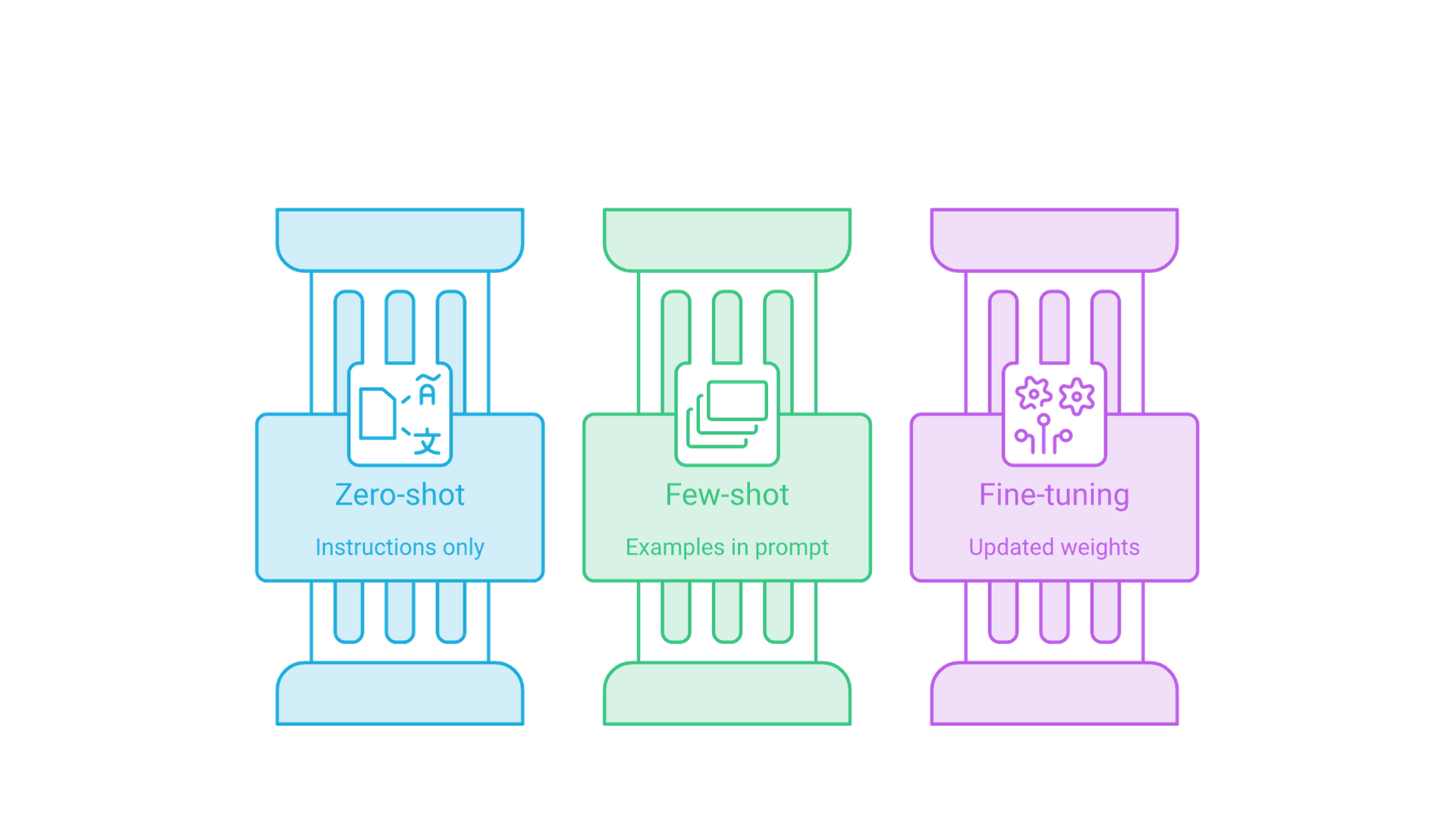
- Few-shot prompting sits between zero-shot prompting and fine-tuning: cheaper and faster to change than training, but more expensive per request and more sensitive to example selection and ordering than a clean zero-shot prompt.
- Current vendor guidance converges on a few rules: use relevant, diverse and consistently formatted examples, mark them clearly, and for reasoning models try zero-shot first.
Introduction to Few-Shot Prompting
Few-shot prompting is a prompt engineering technique in which you provide a few input-output demonstrations before the actual task. The model reads those demonstrations as part of its context, recognizes the pattern and applies it to the new input. Nothing about the model's weights changes; the adaptation lasts only for that request.
The technique addresses a core limitation of zero-shot prompting. Large language models are good at general tasks that resemble patterns in their pre-training data, but they can drift when a task needs a domain-specific label set, a strict output schema, a house style or a judgment call on ambiguous inputs. A few concrete examples often settle those questions faster than another paragraph of instructions. If you are new to the wider discipline, our developer guide to prompt engineering covers how to define inputs, outputs and test sets before you tune any wording; this article goes deep on the examples themselves.
What This Guide Covers
This guide explains how few-shot prompts work, how they compare with zero-shot, one-shot and fine-tuning approaches, what the research says about example selection and ordering, and what current official prompting guides recommend. It includes prompt templates for text classification, question answering, content generation and code generation, plus a section on when few-shot prompting helps and when it hurts.
Who This Is For
This guide is for developers, prompt engineers and AI practitioners who want to move beyond basic zero-shot prompting in content creation, code generation or text classification systems, without additional training.
Why This Matters
Few-shot prompting is often the cheapest lever between an underperforming zero-shot prompt and a fine-tuning project: it needs a handful of labeled examples, changes in minutes and works with hosted models whose weights you cannot touch. Gains are task-dependent, so measure them on your own evaluation set rather than expecting a fixed percentage.
Understanding Few-Shot Prompting, In-Context Learning and Pre-Trained Knowledge
Few-shot prompting relies on in-context learning: the ability of a pre-trained model to pick up a task from demonstrations that appear in its input. Language models are trained to predict the next token on vast amounts of text, so they are fundamentally pattern learners. When a prompt contains several input-output pairs with the same structure, the most likely continuation after a new input is an output that follows the same pattern.
Unlike fine-tuning, which updates model parameters, in-context learning is temporary: remove the examples and the behavior disappears. That makes few-shot prompts easy to iterate on and roll back, but you pay for the examples in tokens on every request unless you cache them.
What the GPT-3 Paper Showed
The term few-shot prompting traces back to Language Models are Few-Shot Learners (Brown et al., 2020), the paper that introduced GPT-3, an autoregressive language model with 175 billion parameters. The authors evaluated the model "without any gradient updates or fine-tuning," with tasks and demonstrations specified purely through text. They defined three settings that are still used today:
- Few-shot: the model receives a few demonstrations of the task at inference time as conditioning, with no weight updates.
- One-shot: the same, but with exactly one demonstration.
- Zero-shot: no demonstrations, only a natural-language description of the task.
In the GPT-3 experiments the number of examples was typically set between 10 and 100, limited by a 2,048-token context window. The paper listed the main advantage of few-shot learning as a major reduction in the need for task-specific data, and its main disadvantage as results that were, at the time, often much worse than state-of-the-art fine-tuned models, although some tasks came close. That framing still holds: few-shot prompting trades peak task accuracy for speed, flexibility and a much smaller data requirement.
How Large Language Models Process Examples and Use Pre-Trained Knowledge
Large language models process few-shot examples through the attention mechanism of the transformer architecture. Every token of the new input can attend to the tokens of the examples, so the model can align the new input with similar demonstrations and copy their structure, label vocabulary and level of detail.
The examples do not teach the model new knowledge from scratch. They activate and steer knowledge the model already has from pre-training. A sentiment model already "knows" what a complaint sounds like; your examples tell it that you want the labels Positive, Negative and Neutral, in title case, with no explanation. This is why few-shot prompting works well for formatting and classification tasks but cannot reliably inject facts the model has never seen. For that, retrieval or fine-tuning is the better tool.
What Demonstrations Actually Teach
Research on in-context learning suggests that demonstrations teach more about the shape of the task than about the exact input-label mapping. In Rethinking the Role of Demonstrations (Min et al., 2022), the authors found that replacing the labels in demonstrations with random labels barely hurt classification performance across 12 models, including GPT-3. What mattered more was that the examples showed the label space, the distribution of input text and the overall format.
The practical lesson is not that labels are irrelevant; for nuanced or domain-specific decisions, correct labels still matter. The lesson is that format, coverage and consistency deserve as much care as correctness, because those are the signals the model reliably picks up.
Few-Shot vs Zero-Shot vs One-Shot Prompting and Fine-Tuning
Choosing between these approaches is mostly a question of how much the model needs to be shown, how often the task runs and how much labeled data you have. The table summarizes typical trade-offs; the right answer for your workload comes from testing on your own data.
| Approach | Examples | Best use cases | Main trade-off |
|---|---|---|---|
| Zero-shot | 0 | Well-defined tasks the model already handles: general question answering, summarization, simple translation | Least setup, but output format and edge-case handling can drift |
| One-shot | 1 | Showing an output format or template once | Fast to write, but a single example can be over-copied |
| Few-shot | Typically 2 to about 10 in modern prompts | Custom label sets, strict formats, house style, ambiguous boundaries | More tokens per request; sensitive to example choice and order |
| Fine-tuning | Hundreds to thousands of labeled examples | High-volume, stable, specialized tasks where consistency or latency justify training | Needs data, training runs, evaluation and redeployment for every change |
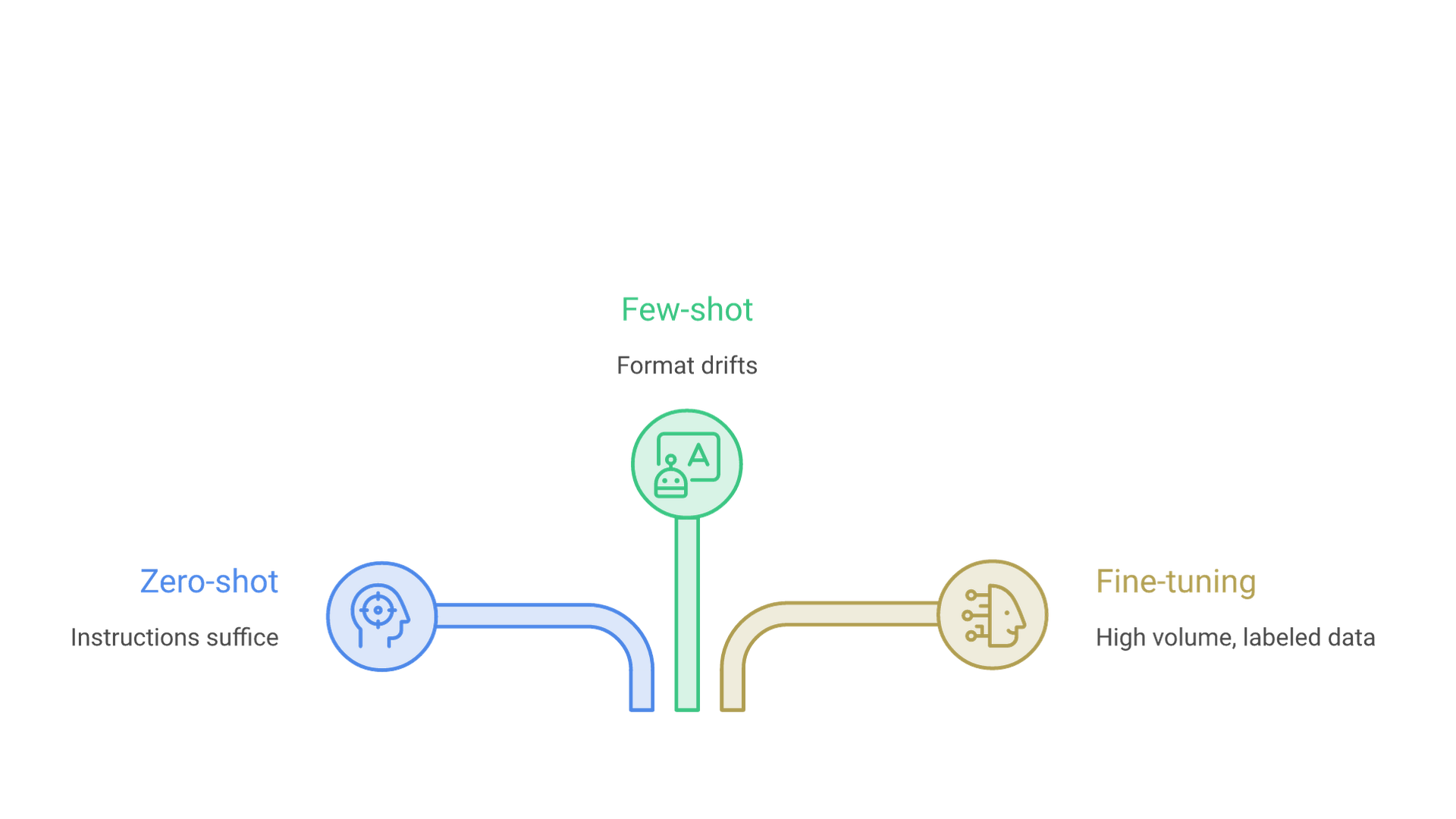
Zero-shot prompting works well when a task aligns closely with patterns in the model's training data and clear instructions are enough. Few-shot prompting earns its tokens when the model needs to see the target: a particular JSON schema, a classification boundary that is hard to describe in words, or a tone of voice. Fine-tuning becomes attractive when the same task runs at high volume, when you have a large labeled dataset and when the examples you would need no longer fit comfortably or cheaply in every prompt.
Where Parameter-Efficient Fine-Tuning Fits
The gap between prompting and full fine-tuning has narrowed thanks to parameter-efficient methods. Techniques such as low-rank adaptation train a small set of adapter weights instead of the whole model, which lowers the cost of specializing an open-weight model. Our explainer on LoRA and low-rank adaptation covers how that works. A sensible path is to prototype with few-shot prompts, use the examples that worked as the seed of a training set, and consider adapter-based fine-tuning only when prompt cost, latency or consistency become the bottleneck.
What OpenAI, Anthropic and Google Recommend in 2026
OpenAI, Anthropic and Google all document few-shot prompting. Their advice overlaps heavily, with a few differences as of October 2026.
OpenAI
OpenAI's prompt engineering guide describes few-shot learning as a way to steer a model toward a new task by including a handful of input-output examples, and advises showing "a diverse range of possible inputs with the desired outputs." It suggests placing examples in the developer message of an API request. The guide also distinguishes GPT models, which benefit from precise, explicit instructions, from reasoning models, which tend to do better with high-level guidance.
That distinction is spelled out in OpenAI's reasoning best practices, which recommends trying zero-shot first and adding few-shot examples only if needed, because reasoning models often do not need them. When you do add examples to a reasoning-model prompt, OpenAI advises making sure they align very closely with your instructions, since mismatches between examples and instructions can produce poor results.
Anthropic
Anthropic's prompting best practices for Claude calls examples one of the most reliable ways to steer output format, tone and structure, and refers to the technique as few-shot or multishot prompting. It asks for examples that are relevant (mirroring the real use case), diverse (covering edge cases and varied enough that the model does not pick up unintended patterns) and structured, wrapped in <example> tags inside an <examples> block so they are not confused with instructions. The guide suggests 3 to 5 examples for best results and notes that you can ask Claude to evaluate your examples or generate more. It also says multishot examples work with extended thinking: worked examples shape how the model approaches similar problems in its own reasoning.
Google's Gemini prompting strategies goes furthest, recommending that you always include few-shot examples and warning that prompts without them are likely to be less effective. It notes that clear examples can sometimes replace instructions, that you may need to experiment with the number of examples, and that too many examples can cause the model to overfit its responses to them. It also insists that every example share the same structure and formatting, including tags, whitespace, newlines and example separators.
Where the Guides Agree
The guides agree that examples should resemble real inputs, vary enough to cover edge cases, share one format clearly separated from instructions, and be counted by testing rather than by rule. The main divergence is reasoning models, where OpenAI starts without examples. If you use several providers, keep examples in a neutral format and adapt the wrapper per model.
Designing Effective Few-Shot Prompts for Text Classification and Question Answering
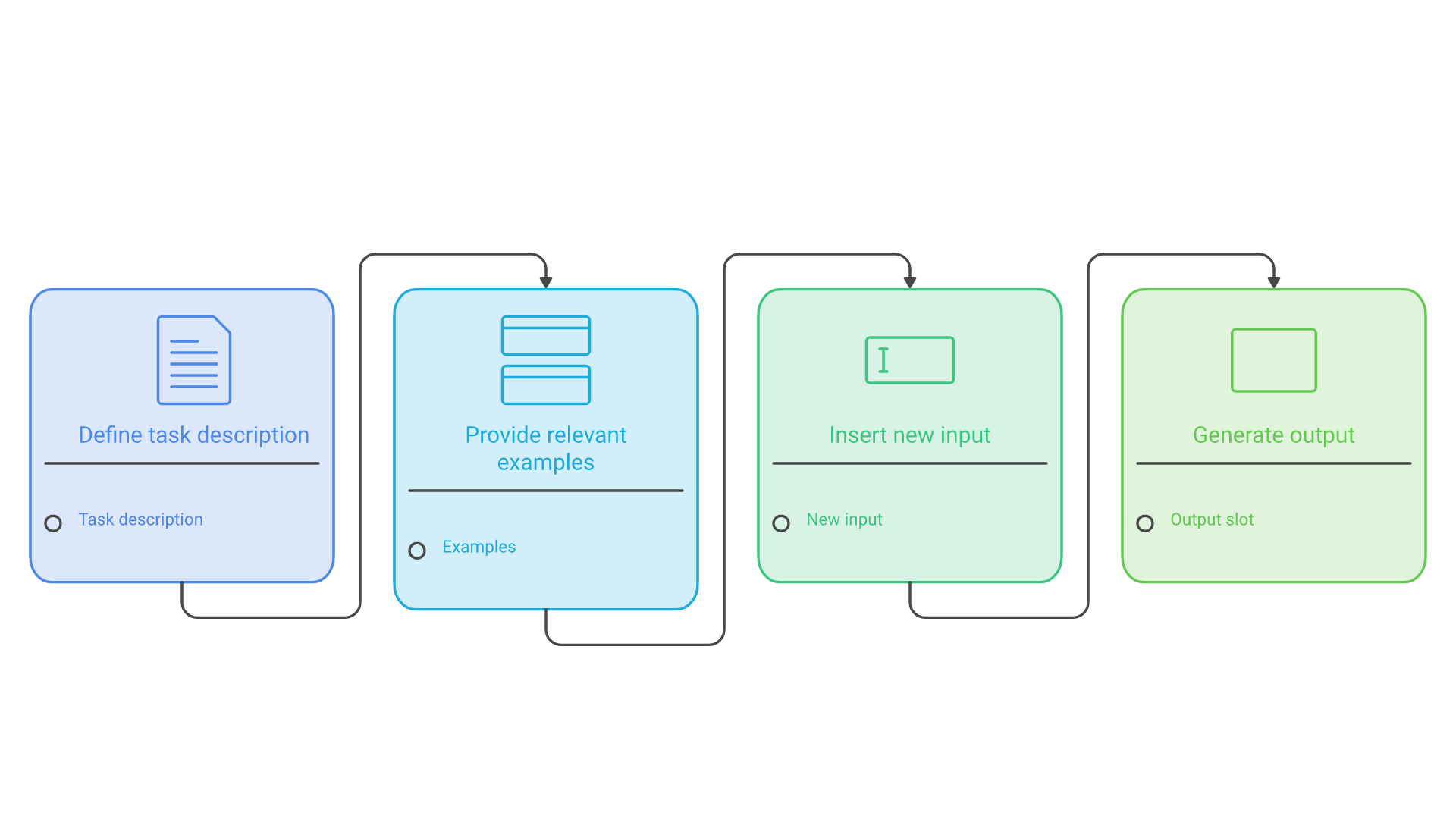
Building on the pattern recognition of language models, an effective few-shot prompt follows a clear structure: a task description, input-output examples, the new input and an output indicator. Each part has a job, and most failures come from one of them being vague or inconsistent.
Generic Structure for Few-Shot Prompts
Use this structure for any task that needs consistent formatting or a specific response pattern, including text classification and question answering:
- Task description: a brief explanation of what the model should do and which labels or fields are allowed.
- Examples section: typically three to five input-output pairs demonstrating the desired pattern, including at least one hard case.
- New input: the actual item you want processed, in exactly the same shape as the example inputs.
- Output indicator: a clear signal for where the response begins, such as
Output:or an open tag.
Here is a sentiment analysis prompt that follows the structure. Note that the final input has no output; that is the slot the model fills.
Classify the sentiment of customer feedback as Positive, Negative or Neutral.
Return only the label.

Input: "This product exceeded my expectations! Amazing quality."
Output: Positive

Input: "The delivery was delayed and the packaging was damaged."
Output: Negative

Input: "The product works as described. Nothing special."
Output: Neutral

Input: "I love how easy this app is to use, but support never replied."
Output:
Formatting Examples So the Model Can Find Them
How you package examples matters as much as what they say. Three formats are common in production:
- Inline text blocks with consistent
Input:andOutput:markers, as above. Simple and portable. - Tagged blocks, such as
<example>elements with nested<input>and<output>. Anthropic recommends this for Claude, and it makes long or multi-line examples unambiguous. - Message pairs, where each example is a user message followed by an assistant message in the chat history. This shows the model exactly what its own turn should look like, which helps with strict schemas.
Whatever you choose, keep it identical across examples. A missing colon, a different capitalization of a label or one example in JSON while the others are plain text is enough to produce mixed outputs. For structured data, combine examples with the provider's structured output or JSON schema features where available, so the schema is enforced rather than only demonstrated.
Criteria for High-Quality Examples
Effective examples share four characteristics that directly affect model performance:
- Diversity: examples cover different scenarios, input lengths and edge cases within the task domain.
- Clarity: each pair shows an unambiguous relationship between input and desired output.
- Relevance: examples closely match the real inputs your system will see, not idealized textbook cases.
- Consistency: formatting, label names and style are uniform across all examples.
Poorly chosen examples narrow the model's behavior. If a code generation prompt only shows short arithmetic functions, the model may produce oversimplified code for complex requests. Include at least one example of the hardest case you care about, such as an ambiguous input or an input that should return "unknown," because that is usually where zero-shot prompts fail.
Example Selection and Ordering
Which examples you pick and the order you put them in can change results more than most people expect. Research since GPT-3 has made this one of the best-documented weaknesses of few-shot prompting, and also one of the easiest to manage once you know about it.
How Many Examples to Use
There is no universal number. GPT-3's experiments used 10 to 100 examples because the model had no instruction tuning and needed the demonstrations to infer the task. Modern instruction-tuned models usually need far fewer: Anthropic suggests 3 to 5 for Claude, Google says to experiment and watch for overfitting, and OpenAI suggests starting with none for reasoning models. Start small, measure on a held-out set and add examples only while they improve results. More examples also mean more tokens, higher latency and a larger surface for accidental patterns.
Choosing Representative Examples
Choose examples from real traffic or your knowledge base, covering the main categories and the edge cases you care about. Avoid repetitive patterns: if most question-answering examples are "what is" questions, "how" and "why" questions may suffer.
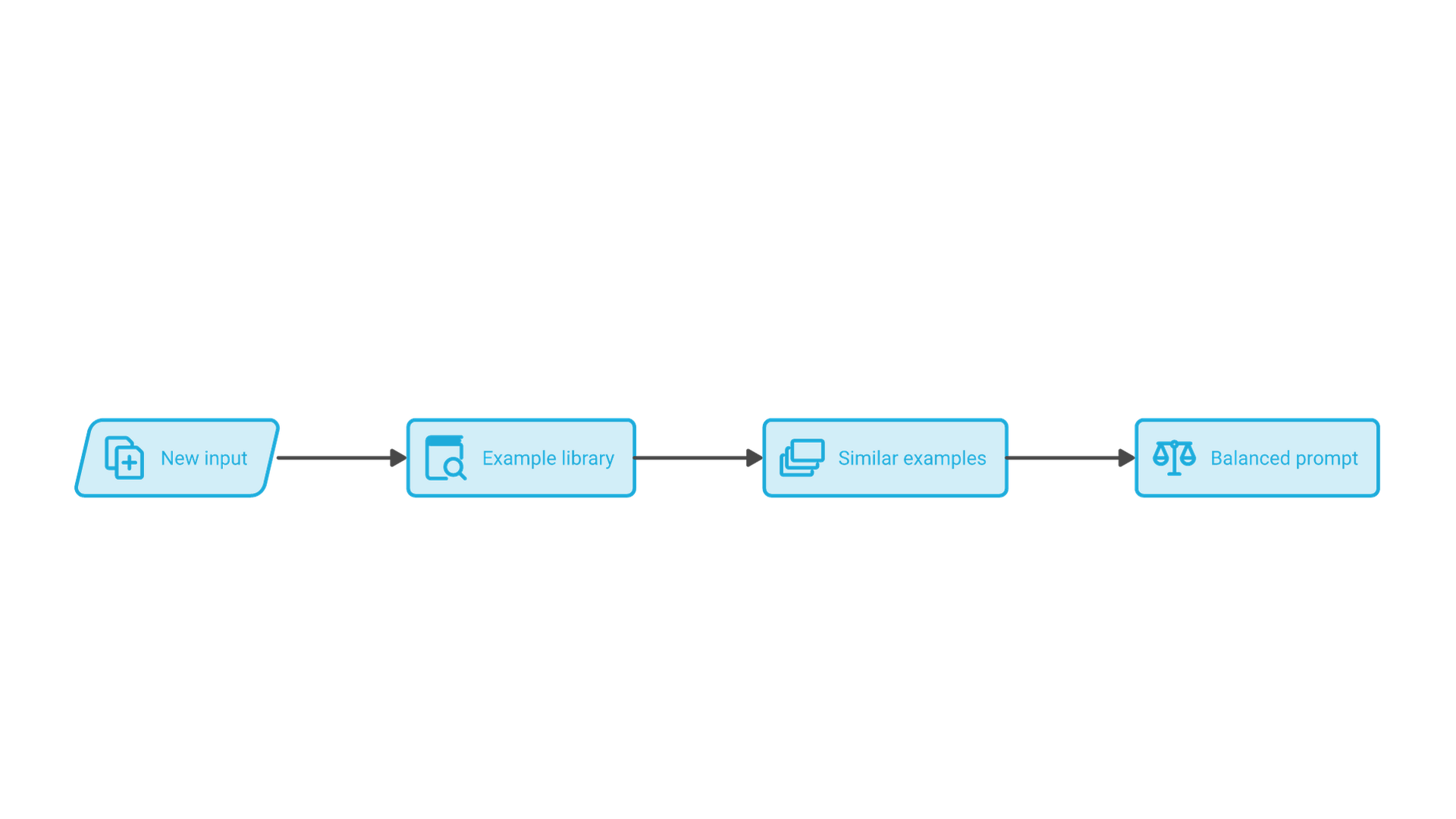
For systems with varied inputs, consider dynamic example selection. Instead of one fixed set, you store a library of labeled examples, embed them, and retrieve the ones most similar to each new input at request time. What Makes Good In-Context Examples for GPT-3? (Liu et al., 2021) found that retrieving semantically similar examples consistently outperformed random selection across the tasks it tested. The trade-off is that dynamic examples change the prompt prefix on every request, which reduces the benefit of prompt caching.
Ordering and Label Balance
Order matters. In Fantastically Ordered Prompts and Where to Find Them (Lu et al., 2022), the order of the same few-shot examples made the difference between near state-of-the-art and random-guess performance on some classification tasks, and a good order for one model did not reliably transfer to another. Calibrate Before Use (Zhao et al., 2021) traced much of this instability to three biases: a majority label bias toward labels that appear more often in the prompt, a recency bias toward labels near the end of the prompt, and a common token bias toward tokens that are frequent in pre-training data. The authors proposed contextual calibration, which estimates the bias with a content-free input and corrects for it.
You do not need to implement calibration to benefit from these findings. Practical rules are enough for most prompts: balance labels across examples, avoid ending the example list with a run of the same label, shuffle or rotate examples during evaluation to see how sensitive your prompt is, and re-test the order when you switch models. A progression from simple to complex cases is a reasonable default, but treat it as a hypothesis to test rather than a rule.
Practical Few-Shot Prompting Applications in Text Classification, Question Answering and Code Generation
Few-shot prompting turns abstract prompting techniques into concrete, repeatable workflows. The patterns below cover text classification, content generation and code generation. They are templates to adapt and test, not benchmarks; your inputs and model will determine how well each performs.
In production, these prompts usually sit inside larger pipelines that route documents, extract fields and hand results to other systems. If you are planning that kind of workflow, our AI process automation services cover the integration, review steps and monitoring around the prompt.
Email Classification
This Python helper builds a few-shot prompt for spam detection. Labeled examples define the boundary between spam and legitimate mail, including an urgent-sounding message that should still be classified as spam.
def build_email_prompt(email_content: str) -> str:
    return f"""Classify each email as 'spam' or 'legitimate'. Return only the label.

Input: "Congratulations! You've won $1,000,000! Click here now!"
Output: spam

Input: "Hi John, can we move our meeting to tomorrow at 3pm?"
Output: legitimate

Input: "URGENT: Your account will be closed unless you verify immediately!"
Output: spam

Input: "Thank you for your purchase. Your order #12345 will ship tomorrow."
Output: legitimate

Input: "{email_content}"
Output:"""
Question Answering with a Fixed Answer Shape
Few-shot examples are useful for question answering when you need a specific answer shape, such as a short answer plus the source field it came from, or an explicit "not found" when the context does not contain the answer:
Answer the question using only the provided record. If the answer is not in the record, reply "Not found".

Record: Order 1182, status shipped, carrier UPS, shipped 2026-10-12
Question: Which carrier is handling the order?
Answer: UPS (field: carrier)

Record: Order 1190, status processing, carrier not assigned
Question: When did the order ship?
Answer: Not found

Record: {record}
Question: {question}
Answer:
The second example is the important one. Without a demonstration of "Not found," models are more likely to guess.
Product Description Writing
For content generation, examples communicate tone, length and structure more precisely than adjectives like "compelling" or "concise":
Turn product features into a one-sentence marketing description.

Input: Wireless headphones, 20-hour battery, noise cancellation
Output: Enjoy uninterrupted listening with wireless headphones that offer up to 20 hours of battery life and noise cancellation that keeps distractions out.

Input: LED desk lamp, adjustable brightness, USB charging port
Output: Light your workspace exactly how you like with an LED desk lamp that offers adjustable brightness and a built-in USB port for charging your devices.

Input: Smartphone case, drop protection, clear design
Output:
Sentiment Analysis for Complex Content
Unlike simple positive or negative classification, nuanced sentiment needs a "mixed" label and examples that show when to use it:
Classify the sentiment of each movie review as positive, negative or mixed.

Input: "The acting was superb but the plot felt rushed and confusing."
Output: mixed

Input: "Every moment of this film captivated me. Brilliant cinematography and compelling characters."
Output: positive

Input: "A disappointing sequel that fails to capture the magic of the original."
Output: negative

Input: "Great special effects and stunning visuals, though the dialogue could have been stronger."
Output:
Code Generation and Refactoring Patterns
For code, few-shot examples establish conventions such as docstring style, naming and error handling. This prompt asks for Google-style docstrings:
Add a Google-style docstring to the Python function. Return only the function.

Input:
def calculate_area(radius):
    return 3.14159 * radius * radius

Output:
def calculate_area(radius):
    """Calculate the area of a circle.

    Args:
        radius (float): The radius of the circle.

    Returns:
        float: The area of the circle.
    """
    return 3.14159 * radius * radius

Input:
{function_code}

Output:
Combining Few-Shot Learning with Chain-of-Thought Prompting for Complex Reasoning Tasks
Chain-of-thought prompting extends few-shot learning by showing intermediate reasoning steps before the final answer. In Chain-of-Thought Prompting Elicits Reasoning in Large Language Models (Wei et al., 2022), adding a few demonstrations with worked reasoning improved large models on arithmetic, commonsense and symbolic reasoning tasks compared with standard few-shot prompts that showed only answers.
A math word problem prompt in that style looks like this:
Solve the word problem. Show your reasoning, then give the answer on the last line.

Problem: Sarah has 24 apples. She gives 1/3 to her friend and eats 2. How many apples does she have left?
Reasoning: She gives away 24 / 3 = 8 apples, leaving 16. She eats 2, leaving 14.
Answer: 14

Problem: A store sells books for $12 each. Someone buys 5 books with a 15% discount. What is the total cost?
Reasoning: The subtotal is 12 x 5 = $60. The discount is 60 x 0.15 = $9. The total is 60 - 9 = $51.
Answer: $51

Problem: Tom runs 3 miles in 24 minutes. At this pace, how long will it take him to run 8 miles?
Reasoning:
Use this combination for multi-step problems where the reasoning process improves accuracy or makes outputs easier to audit: calculations, policy checks, multi-condition eligibility rules or logical deductions.
Chain-of-Thought with Reasoning Models
Reasoning models that think before answering change the picture. They already produce internal reasoning, so hand-written reasoning examples are less necessary and can conflict with the model's own approach. OpenAI recommends trying such models zero-shot first. Anthropic notes that worked examples still help Claude when extended thinking is on, and suggests presenting each example as a problem, the method to apply and the expected answer. In practice, use examples with reasoning models mainly to pin down the final output format or a domain-specific method, and test whether they help before keeping them.
When Few-Shot Prompting Helps and When It Hurts
Few-shot prompting is not a free upgrade over zero-shot. It helps most when the model needs to see the target and hurts when the examples introduce noise, bias or cost the task does not justify.
When It Helps
- Custom label sets and boundaries: internal categories, priority levels or routing rules that are hard to describe in words.
- Strict output formats: a particular JSON shape, table layout or field order, especially with models that do not enforce schemas.
- Style and tone: brand voice, reading level or length, which examples convey more precisely than adjectives.
- Edge cases and abstention: demonstrating "unknown," "not found" or "needs human review" so the model does not guess.
- Older or smaller models: models with weaker instruction following, including many smaller open-weight models, tend to benefit more from demonstrations.
When It Hurts
- Over-copying: the model mimics surface details of the examples, such as length, phrasing or specific entities, instead of the underlying rule. Google's guide warns that too many examples can cause this kind of overfitting.
- Label and recency bias: unbalanced or badly ordered examples skew predictions toward the most frequent or most recent labels.
- Conflicts with instructions: if examples contradict the written instructions, model behavior becomes unpredictable. OpenAI stresses that examples for reasoning models must align closely with the prompt.
- Reasoning models: they often perform well zero-shot, so examples may add tokens without adding accuracy.
- Knowledge gaps: examples cannot supply facts the model lacks. If the problem is missing or changing information, use retrieval instead.
- Cost and latency at scale: every example is paid for on every request. At high volume, caching or fine-tuning may be cheaper.
The safest workflow is empirical: start zero-shot, build a small evaluation set and keep only the examples that improve your metric.
Common Challenges and Solutions in Few-Shot Learning and Prompt Engineering
Implementing few-shot prompting in real workflows brings predictable challenges. Each one has a practical fix.
Challenge 1: Inconsistent Output Formatting
Solution: use strict templates and identical structure across all examples. Inconsistent punctuation, capitalization, JSON brackets or code syntax across examples confuses pattern recognition and leads to unpredictable outputs. Where the API supports structured outputs, enforce the schema there and use examples to demonstrate content, not just shape.
Challenge 2: Context Window and Token Budget Limits
Solution: prioritize the most informative examples and keep them concise. Context windows are now far larger than GPT-3's 2,048 tokens, so the hard limit is rarely the problem; the practical constraint is cost and latency on every call. Shorter, representative examples usually beat long, comprehensive ones. If your examples are static, put them at the start of the prompt: OpenAI's prompt caching guide advises placing stable instructions and shared material first and variable content at the end, so the repeated prefix can be cached.
Challenge 3: Poor Example Quality Leading to Degraded Performance
Solution: validate examples systematically and compare example sets against a zero-shot baseline. Low-quality or unrepresentative examples can make results worse than no examples at all. If a few-shot prompt does not beat zero-shot on your evaluation set, review the examples for clarity, relevance and diversity before adding more.
Challenge 4: Overfitting to Specific Examples
Solution: vary examples across scenarios, lengths and complexity levels. Models may copy details such as a product name or sentence length; diverse examples and a note that examples are illustrative help them generalize.
Challenge 5: Run-to-Run Variability
Solution: separate prompt effects from sampling effects. Even with good examples, outputs vary between runs when sampling settings allow it. For classification and extraction, use low-randomness settings where the model supports them, and evaluate prompts over several runs. Our guide to LLM temperature explains how temperature and related sampling parameters affect consistency, and how current reasoning models handle them.
Best Practices and Developer Patterns in Few-Shot Learning and Prompt Engineering
Few-shot prompting at scale needs the same discipline as production code: versioning, testing and monitoring.
Building and Maintaining Example Libraries
Organize examples by task type, label, complexity and domain so they become reusable assets. Keep prompt templates and example sets under version control, record which model each set was tested against and review them when inputs or models change. Treat examples as data: remove personal or confidential information, and track where each example came from. Measuring performance with a specific example included and excluded shows which examples actually earn their place.
When to Use Few-Shot vs Alternative Methods Including Fine-Tuning
Use few-shot prompting when tasks need specific formatting, domain conventions or consistent handling of edge cases that zero-shot prompts miss. Consider fine-tuning when you have a large labeled dataset, a stable high-volume task and a need for consistency or latency that prompting cannot reach at acceptable cost. Use retrieval-augmented generation when the task depends on large or frequently changing knowledge.
- Few-shot: task-specific formatting, moderate complexity, limited labeled examples, frequent changes.
- Fine-tuning: high-volume single task, substantial training data, stable requirements.
- Retrieval-augmented generation: dynamic information needs and large knowledge bases.
These options combine well. A retrieval system can supply both relevant documents and relevant examples, and a fine-tuned model can still benefit from one or two examples for an unusual output format. Choosing the right mix for a given product is an architecture decision; our LLM solutions team helps companies weigh prompting, retrieval and fine-tuning against cost, latency and governance requirements.
Systematic Prompt Testing and Optimization
Compare few-shot prompts against zero-shot baselines and against alternative example sets using the same evaluation data. Measure what matters for your application, such as label accuracy, schema validity, factual grounding, response time and cost per request. Use the results to refine your example library over time.
- Baseline measurement: establish zero-shot performance on a held-out set.
- Few-shot testing: compare different example sets, counts and orders.
- Optimization cycles: refine examples based on the errors you observe.
- Production monitoring: track drift when inputs, models or model versions change.
Frequently Asked Questions
What is few-shot prompting?
Few-shot prompting is a technique where you include a small number of input-output examples in a prompt so that a language model can infer the task and the expected format, then apply it to a new input. It relies on in-context learning and does not change the model's weights.
What is the difference between zero-shot, one-shot and few-shot prompting?
Zero-shot prompting gives the model only instructions, one-shot adds a single example and few-shot adds several. The GPT-3 paper defined these settings in 2020, and they remain the standard terms today.
How many examples should a few-shot prompt include?
There is no fixed number. Anthropic suggests 3 to 5 examples for Claude, Google recommends experimenting and watching for overfitting, and OpenAI suggests trying reasoning models without examples first. Add examples only while they improve results on your own test set.
Does the order of examples matter?
Yes. Research has shown that the order of the same examples can swing classification accuracy widely, and that models are biased toward labels that appear often or near the end of the prompt. Balance labels and test several orders.
Is few-shot prompting the same as fine-tuning?
No. Fine-tuning updates model weights using a training dataset, while few-shot prompting only adds examples to the input of a single request. Few-shot is faster to change; fine-tuning can be more consistent and cheaper per request at high volume.
Do reasoning models need few-shot examples?
Often not. OpenAI recommends starting zero-shot with reasoning models and adding examples only if needed. Examples can still help pin down an output format or a domain-specific method, as long as they align closely with the instructions.
Conclusion and Next Steps in Few-Shot Prompting
Few-shot prompting bridges the gap between zero-shot prompts and fine-tuning. A handful of well-chosen, consistently formatted examples can teach a model your label set, output format and style without any training, which is why it remains a core technique in OpenAI, Anthropic and Google guidance more than five years after the GPT-3 paper introduced the term. Its limits are just as well documented: sensitivity to example selection and order, a tendency to over-copy surface details and less benefit for modern reasoning models.
To get started, review your current zero-shot prompts and identify tasks with inconsistent outputs. Pick the highest-impact one, write three to five representative examples that include a hard case, and compare the result with your zero-shot baseline on a small evaluation set. Keep the examples that help, version them like code and revisit them when you change models.
If you are deciding how prompting, retrieval or fine-tuning should fit into a production AI system, talk to Cognativ about your AI project.