


Understanding What Is a Prompt in LLM: A Clear Guide for Beginners
Every answer an AI model gives starts with the text you send it. See how instructions, context and examples work together, with copy-ready beginner templates.
Large language models (LLMs) are artificial intelligence systems trained on vast amounts of text to generate human-like language. They power assistants that draft emails, summarize news articles, translate between languages and answer questions in natural dialogue.
Because these language models respond to whatever you send them, the text you provide, the prompt, is the most important control you have. Good results depend less on coding than on framing the task clearly.
Short answer: a prompt is the complete input a language model receives before it writes a response. It can be one question typed into a chat box, or a structured package of instructions, background context, examples and data that an application assembles behind the scenes. The model reads that input as tokens and predicts a response one token at a time, so every word you include, and every word you leave out, shapes what comes back.
This beginner's guide covers the parts of a prompt, system and user messages, prompt types with examples, and how the model reads your words, using OpenAI, Anthropic and Google documentation checked on October 30, 2026.
What Is a Prompt in LLM?
A prompt is the input you give to a language model: a combination of instructions, examples and data that tells the model what to do. Think of it as a natural-language interface. You describe the outcome you want in plain words, and the LLM generates a response that tries to satisfy it.
Prompts can be one sentence ("Summarize this paragraph") or multi-section briefs that provide relevant context, explicit instructions and a desired output format. Google's Gemini documentation describes prompt design as "the process of creating prompts, or natural language requests" that elicit accurate, high-quality responses, and stresses that it is an iterative process rather than a one-time act (Google, Prompt design strategies).
A well-structured prompt reduces ambiguity and increases the chance of getting the response you want on the first try.
A Simple Prompt Example
Compare two prompts for the same job. The first is "Write about our refund policy." The second is "Write a three-sentence reply to a customer who asked whether they can return opened headphones. Use the policy below. Be friendly, and do not promise anything the policy does not state." The second names the audience, length, source of truth and a limit on what the model may claim, so the model has far less to guess.
Prompt, Response and Completion
The prompt is everything sent to the model; the response (or completion) is the text it generates. In chat products, each new message is added to the earlier turns and the whole history becomes the next prompt. The model does not remember previous messages on its own; the application resends them.
Why Prompts Matter
LLMs are probabilistic predictors. They produce text by estimating the most suitable next token given the input text and everything generated so far. Without guidance, the model may respond in a reasonable way but not the way you intended, because many different answers are plausible continuations of a vague request.
Good prompt design points the model at the task and data you care about, improves output quality and reduces irrelevant responses. Anthropic's guidance offers a useful mental model: treat the model like "a brilliant but new employee" who lacks context on your norms and workflows, and explain precisely what you want (Anthropic, Prompting best practices). Its suggested test is simple: if a colleague with minimal context would be confused by your prompt, the model probably will be too.
Because model output is non-deterministic, OpenAI describes prompting as a mix of art and science that rewards testing (OpenAI, Prompt engineering).
From Prompt to Response: How Models Decide
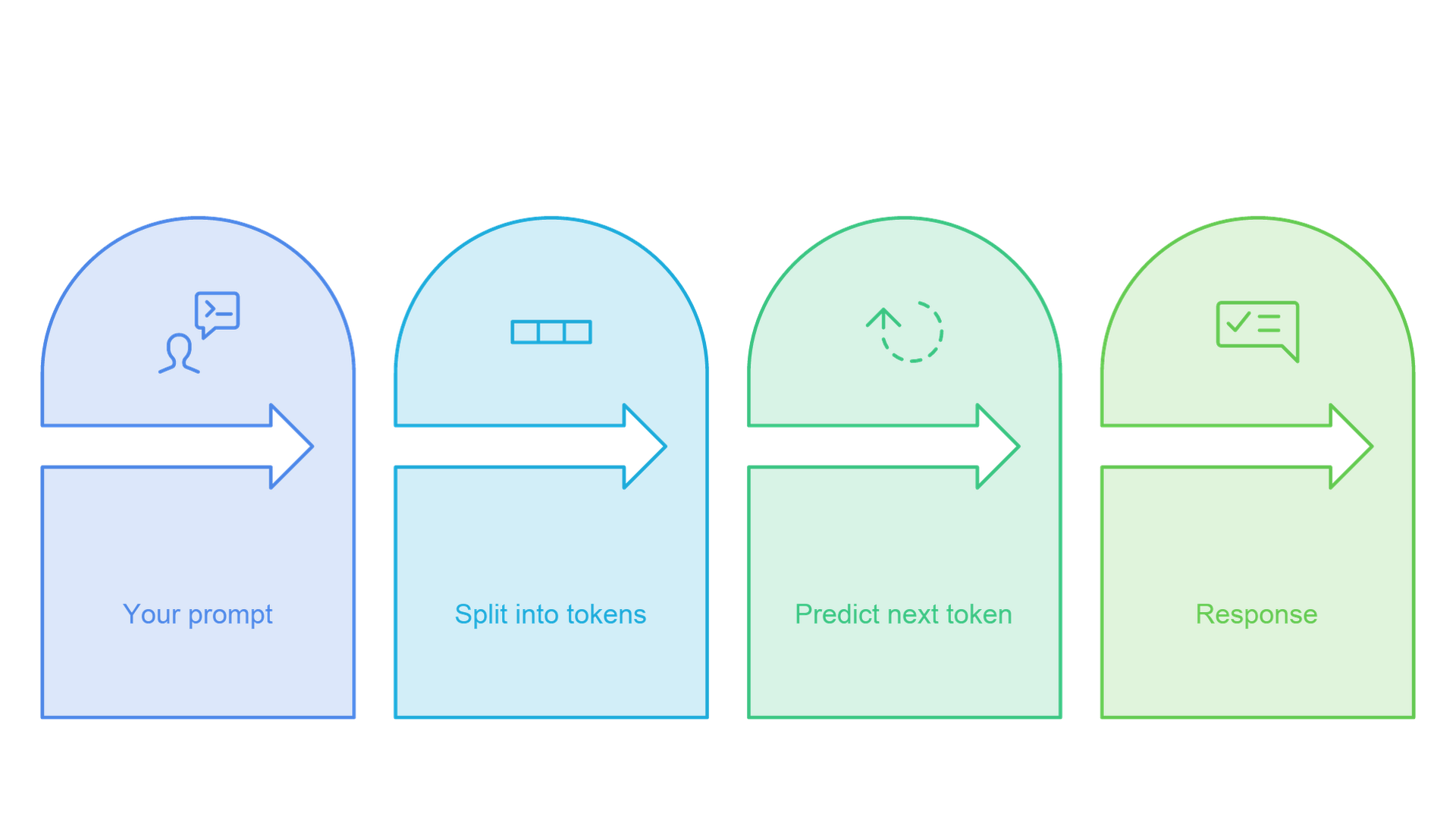
A model never sees your words the way you do. It converts the prompt into tokens, processes them and predicts the next token, over and over, until the response is complete. Understanding these three steps explains why wording, order and length matter.
Your Prompt Becomes Tokens
Tokens are the units a model reads and writes. They can be whole words, parts of words, punctuation or single characters. Google's documentation says a Gemini token is about 4 characters and that 100 tokens equal roughly 60 to 80 English words (Google, Understand and count tokens). Anthropic notes that the ratio depends on the model and language, and that Claude 4.7 and later models use a newer tokenizer that produces about 30 percent more tokens for the same text than earlier models (Anthropic, Glossary). If you want the full picture of tokenization methods and cost, see our guide on what a token is in an LLM.
The Model Predicts One Token at a Time
Once the prompt is tokenized, the model estimates a probability for every possible next token and selects one. That token is added to the sequence, and the process repeats. Anthropic's glossary explains that pretrained models learn exactly this skill, predicting the next word from the previous context, and that later fine-tuning and reinforcement learning from human feedback make them better at following instructions. A clear prompt makes on-task tokens more likely and off-task tokens less likely. A vague prompt leaves many continuations equally plausible, which raises the chance of an irrelevant answer.
The Context Window Sets the Limit
Everything the model considers in a single request, including system instructions, conversation history, pasted documents and the response it is writing, must fit within its context window, measured in tokens. Anthropic describes the context window as the model's "working memory," distinct from the data it was trained on. Google, for example, documents about one million tokens for its current Gemini models, but a large window is not a reason to fill it.
Prompt Anatomy: Structure That Works
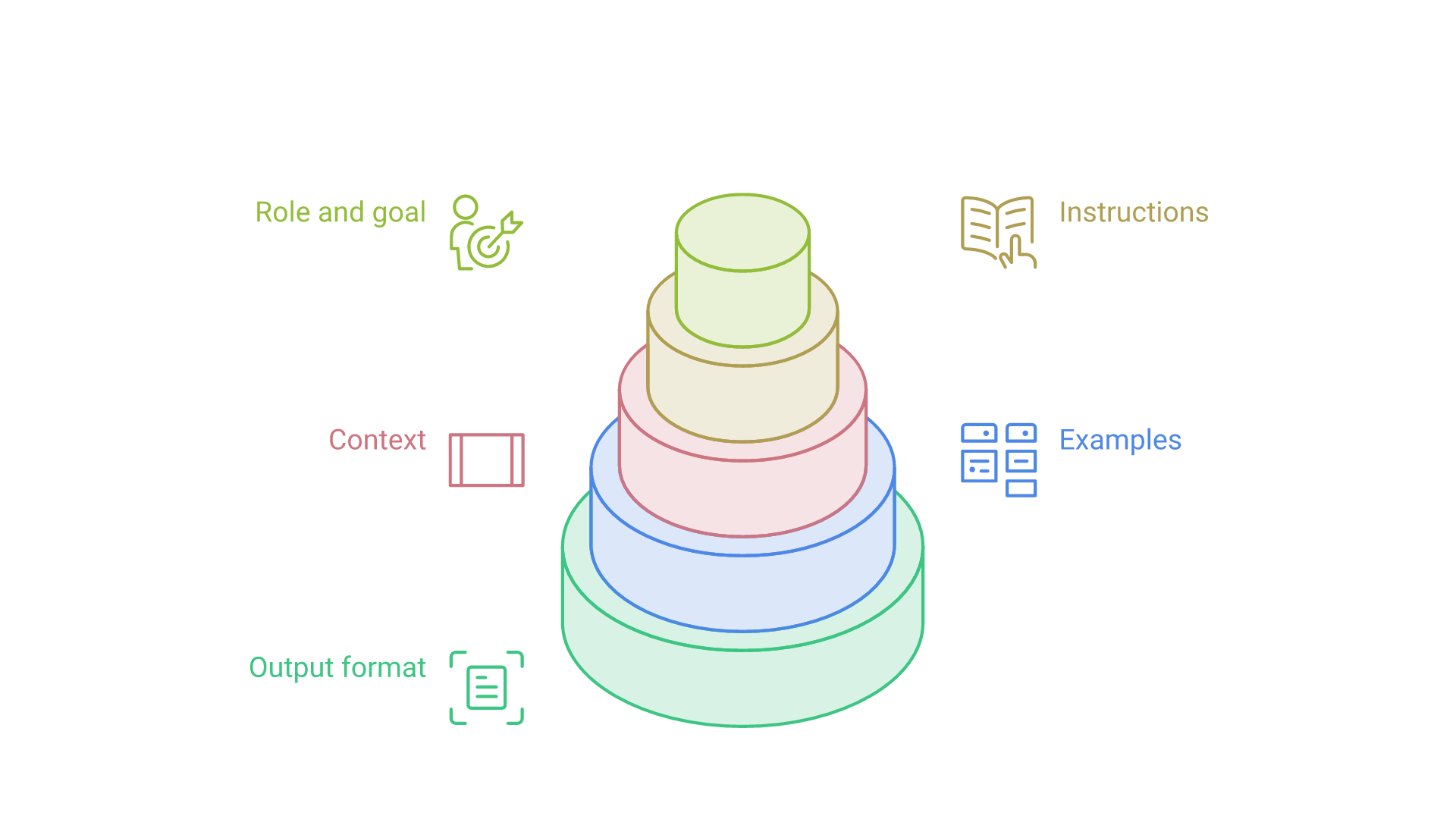
Most effective prompts are built from the same small set of parts. You will not need all of them every time, but knowing them shows you what is missing when a response goes wrong.
- Role and goal. Who should the model act as, and what is the task? ("You are a tax assistant. Your goal is to draft a concise explanation.")
- Instructions. Clear steps, constraints and acceptance criteria, such as tone, style and length.
- Context. Background facts, policies or a knowledge base excerpt the model cannot infer on its own.
- Examples. One or more sample inputs paired with the outputs you want.
- Input data. The actual material to process: a paragraph, an email, a table or a list.
- Output format. Bullets, a table, JSON or another shape, so the model produces structured, consistent responses.
The major vendors agree on the substance. OpenAI suggests a developer message typically covers identity, instructions, examples and context, in that order; Google lists input, constraints, response format, and examples and context.
Use Delimiters to Separate the Parts
When a prompt mixes several kinds of content, mark the boundaries. OpenAI recommends Markdown headers and lists to show hierarchy, and XML tags to show where a reference document begins and ends. Anthropic recommends wrapping each type of content in its own descriptive tag, such as instructions, context and input tags, because it reduces misinterpretation. A simple layout looks like this: a short instruction block first, then the document inside clearly labeled tags, then the question.
Treat the structure like writing a test for another person: if someone else followed your instructions with only the prompt in front of them, would they reliably produce the same output?
System Prompts vs. User Prompts
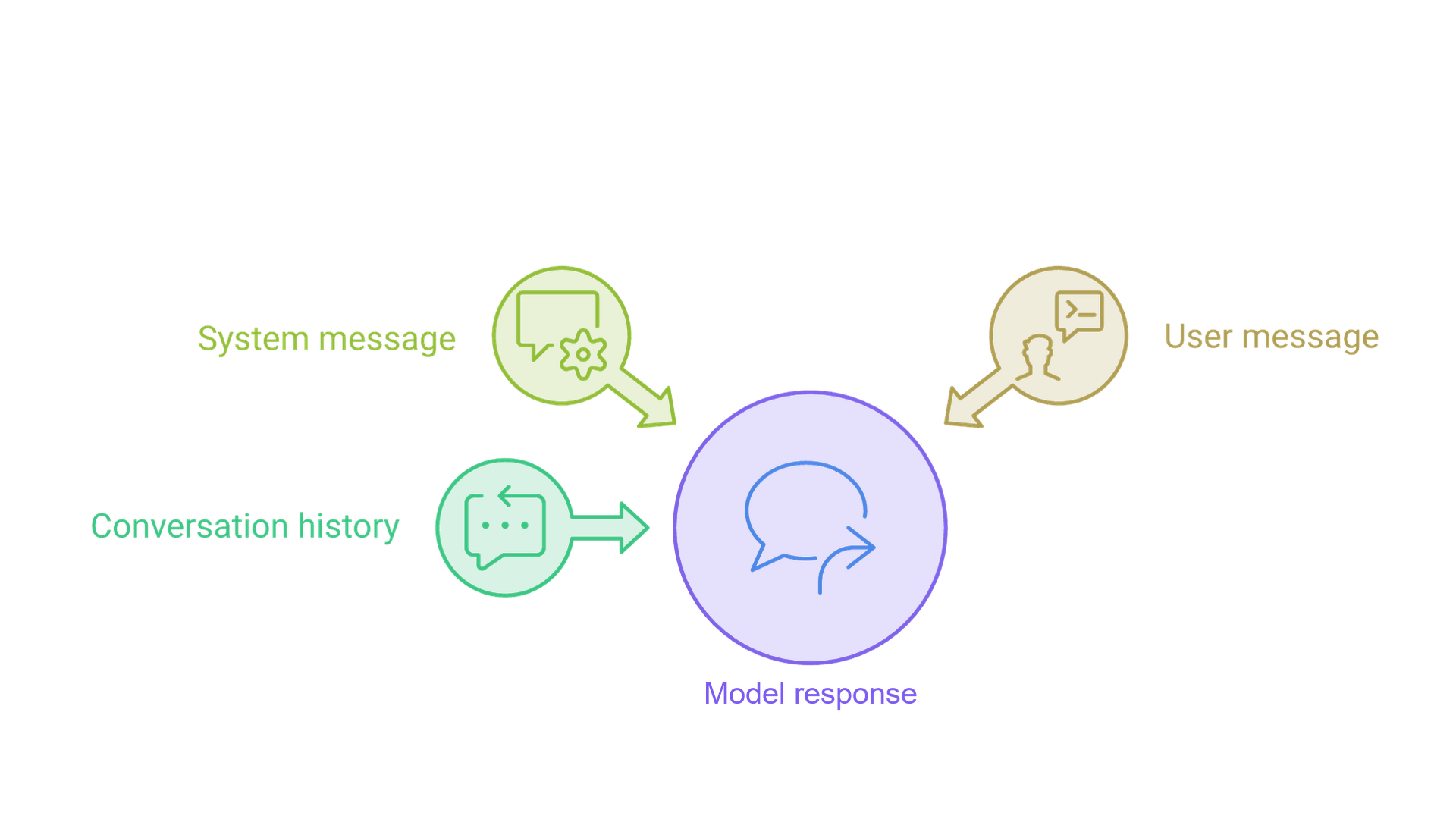
When you type into a chat app, you only see your own message. Behind the scenes, most applications send several kinds of messages at once, each with a role, which explains why the same question can produce different answers in different products.
The System or Developer Message
The system message (OpenAI now calls it the developer message) holds the application's standing rules: the role the model plays, the tone, what it should refuse, and the output format. OpenAI states that developer messages are prioritized ahead of user messages and carry the application's rules and business logic. Its reasoning-model guide adds that newer reasoning models support developer messages rather than system messages (OpenAI, Reasoning best practices). Anthropic recommends setting a role in the system prompt and notes that even a single sentence focuses the model's behavior and tone. Google offers the same mechanism under the name system instructions, passed as a separate parameter (Google, Text generation), and for Gemini 3 advises placing essential constraints, personas and output format requirements in the system instruction or at the very start of the prompt.
The User Message
The user message is the request from the person using the application: a question, a document to summarize or a task to complete. OpenAI describes user messages as instructions from the end user, prioritized behind developer messages. In a business application, the app may wrap your words with retrieved documents or form data before sending them.
Assistant Messages and Conversation History
Assistant messages are the model's earlier replies. In a multi-turn conversation, the application resends previous turns so the model can follow the thread, which is why very long chats cost more and can lose track of early details.
Which Instruction Wins?
When system and user instructions conflict, current APIs are designed to favor the system or developer layer. The practical takeaway: put durable rules in the system message and task-specific details in the user message.
Types of Prompts (with Examples)
Different tasks call for different prompting styles. Here are the most common patterns.
Direct Instruction (Zero-Shot Prompting)
Direct instruction gives a clear command with constraints and no examples. Example: "Summarize the following paragraph in two bullet points for a non-technical reader. Avoid jargon." Zero-shot prompting works well when the task is common and the model already knows the pattern.
Task Completion Prompts
Task completion prompts ask the model to finish text or continue a pattern. Example: "Convert each line to title case:" followed by the lines. Google's documentation also describes response prefixes, such as starting an outline or an opening brace for JSON, to set the pattern the model should follow. Note that support varies by vendor: Anthropic states that prefilling the final assistant turn is no longer supported starting with Claude 4.6 models, and recommends direct instructions or structured outputs instead.
Question-Answering Prompts
Question-answering prompts focus on accuracy and brevity, ideally grounded in supplied text. Example: "Answer using only the passage below. If the passage does not contain the answer, say 'insufficient information.' Reply in one sentence." Giving the model permission to say it does not know is one of the simplest ways to reduce invented answers.
Few-Shot Prompting
Few-shot prompting provides a handful of examples that show the mapping from input to output. For a sentiment task you might include "I waited 40 minutes, never again" labeled negative and "Staff were kind and fast" labeled positive, then ask the model to classify "Food was great but the seat was broken." The technique was popularized by the GPT-3 paper, which showed that large models can pick up a task from examples in the prompt alone (Brown et al., Language Models are Few-Shot Learners). Google recommends always including few-shot examples, and Anthropic suggests three to five varied examples wrapped in example tags. Our guide to few-shot prompting covers how to choose, order and test examples in depth.
Few-Shot CoT (Chain-of-Thought with Examples)
Few-shot chain-of-thought adds worked reasoning to each example, so the model sees not only the answer but the intermediate steps that lead to it. It is most useful for multi-step problems where the path matters as much as the result.
Chain of Thought (CoT) Prompts
Chain-of-thought prompts ask the model to work through a problem step by step before giving a final answer. Research from Google showed that including reasoning steps in examples improved performance on arithmetic and logic tasks (Wei et al., Chain-of-Thought Prompting), and a follow-up paper found that simply adding "Let's think step by step" helped even without examples, an approach called zero-shot CoT (Kojima et al., Large Language Models are Zero-Shot Reasoners). Self-consistency goes a step further by sampling several reasoning paths and choosing the most common answer (Wang et al., Self-Consistency).
A toy example: "I had 7 apples and gave 3 away. How many are left? Think step by step, then give the final answer on its own line." The model explains the subtraction, then states the result.
One important 2026 update: many current models reason internally. OpenAI's reasoning guide says that prompting these models to "think step by step" is unnecessary because they already reason before answering, and that they often perform well with brief, direct instructions. For a reasoning model, describe the goal and the constraints clearly and let it work. For a smaller or non-reasoning model, an explicit request for steps can still help. Many production systems also keep the reasoning hidden and show users only a short final answer.
In-Context Learning
In-context learning is a model's ability to pick up a task from the prompt alone, with no change to its weights. Nothing persists after the request. You can use it in three ways:
- Include labeled input and output pairs to teach a pattern.
- Show what not to do, with a brief note on why an answer is wrong.
- Place relevant rules, glossaries or definitions next to the task.
This guides behavior on the fly, which suits quick experiments and tasks that change often.
LLM Prompting vs. Fine-Tuning
Prompting is fast and flexible: you change words, not the model. Fine-tuning, which Anthropic's glossary defines as further training a pretrained model on additional data, makes the model mimic the patterns of a curated dataset. It can help when you need a strict domain style or very consistent formats at scale, but it requires data preparation and evaluation. A sensible order for most teams is to start with prompts and templates, measure the results, and consider fine-tuning only when prompting reaches a ceiling.
Adding Context the Right Way
Providing additional context is often the difference between a generic answer and a useful one. Google's guide gives the example of a troubleshooting document: with it, the model answers about your product; without it, the model falls back on general knowledge.
Where you place context matters too. OpenAI suggests context is usually best positioned near the end of the prompt. Anthropic, for long documents of roughly 20,000 tokens or more, recommends putting the documents near the top and the question at the end, and reports that queries at the end can improve response quality by up to 30 percent in its tests. These are vendor-specific findings, so test placement with the model you use rather than treating either as universal.
For large knowledge bases, applications usually use retrieval-augmented generation (RAG): the system searches your documents, then pastes only the most relevant passages into the prompt. Avoid simply appending everything. Extra clutter dilutes the signal and raises cost. When grounding answers in company data becomes a product requirement, it is an engineering problem as much as a prompting one, which is the kind of work our LLM solutions team handles.
Natural Language as an Interface
Because prompts are written in ordinary language, non-programmers can direct a model's behavior without writing code. With a few clear sentences you can ask for a transformation ("Convert this news article to five bullets"), generation ("Write a product description for this listing"), translation ("Translate from Spanish to English and keep proper nouns unchanged") or extraction ("Return a JSON list of the dates and amounts in this invoice").
Prompting vs. Programming (And Why Both Matter)
Prompts are fast to iterate and well suited to language tasks. Traditional code still handles validation, permissions, calculations and system integration. Modern applications mix both: code gathers data and enforces rules, prompts steer the model, and the application checks the model's output before acting on it. Connecting those pieces safely to existing business systems is where AI integration work begins.
Decoding Controls: Get the Output You Want
Beyond wording, some APIs expose decoding parameters that shape style and variability:
- Temperature: lower values make output more conservative and repeatable; higher values make it more varied and creative.
- Top-k and top-p (nucleus) sampling: limit choices to the k most likely tokens, or to the smallest set of tokens whose probabilities add up to p.
- Presence and frequency penalties: discourage repetition, where supported.
- Maximum output tokens: cap the length of the response.
Two caveats are worth knowing in 2026. First, Anthropic notes that even at a temperature of 0, results are not fully deterministic, so identical prompts can produce different outputs. Second, newer models may restrict these settings: Google's documentation states that Gemini 4 and Gemini 3.6+ models ignore custom temperature, top_p and top_k values and advises removing them from requests, while earlier Gemini 3 models should keep the defaults. Check the current documentation for your model before tuning sampling.
LLM Prompting for Creative vs. Deterministic Tasks
For creative writing, use open-ended instructions and looser constraints. For deterministic outputs such as schemas, labels or exact figures, use a strict format, explicit rules for missing information and, where available, structured output features. Even creative tasks benefit from a few anchor examples.
Prompt Engineering: The Core Skills
Prompt engineering is the practice of designing and testing inputs that reliably produce the behavior you want. OpenAI defines it as the process of writing effective instructions for a model so its output consistently meets your requirements. The core skills are turning vague requests into precise instructions, supplying context the model cannot infer, choosing examples that demonstrate the correct pattern, and iterating against real test cases. If you build applications, our developer guide to prompt engineering goes further into test sets, failure handling and versioning.
Anthropic's overview adds a sequence worth copying: before refining a prompt, define clear success criteria and a way to test against them (Anthropic, Prompt engineering overview). It also notes that not every problem is a prompting problem; latency and cost, for example, are sometimes easier to fix by choosing a different model.
Building Prompt Templates (Reusable Patterns)
Templates save teams from reinventing the same prompts. An extraction template includes a schema and examples; a classification template defines each label and its edge cases; a summarization template states the audience, length and what to omit. OpenAI recommends keeping prompts in application code so they are versioned with the features that use them.
Evaluating Prompts Systematically
Treat prompts like product code. Define acceptance tests, keep a small "golden set" of real inputs with known good outputs, and compare each new version against the current one. A change that fixes one case can quietly break another, and only a test set will show it.
Best Practices for Prompting
These habits cover most beginner needs and match the common ground across the OpenAI, Anthropic and Google guides:
- State the task and the desired outcome clearly.
- Explain why a rule matters, not only what it is.
- Add specific examples that mirror real inputs.
- Place relevant context near the task and mark it with delimiters.
- Specify the output format and length.
- Test with hard cases and keep the prompts that measurably work.
- Keep prompts short enough to focus and long enough to remove ambiguity.
Anthropic specifically recommends giving context or motivation behind instructions, because explaining why a behavior matters helps the model deliver more targeted responses.
Common Pitfalls (and Fixes)
Too vague? Add constraints and an output format. Too long? Keep only the context the task needs. Drifting on unusual inputs? Add examples for those edge cases. Conflicting instructions, such as "be brief" and "include every detail"? Remove the contradiction.
Safety, Ambiguity, and Guardrails
Prompts should set boundaries. Tell the model what is out of scope, instruct it to say when facts are missing instead of guessing, and ask it to cite the supplied sources for its claims. Replace vague requests ("improve this") with specific ones ("rewrite for an eighth-grade reading level in active voice"). Remember that a prompt is guidance, not enforcement: anything that matters for security, money or compliance should also be checked by the application.
Zero-Shot, Few-Shot, and CoT: When to Use Which
Choosing a technique is easier if you start simple and add structure only when the output shows you need it. Begin with a zero-shot prompt for common tasks and see whether the model already knows the mapping. Add few-shot examples when edge cases appear, when labels are specific to your domain or when the output format must be exact. For multi-step arithmetic, logic or planning, ask a non-reasoning model for explicit steps, or switch to a reasoning model and give it a clear goal. If a task still fails after examples and better instructions, consider retrieval for missing knowledge or fine-tuning for a persistent style or format requirement.
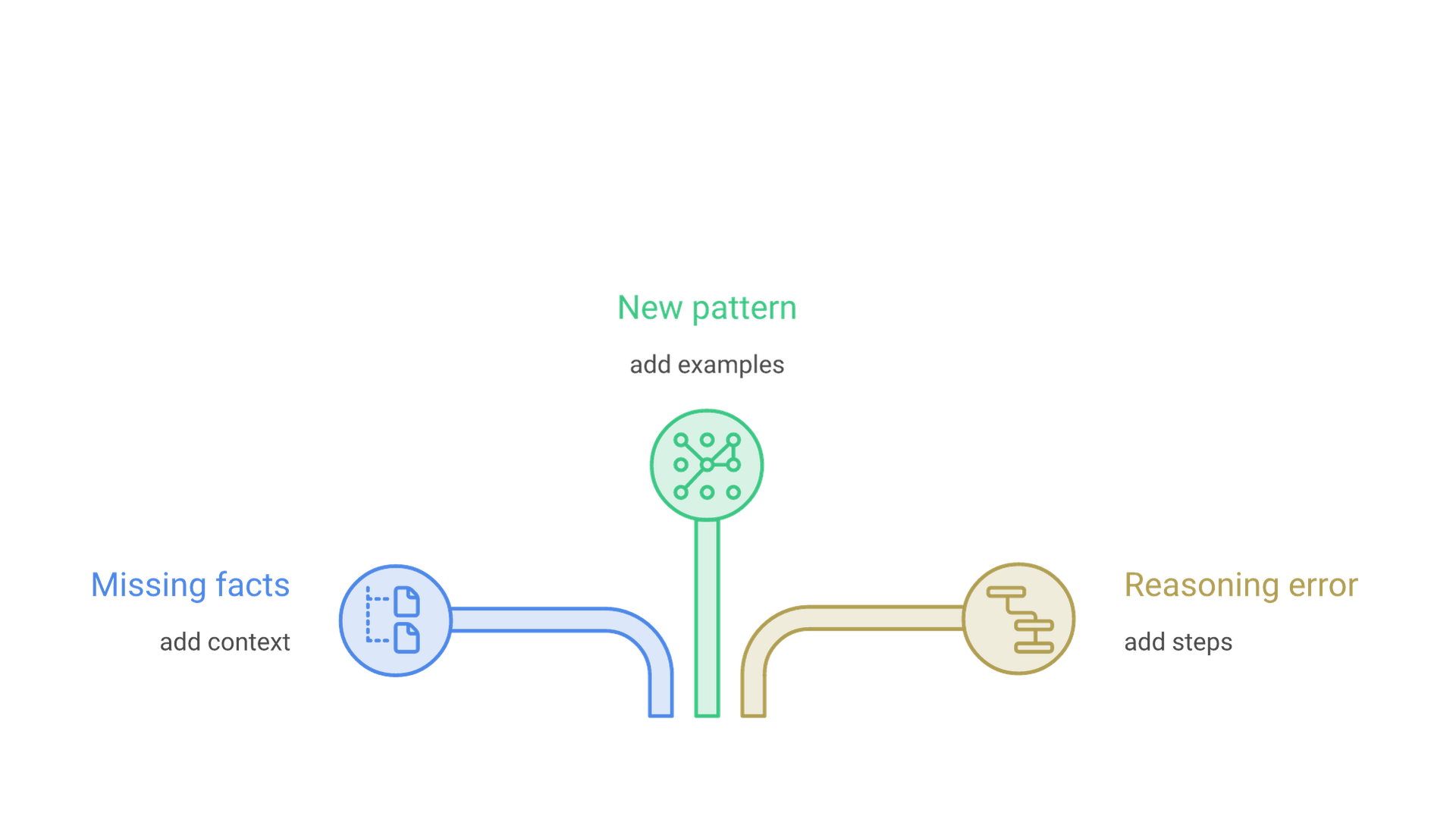
Diagnose the failure first: missing knowledge calls for context, an unfamiliar pattern for examples, and a reasoning error for steps or a stronger model.
Quick Recipes (Copy-Ready Mini-Prompts)
These beginner templates show the parts of a prompt working together. Replace the bracketed text with your own material.
1) Summarize a News Article
"Summarize the news article below in five bullets for a business audience. Include one risk and one opportunity. Use only facts stated in the article. Article: [paste article]"
2) Extract Structured Facts
"Extract the dates, amounts and counterparties from the text below. Return JSON with the keys date, amount and counterparty. If a value is missing, use null. Text: [paste text]"
3) Translate with Constraints
"Translate the passage below into English. Keep names and numbers unchanged. Use a plain style and return a single paragraph. Passage: [paste passage]"
4) Step-by-Step Reasoning
"You are a patient math tutor. Solve the problem below step by step, explain each step in one sentence, then give the final answer on its own line. Problem: [paste problem]"
5) Classification (Few-Shot Prompting)
Provide three to five labeled examples in the same format, then the new input, and ask for exactly one label from a fixed list.
A Minimal Workflow for Beginners
If you are writing your first serious prompt, follow this order:
- Write a short, direct instruction.
- Add the context the model needs, clearly marked.
- Specify the output format.
- Add a few examples that match your real data.
- Test with difficult cases and note what fails.
- Change one thing at a time and retest.
- Move stable rules into a system message or template.
Multimodal Prompts and "Segment Anything" Notes
Prompts are no longer text only. Current models from OpenAI, Anthropic and Google accept images and, depending on the model, documents, audio or video alongside text. In computer vision, Meta's Segment Anything model popularized "promptable" segmentation, where a point or box tells the system which object to segment (Kirillov et al., Segment Anything). The principle carries over to multimodal LLMs: be explicit about the goal, say which part of the image or file matters, and supply the context the model needs for that modality.
Glossary of Prompting Techniques (At a Glance)
- Zero-shot prompting: instructions only, no examples.
- Few-shot prompting: instructions plus a handful of examples.
- Chain-of-thought: asking for intermediate reasoning steps.
- Zero-shot CoT: a reasoning cue such as "Let's think step by step" without examples.
- Self-consistency: sampling several reasoning paths and taking the most common answer.
- Prompt chaining: splitting a complex task into stages, each feeding the next.
- Verifier prompt: a second pass that checks the first answer before it is used.
Frequently Asked Questions
What is a prompt in an LLM, in one sentence?
A prompt is the full input a language model receives, including instructions, context, examples and data, that it uses to generate a response.
What is the difference between a system prompt and a user prompt?
A system (or developer) prompt sets standing rules from the application, such as role, tone and limits. A user prompt is the request from the person using it. Current APIs give the system layer priority when the two conflict.
Do I always need examples in a prompt?
No. Try a zero-shot prompt first. Add a few examples when the output format must be exact, labels are specific to your domain or the model keeps missing edge cases.
How long should a prompt be?
As short as possible and as long as necessary. Include the context the task needs and leave out the rest, because every token counts toward the context window and irrelevant text can distract the model.
Why does the model sometimes invent details?
Models predict plausible text, so missing context and vague instructions leave room for guesses. Supply source material, allow the model to say it does not know, and verify important facts.
When should I move from prompting to fine-tuning?
Consider fine-tuning when well-tested prompts, examples and retrieval still cannot deliver a consistent style or format at scale. For most beginner and early product use cases, better prompts come first.
Closing Thoughts: What a Prompt Really Is
A prompt is your steering wheel for a large language model. It combines a goal, instructions, context, examples and a format, and the model reads all of it as tokens before predicting a response. Understanding the roles behind it, system rules and user requests, explains why the same question can behave differently from one product to the next.
Start with a clear, direct instruction, add context and examples only when the output shows you need them, and treat prompts as living artifacts: version them, test them and keep refining. As your prompts improve, so will the responses.
If you are turning prompts into a dependable feature for your product or team, talk to Cognativ about your AI project.