


Mastering Mistral AI: A Guide on How to Use Mistral AI Effectively
Mistral AI offers models for chat, code, documents, speech and embeddings, many with open weights. Learn how to pick one, call it and run it yourself.
Mistral AI builds efficient, production-ready large language models with an architecture that emphasizes throughput, quality and control. The company's work in generative AI covers chat and reasoning, code, document understanding, speech and embeddings, so you can start with a general-purpose Mistral model and add specialist models only when a task needs them.
Mistral's lineup spans compact checkpoints for edge inference and very large mixture-of-experts models for high-quality generation in the cloud. Unlike most frontier labs, Mistral publishes open weights for many of its flagship models, so the same model you call through a hosted endpoint can often be downloaded and run on your own infrastructure. The models generate text, structured outputs or embeddings in response to user prompts, and several of them accept images as input.
A core promise is control: you choose where models run, how prompts are stored and which parameters govern behavior. This guide was updated on October 30, 2026 to reflect the current lineup, including Mistral Large 4, Mistral Medium 3.5 and Mistral Small 4, the rename of Le Chat to Vibe, the Studio developer console that grew out of La Plateforme, and the licenses that decide what you can self-host. Treat prices and plan details as a snapshot and confirm them in the official documentation.
Understanding Mistral AI
Mistral AI was founded in April 2023 by Arthur Mensch, Guillaume Lample and Timothée Lacroix, according to the company's about page. At a high level, Mistral focuses on efficient training and inference: sparse mixture-of-experts (MoE) architectures that activate only a fraction of their parameters per token, careful data curation and optimized serving stacks. The goal is high quality at a favorable cost per token.
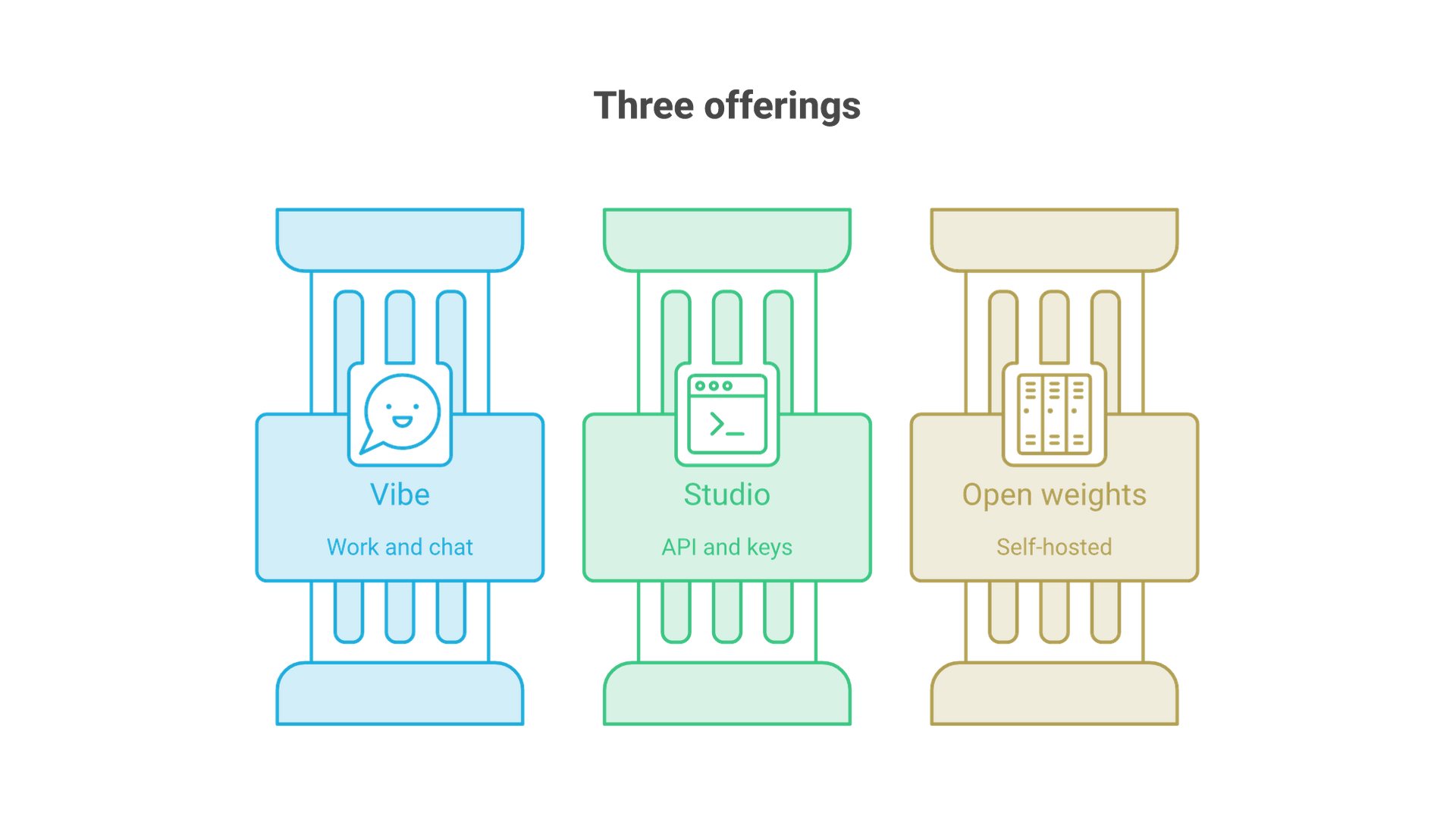
The ecosystem has three main entry points, and two of them have new names since this guide was first published:
- Vibe (formerly Le Chat). Mistral's assistant for people, available on the web at chat.mistral.ai and on mobile. Mistral announced that "Le Chat is now Vibe" on May 28, 2026, with a Work mode for multi-step tasks and a Code mode for remote coding sessions.
- Studio (formerly La Plateforme). The developer console at console.mistral.ai, where you create API keys, test models, review usage and configure agents.
- Open-weight models. Checkpoints published on Hugging Face that you can deploy on-premises, in your own cloud account or at the edge, under the license attached to each model.
Most Mistral models are multilingual. Mistral positions its models for European and global user bases, and in practice the larger models handle major European and Asian languages, including French, German, Spanish, Italian, Japanese, Korean and Chinese. Language quality still varies by model size and domain, so evaluate on your own content rather than relying on a general claim.
How Mistral differs from other LLM providers
Three traits set Mistral apart. First, it releases open weights for many frontier-class models rather than only for small ones. Second, it offers regional processing: Mistral's August 2026 infrastructure announcement describes generally available regional endpoints that keep processing in Europe or the US, with limited safeguarded transfers to sub-processors. Third, its platform now also hosts selected third-party open models, such as Z.ai GLM 5.3 and DeepSeek V4.1 Flash, alongside Mistral's own.
Mistral AI Model Lineup in October 2026
The table below summarizes the main models on Mistral's models overview as of October 30, 2026. Context lengths, parameters and licenses come from the official model cards and announcements linked in this guide.
| Model | Best for | Architecture | Context | License |
|---|---|---|---|---|
| Mistral Large 4 (v26.10, public preview) | Hardest reasoning, agentic coding, security and multimodal analysis | MoE, about 1.05T total, 52B active | 1M tokens | Mistral Ecosystem Open-Weight License |
| Mistral Medium 3.5 (v26.04) | Agentic and coding workloads, general enterprise chat | Dense, 128B | 256k tokens | Modified MIT (open weights) |
| Mistral Small 4 (v26.03) | Fast, low-cost chat, reasoning and coding with image input | MoE, 119B total, about 6B active | 256k tokens | Apache 2.0 |
| Mistral Large 3 (v25.12) | Open general-purpose multimodal model | MoE, 675B total, 41B active | 256k tokens | Apache 2.0 |
| Ministral 3 (3B, 8B, 14B) | Edge and on-device inference | Dense, base, instruct and reasoning variants | 256k tokens (8B card) | Apache 2.0 |
| Codestral (v25.08) | Code completion and fill-in-the-middle | Code model | 128k tokens | Premier (API) |
Beyond the generalist and code models, the catalog includes OCR 4.1 for document intelligence, the Voxtral family for transcription and speech generation, Mistral Embed and Codestral Embed for vectors, Mistral Moderation 2 and the Apache-licensed Shieldstral 1.0 for safety classification, and the Timestral time-series forecasting models. Mistral Large 4 launched in public preview on October 6, 2026, and Mistral's launch post lists API pricing of $0.70 per million input tokens and $2.10 per million output tokens.
Retired models you may still see in older tutorials
Many older guides, including the first version of this one, reference retired models. According to the deprecation table on the models overview, Codestral Mamba was retired on June 6, 2025, Mistral NeMo 12B on July 31, 2026, the Magistral reasoning models and the Devstral coding models during 2025 and 2026, and Mistral Medium 3 and 3.1 on August 31, 2026. Each entry names a replacement, which is usually Mistral Medium 3.5, Mistral Small 4 or a Ministral 3 model. If code still calls a retired model ID, update it before the endpoint stops responding.
Quick Start: Pick a Model
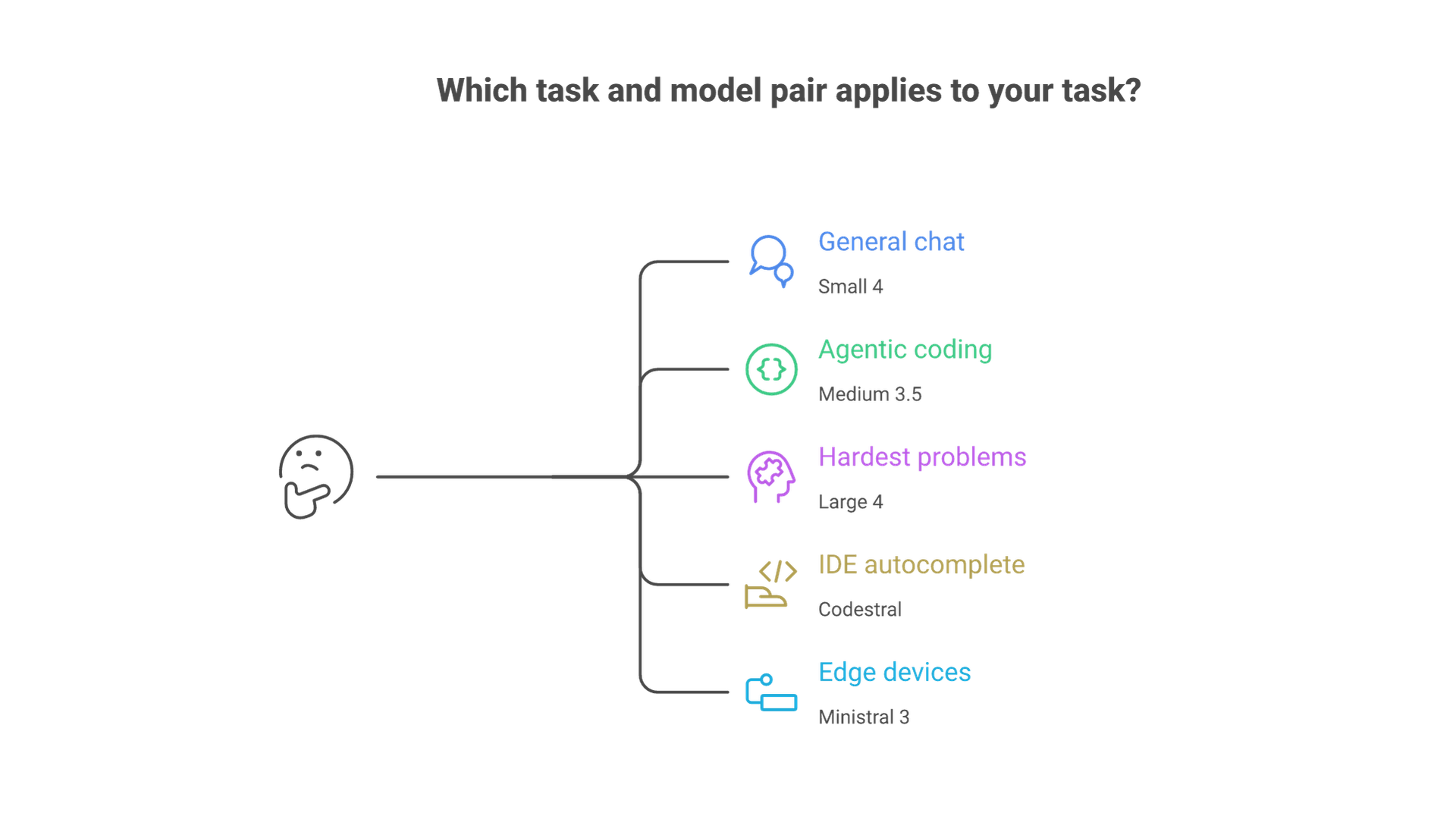
Your choice depends on context size needs, latency targets, cost per token and whether you need to self-host. A practical default order looks like this:
- General chat and assistants: start with Mistral Small 4 (
mistral-small-latest). Itsreasoning_effortsetting lets one model serve both quick replies and step-by-step reasoning. - Agentic and coding work at higher quality: move to Mistral Medium 3.5 (
mistral-medium-latest). - The hardest problems and very long context: evaluate Mistral Large 4, keeping in mind that it is still in public preview.
- Code completion in an IDE: use Codestral (
codestral-2508) and its fill-in-the-middle endpoint. - Edge devices and small GPUs: use a Ministral 3 model.
- Scanned documents and PDFs: use the OCR models before sending text to a chat model.
Start simple; you can switch later by changing a model name and a few parameters. If you are comparing Mistral against other providers or planning a multi-model architecture, our LLM solutions team helps companies select, evaluate and integrate models for specific workloads.
Aliases versus pinned versions
Mistral exposes "latest" aliases such as mistral-small-latest and dated IDs such as mistral-small-2603. Aliases are convenient for prototypes because they move to newer versions automatically. In production, pin the dated ID so a silent upgrade cannot change output format, tone or cost, and upgrade deliberately after running your evaluation set.
Access via La Plateforme (Now Mistral Studio)
La Plateforme, Mistral's developer platform, is now presented as Studio. Sign in at console.mistral.ai, activate Studio (a Free mode is available for experimentation) and create an API key. Studio gives programmatic access to Mistral models for chat, agents, document processing, audio and retrieval-augmented generation, plus a console for testing models, managing keys and reviewing usage.
Keys are managed per workspace. Keep separate keys for development and production, scope them by project and store them in a secret manager rather than in source code. The official SDKs read the key from the MISTRAL_API_KEY environment variable in their examples.
What else lives in Studio
The API reference shows how much the platform has grown beyond chat completions. Alongside the core endpoints for chat, fill-in-the-middle, embeddings, OCR, batch and files, it lists a Responses API, workflows, and public-preview endpoints for agents, conversations, document libraries, connectors, prompts and skills, observability and managed RAG indexes.
Try It in Le Chat (Now Vibe)
Use Vibe, the assistant formerly called Le Chat, to experiment with prompts before you write code. Test system instructions, check how the model handles images and documents, and verify multilingual behavior. Mistral's Vibe announcement describes a Work mode for long-running tasks such as research and document drafting, a Code mode for remote coding sessions tied to GitHub, and a Chat mode that keeps existing Le Chat history and settings but is scheduled to be retired.
As you iterate, copy the prompt and parameters you settle on into your application. This tight loop speeds up prompt design and reduces rework for your user experience. Remember that a consumer assistant and the API are separate products: Mistral's pricing page lists Free, Pro ($14.99 per month), Team ($24.99 per user per month) and custom Enterprise plans, while API usage is billed per million tokens.
Call the API (Examples)
Below are minimal calls against the chat completions endpoint, https://api.mistral.ai/v1/chat/completions. The Python example follows Mistral's first API request quickstart and uses the official mistralai package. Replace the model name with the one you selected.
Python (official SDK)
pip install mistralai

import os
from mistralai.client import Mistral

client = Mistral(api_key=os.environ["MISTRAL_API_KEY"])

response = client.chat.complete(
    model="mistral-small-latest",
    messages=[{"role": "user", "content": "Give me 3 bullet points on model quantization."}],
    temperature=0.3,
    max_tokens=200,
)
print(response.choices[0].message.content)
JavaScript (fetch)
const r = await fetch("https://api.mistral.ai/v1/chat/completions", {
  method: "POST",
  headers: {
    "Authorization": `Bearer ${process.env.MISTRAL_API_KEY}`,
    "Content-Type": "application/json"
  },
  body: JSON.stringify({
    model: "mistral-small-latest",
    messages: [{ role: "user", content: "Summarize retrieval augmented generation in 5 lines." }],
    temperature: 0.5
  })
});
const data = await r.json();
console.log(data.choices[0].message.content);
cURL
curl https://api.mistral.ai/v1/chat/completions \
  -H "Authorization: Bearer $MISTRAL_API_KEY" \
  -H "Content-Type: application/json" \
  -d '{
    "model": "mistral-small-latest",
    "messages": [{"role":"user","content":"Explain mixture-of-experts in one paragraph."}],
    "temperature": 0.3, "max_tokens": 256
  }'
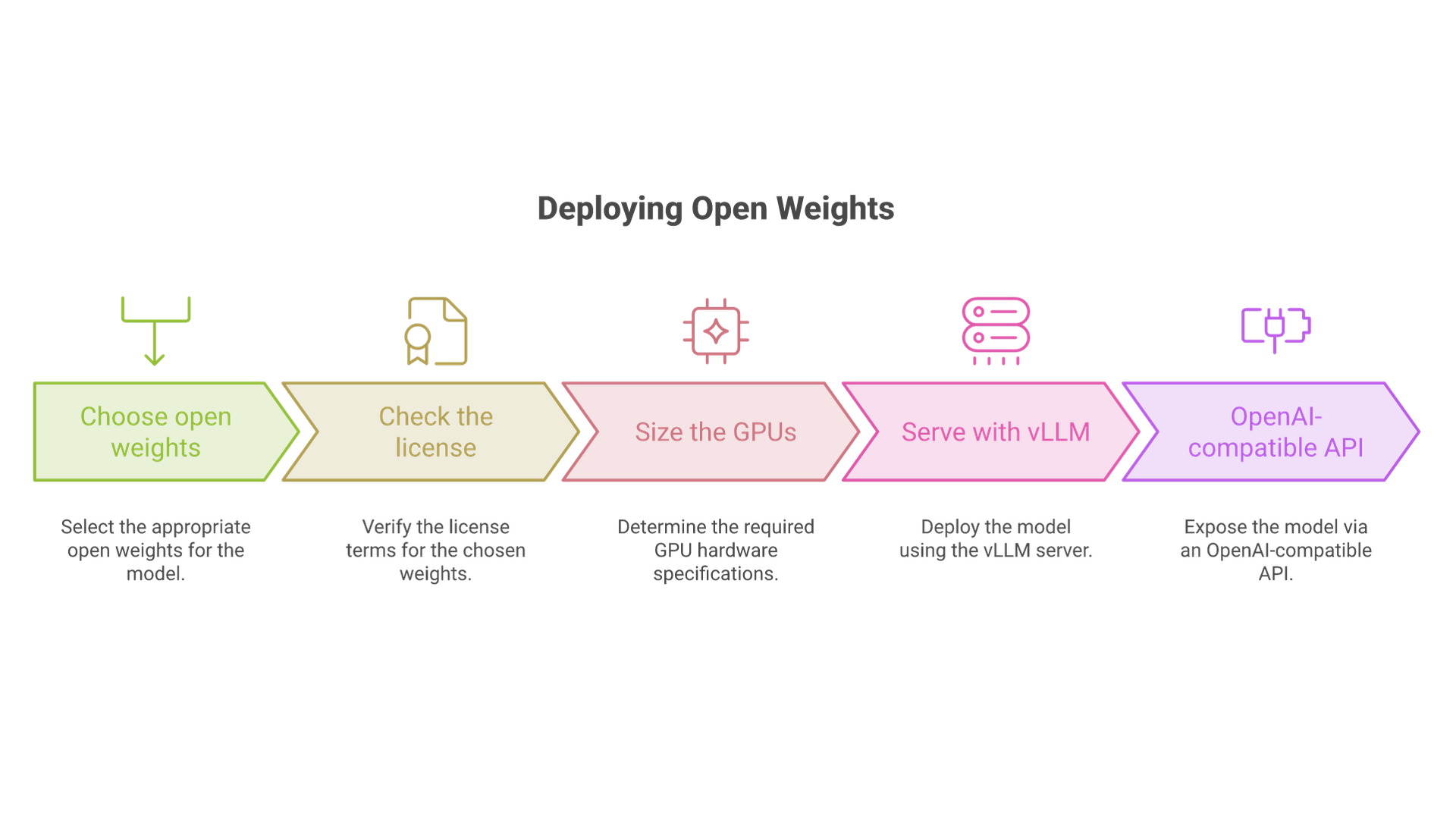
Because self-hosted Mistral models are commonly served through vLLM, which exposes an OpenAI-compatible API, the same request shape usually works against your own server once you change the base URL and model name.
Control Generation with Parameters
Tuning decoding parameters lets you balance creativity, determinism and cost. The chat completions reference documents these as the most useful controls:
- temperature: the reference suggests staying roughly between 0.0 and 0.7; lower values concentrate probability on the top tokens and yield more consistent answers. Defaults vary by model.
- top_p: nucleus sampling that trims the low-probability tail. Adjust temperature or top_p, not both at once. Note that the API reference does not list a
top_kparameter. - max_tokens and min_tokens: bound the generated length to manage cost and latency. Prompt tokens plus
max_tokenscannot exceed the model's context length. - presence_penalty and frequency_penalty: reduce repetition, which helps in long reports.
- reasoning_effort: from
nonetoxhighon models that support it, trading latency and tokens for deeper reasoning. - response_format: plain text,
json_objector ajson_schemafor structured outputs. - random_seed, stop and safe_prompt: make sampling reproducible, end generation on a marker, or prepend Mistral's safety system prompt.
Start with a temperature around 0.3 for factual tasks and raise it only for creative work, then adjust based on user feedback and evaluation. Prompt structure usually matters more than any single sampling value; our developer guide to prompt engineering covers system prompts, examples and output constraints in more depth.
Handle Context and Context Length
Every request consumes a context window composed of your prompt, any retrieved documents, the conversation history and the model's generated tokens. Current Mistral models offer large windows: 256k tokens for Mistral Small 4, Medium 3.5 and Large 3, and 1M tokens for Mistral Large 4, according to the Large 4 model card and its siblings.
A large window is not a reason to fill it. Long histories and big documents increase cost and processing time, and models can still miss details buried in the middle of a very long prompt. Use summaries and retrieval to keep only the most relevant input: chunk documents, store embeddings, then fetch the top passages per query. For repeated prefixes such as long system prompts, take advantage of cached-input pricing, which Mistral's pricing page lists at up to 90% off.
Multimodal & Media Inputs
Many current Mistral models accept images alongside text. Mistral Small 4 takes text and image input, Ministral 3 models include image understanding in every variant, and Mistral Large 4 is described as natively multimodal with a dedicated vision encoder. You can ask a model to caption an image, read a chart or ground an answer in a screenshot.
For documents, use a dedicated OCR model first. Mistral's OCR models extract text, tables and layout from scanned pages and PDFs, which produces cleaner input for retrieval and question answering than sending page images to a chat model. For audio, the Voxtral models handle transcription, including real-time transcription, and speech generation. Validate file sizes and formats before upload to avoid retries and wasted processing.
Codestral Mamba for Code: What Replaced It
Codestral Mamba targeted code reasoning and generation, but it was retired on June 6, 2025, and the models overview names Codestral as its replacement. The current Codestral (version 25.08, API ID codestral-2508) has a 128k-token context window and specializes in fill-in-the-middle and code generation through the /v1/fim/completions endpoint, which suits IDE autocomplete.
For agentic coding, such as multi-file changes, test generation or migrations across Python, Java and TypeScript, Mistral now points developers to Mistral Medium 3.5, which replaced the Devstral models, and to Mistral Large 4, which Mistral promotes for agentic coding and cybersecurity work. Vibe's Code mode and the Vibe CLI run these models as coding agents. Whatever model you use, add repository context through retrieval so answers reflect your project structure, not just public code.
Streaming, Speed, and Cost
Set stream to true to receive tokens as server-sent events while the model generates them. This improves perceived speed for your user even when total generation time is unchanged.
Cost is driven by tokens in and tokens out, so track both per request. As of October 30, 2026, Mistral's model cards list Mistral Small 4 at $0.15 per million input tokens and $0.60 per million output tokens, Mistral Medium 3.5 at $1.50 and $7.50, and Mistral Large 4 at $0.70 and $2.10. Mistral's pricing page also lists a 50% discount for batch processing. Use batch for offline jobs; for interactive features, cap max_tokens and cache stable prompt prefixes.
Is Mistral AI free?
Partly. Vibe has a free plan with usage limits, and Studio has a Free mode for experimenting with the API. Production API traffic is billed per token. Open-weight models have no license fee for most uses, but self-hosting is not free: you pay for GPUs, storage, operations and engineering time.
Run Open Models Locally
If you prefer local inference, download open weights from Hugging Face and serve them with your preferred runtime. This maximizes control, keeps data inside your environment and helps with residency requirements. Mistral's self-deployment documentation recommends vLLM, which can expose an OpenAI-compatible API, and also covers TensorRT-LLM and TGI. Model announcements add SGLang, llama.cpp and Hugging Face Transformers for specific checkpoints.
Hardware is the main constraint. The 3B, 8B and 14B Ministral 3 models are the most practical starting point for a single GPU or edge device, especially when quantized. Mistral Small 4 is far larger than its active parameter count suggests: its launch post lists a minimum of four NVIDIA H100, two H200 or one DGX B200. Mistral Large 4's Hugging Face model card shows a vLLM example with eight-way tensor parallelism and an NVFP4 checkpoint aimed at Blackwell GPUs.
Local setups shine for prototyping, private corpora and offline workloads at the edge. If you are new to this, our guide to setting up a local LLM for optimal performance walks through runtimes, quantization and hardware sizing. For serving at scale, many teams combine a local gateway for sensitive traffic with managed endpoints for everything else.
Open-weight licensing explained
"Open weights" does not mean one license. Read the license on each model card before you build a product on it:
- Apache 2.0: Mistral Small 4, Mistral Large 3, the Ministral 3 family and Shieldstral 1.0. Permissive, including commercial use.
- Modified MIT: Mistral Medium 3.5. Open weights with modifications to the standard MIT terms; review the exact text.
- Mistral Ecosystem Open-Weight License: Mistral Large 4. Mistral describes it as a modified MIT license that allows use, modification, fine-tuning and commercial use, but businesses offering the model as a service must obtain a separate commercial license.
- CC BY-NC 4.0: the open Voxtral TTS model, which excludes commercial use.
- Premier (API only): models such as Codestral, OCR 4.1 and Mistral Embed, which you access through the API rather than as downloadable weights.
Cloud, Edge, and Enterprise Options
You can use hosted endpoints in Mistral's cloud, run open models in containers on-premises, or deploy small models on accelerated nodes at the edge for low-latency experiences. Mistral models are also offered through cloud marketplaces; the Mistral 3 announcement listed availability on Amazon Bedrock, Azure Foundry, IBM watsonx, Hugging Face and several inference providers.
For regulated teams, Mistral's Enterprise offering adds SAML SSO, audit logs and custom deployments, and Mistral's self-deployment documentation invites organizations that want the full platform in their own environment to contact its team. Choosing between these options is an infrastructure decision as much as a model decision; our AI infrastructure practice designs GPU capacity, networking and deployment pipelines for hybrid setups like these.
A correction to older guides: Mistral NeMo is not a GPU scheduling tool. It was a 12B open model, retired from Mistral's API on July 31, 2026. NVIDIA's NeMo framework and NIM containers are separate NVIDIA products for customizing and serving models such as Mistral Small 4.
Custom models and fine-tuning
Customization has also moved. The API reference now lists the legacy fine-tuning endpoints as deprecated, while Mistral's Forge program targets enterprises that want models trained on proprietary knowledge through pre-training, post-training and reinforcement learning. For most teams, prompt design, retrieval and structured outputs should come first; consider custom training only after they plateau.
Data Protection and Security
Adopt least-privilege API keys, encrypt data at rest, and redact personal data in logs. Rotate secrets regularly and pin model versions to avoid surprises. Add data loss prevention filters when prompts can include customer documents.
Mistral separates two privacy controls. Zero data retention (ZDR) decides whether supported API inputs and outputs are kept after a response; it is available on paid plans for stateless calls such as chat completions, fill-in-the-middle, embeddings, moderation, OCR and speech, and you request it from Mistral support. It does not cover stateful services that need to store data, such as agents, conversations, libraries, files, batch files and Vibe. Training opt-out is a separate setting that controls whether eligible data can be used to improve Mistral's models. Check both in the admin panel and in your contract rather than assuming a default.
When the data is highly sensitive, the strongest option is to keep it entirely inside your own environment with an open-weight model. Our guide on how to use an LLM with private data compares retrieval, fine-tuning and self-hosting patterns for exactly this situation.
Multilingual: Build for a Global User Base
The larger Mistral models are fluent in major European and Asian languages, including Japanese, Korean and Chinese. This lets you build one flow with regional instructions per locale.
For specialized terminology, include glossaries, style guides and a few in-domain examples per language. Evaluate with bilingual reviewers before scaling, using the smallest model you plan to deploy.
Tool Use, RAG, and Function Calling
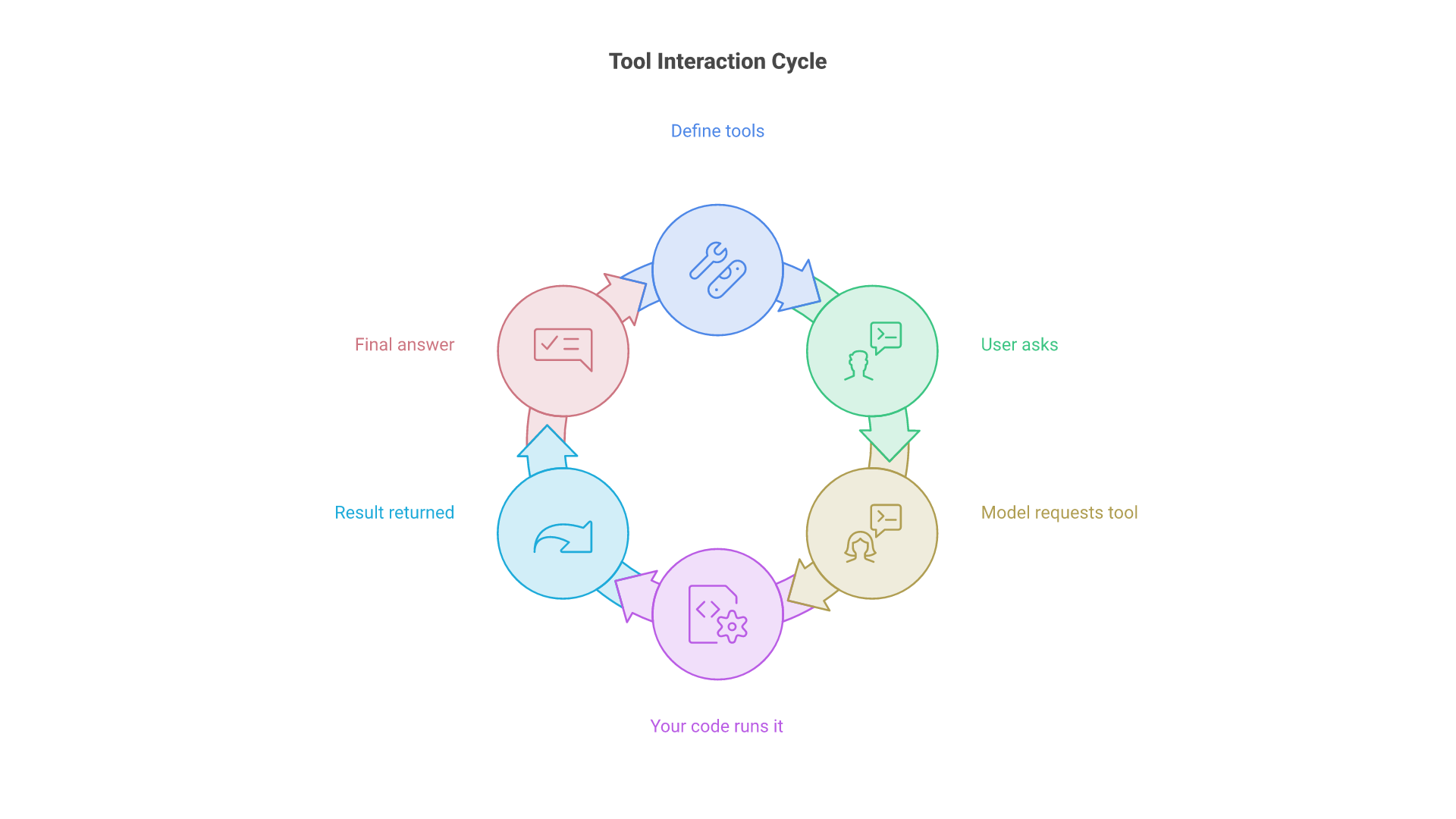
Use tool and function calling to connect the model to search, databases, calculators and internal APIs. Mistral's function calling guide describes a five-step loop: you define tools with JSON schemas, the user asks a question, the model returns tool_calls with arguments, your code runs the function and returns the result with the tool role, and the model writes the final answer or requests another call. The tool_choice parameter accepts auto, any to force a tool call, or none.
response = client.chat.complete(
    model="mistral-small-latest",
    messages=messages,
    tools=tools,
    tool_choice="auto",
)
message = response.choices[0].message
for call in message.tool_calls or []:
    args = json.loads(call.function.arguments)
    result = run_tool(call.function.name, args)  # your code
    messages.append({"role": "tool", "name": call.function.name,
                     "content": result, "tool_call_id": call.id})
Keep tool schemas concise and validate every argument before executing anything with side effects. With retrieval-augmented generation (RAG), store embeddings of your knowledge base, retrieve the top passages per query and attach them to the prompt; this reduces hallucinations and makes answers auditable. Studio's managed RAG indexes and document libraries can replace some of this plumbing, and caching frequent queries saves cost either way.
Monitoring, Evaluation, and Guardrails
Measure faithfulness, toxicity and policy adherence on a held-out set of prompts that reflects real traffic. Add automatic checks for personal data leakage and risky content. Mistral Moderation 2 and Shieldstral 1.0 can classify text, and Shieldstral also images, as an extra layer in front of or behind the main model.
Log parameters, prompts, model versions and hashes of retrieved context so you can reproduce behavior. Roll out in stages and watch real-time metrics for drift, especially after any model upgrade.
Best Practices for AI Development
Mistral AI's commitment to open-weight models and transparent development has shaped a set of practices that help teams build robust, secure and high-performing AI solutions. Whether you deploy Mistral models for text generation, document understanding or code generation, these guidelines will help you get reliable value.
1. Optimize for context length and enterprise-grade needs
Choose the smallest model and the shortest context that meet your quality bar. Mistral Small 4 covers many workloads at low cost, Medium 3.5 suits demanding agentic tasks, and Large 4 is reserved for the hardest problems. Managing input and output context carefully gives faster processing, lower cost and more relevant results.
2. Prioritize security and data privacy
Use unique API keys per project and environment, restrict access by workspace, and decide early whether you need zero data retention, training opt-out, regional endpoints or full self-hosting. Rotate keys and monitor usage to catch unauthorized access.
3. Leverage open-weight and multimodal capabilities
Open weights let you prototype on the API and later move the same model family in-house. Multimodal and OCR models expand what you can build beyond text.
4. Balance performance, cost and flexibility
Route simple requests to small models and escalate only when needed. Revisit the choice each quarter, because the lineup changes often.
5. Foster experimentation and collaboration
Keep a shared, versioned library of prompts and evaluation sets; Studio's prompt and skill management can serve as that system of record.
6. Stay future-ready
Watch Mistral's changelog and deprecation table, pin versions in production and schedule upgrades. Make someone responsible for tracking deprecation notices. When you plan larger initiatives, weigh hosted, hybrid and self-hosted options against cost and governance requirements before you lock in an architecture.
Common Pitfalls and How to Avoid Them
- Overlong context: stuffing the window raises cost and slows processing. Summarize, prune and retrieve.
- Unbounded temperature: high values produce irrelevant responses. Use a moderate setting and penalties.
- Inconsistent system prompts: different base instructions per service yield inconsistent tone. Standardize and version them.
- Stale model IDs: code copied from older tutorials may call Codestral Mamba, Mixtral or Mistral 7B endpoints that are retired. Check the deprecation table.
- Assuming every open model is Apache 2.0: Large 4, Medium 3.5 and Voxtral TTS have different terms. Review the license before shipping.
- Underestimating self-hosting hardware: MoE models load all of their parameters into memory even though only a fraction is active per token.
End-to-End Example: Doc Q&A Agent
The following outline shows how the pieces fit together in a document question-answering agent. It is an illustrative architecture, not a benchmarked reference implementation.
- Run scanned PDFs through an OCR model and keep the extracted text with page references.
- Chunk the text, embed it with Mistral Embed and store the vectors in your index.
- Build a retrieval layer that returns the top passages plus citations for each question.
- Call Mistral Small 4 with a system prompt and a
json_schemaresponse format that requires an answer field and a citations field. - Set decoding parameters such as a temperature around 0.2 and a bounded
max_tokens. - Stream tokens to the user and render citations under the generated answer.
- Log the model version, retrieved chunk hashes and output for evaluation.
This design scales from a single workstation running a Ministral 3 model to a cloud deployment on Medium 3.5. A variant swaps in Codestral or Medium 3.5 and adds test generation for codebases.
Mistral Offers and Where to Go Next
Mistral offers a pragmatic path: start in Vibe, build through Studio and the API, or bring open-weight models into your own stack. The same model families appear in all three, which makes it easier to move a workload as requirements change.
For long-term success, document your architecture, set service-level objectives and keep prompts versioned.
Future Outlook
The direction is visible in Mistral's 2026 releases: larger context windows, models that combine instruction following and reasoning in one checkpoint, native multimodality, and more agent infrastructure around the models. Mistral's open-weight release of Large 4 shows that the company intends to keep publishing frontier-class weights, under licenses that are becoming more varied.
Keep an eye on the deprecation table and changelogs; new model families often unlock simpler designs.
Frequently Asked Questions
Who are the founders of Mistral AI?
Mistral AI was founded in April 2023 by Arthur Mensch (CEO), Guillaume Lample (Chief Science Officer) and Timothée Lacroix (CTO).
Is Le Chat still available?
Le Chat was renamed Vibe in May 2026. It is still served at chat.mistral.ai, and existing plans, history and settings carried over. Vibe adds Work and Code modes, and the classic Chat mode is scheduled to be retired.
Can I run Mistral models for free?
You can try Vibe on its free plan and the API in Studio's Free mode. Many open-weight models carry no license fee, but self-hosting still costs hardware and operations, and production API traffic is billed per token.
How do I choose between small and large models?
Start with Mistral Small 4 for speed and cost, then move to Medium 3.5 or Large 4 only if quality plateaus on your evaluation set. Re-run the same prompts on each candidate before switching.
Can I fine-tune Mistral models?
Open-weight models can be fine-tuned on your own infrastructure within their license terms. On Mistral's platform, the legacy fine-tuning API is listed as deprecated, and Forge targets enterprises that want custom training on proprietary data.
Do Mistral models accept images and documents?
Yes. Mistral Small 4, Ministral 3 and Mistral Large 4 accept image input, and the OCR models extract text, tables and layout from PDFs and scans for downstream retrieval and question answering.
Conclusion: How to Use Mistral AI Effectively
Using Mistral AI effectively in 2026 comes down to a few decisions: pick the smallest current model that meets your quality bar, pin its version, control context and decoding parameters, ground answers with retrieval and tools, and decide early whether data should stay on Mistral's regional endpoints, under zero data retention or entirely in your own environment with open weights. Test ideas in Vibe, build through Studio and the API, and check the license and deprecation table before you ship.
Mistral's lineup will keep changing, but those habits carry over to every new release. If you want help choosing, integrating or self-hosting Mistral models for your product or operations, talk to Cognativ about your AI project.