


Kubernetes Architecture Diagram: Complete Guide to Cluster Components
From the API server hub to kubelets on every node, see how each Kubernetes component fits together, how a Pod request flows, and how to draw your cluster.
Kubernetes architecture diagrams provide visual blueprints that map how Kubernetes control plane components, worker nodes and core Kubernetes components interact within a distributed container orchestration system. They are essential tools for understanding the relationships inside a Kubernetes cluster, troubleshooting issues and designing scalable containerized applications across multiple nodes.
A good diagram answers three questions at a glance: which component owns a decision, which component stores the state, and which path a request takes from a user's command to a running container.
What this guide covers. Every component in a standard Kubernetes architecture diagram, using the official Kubernetes documentation as the primary source: the control plane (kube-apiserver, etcd, kube-scheduler, kube-controller-manager and cloud-controller-manager), the node components (kubelet, kube-proxy and the container runtime) and the add-ons that complete a cluster. It then shows how to read, create and maintain your own diagram. Vendor-specific managed services, cost optimization and advanced security configuration are out of scope.
Who this is for. DevOps engineers, system administrators, Kubernetes beginners and technical teams who document existing clusters for training or design new cluster architectures for stakeholders.
Why it matters. Kubernetes components run across several machines and communicate through a single API. A diagram shows those dependencies and communication patterns in one view, which improves conversations between developers and operations and supports better cluster design decisions.
What you'll learn:
- How to read and interpret Kubernetes architecture diagrams
- What each control plane and node component does, according to kubernetes.io
- How components interact when you create a workload
- Standard visual conventions and a step-by-step process for drawing a diagram
Understanding Kubernetes Architecture Fundamentals
The Kubernetes documentation describes Kubernetes as a portable, extensible, open source platform for managing containerized workloads and services that supports both declarative configuration and automation (Kubernetes overview). According to the official Cluster Architecture page, a cluster consists of a control plane plus a set of worker machines, called nodes, that run containerized applications. Every cluster needs at least one worker node to run Pods, the smallest deployable unit, which wraps one or more containers. In production, the control plane usually runs across multiple computers and a cluster usually runs multiple nodes, providing fault tolerance and high availability.
Kubernetes is one layer in a larger platform. It does not build your application, choose your database or mandate a logging stack, so a cluster diagram should sit alongside the rest of your tech stack components and selection strategy rather than replace it.
Core Architecture Patterns
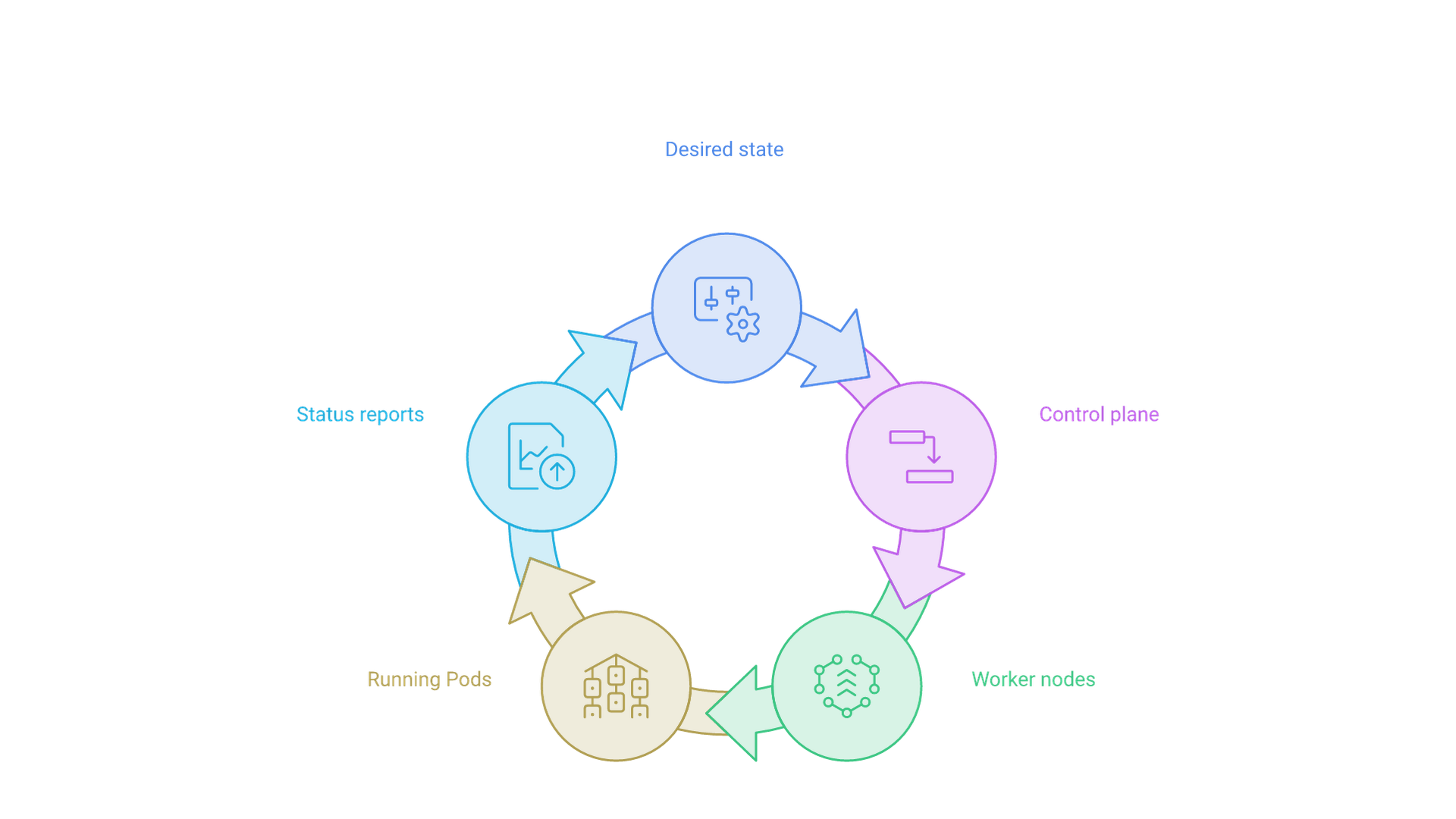
The control plane versus worker node separation appears in diagrams as distinct groupings, typically with control plane components clustered at the top or left and worker nodes arranged below or alongside. The control plane records and enforces the desired state; worker nodes run the containers that implement it.
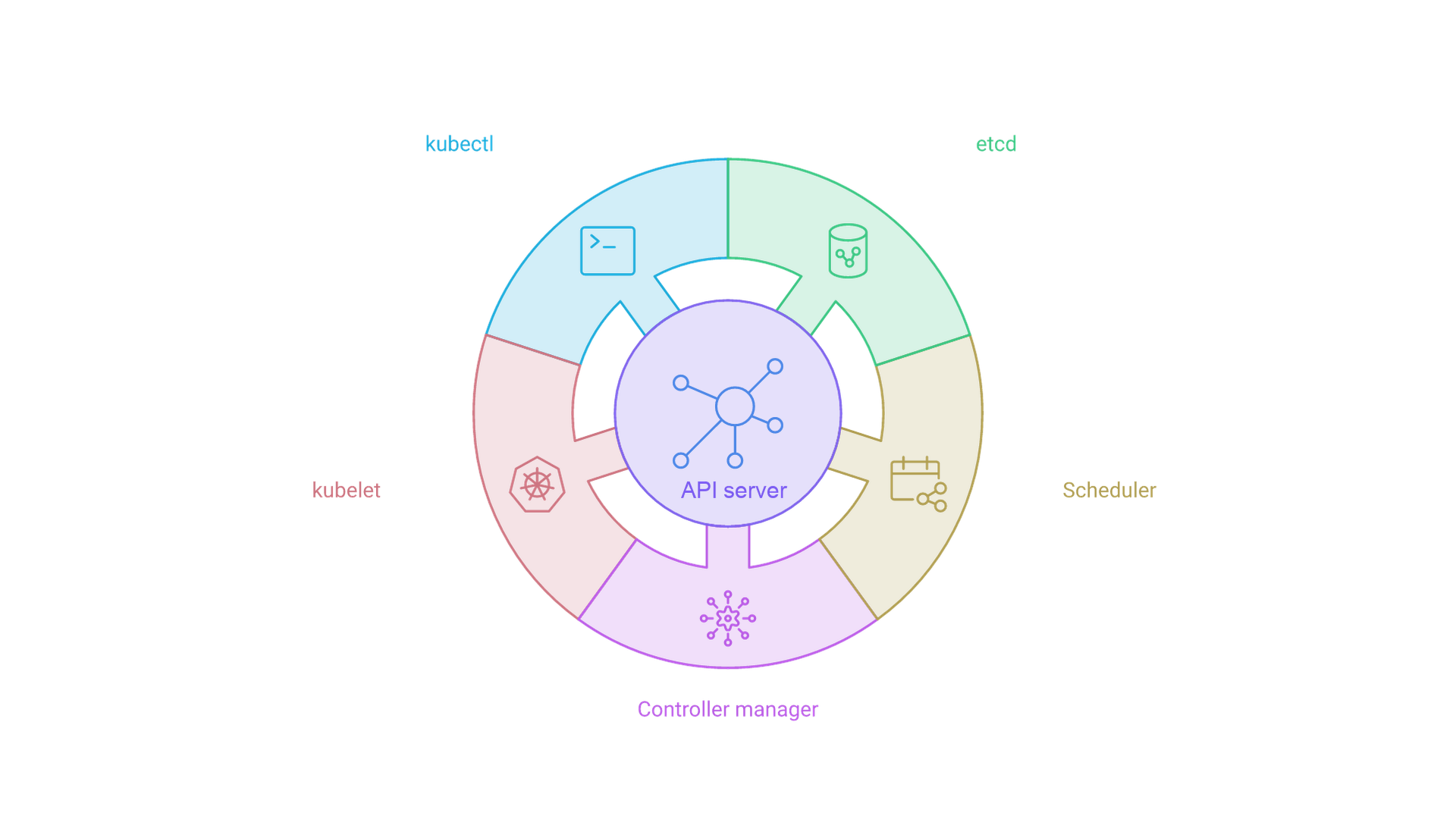
Arrows show the Kubernetes API server as the central communication hub. Control plane and node components connect through the API server rather than directly to each other. A diagram that draws direct lines from the scheduler to etcd, or from one node to another node's kubelet, misrepresents the architecture.
Desired State and the Control Loop
The Kubernetes docs explain controllers with a thermostat analogy: you set a desired temperature, the room has a current temperature, and the thermostat acts to bring them closer. Controllers are non-terminating control loops that watch cluster state through the API server and move the current state toward the desired state recorded in each object's spec. That is why diagrams often include arrows pointing back to the API server as status updates, not just a one-way pipeline.
Which Kubernetes Version Does This Describe?
As of October 30, 2026, the current Kubernetes minor release is v1.37, announced on August 26, 2026 as Kubernetes v1.37: Garhwal. The official releases page lists 1.37.1 as its newest patch, with 1.36 and 1.35 also maintained. Version 1.34 reached end of life on October 27, 2026, per the patch release schedule, which gives each minor series about 14 months of support: 12 months standard plus two months of maintenance mode. The core architecture described here is stable across these releases; version details matter mainly for defaults such as the kube-proxy mode.
Control Plane Components in Architecture Diagrams
The control plane forms the decision-making layer of Kubernetes architecture. Its components make global decisions, such as scheduling, and respond to cluster events, such as starting a new Pod when a Deployment has too few replicas. They can run on any machine, but setup scripts typically start them together on one machine without user containers (Kubernetes Components). In a diagram, they belong inside one labeled control plane boundary.
API Server Representation
The kube-apiserver is the front end for the Kubernetes control plane. It exposes the Kubernetes API and is designed to scale horizontally, so you can run several instances behind a load balancer. Diagrams place it at the center or top of the control plane grouping, receiving requests from kubectl, CI/CD pipelines, external systems and internal components.
The page on communication between nodes and the control plane calls this a hub-and-spoke pattern: all API usage from nodes, or the Pods they run, terminates at the API server, and no other control plane component is designed to expose remote services. Annotations should also show the API server as the gateway that reads and writes cluster data in etcd.
etcd Database Visualization
etcd is the consistent, highly available key-value store that Kubernetes uses as the backing store for all cluster data. Draw it as a cylinder next to the API servers. For high availability, show multiple etcd members, either stacked on control plane nodes or as an external etcd cluster.
Connections to etcd flow through the API server, never directly from other components. The Kubernetes guide to operating etcd clusters explains why: access to etcd is equivalent to root permission in the cluster, so ideally only the API server should reach it. The guide also recommends an odd number of members, five for production, and a backup plan for etcd data, which a backup arrow to snapshot storage communicates visually.
Scheduler and Controller Manager
The kube-scheduler watches for newly created Pods with no assigned node and selects a node for them. The kube-scheduler documentation describes two steps: filtering finds feasible nodes, and scoring ranks them to choose the most suitable one. Factors include resource requirements, hardware, software and policy constraints, affinity and anti-affinity, data locality, inter-workload interference and deadlines. The scheduler then notifies the API server, a step called binding. Diagrams show this with branching arrows toward candidate nodes.
The kube-controller-manager runs controller processes. Logically each controller is separate, but they are compiled into a single binary and run in one process to reduce complexity. Examples include the Node, Job, EndpointSlice and ServiceAccount controllers. Draw it as one box containing several smaller controller boxes, with watch-and-update arrows to the API server.
Cloud Controller Manager
The cloud-controller-manager embeds cloud-specific control logic and links the cluster to a cloud provider's API. It runs only provider-specific controllers; the docs list node, route and service controllers as having cloud dependencies, such as creating a cloud load balancer for a Service. On-premises clusters and learning environments on your own PC do not have one, so show it only when it exists, with a dashed line to the external cloud API.
Key points:
- Control plane components cluster together to show shared responsibility
- Node and Pod traffic to the control plane terminates at the API server
- Only the API server should talk to etcd
- High-availability setups show multiple API servers behind a load balancer and an odd number of etcd members
Worker Node Components
Worker nodes are the execution layer where containerized applications run. Node components run on every node, maintain running Pods and provide the Kubernetes runtime environment. Draw each node as its own box containing the same components, with Pods inside the node that runs them.
kubelet
The kubelet is an agent on each node that ensures Pods, including their containers, are running. It takes PodSpecs and ensures the containers they describe are running and healthy; it does not manage containers that Kubernetes did not create. Show it with a two-way arrow to the API server: it watches for Pods assigned to its node and reports status back.
kube-proxy (Optional)
kube-proxy maintains network rules on nodes that implement Kubernetes Services. The documentation marks it as optional: some network plugins provide their own proxying, and with those plugins the node does not need kube-proxy. On Linux it supports iptables, ipvs and nftables modes; on Windows, kernelspace. The virtual IPs and Service proxies reference states that iptables is the default in Kubernetes 1.37, that a future version will switch the default to nftables, and recommends setting the mode explicitly.
Container Runtime
The container runtime manages the execution and lifecycle of containers. Kubernetes supports runtimes such as containerd and CRI-O, and any other implementation of the Container Runtime Interface (CRI). Draw the runtime beneath the kubelet with a labeled CRI arrow, and Pods above it with their containers inside.
Pods, Services and Workload Objects
Detailed diagrams often add Deployments, ReplicaSets, Pods and Services. Deployments, ReplicaSets and Services are API objects stored in etcd, not processes, so use a different shape or color from running components.
Kubernetes Add-ons in the Diagram
Add-ons use Kubernetes resources such as DaemonSets and Deployments to implement cluster features, and their namespaced resources belong in the kube-system namespace. The Cluster Architecture page lists:
- DNS: other add-ons are optional, but all clusters should have cluster DNS, which serves records for Kubernetes Services.
- Web UI (Dashboard): a web interface for managing and troubleshooting applications and the cluster.
- Container resource monitoring: records time-series metrics about containers in a central database.
- Cluster-level logging: saves container logs to a central store with search and browsing.
- Network plugins: implement the Container Network Interface (CNI) specification, allocate IP addresses to Pods and let them communicate.
A common convention is a separate band labeled "Add-ons" or "kube-system" spanning all nodes. Keep add-ons visually distinct so readers can tell upstream Kubernetes components from choices your team made, such as a specific CNI plugin, metrics stack or ingress controller.
How Kubernetes Components Work Together
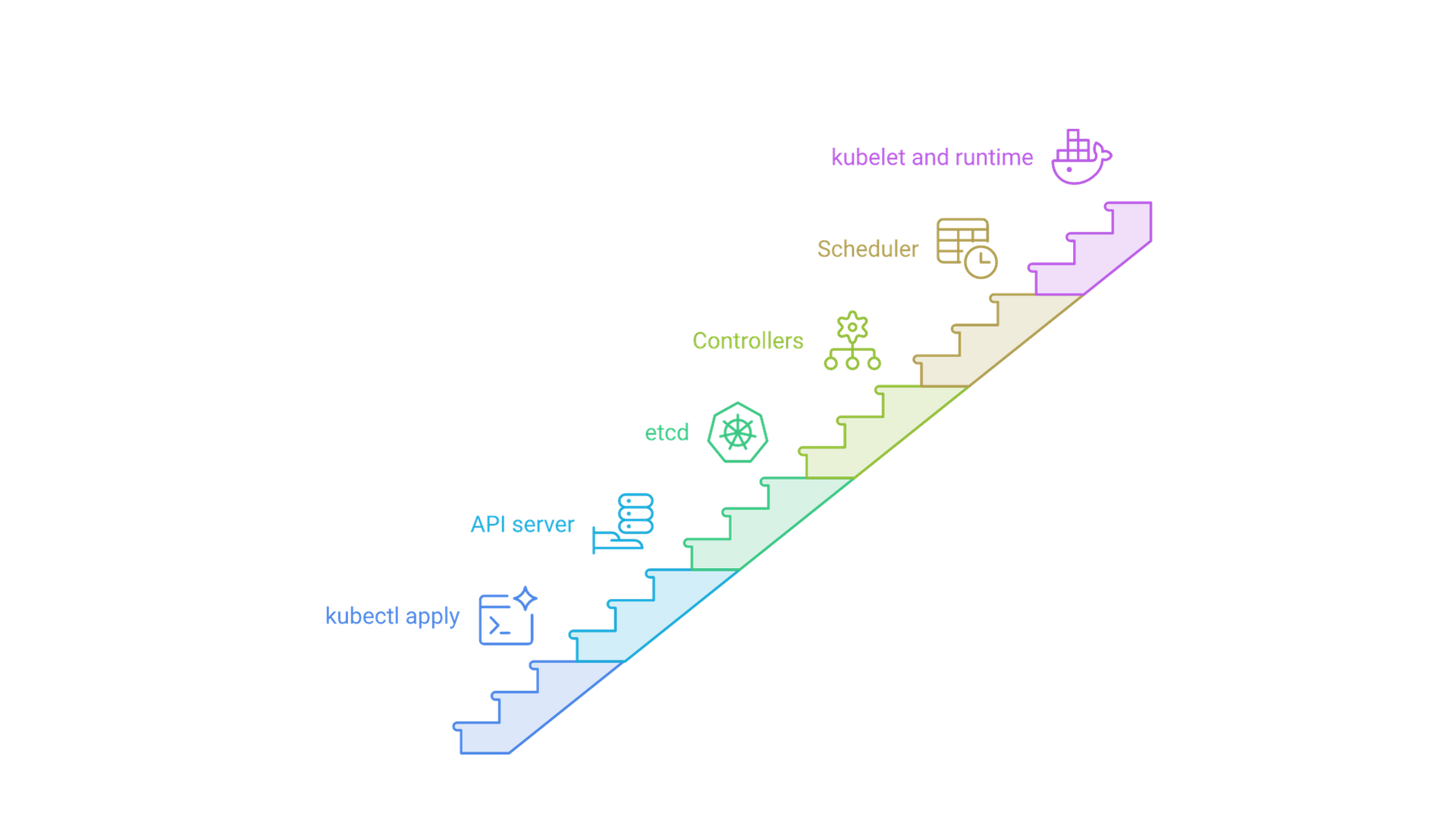
Static boxes explain what exists; a sequence explains what happens. Following one request is the fastest way to check whether a diagram is correct. Based on the responsibilities in the official docs, this is the path when you apply a Deployment:
- kubectl sends the manifest to the kube-apiserver, which authenticates, authorizes and validates it.
- The API server persists the Deployment in etcd.
- Controllers in the kube-controller-manager notice it and ask the API server to create a ReplicaSet and then Pods.
- The kube-scheduler filters and scores nodes for each unassigned Pod and binds it through the API server.
- The kubelet on the chosen node asks the container runtime, through the CRI, to start the containers; the network plugin assigns the Pod an IP.
- The kubelet reports status, and kube-proxy or the network plugin updates Service forwarding so traffic reaches the Pod.
Apart from the node-local CRI call, every handoff in this sequence passes through the API server. Overlay these numbered steps on your component diagram so new team members can trace them.
Kubernetes Architecture Variations
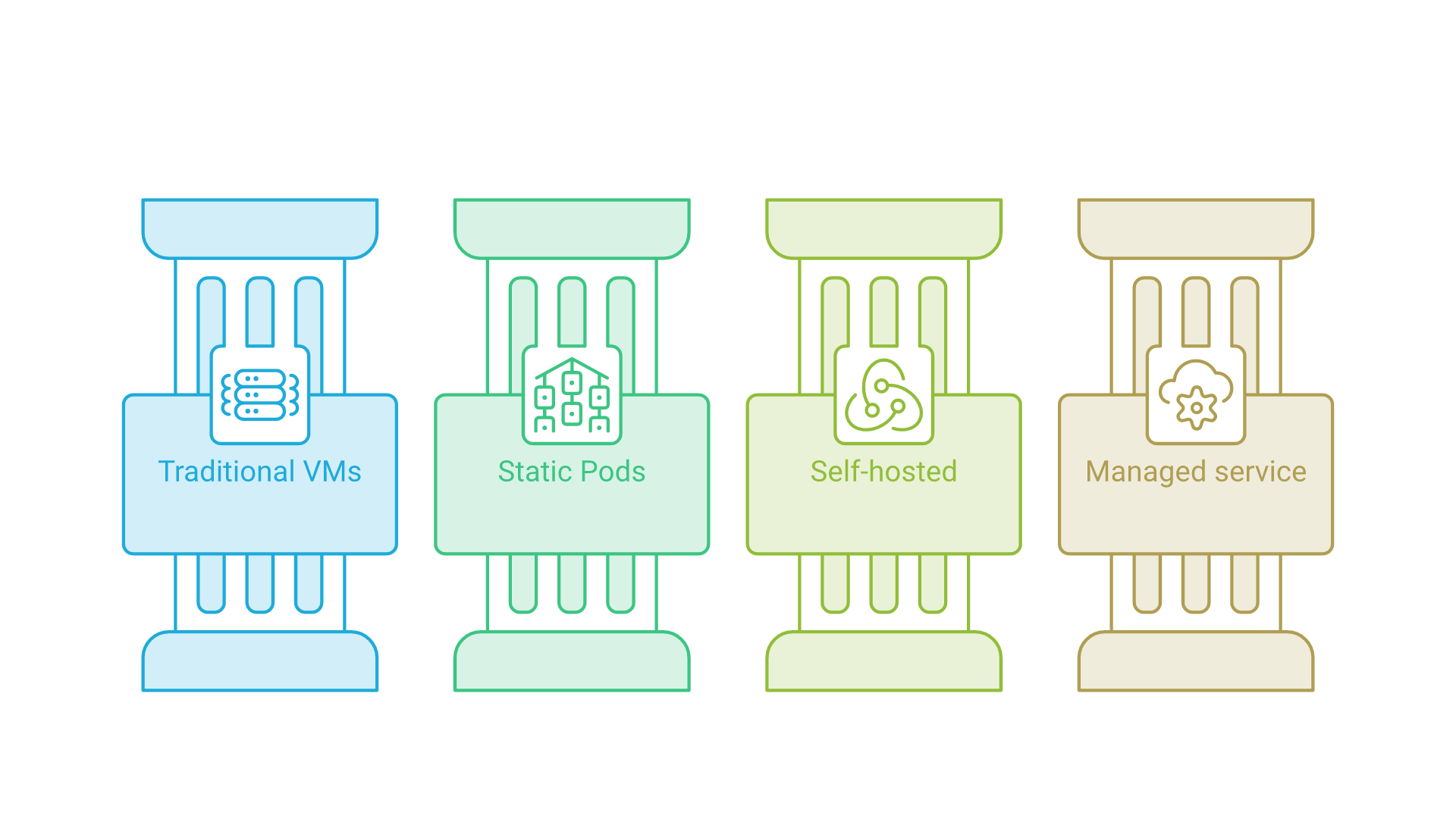
The reference diagram on kubernetes.io is an example, and the Cluster Architecture page says the actual distribution of components can vary. It describes four control plane deployment options:
- Traditional deployment: components run on dedicated machines or VMs, often as systemd services.
- Static Pods: components run as static Pods managed by the kubelet, a common approach used by kubeadm.
- Self-hosted: the control plane runs as Pods inside the cluster itself.
- Managed Kubernetes services: cloud providers abstract away the control plane and manage it for you.
Your diagram should match the variant you run. With a managed service, the control plane may be one provider-operated box you cannot inspect; with kubeadm, static Pods on control plane nodes are more accurate. Choosing between these models is an operating decision as much as a technical one, often worked through in a cloud and infrastructure consulting engagement that also covers migration, observability and recovery.
Workload Placement and Extensibility
Small or development clusters might run control plane components and user workloads on the same nodes, while larger production clusters often dedicate nodes to the control plane. Tools such as kubeadm, kops and Kubespray each have their own component layout. Kubernetes is also extensible: custom schedulers can run alongside or replace the default, the API can be extended with CustomResourceDefinitions and API aggregation, and operators add controllers that watch and update state through the API server like built-in ones.
Creating a Kubernetes Architecture Diagram
Diagram Types and Conventions
High-level overview diagrams show clusters as conceptual blocks for executive presentations or early design discussions. Detailed component diagrams break down individual components and communication paths for technical teams.
Common conventions include rectangles for components, cylinders for data stores such as etcd, branching symbols for scheduling decisions, solid lines for API calls, dashed lines for etcd replication and dotted lines for monitoring and health checks. The Kubernetes community maintains an icon set in SVG and PNG, created to standardize Kubernetes architecture diagrams, with symbols for components such as api, etcd, sched, c-m, c-c-m, kubelet and k-proxy. Its README lists Apache-2.0 or CC-BY-4.0 licensing; the Kubernetes logo is a trademark with separate guidelines.
Step-by-Step: Creating a Complete Kubernetes Architecture Diagram
- Position control plane components: place the kube-apiserver centrally with etcd adjacent, then group the controller manager, scheduler and any cloud-controller-manager in one boundary.
- Add worker nodes: draw node boxes with the kubelet, kube-proxy (if used) and the container runtime, and Pods containing one or more containers.
- Draw communication lines: route node-to-control-plane arrows to the API server, and label Service traffic and CRI calls.
- Include add-ons: add DNS, the CNI plugin, monitoring and logging beside, not inside, the core control path.
- Add labels and a legend: include one-line responsibilities, the Kubernetes version and a legend for line styles and colors.
The same boundary-first approach works for application diagrams on top of a cluster. Our Ollama server architecture diagram applies it to a single AI service, separating the request path from the resources it uses.
Comparison: Simple vs Detailed Architecture Diagrams
| Feature | Simple overview | Detailed component |
|---|---|---|
| Audience | Executives, stakeholders | Engineers, operators |
| Detail level | Conceptual blocks | Individual components and objects |
| Use case | Architecture presentations | Troubleshooting, implementation, onboarding |
| Maintenance | Updated with major design changes | Updated with upgrades and configuration changes |
Simple diagrams communicate Kubernetes concepts to non-technical stakeholders, while detailed diagrams serve teams who need component interactions, network rules and troubleshooting workflows. Most teams need both. General-purpose tools such as draw.io, Lucidchart and Visio suit curated diagrams, while diagrams-as-code tools keep the source in version control next to your manifests.
Common Challenges and Solutions
Effective diagrams balance complete component coverage with visual clarity, especially in clusters with multiple node pools, network plugins and custom resources.
Challenge 1: Overcomplicated Diagrams
Solution: start with a high-level cluster view, then create sub-diagrams for networking, storage or security instead of showing everything in one picture. Executives need a conceptual view; platform engineers need interaction flows and network rules.
Challenge 2: Missing Network Flows
Solution: include directional arrows for API calls, etcd replication and Pod and Service traffic, and use line styles to separate control plane traffic from data plane traffic. Without arrows, a diagram cannot show the hub-and-spoke rule, the most useful thing it can teach.
Challenge 3: Outdated Diagram Information
Solution: version diagrams with cluster upgrades and print the Kubernetes version on the diagram. Keeping diagram source beside infrastructure code and reviewing it in the same pull requests follows the documentation-as-code habits in our guide to modern software development best practices.
Challenge 4: Drawing Components Your Cluster Does Not Run
Solution: verify optional components first. On-premises clusters have no cloud-controller-manager, some network plugins replace kube-proxy, and managed services may hide the control plane. Accuracy also depends on who owns upgrades and day-two operations, which is why teams often tie diagram reviews to their software support and maintenance process.
Additional Resources
Primary references: the Cluster Architecture, Kubernetes Components and controller pages on kubernetes.io confirm component responsibilities, and the releases page is authoritative for current versions and end-of-life dates.
Automation tools: cluster visualization tools that read live state can generate views of current resources, which helps catch drift from a static drawing. Review generated output for accuracy and remove sensitive details before sharing.
Frequently Asked Questions
What are the main components of Kubernetes architecture?
A control plane (kube-apiserver, etcd, kube-scheduler, kube-controller-manager and, on cloud providers, cloud-controller-manager), worker nodes (kubelet, optional kube-proxy and a container runtime) and add-ons such as cluster DNS and a network plugin.
What is the difference between the control plane and worker nodes?
The control plane stores the desired state and makes global decisions such as scheduling. Worker nodes run the Pods that hold your application containers and report status to the API server.
Why does every component talk to the API server?
Kubernetes uses a hub-and-spoke design. API usage from nodes and Pods terminates at the API server, and only the API server should access etcd, which keeps state consistent and access controlled.
Is kube-proxy required?
No. The Kubernetes documentation marks kube-proxy as optional. If your network plugin provides its own Service proxying, nodes do not need to run kube-proxy.
What is the latest Kubernetes version?
As of October 30, 2026, the latest minor release is Kubernetes v1.37, released August 26, 2026; kubernetes.io lists 1.37.1 as its newest patch. Versions 1.36 and 1.35 are also supported.
How do I draw a Kubernetes architecture diagram?
Group the control plane with the API server at the center and etcd beside it, draw each node with its kubelet, kube-proxy and runtime, route arrows through the API server, then add add-ons, a legend and a version label.
Conclusion and Next Steps
A Kubernetes architecture diagram turns a distributed system into a picture you can reason about. The essentials are consistent across current releases: a control plane built around the kube-apiserver, with etcd as the backing store, the scheduler placing Pods and controllers reconciling state; worker nodes running the kubelet, an optional kube-proxy and a CRI-compatible runtime; and add-ons such as DNS and a CNI plugin that complete the cluster.
To get started, choose a diagramming tool, confirm which components your cluster actually runs, draw a high-level view of control plane and node separation, then iterate into sub-diagrams for networking, security and observability. Label each diagram with its Kubernetes version and review it with every upgrade.
If you are planning a new cluster, a move to managed Kubernetes or a cleanup of undocumented infrastructure, talk to Cognativ about your cloud architecture.