


What Is Ollama? A Guide to Running AI Models Locally and Efficiently
Ollama is the open source runtime that pulls, stores and serves open models on your hardware. See how Modelfiles, its local API and GPU support fit together.
Ollama is a lightweight runtime and toolchain for running large language models (LLMs) directly on your local machine. It is an open source project, released under the MIT license, that lets you download open-weight models, run them on your own hardware, customize them and call them from applications through a local API. Key features include model management from the command line, a local server with its own REST API, compatibility with OpenAI-style and Anthropic-style clients, and installers for macOS, Windows and Linux.
Ollama emphasizes privacy, portability and simplicity, so you can evaluate and deploy open source models without sending data to external services. When you run a model locally, inference happens on your device, and Ollama states in its official FAQ that it does not see your prompts or data in that mode. You keep control over sensitive information and reduce exposure to third-party systems.
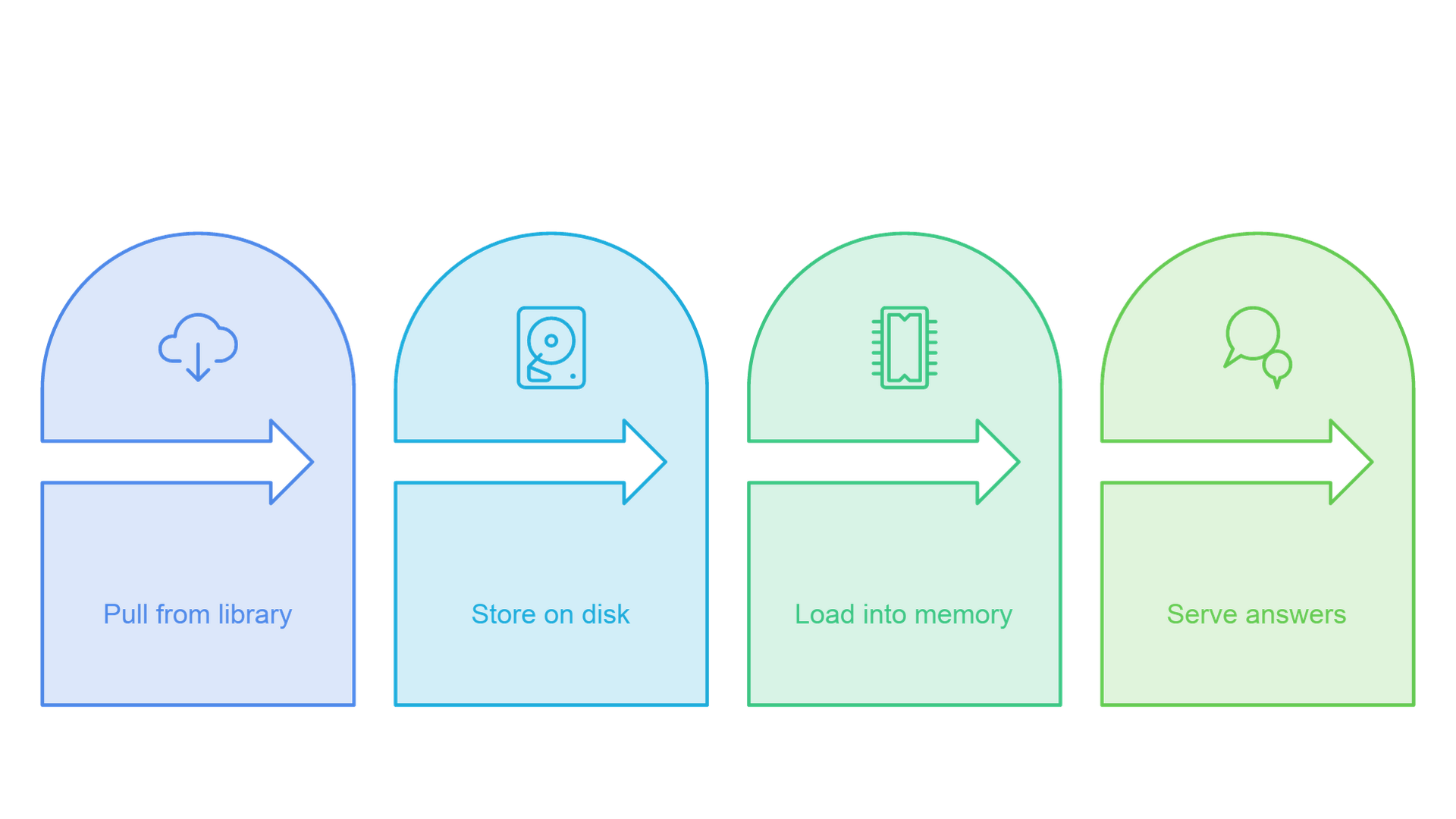
Short answer: Ollama is a model manager and inference server for local AI. It does three jobs: it fetches and stores model files, it loads those models into memory on your CPU or GPU when a request arrives, and it exposes them through a command line interface and an HTTP API on localhost:11434. This guide explains each of those jobs, the Modelfile format used to customize models, the API and OpenAI compatibility layer, supported platforms and the current version as of October 30, 2026.
What Is Ollama?
At its core, Ollama packages three things that used to require separate tools: a model registry client, a model runtime and an API server. You ask for a model by name, Ollama downloads it from its library, and the same binary then runs it and answers requests. The official documentation describes the goal plainly: use open models in desktop apps and coding agents, or build them into your own application.
Ollama is not a model. Llama, Gemma, Qwen, Mistral, gpt-oss and DeepSeek are models; Ollama is the software that downloads, manages and serves them.
How Ollama Relates to llama.cpp and GGML
Ollama's inference is built on GGML, the tensor library that also underpins the llama.cpp project. In its May 2025 engine announcement, Ollama explained that it previously relied on llama.cpp for model support and was moving to its own engine, written against GGML from Go, so that multimodal models with separate vision and text components could be supported more reliably. Recent Windows builds also ship optional MLX libraries, according to the Windows documentation. In practice, Ollama trades some of llama.cpp's low-level configurability for automatic hardware detection, a model registry and a stable API.
Is Ollama Free and Open Source?
Yes. The Ollama GitHub repository is published under the MIT license, and running models locally does not require an account or a subscription. Two caveats apply. First, each model you download carries its own license, which you should review before commercial use; a Modelfile can include that license text through its LICENSE instruction. Second, Ollama also offers optional cloud models that run on Ollama's infrastructure, which require signing in and are subject to usage limits and plans described on the cloud documentation.
Local Models and Cloud Models
Ollama now supports two kinds of models from the same interface. Local models are downloaded and run on your own computer. Cloud models, invoked in the app or command line with a :cloud tag such as gemma4:cloud, run on Ollama's servers without a local GPU. Ollama says it does not use cloud prompts to train models, but the data does leave your machine, so keep sensitive workloads on local models or disable cloud features entirely.
Why Ollama (and Why Local)?
Running models locally removes many cloud dependencies and can improve responsiveness for interactive tasks, because there is no network round trip to a remote endpoint. For teams that handle private documents, on-device inference means customer data, intellectual property and logs can stay on the machine. Local execution can also be cost efficient for prototyping and steady workloads that do not need always-on cloud endpoints, since you pay for hardware and electricity rather than per-token API fees.
Organizations also use Ollama to standardize how developers access models: everyone installs the same runtime and calls the same API.
Data Security and Sensitive Information
Because local inference runs on your hardware, prompts and outputs remain on your machine by default. That is important for sensitive information such as contracts, customer messages or clinical notes. When you migrate or back up, copy only the model files and configuration you actually need.
Working Offline (Minimal Cloud Dependencies)
Once a model has been pulled, it runs without an internet connection for most workflows. This helps on air-gapped networks, in field deployments with strict controls and on laptops used while traveling. The main exceptions are pulling new models, receiving updates and using cloud models, all of which require connectivity.
Comparing to Cloud-Based AI Solutions
Cloud APIs excel at elastic scale, frontier models and turnkey maintenance. Local runtimes shine when privacy, latency predictability or control matter more than automatic scaling. Many teams mix both: they run LLMs locally for development and private data, then route specific workloads to hosted models where capability or scale requires it. Because Ollama speaks OpenAI-compatible and Anthropic-compatible APIs, switching between a local model and a hosted one is often a change of base URL and model name rather than a rewrite.
Core Concepts: Models, Model Files, and Runtimes
In Ollama, each model is stored as a set of model files: the weights plus metadata such as the prompt template, default parameters, system message and license. A Modelfile, Ollama's recipe format, declares how those pieces fit together. You can keep multiple models for different use cases, such as one configured for creative output and another for concise technical replies, without duplicating the underlying weights.
Model Names and Tags
Models are addressed as name:tag. The name identifies the model family, such as llama3.2 or gemma4, and the tag identifies a variant, typically a parameter size or quantization level. If you omit the tag, Ollama uses latest. Pinning an explicit tag in scripts and recipes prevents a project from silently changing behavior when the default variant is updated.
Where Model Files Live
Ollama manages downloads, caching and storage automatically. According to the FAQ, models are stored in ~/.ollama/models on macOS, /usr/share/ollama/.ollama/models on Linux and C:\Users\%username%\.ollama\models on Windows. Set the OLLAMA_MODELS environment variable to move them, which is useful because models can take tens to hundreds of gigabytes.
The Server and the Model Lifecycle
Ollama runs as a background server. When a request names a model that is not in memory, the server loads it onto the GPU, the CPU or a split of both, generates the response and keeps the model loaded for a while so the next request is fast. By default a model stays in memory for five minutes after its last use; the keep_alive request parameter or the OLLAMA_KEEP_ALIVE variable changes that, and a value of 0 unloads it immediately. The command ollama ps shows which models are loaded and whether they run on GPU, CPU or both. If you want to follow a single request through these components in more depth, our Ollama server architecture diagram maps the request, model and application boundaries.
Supported Models and Use Cases
Ollama supports a large catalog of pre-trained LLMs in its library at ollama.com, including Llama, Gemma, Qwen, Mistral, DeepSeek, gpt-oss, GLM and Kimi families, as listed in the project's repository description. Coding-focused models help generate, explain and review code; general instruction models cover chat, summarization and question answering; embedding models turn text into vectors for search. You can also import your own weights in GGUF or Safetensors format, covered in the Modelfile section below.
Beyond plain text generation, the documentation lists capabilities that a model may support: tool calling, structured outputs constrained to a JSON schema, thinking (separating a model's reasoning from its final answer), vision, embeddings and streaming. Recent 0.40 releases have also added speech models, and the OpenAI compatibility layer now exposes speech and transcription endpoints. Not every model supports every capability, so check the model page before you design around one.
Multimodal Models (Text + Image)
Some multimodal models accept both text and images for tasks such as captioning, chart reading or extracting fields from a scanned form. You pass an image alongside a question, and the model returns text. Asking for a table or JSON makes the result easier to parse.
Retrieval on Your Files (RAG Basics)
Retrieval-augmented generation pairs an LLM with a document index so answers are grounded in your content. With Ollama, both halves can run locally: an embedding model turns chunks of your documents into vectors through the embed endpoint, a local vector database stores them, and at query time the top passages are passed as context to a chat model.
Building Local Chatbots
Ollama's chat endpoint is stateless: your application sends the conversation history with each request, which gives you full control over memory and makes each conversation easy to log and debug.
Installing Ollama (Command Line) and Supported Platforms
Setup is intentionally minimal. The download page offers installers for macOS, Windows and Linux, and the GitHub README gives one-line installers: curl -fsSL https://ollama.com/install.sh | sh on macOS and Linux, and irm https://ollama.com/install.ps1 | iex in Windows PowerShell. After installation, open a terminal window and confirm that the ollama command is on your PATH. This article stays at the explainer level; for a fuller walkthrough of choosing, configuring and troubleshooting a local model, see our guide to local LLM models setup and use.
| Platform | Requirements in the official docs | Acceleration |
|---|---|---|
| macOS | macOS Sonoma (14) or newer; drag the app to Applications | Apple silicon uses CPU and GPU through Metal; Intel Macs are CPU only |
| Windows | Windows 10 22H2 or newer, Home or Pro; installs to your home directory without administrator rights | NVIDIA (driver 551.61 or newer per the Windows page), AMD through ROCm v7 or Vulkan |
| Linux | Install script or manual install; re-run the script to update | NVIDIA, AMD through ROCm v7, Vulkan |
| Docker | Official ollama/ollama image on Docker Hub | Depends on the host GPU configuration |
GPU Support
A GPU is optional, but it speeds up generation considerably. According to the GPU documentation, Ollama supports NVIDIA GPUs with compute capability 5.0 or higher and driver 550 or newer, with older 5.0 to 6.2 cards needing driver 570 or newer. AMD GPUs require the ROCm v7 driver stack, and Vulkan is available as an alternative backend that is enabled by default when installed. Apple devices use Metal. If a model does not fit in video memory, Ollama splits it between GPU and system RAM, which works but is slower.
Current Version and Updates
As of October 30, 2026, the latest release on the Ollama GitHub releases page is v0.40.13, published October 28, 2026. Ollama ships frequent small releases, often several per week, that add model families and fix issues. On macOS and Windows the app downloads updates automatically and offers a "Restart to update" option; on Linux you re-run the install script. Because releases move quickly, pin the version you test against for production systems, and note that a Modelfile can declare a minimum Ollama version with the REQUIRES instruction.
First Run: Download Models and Run Ollama
To get started, open a terminal window and run a model by name. The first time, Ollama downloads the model files; after that, they are reused from the local cache, so subsequent runs start quickly and work offline. The repository README uses Gemma 4 as its example:
ollama run gemma4This pulls the default variant, loads it and opens an interactive chat. Type a question, press Enter and the model streams its reply. Type /bye to exit. To download a model without starting a chat, use ollama pull instead.
Quick Start: Command Line Examples
A few simple flows show how to run Ollama in seconds with no extra services. Ask a one-off question by passing the prompt as an argument, which is handy in scripts:
ollama run gemma4 "Summarize the benefits of local inference in three bullets."Pipe a text file in and write the result to another file for batch work:
ollama run gemma4 < prompts.txt > answers.txtCall the local REST API directly with curl, which is the same pattern your applications will use:
curl http://localhost:11434/api/chat -d '{
  "model": "gemma4",
  "messages": [{"role": "user", "content": "Why is the sky blue?"}],
  "stream": false
}'
Example: Local Script to Summarize a Folder
You can script summaries over a directory: read each file, send its content to the model through the API and write a summary alongside it, logging file name, date and model tag in a CSV file. The documents never leave the machine.
Managing Models and Model Files
Ollama keeps a local cache that you list, inspect, copy and prune from the command line. The CLI reference documents the core commands:
| Command | What it does |
|---|---|
ollama pull <model> | Downloads a model to local storage |
ollama run <model> | Runs a model interactively or with a one-off prompt, pulling it first if needed |
ollama ls | Lists installed models |
ollama ps | Lists models currently loaded in memory and where they run |
ollama stop <model> | Unloads a running model |
ollama rm <model> | Deletes a model from local storage |
ollama create <name> -f Modelfile | Builds a customized model from a Modelfile |
ollama show --modelfile <model> | Prints the Modelfile behind an existing model |
ollama serve | Starts the server manually, for example on Linux or as a service |
ollama launch | Configures and starts supported coding tools and apps against Ollama |
Within Ollama you can also build new models from existing ones, which is how most customization works. To reclaim storage, remove models you no longer use; other models are not affected.
Tips for Stability and Speed
Pin model tags in your recipes and scripts to avoid accidental upgrades mid-project. Prefer structured prompts and only as much context as the task needs for consistent results. Track which model tag and Ollama version produced each result, so a teammate can reproduce it from the same recipe file.
The Modelfile: Customizing Models With Recipes
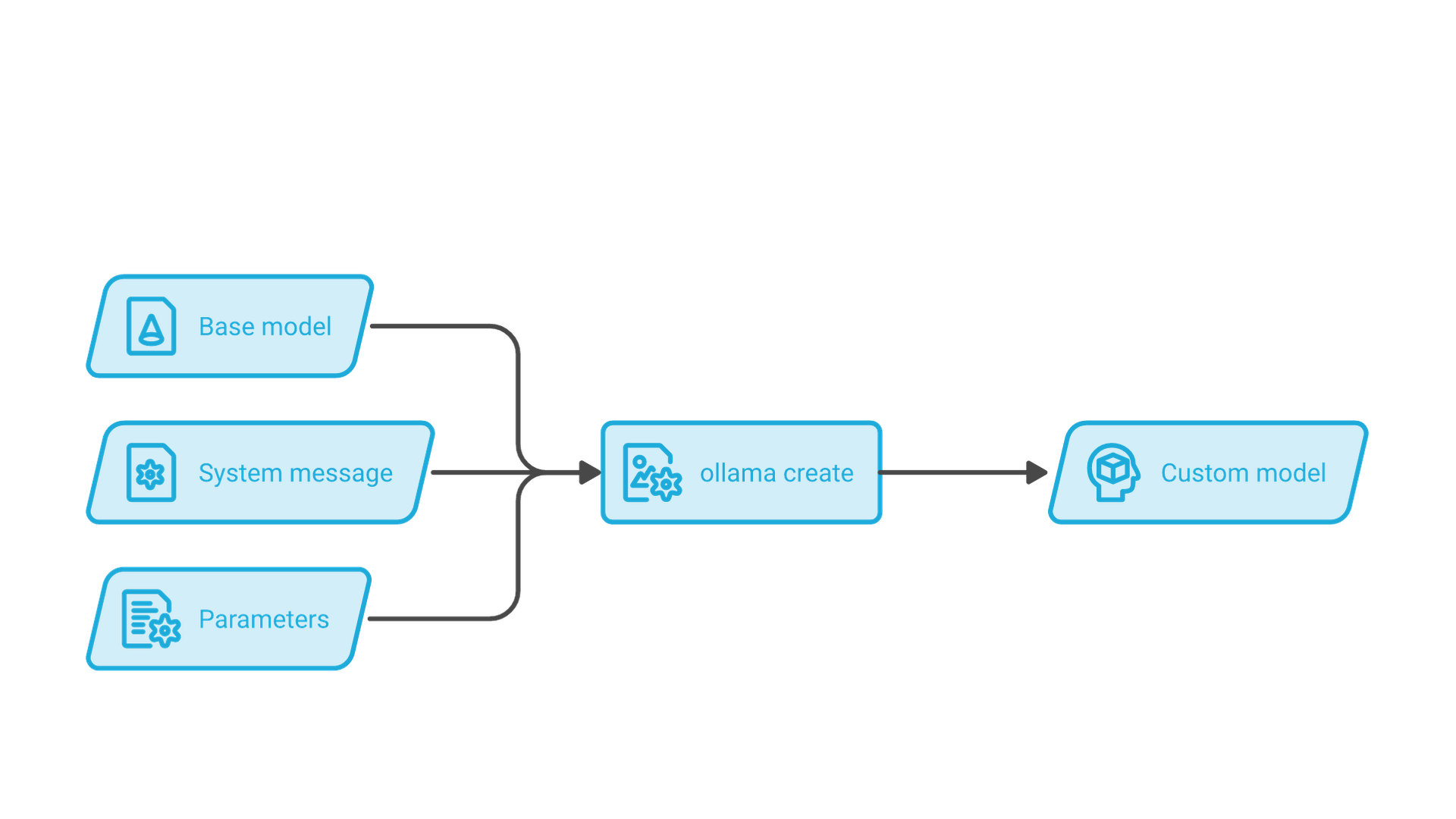
A Modelfile is a plain text recipe that defines a model: which weights to start from, which parameters to apply, which prompt template and system message to use, and which license applies. The concept is similar to a Dockerfile. You write the recipe, run ollama create, and Ollama produces a new named model you can run, share or call from the API. The Modelfile reference lists these instructions:
| Instruction | Purpose |
|---|---|
| FROM (required) | The base model: a library model and tag, a Safetensors directory or a GGUF file |
| PARAMETER | Runtime settings such as temperature, context size and stop sequences |
| TEMPLATE | The full prompt template, written in Go template syntax |
| SYSTEM | The default system message |
| MESSAGE | Example conversation turns that guide style |
| LICENSE | The license under which the model is shared |
| REQUIRES | The minimum Ollama version the model needs |
A minimal example based on the official reference looks like this:
FROM llama3.2
PARAMETER temperature 0.7
PARAMETER num_ctx 4096
SYSTEM """You are a concise technical assistant."""
Save it as Modelfile, then run ollama create tech-assistant -f ./Modelfile followed by ollama run tech-assistant. To learn from existing models, print their recipe with ollama show --modelfile, which reveals the template and defaults the publisher chose.
Fine-Tuning, Adapters, and Recipes
Ollama is a runtime, not a training framework. Fine-tuning a model is compute-intensive and happens in other tools; Ollama's role is to run the result. Many behavior changes do not need fine-tuning at all: a SYSTEM message, a few MESSAGE examples and adjusted parameters are often enough to set tone, format and scope. When you do fine-tune, export the weights in Safetensors or GGUF and point FROM at them. The import guide notes that Ollama does not quantize GGUF files during import, so quantize them beforehand with a tool such as llama.cpp's quantizer. Keep a changelog next to each recipe to track what changed between variants.
Sampling, Temperature, and Output Control
Ollama exposes common decoding controls as Modelfile parameters or per-request options: temperature, top_k, top_p, min_p, repeat_penalty, seed, stop, num_predict and num_ctx. At low temperature the model favors high-likelihood tokens for predictable replies; at higher temperature it produces more varied, creative alternatives. A fixed seed helps reproduce outputs during testing, and num_predict caps the number of generated tokens. For machine-readable output, structured outputs let you pass a JSON schema so the response conforms to it.
Prompt Patterns Worth Exploring
Add role instructions, constraints and examples to get more accurate responses, keep reusable snippets in files, and for RAG, ask the model to cite the passages it used.
The Ollama API and OpenAI Compatibility
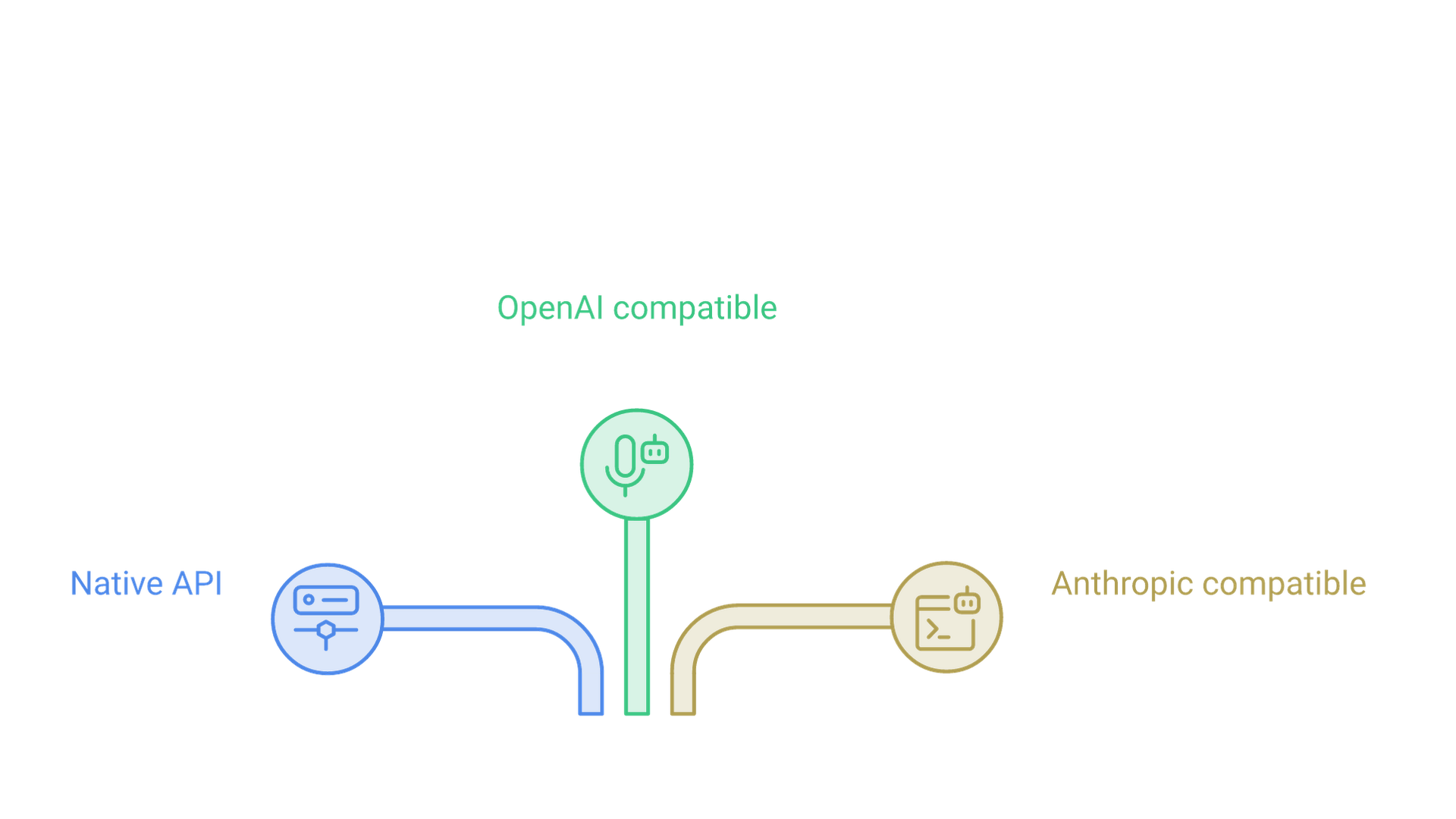
Everything the command line does is also available over HTTP. By default the server listens on http://localhost:11434, and the API introduction describes three surfaces on the same port. Local requests do not need an API key.
The native API under /api covers generation and model management: /api/generate for single prompts, /api/chat for conversations, /api/embed for embeddings, plus endpoints to list, show, pull, create, copy, push and delete models, list running models and report the server version. According to the streaming documentation, the REST API streams responses by default, while the official SDKs disable streaming by default.
The OpenAI-compatible API under /v1 lets existing OpenAI clients talk to local models by changing the base URL to http://localhost:11434/v1/. The OpenAI compatibility page lists chat completions, completions, models, embeddings, the stateless Responses API and audio endpoints. The client still requires an API key value, but Ollama ignores it locally. Some features are unsupported, including logprobs and tool_choice, and the context size cannot be set through this API, so create a Modelfile with num_ctx when you need a larger window.
The Anthropic-compatible API at /v1/messages implements a subset of the Messages API, including streaming, system prompts, images, tool use and thinking. The Anthropic compatibility page explains how tools built for that API, such as Claude Code, can point at a local server by setting a base URL; prompt caching, batches and token counting are not supported. When these interfaces become part of a production system, the surrounding work of model selection, evaluation and integration is where Cognativ's LLM solutions team typically helps.
Using Python Code with Ollama
Developers often orchestrate generation from Python code. The official ollama package on PyPI (installed with pip install ollama) and the ollama package for JavaScript wrap the native API, so a minimal client connects to the local server, sends a chat message and streams tokens back. Alternatively, the standard OpenAI Python client works by setting its base URL to the local /v1 endpoint.
Integrations with AI Tools and Web Pages
Because the API is a familiar HTTP interface, Ollama works with many downstream AI tools for chat interfaces, retrieval frameworks and coding assistants. The ollama launch command configures supported tools, including OpenCode, Claude Code, Codex and VS Code, to use Ollama models. Internal web pages can also call a local assistant through a backend, so queries never reach external endpoints.
Performance Tuning and Cost Efficiency
Latency depends on model size, quantization, context length and hardware, but there are reliable levers. The biggest is choosing a model and quantization that fit entirely in GPU memory; ollama ps shows whether a model is running fully on the GPU or partly on the CPU, and a split usually explains slow generation.
Context length is the next lever. The FAQ lists a default of 4,096 tokens, adjustable with OLLAMA_CONTEXT_LENGTH or the num_ctx parameter. Larger windows let the model read more text but consume more memory, so raise the value only when your prompts need it. Keep models warm with a longer keep_alive for interactive tools, and cap num_predict for faster, bounded replies.
For concurrency, OLLAMA_NUM_PARALLEL sets how many requests a loaded model handles at once (default 1), and OLLAMA_MAX_LOADED_MODELS sets how many models can be loaded simultaneously, defaulting to three per GPU or three for CPU inference. Running locally brings predictable cost for steady workloads, but hardware must be sized for peak demand.
Managing Projects and Multiple Instances
Most teams keep one Ollama installation per machine and isolate projects through separate recipes, model names and configuration. If you need stronger isolation, you can start another server with ollama serve on a different port by setting OLLAMA_HOST, or run separate containers from the official Docker image. On Windows, the app runs from the system tray, and the standalone CLI package can run Ollama as a service with ollama serve.
Ollama vs. LM Studio and llama.cpp
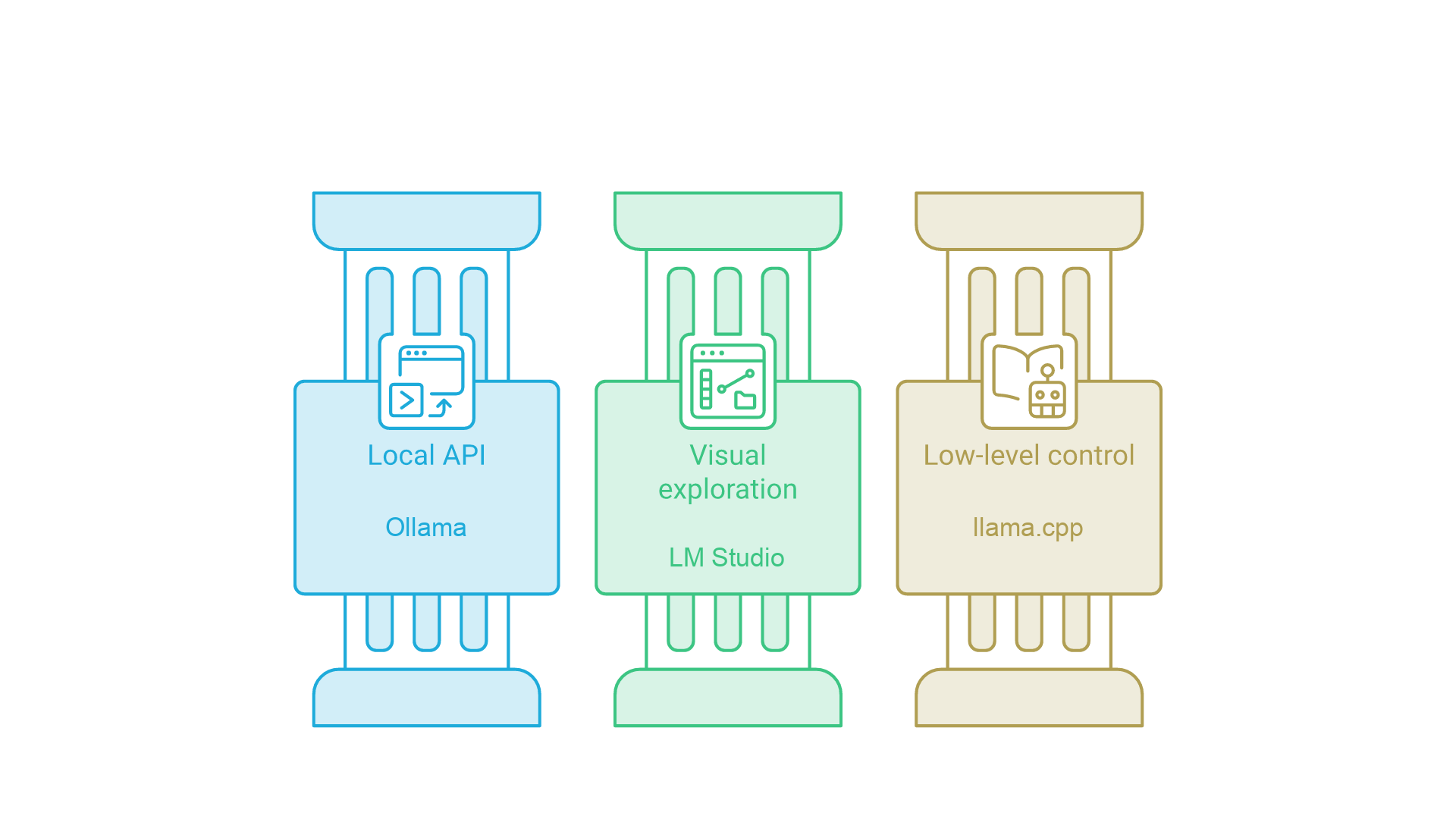
Ollama is one of several popular ways to run local models, and the right choice depends on who uses it and how. Ollama is server-first: a background service and API designed for scripting, integration and headless machines, with a desktop app on macOS and Windows. LM Studio is a desktop-first application with a graphical model browser, chat interface and its own local OpenAI-compatible server; our LM Studio setup guide walks through that tool. llama.cpp is the lower-level open source inference project that exposes the most configuration and typically receives new model architectures and optimizations first.
In short: choose Ollama when applications need a consistent local API, LM Studio for graphical exploration, and llama.cpp for fine-grained control. The tools are not mutually exclusive.
Privacy, Compliance, and Governance
Ollama's defaults are conservative. The server binds to 127.0.0.1 on port 11434, so only programs on the same machine can reach it. Setting OLLAMA_HOST to 0.0.0.0 exposes it to the network, and that is the most important governance decision you will make: the Anthropic compatibility documentation notes that the local server does not validate API keys, so anyone who can reach an exposed port can use the models. If several people or services need shared access, put an authenticating reverse proxy, network rules and logging in front of it rather than opening the port directly. Teams planning that kind of shared, governed deployment can review Cognativ's AI infrastructure services.
Beyond network exposure, apply least-privilege access to directories that hold model files, logs and conversations, encrypt backups, and decide per workload whether cloud models are allowed.
Community, Docs, and Next Steps
The official documentation at docs.ollama.com covers installation, the API and integrations, and the GitHub repository hosts release notes. Test several open models against your own tasks and share a reproducible starter recipe with teammates.
Frequently Asked Questions
What is Ollama used for?
Ollama is used to download, run and serve open-weight language models on your own computer or server. Developers use it for private chat, coding assistants, document summarization, retrieval-augmented generation and as a local API behind applications.
Is Ollama free?
Yes. Ollama is open source under the MIT license and running models locally is free. Optional cloud models require signing in and are subject to usage limits and plans, and each model carries its own license.
Do I need a GPU to run Ollama?
No. Ollama runs on a CPU, but a supported NVIDIA, AMD or Apple silicon GPU makes generation much faster. Models that do not fit in video memory are split between GPU and system RAM.
Can I run Ollama offline?
Yes. After a model has been pulled, local inference works without an internet connection. Pulling new models, updating Ollama and using cloud models require connectivity.
Is Ollama compatible with the OpenAI API?
Yes. Ollama exposes an OpenAI-compatible API at localhost:11434/v1 covering chat completions, completions, embeddings, models and more, plus an Anthropic-compatible Messages endpoint. Some parameters are not supported.
How do I customize a model in Ollama?
Write a Modelfile that starts FROM a base model and sets a system message, parameters or template, then run ollama create with a new name. This changes behavior without retraining.
Conclusion and Next Steps
Ollama makes it straightforward to run LLMs locally with strong privacy defaults, simple tooling and reproducible model recipes. It manages model files for you, loads models onto whatever hardware you have, and serves them through a native API and OpenAI-compatible and Anthropic-compatible endpoints, which makes local models easy to drop into existing applications.
Start with a small model and the defaults, add a Modelfile when you need consistent behavior, and introduce retrieval, tool calling or multimodal models as your use case grows. Pin model tags and the Ollama version in anything that matters, keep the server on localhost unless you have deliberately secured it, and treat cloud models as a separate decision from local ones.
If you are deciding whether a local runtime like Ollama, a hosted model or a hybrid design fits your product or operations, talk to Cognativ about your AI project.