


Prompt Engineering Best Practices for Effective AI Responses
Write prompts that hold up: thirteen checks for clarity, context, format, examples and testing, plus what changed for reasoning models in the official guides.
Prompt engineering best practices turn generic AI interactions into dependable work through deliberate prompt design. Whether you use ChatGPT, Claude, Gemini or another generative AI tool, the gap between a vague request and a well-crafted prompt shows up immediately in relevance, accuracy, format and how much editing you still have to do.
This guide is the short, practical version: a checklist you can apply to any prompt, the reason each item works, and what OpenAI, Anthropic and Google say in their official prompting guides as of October 2026, including where that advice changed for reasoning models.
What this guide covers. Core principles that work across AI platforms, before-and-after examples for writing, analysis, coding and formatting tasks, advanced methods such as chain-of-thought and prompt chaining, and reusable prompt templates. It does not cover model training or fine-tuning.
Who this is for. Professionals, students and creators who use generative AI tools daily, and developers who need prompts that keep working in front of real users. Well-crafted prompts cut back-and-forth iterations and make quality repeatable instead of lucky.
The Prompt Engineering Best Practices Checklist
Use this list as a final pass before you send an important prompt or ship one inside a product. Each item is explained in the sections that follow.
- State the task and the goal. Say what you want done and what the result is for, using direct action verbs.
- Name the audience. Who will read or use the output changes vocabulary, depth and tone.
- Give the context the model cannot guess. Background, source material, definitions and constraints.
- Explain why a rule matters. A reason helps the model generalize instead of applying the rule literally.
- Specify the output format. Length, structure, headings, fields or a schema.
- Set constraints positively. Describe what to do rather than only what to avoid.
- Show examples when format or style matters. Keep them varied, consistent and separate from instructions.
- Separate the parts of the prompt. Use Markdown headings or XML-style tags for instructions, context, examples and input.
- Put long documents first and the question last.
- Allow "I don't know." Let the model say when information is missing instead of guessing.
- Match the technique to the model. Reasoning models need clear goals more than step-by-step scripts.
- Test against fixed cases. Judge a change by a small evaluation set, not by one good answer.
- Save and version what works. Keep proven prompts in a library or in code, with the model they were tested on.
Understanding Prompt Engineering Fundamentals with Background Information
Prompt engineering is the practice of designing inputs that guide an AI model toward a desired output through clear instructions, relevant context and explicit expectations. A prompt is everything the model receives, not only the question you type: system or developer instructions, conversation history, attached documents and examples. For a deeper look at how that input is assembled and split into tokens, see our guide on what a prompt is in an LLM.
How AI Models Process Prompts and Generate a Response
Large language models analyze your input for context clues, task requirements and output expectations. Unlike traditional software that executes exact commands, they work probabilistically, predicting likely continuations of the text they receive. A model does not know your company, audience or the decision behind a request unless the prompt says so, and it fills every gap with the most generic plausible answer. That is why vague prompts produce generic output and why prompt quality directly affects relevance and accuracy.
Anthropic's Claude prompting best practices offer a useful test: show your prompt to a colleague with minimal context on the task. If they would be confused, the model probably will be too.
The Anatomy of Effective Prompts for Desired Output
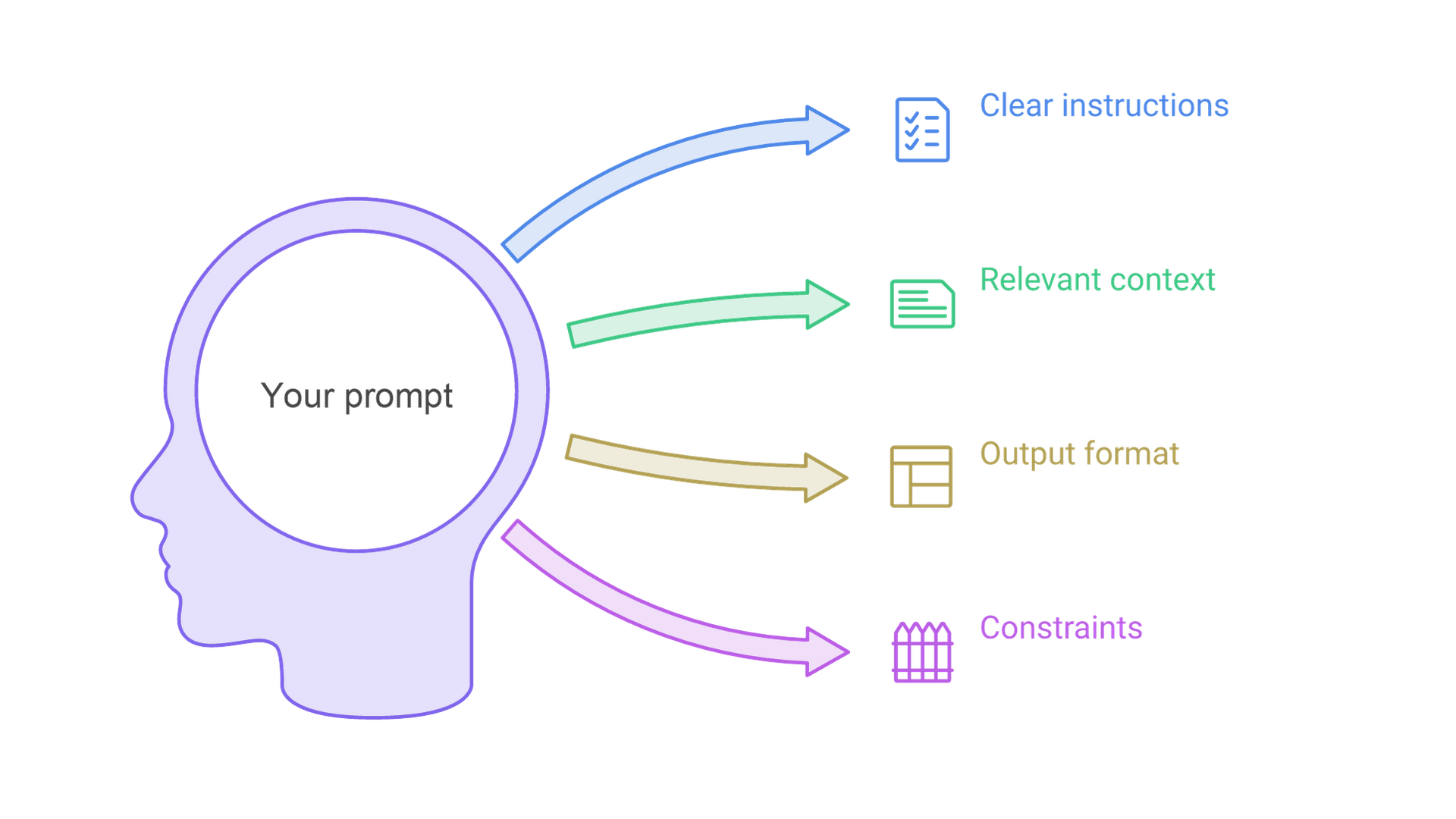
Good prompts contain four key components: clear instructions, relevant context, the desired output format and specific constraints. Examples are an optional fifth component when format or style matters. Together they reduce ambiguity and steer the model toward your intended outcome. OpenAI's prompt engineering guide describes a developer message that typically contains identity, instructions, examples and context, in that order, with Markdown headers and XML tags marking where each part begins and ends.
What the Official OpenAI, Anthropic and Google Guides Say
The major model providers publish their own prompting documentation, and the primary sources are worth reading because the advice changes as models change.
OpenAI
OpenAI separates application rules, which go in developer messages and take priority, from user input. It recommends pinning production apps to a specific model snapshot and building evaluations to measure prompt behavior across iterations and upgrades. Its reasoning best practices say reasoning models work best with brief, clear instructions and a defined end goal, that you should try zero-shot first, and that explicit chain-of-thought prompts are usually unnecessary. Non-reasoning GPT models benefit from more explicit, precise instructions.
Anthropic
Anthropic's prompt engineering overview starts before any technique: define success criteria and a way to test against them. Its best practices recommend clear and direct instructions, the motivation behind them, three to five relevant and diverse examples wrapped in tags, XML structure for complex prompts and a role in the system prompt. It notes that prefilled responses are no longer supported starting with Claude 4.6 models, and that forceful wording such as "CRITICAL: you MUST" can make newer models over-trigger.
Google's Gemini prompt design strategies recommend clear instructions, explicit constraints, a defined response format, supplied context and breaking complex prompts into steps. Unlike OpenAI's reasoning guidance, Google recommends always including few-shot examples, while warning against mixed formats and too many examples. For Gemini 3 it advises consistent delimiters, long context first and questions last, and leaving temperature, topP and topK at their defaults.
Where the Guides Agree
All three ask for clear, specific instructions, supplied context, an explicit output format, delimited sections and systematic testing. They differ mainly on examples and step-by-step reasoning, and those differences track the model type. The lesson for 2026: write prompts for the model you actually use, and retest when it changes.
Core Prompt Engineering Best Practices for Crafting Effective Prompts
These core techniques consistently produce better outputs across AI tools and task types. Each includes a weak prompt and a stronger version.
Be Specific and Detailed to Guide the AI's Output
Weak prompt: "Write a blog post about marketing."
Stronger prompt: "Write a 1,200-word blog post about email marketing best practices for B2B SaaS companies, aimed at marketing managers, with actionable tips and three specific examples."
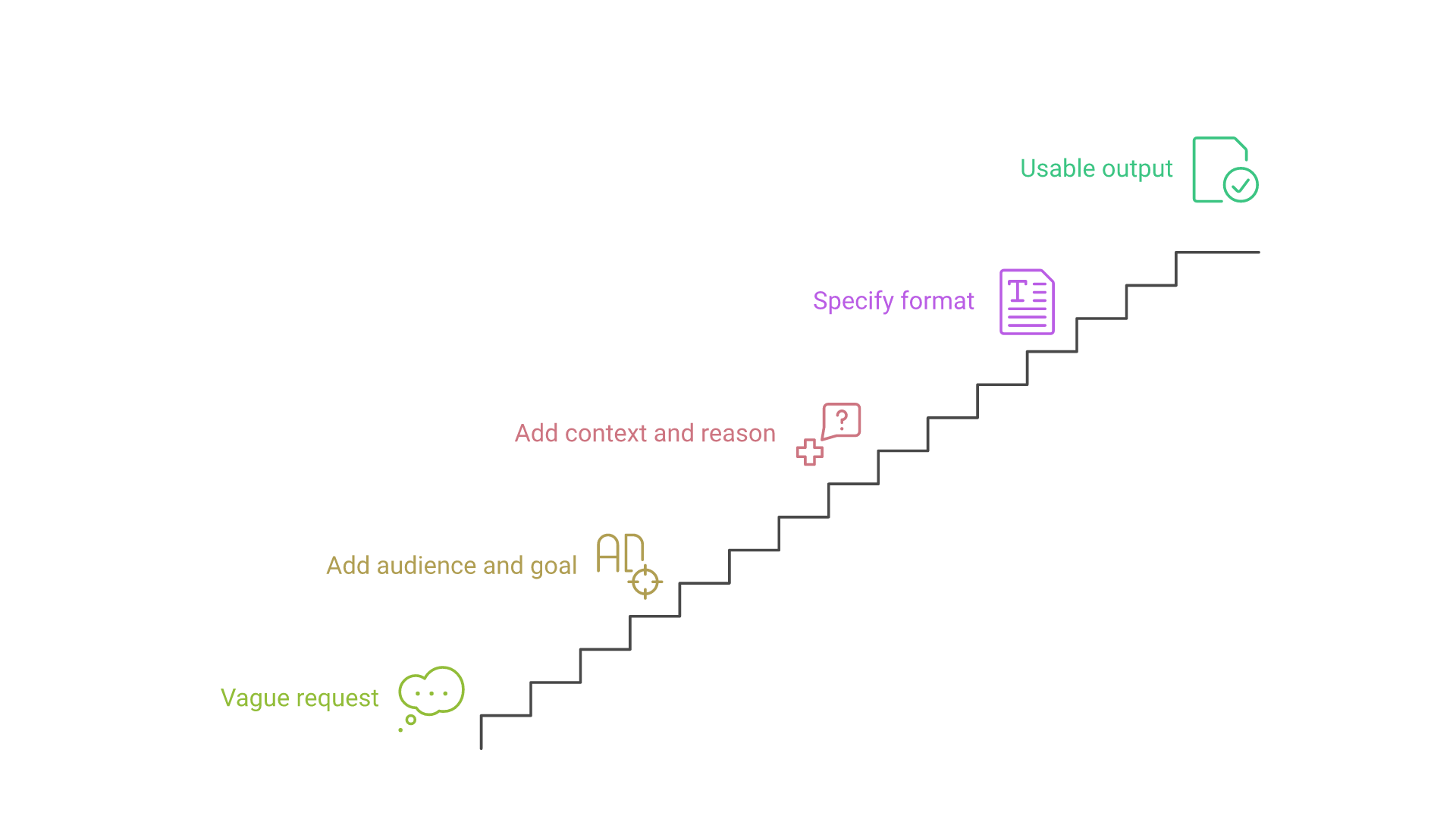
The stronger prompt names the audience, industry, length and expected content. If you want the model to go beyond the literal task, say so; Anthropic notes that its newer models follow instructions precisely rather than inferring that you wanted more.
Provide Clear Context, Role Assignment and Background Information
Weak prompt: "Help me with Python code."
Stronger prompt: "As a senior Python developer, review this API endpoint code for security vulnerabilities, focusing on authentication and input validation. Suggest specific improvements with code examples."
The stronger prompt sets expert context, defines the task and asks for a specific output. A role helps most when it implies a standard of work, so state the perspective and quality bar you expect, not just a persona label.
Explain Why an Instruction Matters
Rules without reasons are followed literally. Anthropic's guide replaces "never use ellipses" with an explanation that the response will be read aloud by a text-to-speech engine that cannot pronounce them. With the reason, the model can generalize to related cases, such as other symbols that do not read well aloud.
Define Output Format and Structure for Consistent Responses
Weak prompt: "Compare different project management tools."
Stronger prompt: "Compare Asana, Monday.com and Notion. For each tool use a heading with its name, then Key features (bullets), Pricing tiers, Best for, and three pros and three cons."
A defined structure removes guesswork and saves formatting revisions. Describe the format you want rather than only what you do not want ("write in flowing prose paragraphs" beats "don't use Markdown"). When software will parse the result, use schema-enforced output where available: OpenAI's Structured Outputs guarantee responses that match a supplied JSON Schema, while plain JSON mode only guarantees valid JSON.
Use Examples and Templates with Few-Shot Prompting
Sample few-shot prompt: "Write product descriptions following these examples. Wireless Headphones: 'Clear audio and all-day comfort for commuters who want quality sound without the bulk.' Standing Desk: 'Smooth height adjustment and memory presets for professionals who switch between sitting and standing.' Now write one for: Ergonomic Office Chair."
Examples keep style and structure consistent across many outputs. Make them relevant, varied enough that the model does not copy surface details, and clearly separated from the instructions. For example selection, ordering and when examples hurt, read our few-shot prompting guide.
Set Clear Constraints and Guidelines to Fine-Tune the AI's Output
Weak prompt: "Write content about our product."
Stronger prompt: "Write a product description under 150 words, focusing on benefits over features, in a conversational tone, avoiding technical jargon, and ending with a clear call to action."
The stronger prompt defines length, priorities, tone and a required element. Keep constraints calm and specific: "Use the glossary terms when they fit" is safer than "ALWAYS use the glossary," which newer models may over-apply.
Give the Model Permission to Say It Does Not Know
Models tend to answer even when the prompt lacks supporting facts. Tell the model what to do instead: "If the documents do not contain the answer, say so and list what you would need." Anthropic's best practices for prompt engineering article lists permission to express uncertainty as a core technique.
Advanced Prompt Engineering Techniques for More Detail and Fine-Tuning
These strategies handle complex analysis, iterative refinement and template-based workflows. Several changed meaning as reasoning models became common, so each note says when the technique still applies.
Step-by-Step: Chain-of-Thought Prompting for Complex Tasks
Chain-of-thought prompting asks a model to work through intermediate steps before answering. It was popularized by the 2022 paper Chain-of-Thought Prompting Elicits Reasoning in Large Language Models by Wei and colleagues, which reported gains on arithmetic, commonsense and symbolic reasoning tasks.
With non-reasoning models, phrases such as "think through this step by step," splitting a problem into sub-questions and asking for the logic before the answer can still help. With reasoning models, OpenAI and Google advise against requesting step-by-step reasoning in the output, because the model already reasons internally. State the goal and success criteria instead, and use the provider's reasoning or effort settings. Either way, review the result and ask for an alternative approach if the logic looks flawed.
Multi-Turn Conversation Strategy for New Chats and Iterative Refinement
Build context progressively instead of cramming everything into one prompt. Start with background, then refine with follow-ups such as "make this more concise," "add technical details" or "change the tone to formal." When a conversation grows long or drifts, start a new chat with a short summary of the decisions so far, so the model works from a clean context.
Prompt Chaining and Long Documents
Prompt chaining splits a task into sequential prompts, where each output feeds the next. Anthropic notes that chaining remains useful when you need to inspect intermediate results; its most common pattern is self-correction: draft, review against explicit criteria, then refine. For long documents, Anthropic recommends placing the data above the query and instructions, and reports that queries at the end improved response quality by up to 30 percent in its tests on complex, multi-document inputs. Google gives the same placement advice for Gemini 3.
Zero-Shot vs Few-Shot vs Chain-of-Thought: Selecting the Right Approach
| Approach | Best use cases | Effort to write | 2026 note |
|---|---|---|---|
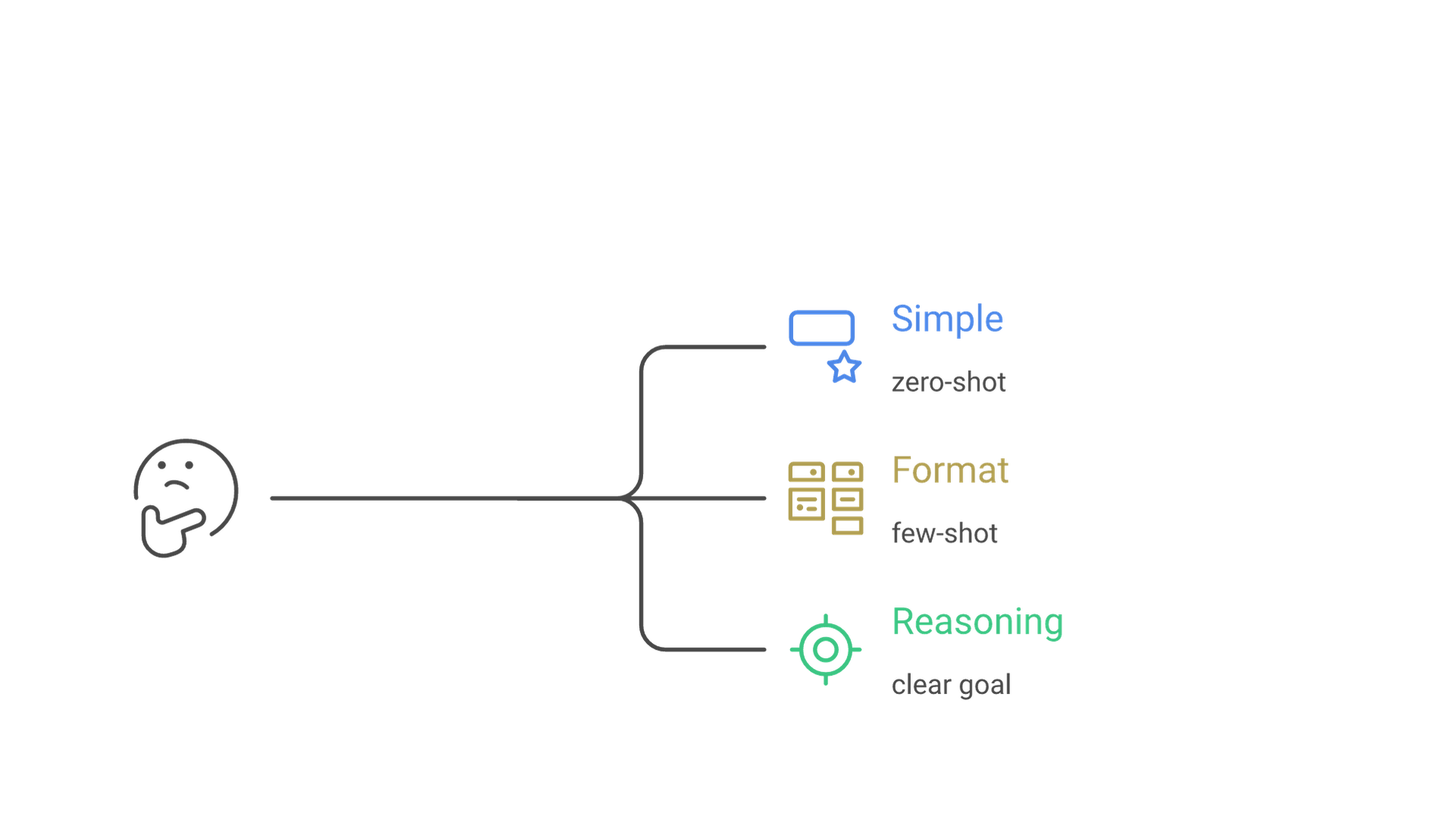
| Zero-shot | Simple, direct tasks | Low | OpenAI's suggested starting point for reasoning models |
| Few-shot | Format matching, style consistency, classification | Medium | Google recommends examples by default; keep them consistent |
| Chain-of-thought | Analysis, reasoning, problem solving | Medium to high | Useful for non-reasoning models; reasoning models think internally |
| Prompt chaining | Multistage work you need to inspect | High | Use when intermediate outputs must be checked |
Choose zero-shot for straightforward requests, few-shot when you need a specific format or style, and explicit chain-of-thought for complex reasoning on models that do not reason internally. No approach guarantees accuracy; the right one is the one that passes your test cases.
Template Building and Reuse Strategy to Save Time and Improve Consistency
Capture high-performing patterns with this structure: Role + Task + Context + Format + Constraints.
Content writing template: "As a [specialist role], write a [content type] about [topic] for [target audience], using [tone], in [format], focusing on [key objectives], and avoiding [unwanted elements]."
Data analysis template: "Acting as a [type of analyst], analyze this [data type] to [specific goal], present the insights as [structured format], include [required elements], and explain [level of reasoning]."
Save templates in a prompt library and note which model each was tested with, because a template tuned for one model may behave differently on another.
Best Practices for Prompts in Production Applications
A prompt inside an application faces many users, unpredictable input and model upgrades, and every change needs evidence that it helps. For a worked example, including how to stop a model presenting unsupported causes as fact, see our developer guide to prompt engineering.
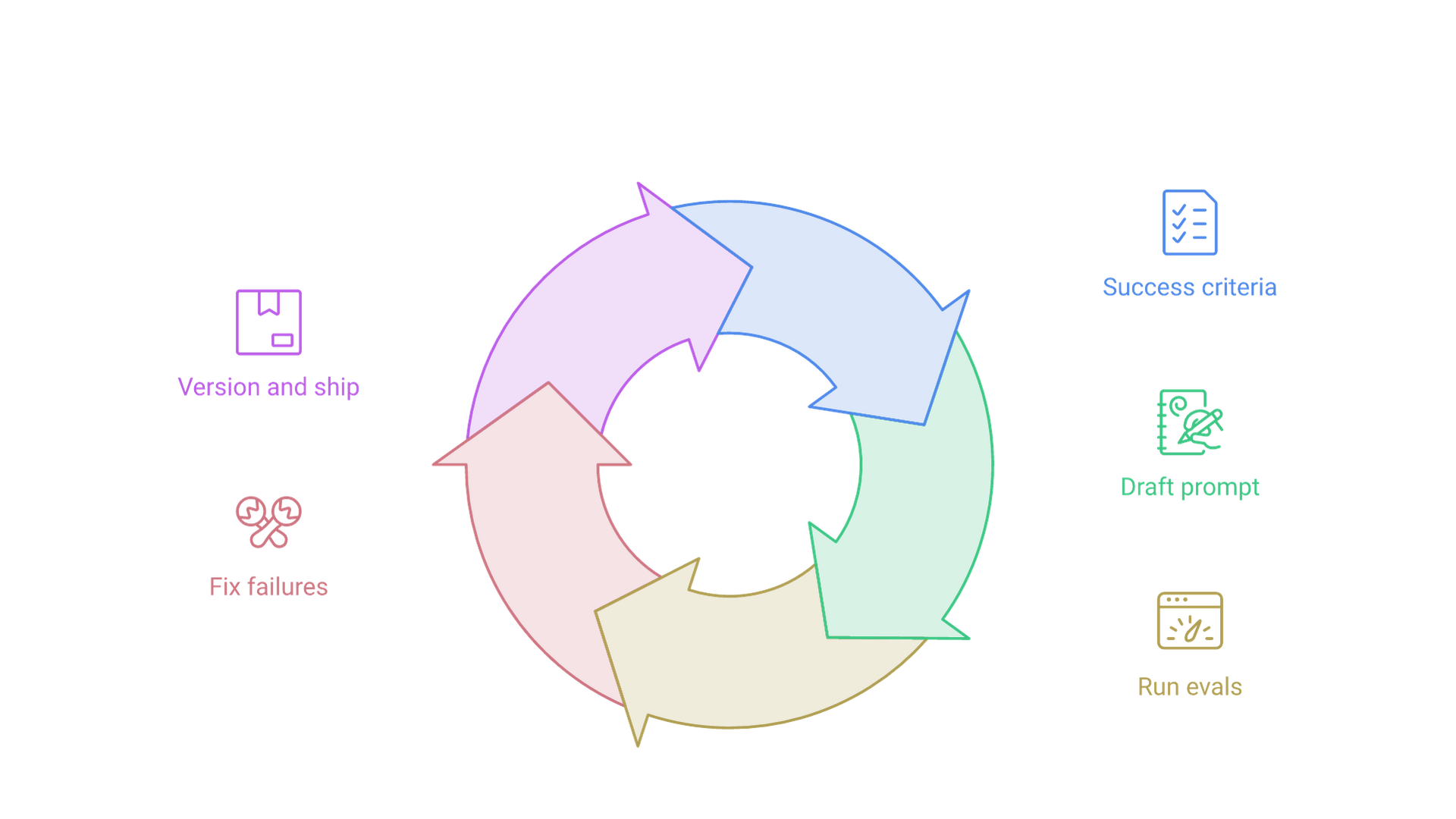
Define Success Criteria and Build Evaluations First
OpenAI's evaluation best practices describe the loop: set success criteria, gather representative data, choose metrics, run the evals, and keep evaluating on every change while the test set grows. A small set of realistic inputs with expected outcomes is enough to start.
Pin Model Versions and Structure Prompts for Caching
Pin production traffic to a model snapshot where possible and rerun evaluations before switching, since updates can change how literally instructions are followed and how output is formatted. Put stable content such as instructions, policies and examples first and variable input last; OpenAI notes that reused content at the start helps prompt caching reduce cost and latency.
Treat Prompts as One Layer of Control, Not a Security Boundary
Malicious or unexpected input can override prompt instructions, the risk OWASP calls prompt injection. OWASP says it is unclear whether fool-proof prevention exists and recommends layers: constrain behavior in the system prompt, validate outputs with deterministic code, label untrusted content, enforce least privilege in application code and require human approval for high-risk actions. When models connect to internal data or tools, these controls belong in the system design, the kind of work our LLM solutions team scopes before a prompt reaches production.
Version Prompts Like Code
Store production prompts with the application, review changes and record which evaluation results justified each version. When prompts drive connections to business systems, versioning lets you trace a change in output back to a change in instructions, which matters for any AI integration other teams depend on.
Common Challenges and Solutions in Crafting Effective Prompts
These are the problems that come up most often, with the fix to try first.
Challenge 1: Generic or Irrelevant Responses
Solution: Add specific context, constraints and examples. Instead of "explain climate change," try "As an environmental scientist speaking to young adults, describe local impacts of climate change with relatable examples, and say where the evidence is uncertain."
Challenge 2: Inconsistent Output Quality Across Users
Solution: Standardize templates with clear format specifications and save high-performing variations. Run each template several times on the same inputs, fix consistent weak points, and use schema-enforced output when results are parsed.
Challenge 3: Inaccurate or Misleading Information
Solution: Supply source material, ask the model to answer only from it and allow it to say when the answer is missing. Asking for supporting quotes or stated assumptions exposes uncertain claims. Prompts reduce errors but do not eliminate them, so verify critical facts independently and use search or retrieval when the task depends on current information.
Challenge 4: Overly Long or Unfocused Output
Solution: Set length limits, request a structured format and ask for key takeaways first. Break complex requests into focused sub-prompts to control the depth of each section.
Challenge 5: A Prompt Stops Working After a Model Update
Solution: Rerun your test cases on the new model, then remove instructions that compensated for old behavior: capitalized rules, step-by-step requests on reasoning models, prefilled responses and sampling settings the new model ignores. The provider's current prompting guide is the best record of what changed.
Frequently Asked Questions
What are the most important prompt engineering best practices?
Be clear and specific about the task, give the context the model cannot guess, define the output format, add examples when style or structure matters, and test changes against fixed cases. These points appear in the OpenAI, Anthropic and Google guides alike.
Should I still use chain-of-thought prompts in 2026?
It depends on the model. Non-reasoning models can still benefit from step-by-step prompts. OpenAI and Google advise against asking reasoning models for step-by-step output because they already reason internally; give them a clear goal and success criteria instead.
How many examples should a few-shot prompt include?
Anthropic suggests three to five relevant, diverse examples. Google recommends examples by default but warns that too many can cause overfitting, and OpenAI suggests trying zero-shot first with reasoning models. Test a few counts on your own cases.
Does role prompting still help?
A short role in the system prompt can focus tone and expertise, and Anthropic still recommends it. The bigger gain usually comes from stating the audience, the standard of work and the decision the output supports.
What is the difference between prompt engineering and context engineering?
Prompt engineering is writing and organizing instructions. Anthropic describes context engineering as curating everything the model sees during inference, including tools, message history and retrieved data.
Can a good prompt prevent prompt injection?
No. Clear system instructions help, but OWASP says fool-proof prevention is unclear. Combine prompts with output validation, least-privilege access, separation of untrusted content and human approval for high-risk actions.
Conclusion and Next Steps for Users
Mastering prompt engineering best practices turns AI from a basic tool into a dependable part of professional work. The foundation is unchanged: specificity, relevant context, a defined output format and iterative refinement. What changed by 2026 is the detail: reasoning models need clear goals more than scripted steps, examples should be tested deliberately, and production prompts need evaluations, pinned versions and controls outside the prompt. Anthropic's guidance on context engineering sums up the method: start with a minimal prompt, observe where it fails, and add only what fixes those failures.
To get started, apply one core technique to your most common AI task, write your first template using Role + Task + Context + Format + Constraints, save it with the model you tested it on, and run the checklist above before every important prompt.
If you are moving prompts from individual experiments into products, workflows or agents and want help with evaluation, integration and safeguards, talk to Cognativ about your AI project.